
· 10 min read

How to Scrape Amazon Search Results to CSV: Prices, Ratings, Reviews, and ASINs
With the built-in  Shop::Amazon scraper, you can scrape Amazon search results and export product titles, ASINs, URLs, current and strikethrough prices, currencies, ratings, and review counts to CSV.
From an Amazon Search Query to a Ready-to-Use CSV
This guide shows you how to configure a task for one search query, validate the CSV, and save the configuration for future runs. It also breaks down a real test run with 275 Amazon listings.
| Input | Output |
|---|---|
A search query such as wireless headphones | One CSV row for every product listing found |
| An Amazon country in the UI, or a domain in the API | Prices and currency for the selected site and location |
The number of pages in pagecount | Data from however many pages you specify |
A ready-made tools.CSVline template | A valid CSV even when product titles contain commas or quotation marks |
What Amazon Data You Can Save to CSV
The built-in Shop::Amazon scraper takes a standard Amazon search query and extracts data from the product listings in the results.
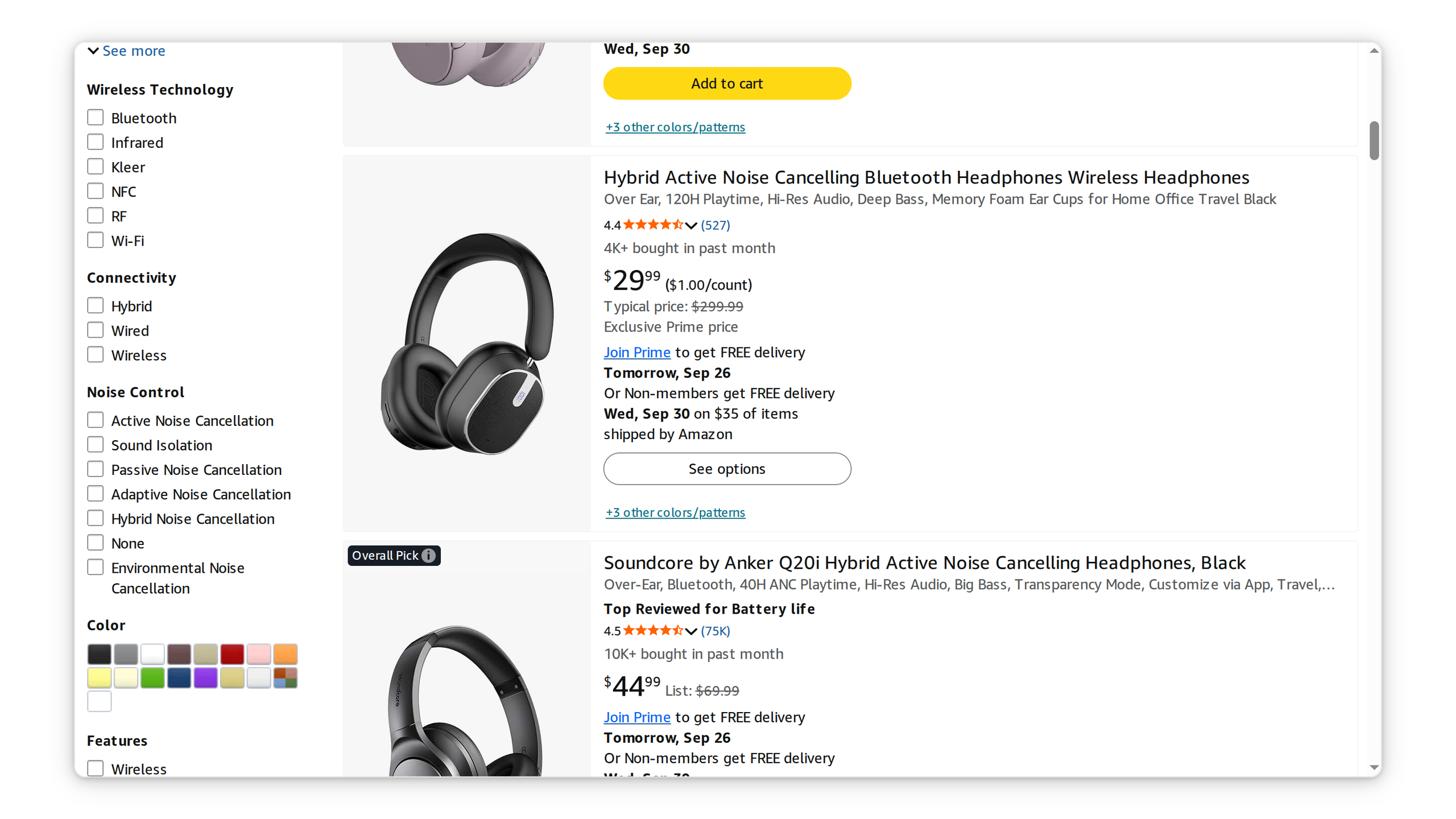
For your first export, you only need eight product fields:
| Column | Shop::Amazon field | Contents |
|---|---|---|
| ASIN | item.asin | Amazon’s unique 10-character product identifier |
| Title | item.title | The title shown on the product card in search results |
| URL | item.link | The product page URL |
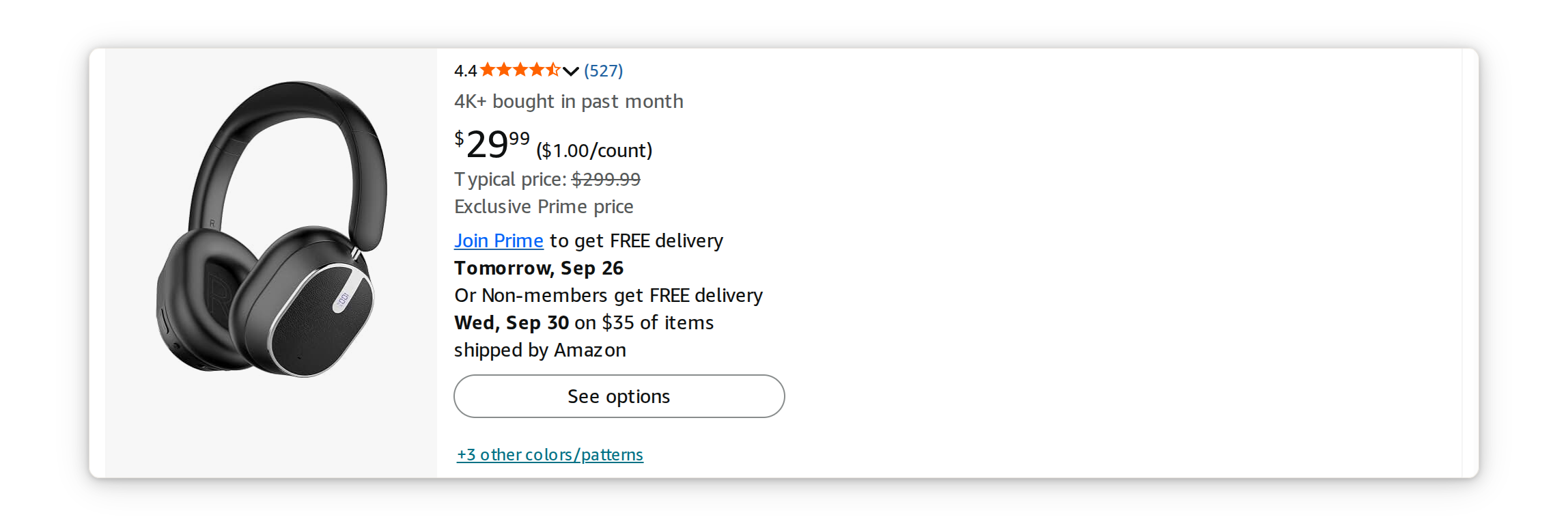
| Current price | item.price | The price shown in search results; it may be empty when Amazon displays See options |
| Old price | item.oldprice | The strikethrough reference price, if Amazon displays one |
| Currency | item.currency | The currency symbol, such as $ |
| Rating | item.rating | The customer rating on a scale from 1 to 5 |
| Reviews | item.commentscount | The review count in Amazon’s format: 535, 2.8K, or 225.6K |
The scraper also returns optional data: item.boughtCount contains the displayed number of purchases in the past month, item.additionalinfo contains badges such as Best Seller and Amazon’s Choice, item.sellerscount contains the number of sellers, and item.imagelink contains the product image URL.
How to Set Up Amazon Scraping in A-Parser
What You Need
- A-Parser Pro or Enterprise;
- one or more search queries;
- proxies with IP addresses in the target country are recommended for recurring runs.
Step 1. Select Shop::Amazon
Open the Task Editor and select Shop::Amazon from the scraper list.
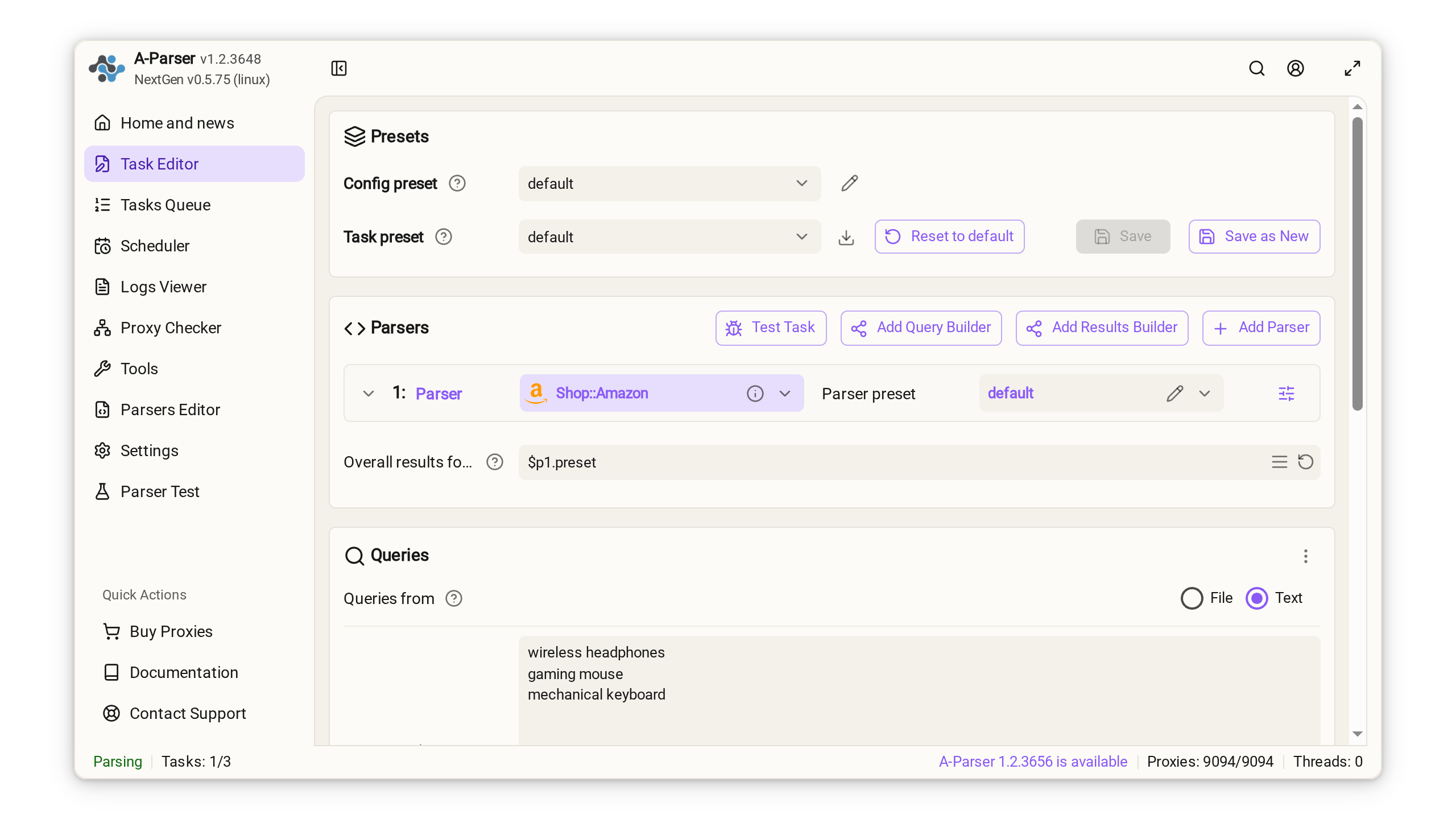
Step 2. Add Search Queries
Enter queries in the Queries field just as you would enter them in the Amazon search bar:
wireless headphones
gaming mouse
mechanical keyboardOne to five queries are enough for the first test. You can also expand queries automatically and use letter ranges such as {az:a:z}, but verify the basic task before scaling up.
Step 3. Choose the Amazon Domain and Number of Pages
In NextGen, choose a country such as United States from the Amazon domain dropdown. For an API request, specify the corresponding Amazon domain.
domain— the target site domain for an API request, such aswww.amazon.com,www.amazon.de, orwww.amazon.co.uk;pagecount— the number of pages to scrape. Set it to1for the first test, then increase it to3–5.
Choose the country from the list in the UI. Through the API, pass the full domain, such as
www.amazon.com. A raw value such asgermanyis not converted to a domain automatically.
Step 4. Configure Proxies and Geolocation
You can run a few test queries from your current IP address. For consistent USD pricing on amazon.com, use a US exit IP address.
If a proxy uses the user:pass@host:port format, enable Use proxy authorization in Proxy Checker. Otherwise, the proxy server may return 407 Proxy Authentication Required.
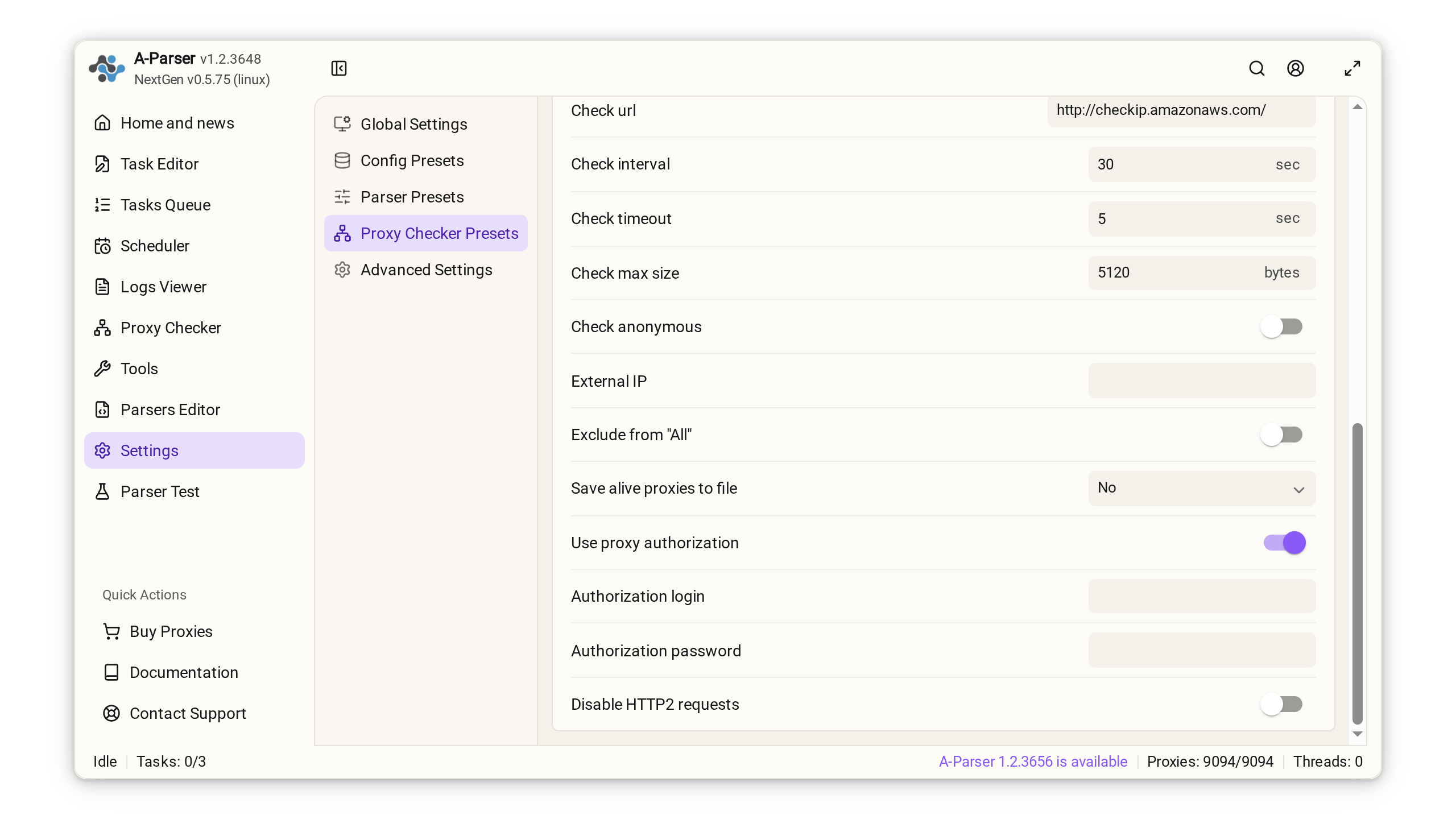
Step 5. Save the Results to CSV
You do not need to write the template yourself. In NextGen, the CSV template belongs in the scraper’s Result format field, while the ready-made preset at the end of this guide already includes the table header. In the classic UI, use Initial text for the header.
CSV header
In the ready-made preset, the header is stored in resultsPrepend and already contains this line:
Keyword,ASIN,Product Title,Current Price,Old Price,Currency,Rating,Reviews,Product URLA newline is required after Product URL; otherwise, the first product row will merge with the header. It is already included in the preset. When configuring the classic UI manually, press Enter after the header.
Product rows
Paste this into the Result format field:
[% FOREACH item IN p1.products;
    # If ASIN is absent from the dedicated field, extract it from the URL
    asin = item.asin ? item.asin : item.link.match('/(?:dp|gp/product)/([A-Z0-9]{10})').0;

    tools.CSVline(
        query,
        asin,
        item.title,
        item.price,
        item.oldprice,
        item.currency,
        item.rating,
        item.commentscount,
        item.link
    );
END %]Here, p1 is the short name assigned to Shop::Amazon, while p1.products is the list of products found. If this is the only scraper in the task, you do not need to change p1.
Why use
tools.CSVline? Amazon titles may contain commas, quotation marks, and line breaks. In the test dataset, 199 of 275 titles contained a comma. The function escapes these values automatically so that a title does not split across multiple columns.
File name and task launch
Choose to save the results to a file and enter:
results/amazon-$datefile.format().csvA timestamp is added to the file name, so a new export does not overwrite the previous one.
If you plan to open the CSV in Excel, enable Write BOM in the output settings. This option is already enabled in the ready-made preset.
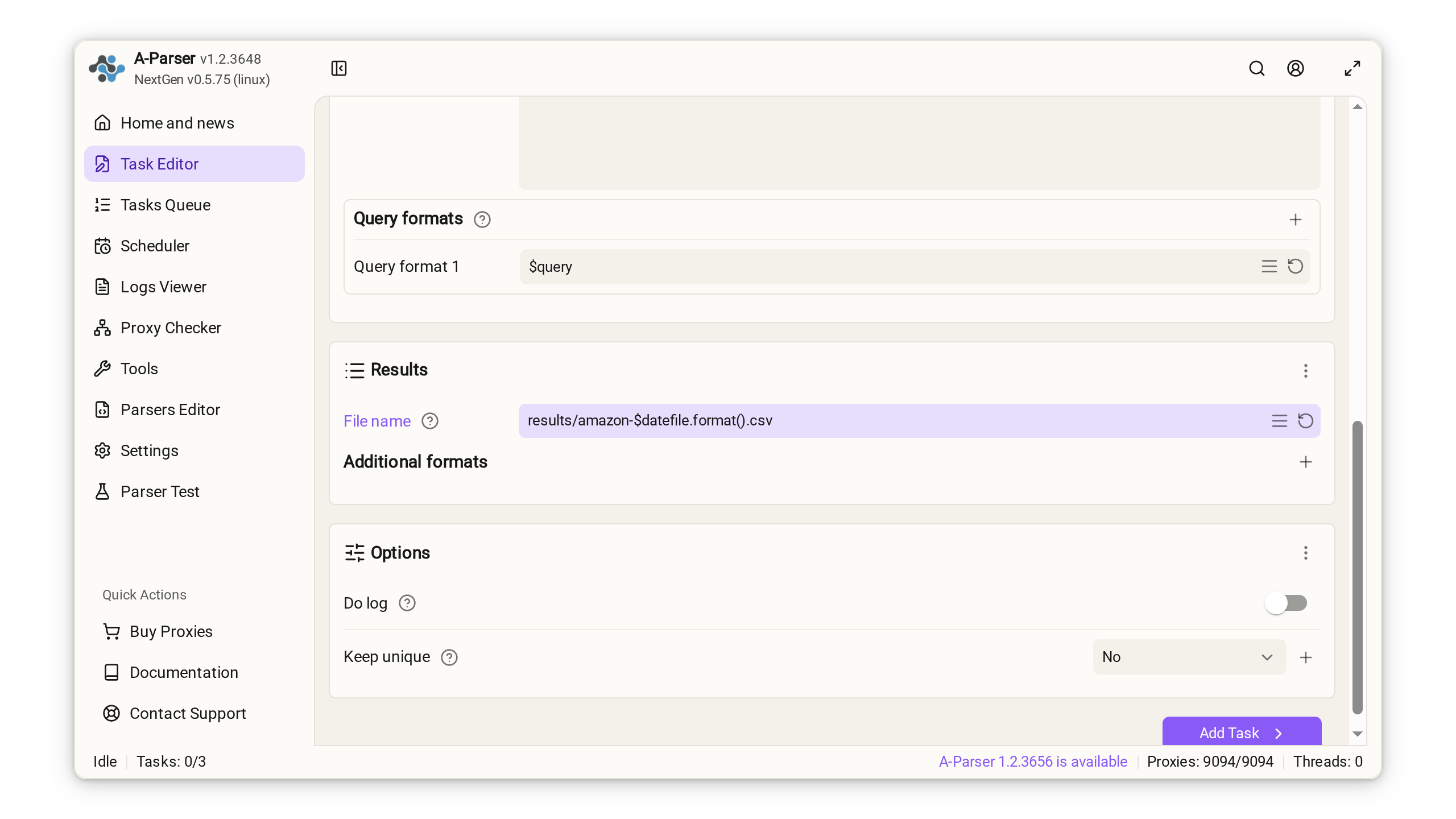
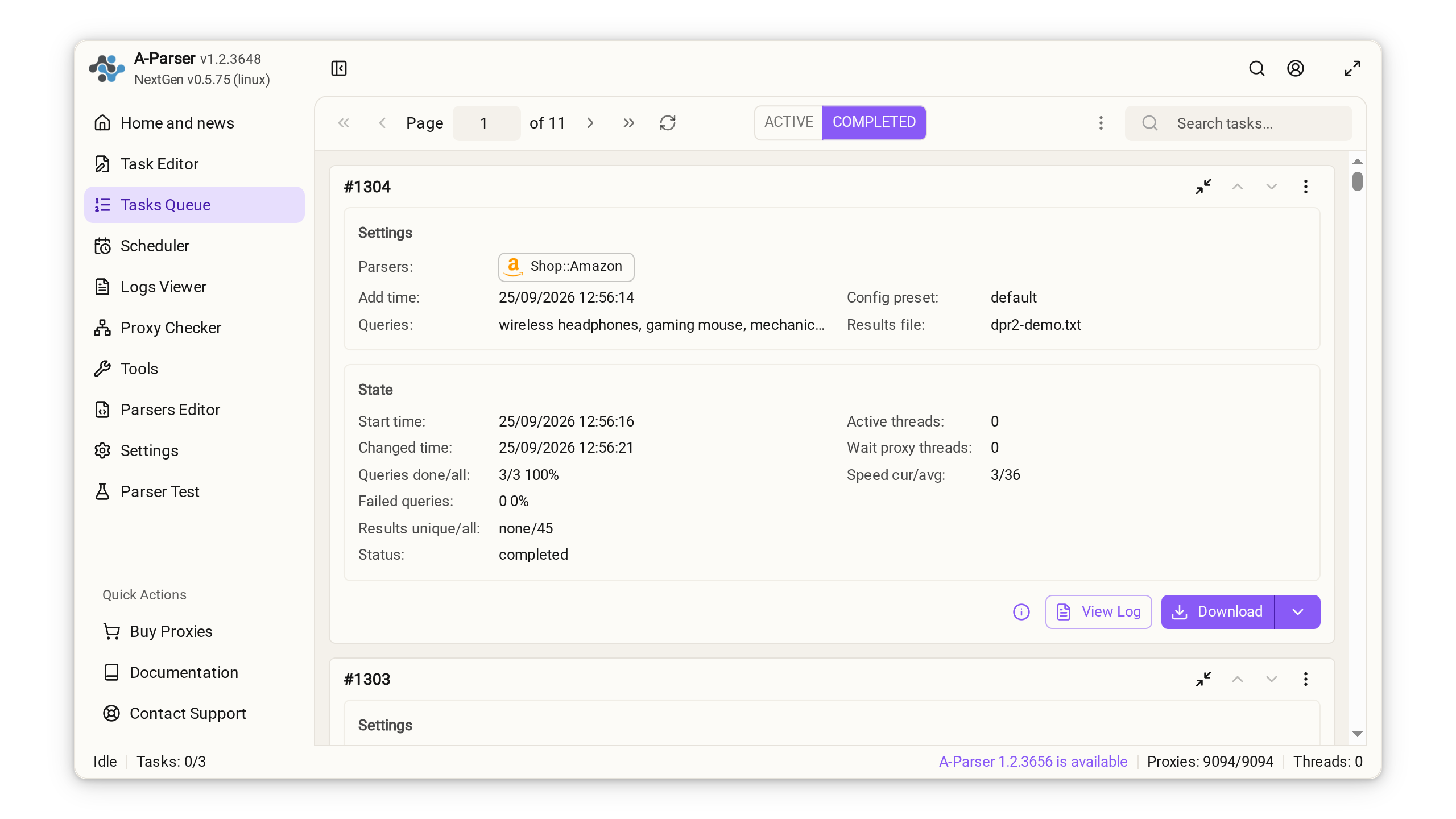
Click Add Task. When the status changes to Completed, download the CSV from the task queue.
How to Validate the CSV Before Scaling Up
Check the first 20 rows before scaling up the number of queries and pages:
- prices are stored as decimal numbers, such as
29.99; - empty prices correspond to listings with
See options; - ratings are stored as numbers, such as
4.5; - review counts are preserved in Amazon’s abbreviated format:
535,2.8K,225.6K; - each ASIN contains 10 alphanumeric characters;
- every row contains the same number of columns;
- decode HTML entities such as
&before analysis if necessary.
Important: an empty price does not always indicate an error. A listing may offer several colors, sizes, or configurations, and Amazon may display the price only after a variant is selected.
Real-World Test: 275 Amazon Listings with a Limit of 30 Pages
One page is enough to validate the CSV format, but not to show whether the task remains reliable over a longer run. We therefore set the same configuration to a maximum of 30 pages and checked prices, ratings, reviews, duplicate ASINs, and missing values. Amazon returned No more pages after page 20, so the run ended before reaching the configured limit.
How the Data Was Collected
| Parameter | Value |
|---|---|
| Marketplace | www.amazon.com |
| Search query | wireless headphones |
| Configured page limit | pagecount = 30 |
| Pages actually scraped | 20; Amazon then returned No more pages |
| Geolocation and proxy | US exit IP address using the amazon Proxy Checker profile |
| A-Parser software version | v1.2.3648; NextGen v0.5.75 (Linux) |
| Output format | CSV with nine columns and rows generated by tools.CSVline |
| Fields analyzed | asin, price, oldprice, currency, rating, commentscount |
| Run status | Completed; one request was retried automatically after the exit proxy returned 597 Read first line error: EOF |
We normalized the values before calculating the metrics. Abbreviated review counts were converted to numbers: 2.8K → 2,800 and 225.6K → 225,600. Empty values were excluded from the relevant price, rating, and review-count calculations. Duplicate rows were identified by ASIN.
Running the same task again may return a different set of products because this dataset is a snapshot of Amazon search results from that run.
Results
Amazon search results dataset, collected on September 25, 2026.
| Metric | Result |
|---|---|
| Dataset size | 275 listings from 20 pages actually scraped; 271 unique ASINs |
| Listings with a displayed price | 269 of 275 listings (97.8%); 6 displayed See options |
| Price range | $6.79–$669.29 |
| Median / average price | $26.99 / $50.67 |
| Price distribution | 203 below $50; 38 from $50 to $99.99; 28 at $100 or more |
| Listings with a strikethrough price | 159 |
| Average rating | 4.30 out of 5 across 274 listings |
| Review count | Median: 2,800; range: 8 to 225,600 across 274 listings. The median value appears as 2.8K in the CSV |
| Currency | $ in all 269 rows with a price |
What the Results Show
- Products below $50 dominate the search results. This range contained 203 of the 269 listings with a price, or 75.5%. The average price ($50.67) is higher than the median ($26.99) because it is pulled upward by 28 listings priced at $100 or more.
oldpricedoes not show price history. One product had a current price of $23.98 and a strikethrough price of $299.99, a difference of 92%. This is a reference price for comparison, not proof that the product previously sold at that price.- Review counts must be converted to numbers. The
Ksuffix appeared in 181 of 274 non-empty values, or 66%. These strings cannot be compared directly as numbers. After converting2.8Kto2,800and normalizing the other abbreviated values, the median was 2,800 reviews. - Duplicates should be removed by ASIN. The 275 rows contained 271 unique ASINs: four products appeared twice.
Download the CSV with 275 Amazon listings or view it as HTML used for these calculations.
What to Do If the Output Looks Wrong
| Problem | Cause | Solution |
|---|---|---|
| A product has no price | Amazon displays See options | Leave the field empty; this is expected Amazon behavior, not a scraping error |
407 Proxy Authentication Required | Proxy credentials were not sent | Enable Use proxy authorization |
amazon.com displays a different currency | Amazon uses your IP address to determine location | Use a proxy in the target country and inspect several rows |
| The title split across columns | The values were not escaped | Use tools.CSVline() |
| Excel put the entire row in one cell | Excel detected the wrong delimiter | Import the file through Data → From Text/CSV and select a comma as the delimiter |
| The header merged with the first row | The resultsPrepend value has no trailing line break | Add a line break after Product URL |
When A-Parser Makes More Sense Than a Custom Script
A Python script makes sense when you need custom logic and complete control over every request. For recurring scrapes, however, you must separately maintain selectors, proxies, retry logic for network errors, output formatting, and scheduling.
A-Parser combines these components in one task. You can save the configuration as a preset, run it with other queries, and schedule it through Task Scheduler. In Enterprise, you can also integrate the task with your own system through the HTTP/JSON API.
Frequently Asked Questions About Scraping Amazon to CSV
Can I Export Amazon Products Without Writing Code?
Yes. Shop::Amazon is a built-in module, so you do not need to build a custom scraper. Select the module, enter your queries, and copy the ready-made CSV template. You only need to edit the template if you want a different set of columns.
Do I Need Proxies to Scrape Amazon?
You can use your current IP address for a small test. For recurring runs and consistent regional results, rotating proxies in the target country are preferable. The exit IP location affects the currency and localization of Amazon results.
How Do I Avoid Duplicate Rows in the CSV?
Use ASIN as the unique key. The same product may appear on several pages or for different queries. For a combined catalog, remove duplicate ASINs; for rank tracking, keep each query + ASIN pair unique.
Resources and Next Steps
- Official Shop::Amazon documentation
- Download the dataset of 275 Amazon listings as a CSV file or view it as HTML.
- Choose A-Parser Pro or Enterprise
- Get A-Parser Premium proxies
Ready-to-Import Preset
In the Task Editor, click the import button to the right of the Task preset field and select Import preset. Expand the spoiler and paste the Base64 code into the import field.
Show the preset code for import
eJztVd1uIzUUfpWR6WoTNE2TC5A2CK2yoYGF0oT+cEFbrdyZk8TEY8/anmRD
NhftXsIt74EKFdUWyis4b8SxPU3SdJ8AkUiJz4/P73eOZ2QMSjMpSLMRE0P1
SPcUaDCaNE9mJPdn0iQ0oz9JsZ1TpUFtJ3pMYhIIp3hCDocybzZbXgtFpbrX
mxEzzQFtSHSlWAooZynSfakyatBDwQ3yxpQXTu3kSdTpHuy22l9FzEAWvdyP
8kYtVzItEqM/OxURfj6K7K+LC3trb6LWIWrYu8Xl4mLxzv9e2qvFO3u9uIzs
lZfYP+y1vV38Yv+2d/avyP6Df7f2Oo7sjf3TXrmzfW9/w18UXtvf7Z2XRGjr
YvEzit/bm+CXaiaiz31gNX9+vnZuhjNnYlTDzJJh5elO5Xkzzd8O8p0ygepO
5aS1/UN9+9nZrFGfV59Wa3XMKVg3UnJdax9+jyagEnju87oANY1XtPO2Rnqv
hhkOm8xcseQRU/L0g/ykUApEMt3kK2qYGDzSllkGwuhEFsJsCl0JAquKye3u
fxE9OSPzs7OYhHbrju89dnvL99ajbCk8pGM4kg4hjMOK3UFqn2YOIyVnp8TZ
VkoNOOVawFSlWgsQpWnKDKKb8uDQgXUVxLFgrz3khERdV2QGuqNkhiwDb0zJ
nN4He0K2PE3QROHvfhfukGafcg0x0Rh5h2Ig6aYEy4J1lKqbu3iQPyNStDjf
gzHwlZq3/6JgPMXJavXx0svy4odVuo9szJfprbvC0ZsojGFpxVMvut+SplGF
u5TKPTnAxNNzTJuzjBmkddt1F7l1ZI4A8mXJ9l3JMqlg6aU0XDrHLZKDcGP+
DUwnUqWxm9O4F6YgOvJobXvEmajn4djlaXlq3yPxIEDvAMYMJnp5+/hg71Ss
gNHKS1dkozoPuv2QmUjRZ4NuuZLuNQtxhCuwK9oyyzm4comCc+y2hoMVCFu6
7K4jVolvXm57F66k0Kdhx/kB//owhIpDiCD/xAWYYYPWvZYmE8o55roucRe1
kXlX7Cq1gQqPNzJhCjhoHQ2BpvlQCtCnYkAzLGSUSczkVGSQDKlgaD4awfRc
UpUS583AQCK81wrUu38A7nOYny0X//KhmD1c/0iv7X+kfE/6y4kPMxQTnDBF
A+HTwtDwqwOaHCpjcmwYf9UShn2Jsb3KN4NxoQwgCRhtuIrKN1MFpqxEo05K
XnsIyQiwWuRjDxv0qk0KnE5LbHutcyoEpAkHKoocBZ/WnSiVGWXCFXYyqYXE
3PJDyYMH7P+H6z/7cOHcsgxkYTwmAlI9YMrlOcf1+aPuhalwO8HNxHz+L16g
azA=
For the first run, keep pagecount = 1, replace the test query with your own, and inspect the first 20 CSV rows. If the prices, currency, and columns look correct, increase the number of pages.