
· 12 min read

Scrape Google Trends with A-Parser: Find Breakout Trends and Export Results to CSV
Table of Contents
- Limitations of the Google Trends web interface for business tasks
- Economics: Google Trends vs. paid trend tools
- Live benchmark: 30 niches and 319 breakout trends
- Business use cases: who needs automated Trends data and why
- Step-by-step task configuration in A-Parser
- Real-world data breakdown: breakout products surging up to +2,652,350%
- Best practices and common pitfalls
- Summary and ready-to-use preset
- Official sources and documentation
1. Limitations of the Google Trends web interface for business tasks
The Google Trends web service shows relative search interest for queries. It visualizes momentum and seasonality, but does not reveal absolute search volume or market size, and it does not guarantee purchase intent.
For repeatable business workflows, the browser interface quickly runs into three limitations:
1. Comparing up to five queries at a time. In the web UI, you can compare up to five keywords at a time. For an e-commerce seller managing a catalog of 500 SKUs or an SEO team tracking 2,000 queries, this means repeating the same checks by hand.
2. HTTP 429 errors during consecutive requests. When requests are sent in quick succession, Google may throttle them and return 429 Too Many Requests. This makes batch collection unpredictable and requires delays, retries, and proxy management.
3. Official API is still in alpha. On July 24, 2025, Google unveiled the Google Trends API in alpha. Access currently requires an application and is limited to a small group of developers, so the alpha program is not yet a public production REST API with guaranteed quotas. See Google’s official announcement and alpha documentation for details.
2. Economics: Google Trends vs. paid trend tools
Popular trend-monitoring platforms package Google data into polished interfaces, but use subscriptions and usage limits:
| Tool / solution | Subscription price | Starter plan includes |
|---|---|---|
| Exploding Topics | from $39/mo | 100 tracked trends per month |
| Glimpse | from $99/mo | Free tier up to 10 searches/mo; paid plans Pro $99, Expert $299 |
| Treendly | from $99/yr (~$8/mo) | Up to 25 tracked trends |
| A-Parser Pro/Enterprise | License and proxy costs | Automated collection and CSV export; practical limits depend on the license, infrastructure, and Google’s rate limits |
Paid dashboard vs. your own scraper: practical differences
To spot rapid demand growth, tracking 5–10 obvious queries is not enough; you need to run broad scans across hundreds or thousands of seed keywords.
Subscription SaaS platforms often have monthly quotas of 25 to 100 checks and require more expensive plans for higher volume. A-Parser lets you configure larger batches, filter phrases growing by more than 100%, and export the results to CSV. Actual limits depend on the license, proxy pool, configuration, and Google’s rate limits.
Below is the configuration used in the benchmark to reduce HTTP 429 errors.
3. Live benchmark: 30 niches and 319 breakout trends
To benchmark the workflow, we selected 30 consumer product categories (consumer electronics, sleep accessories, fitness gear, portable power products, and smart-home gadgets) and collected rising queries over a 90-day window in the United States (US).
List of 30 test seed queries
air purifier
portable power station
wireless earbuds
standing desk
mini projector
creatine gummies
mechanical keyboard
collagen peptides
dash cam
smart ring
ice bath tub
electric scrubber
heated vest
label maker
red light therapy
bone conduction headphones
white noise machine
meat thermometer
walking pad
laser hair removal
portable blender
air fryer
sleep mask
electric bike
posture corrector
sauna blanket
massage gun
weighted blanket
cold plunge
smart bird feeder
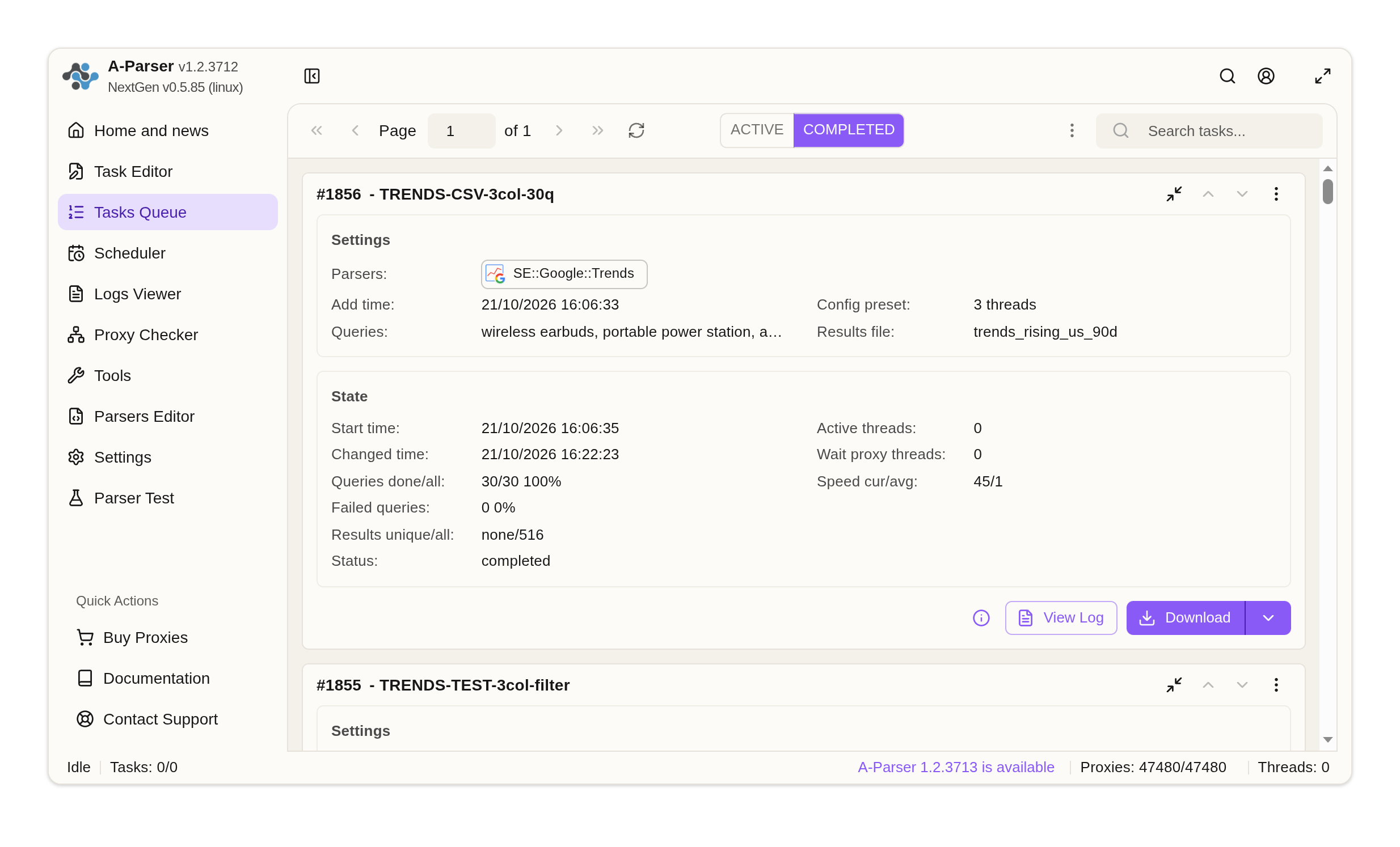
Benchmark test metrics
- Total input queries: 30
- Successfully collected: 30 of 30 (100%)
- Breakout trends collected (growth > 100%): 319 rows, including 280 unique queries (filtered from 545 raw suggestions; the remaining rows either showed growth below +100% or duplicated queries from other seeds, e.g.,
gnc near me) - Median speed: 32 seconds per query (peak 100 seconds on the most demanding keyword)
- Retry rate: just 0.06 retries per query
- Proxy ports temporarily placed on cooldown: 8 ports before returning to active rotation.
⚠️ How Google Trends behaves under load:
Without request pacing, Google can return HTTP 429 errors and temporarily block proxy ports.
In the tested preset, an 8-second request delay and proxy rotation kept temporary blocks to a minimum: 8 temporary blocks across 30 categories. The tested rate-limit configuration is described below.
4. Business use cases: who needs automated Trends data and why
Search interest in Google Trends can serve as a leading indicator of demand. Unlike marketplace analytics, which reflect historical sales, and keyword databases, which report search volume, Trends captures what consumers are just starting to search for.
Automating this data pipeline supports three practical use cases:
1. For e-commerce and marketplace sellers: spotting products before competitors
Standard marketplace analytics platforms (MPStats, Moneyplace, Helium 10) report sales after the fact—once competitors have already imported inventory and marketplace ad bids have increased.
When used to track breakout trends, Google Trends can identify emerging items and new product variations as consumer interest starts to rise—weeks or months before they appear widely on local marketplaces.
2. For SEO and content marketing: timing seasonal peaks
A common seasonal SEO mistake is publishing content during peak sales periods, when new pages lack sufficient time to index and rank.
Historical search patterns (interest_over_time) can help identify when seasonal interest starts to rise. This allows teams to prepare and index content 1.5–2 months in advance, capturing organic traffic as the seasonal wave begins.
3. For paid ads and media buying: testing rising queries before competition increases
In mature verticals, paid search auctions are fiercely contested. Regularly scanning for micro-trends surging over the past 7–30 days allows performance marketers to test rising queries and emerging news hooks before competition and bids increase.
5. Step-by-step task configuration in A-Parser
Setup takes no more than 5 minutes in the standard A-Parser web interface.
Step 1. Task creation and parser selection
1. In the left navigation menu, open Task Editor;
2. In the Parsers section, select:  SE::Google::Trends;
3. In the Queries field, paste your list of target keywords (one per line).
Step 2. Parser settings and stable collection
1. Search parameters (under SE::Google::Trends):
- Search region:
United States(orWorldwide/ your target region); - Search time: select
Past 90 daysorPast 30 daysfor fast-moving trends; - Search property: leave blank by default (
Web Search); - Interface language:
en(or target region language).
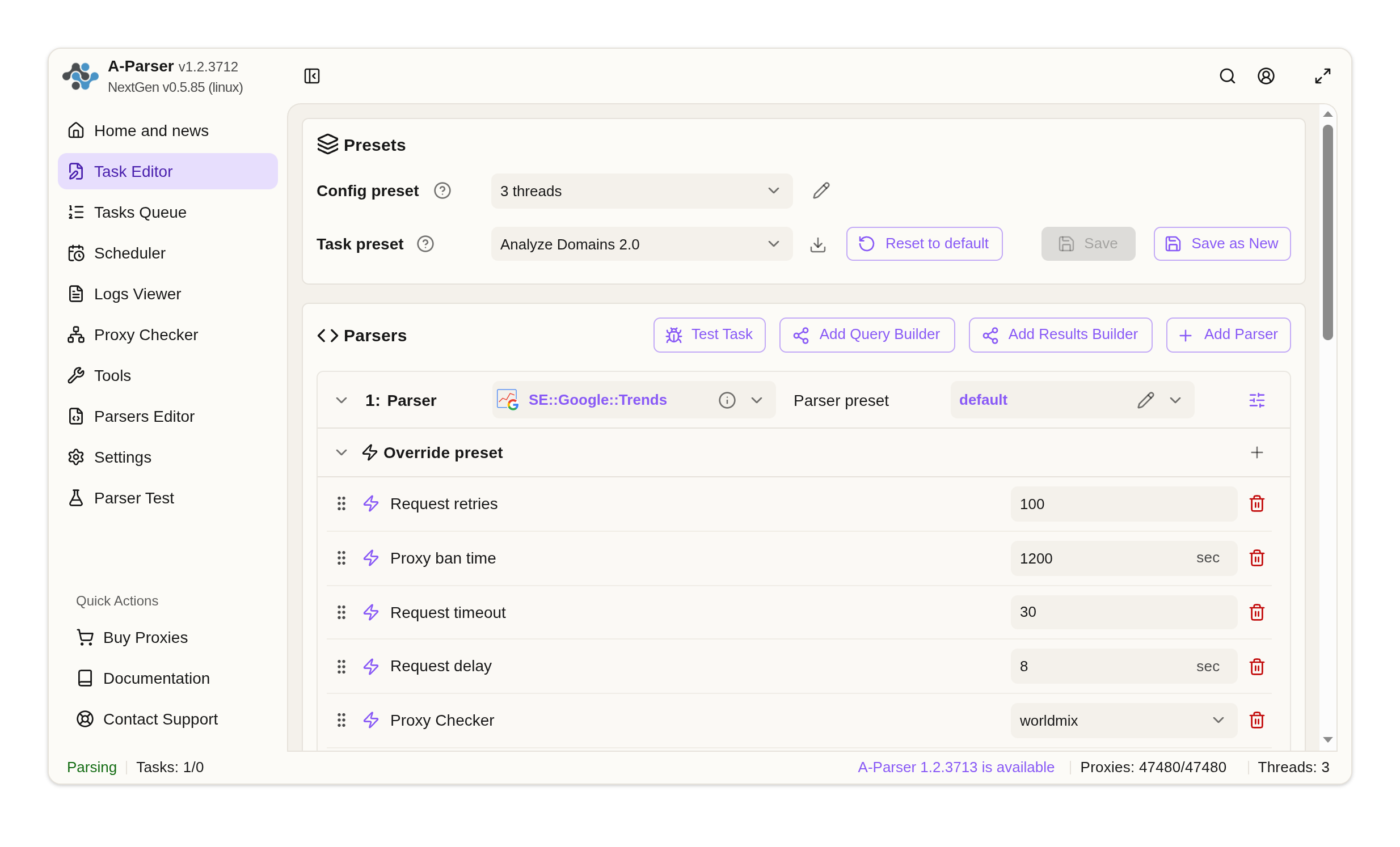
2. Rate-limit protection (under Overrides):
Google Trends is an interactive web application: for a single query, it renders time-series charts, geographic maps, and related-topic widgets. Sending requests without delays or at high concurrency may trigger HTTP 429 (Too Many Requests).
To reduce proxy blocks, use the following tested profile in the parser’s Overrides section:
| Override parameter | Value | Why it matters |
|---|---|---|
| Request delay | 8 seconds | Base delay between consecutive requests inside a worker thread. Reduces request bursts and the risk of sequential IP blocks. |
| Request timeout | 30 seconds | A single attempt takes 10–15 seconds (page load: 3–5 seconds, POST: 5–12 seconds, widgets: 2–4 seconds), while the median end-to-end time per query with proxy rotation was 32 seconds. Short timeouts (6–15 seconds) can abort a render midway; long timeouts (60 seconds or more) keep failed requests waiting unnecessarily. |
| Request retries | 100 | Maximum retries per query. Combined with proxy rotation, each retry attempts the query via a fresh port, which can improve completion rates. |
| Proxy ban time | 1200 seconds (20 min) | When a 429 occurs, the proxy is paused for 20 minutes before returning to rotation. |
Why use task overrides: Task overrides apply specifically to this Trends workflow without affecting the global settings of your other parsers.
3. Thread configuration and proxy logic (under Threads Config):
Concurrency and proxy switching are managed in the Threads Config section:
- Thread count:
3
While A-Parser allows multiple threads,SE::Google::Trends relies on an embedded Chromium engine to render interactive Google pages, creating heavier CPU demand. In our benchmark on a 4-core CPU system, 3 threads completed all queries without overloading the server. - Reuse proxy between retries: leave the default setting (disabled / unchecked).
When disabled, a failed request automatically rotates to the next proxy in the pool while temporarily banning the blocked port. Leave it disabled: reusing a failed proxy can send repeated retries to the same blocked IP.
Step 3. CSV export and breakout-trend filtering
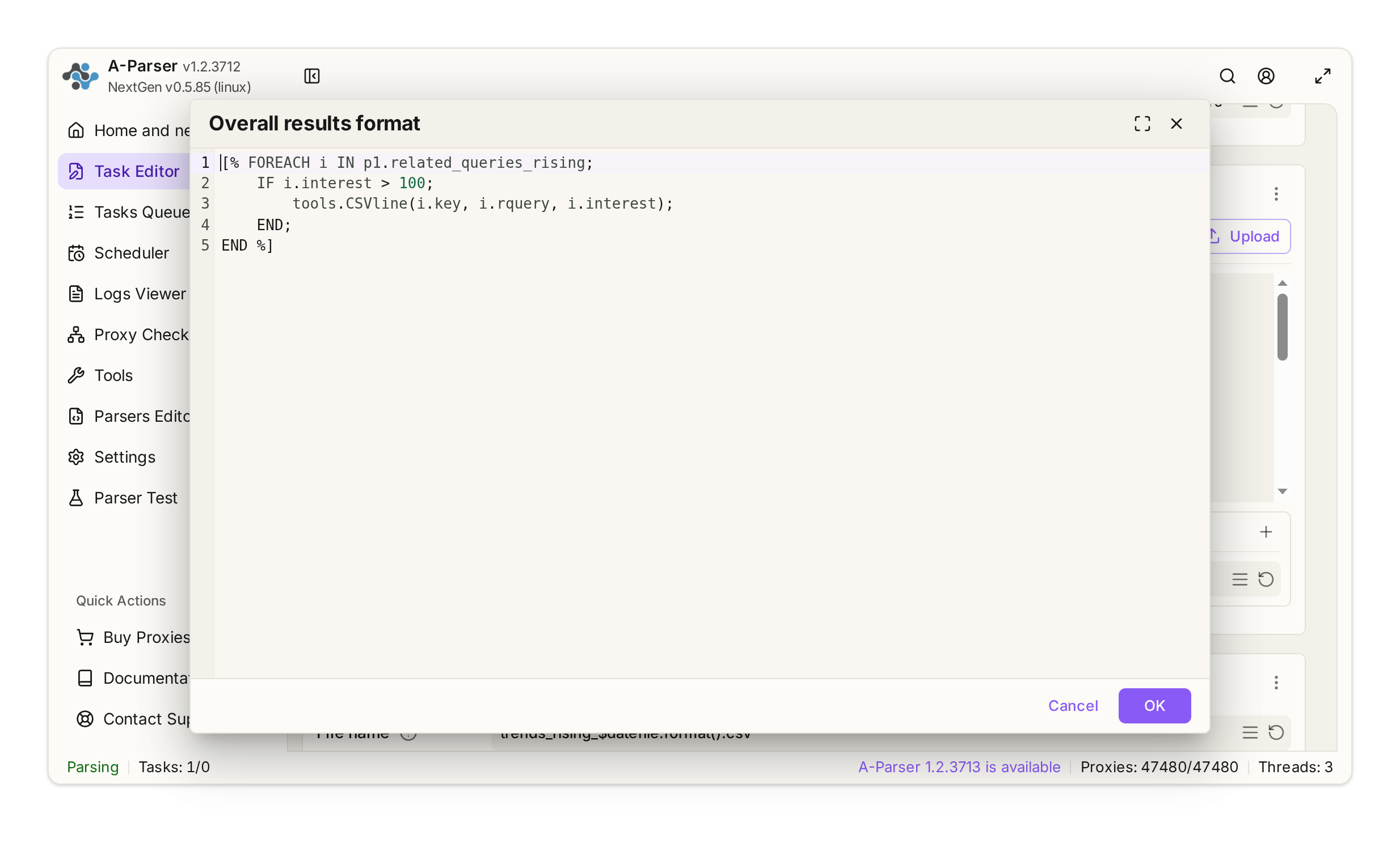
By default, Google returns all rising queries, including modest +20% or +40% increases. To reduce noise and isolate stronger demand surges, we filter queries directly in Template Toolkit with IF i.interest > 100 (growth above 100%).
Google returns the growth values as integers, including very large spikes such as 2652350 for the Aldi portable blender, so the numeric filter works as expected.
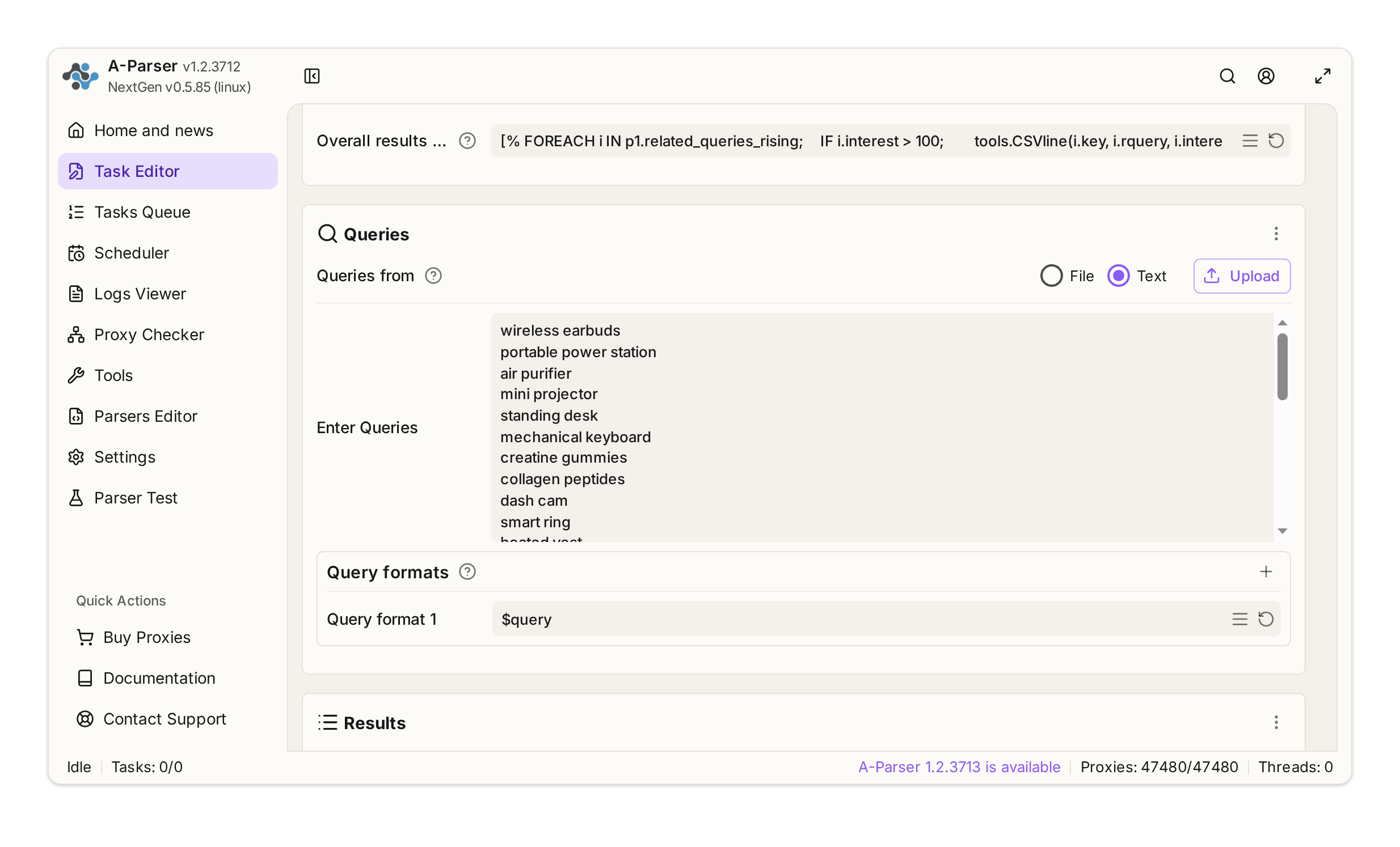
In Task Editor, populate the Overall results format field and set the File name. The Prepend text field for CSV headers appears after toggling More options:
1. Prepend text (CSV column headers):
Seed Keyword,Rising Related Query,Growth Rate (%)
2. Results format (Template Toolkit with > 100% filter):
[% FOREACH i IN p1.related_queries_rising;
    IF i.interest > 100;
        tools.CSVline(i.key, i.rquery, i.interest);
    END;
END %]
3. Results file name:
trends_rising_$datefile.format().csv
6. Real-world data breakdown: breakout products surging up to +2,652,350%
Our benchmark test yielded 545 raw rising trends (506 unique queries). Applying the “growth > 100%” filter isolated a usable set of 319 fast-growing queries (representing 280 unique products and brands). Below are examples of how search spikes can reveal commercial opportunities:
| Seed keyword | Breakout query | Interest growth | Demand context |
|---|---|---|---|
| portable blender | aldi ambiano portable blender | +2,652,350% | Supermarket private label: Viral interest in Aldi’s budget-friendly private label (Ambiano). |
| mini projector | mac cubic mini projector | +265,600% | Trending gadget: Demand for the viral Magcubic projector; the brand is often searched as “mac cubic”. |
| heated vest | best heated hunting vest | +77,350% | Seasonal niche: Rising demand for heated vests designed for hunting ahead of the fall and winter season. |
| heated vest | scentlok heated vest | +53,850% | Gear brand: A new heated-vest model from hunting-focused brand ScentLok. |
| smart ring | actxa core smart ring | +36,000% | New wearable: The launch of Actxa Core, a new smart-ring model. |
| creatine gummies | omni creatine gummies reviews and complaints | +12,500% | New sports nutrition format: Search interest in Omni’s creatine gummies, including reviews and complaints. |
| portable power station | anker solix f3000 portable power station large capacity 3072 wh | +9,900% | Flagship hardware launch: Launch of Anker’s 3,072-Wh high-capacity portable power station. |
| smart ring | oura ring 4 | +6,250% | Category flagship: Product-launch interest in Oura Ring 4, the next generation of Oura’s smart ring. |
| wireless earbuds | galaxy buds 4 pro premium true wireless earbuds with anc | +5,100% | Premium audio launch: Strong search interest in Samsung’s ANC Pro earbuds. |
| dash cam | viofo a229 pro 4k hdr dash cam front and rear | +650% | Automotive tech: Continued search interest in VIOFO’s dual-channel 4K Sony STARVIS 2 dash cam. |
Download the complete CSV dataset with all discovered trends (view in HTML) (319 rows after applying the > 100% filter to 545 collected rows; three columns: seed keyword, rising query, growth rate).
Important observation about how Google’s algorithm behaves:
For 3 of the 30 queries (
air purifier,standing desk,electric bike), Google returned a broad, global list of trends (fitness tracker review, how to cook pasta).We checked this three times: in two parser runs with different time windows (30 and 90 days) and in a manual check using the Google Trends web interface without A-Parser. The result was the same each time: when there is not enough breakout data for a query in the selected region and period, Google returns a broader background sample instead of an empty list. This is normal algorithm behavior, not a parser error, but such seeds should be filtered out before publishing the dataset. Keeping the seed keyword column (
i.key) in your CSV export makes that easy.
7. Best practices and common pitfalls
1. Search property: Why standard Web Search is more useful than Shopping: Most consumer demand starts in Google’s main search results rather than in the dedicated Shopping tab. Leaving Search property blank (the default Web Search) gives you broader coverage of commercial intent (506 unique trends in our test), while queries are processed faster and more reliably.
2. ⏱️ Do not set Request timeout below 20 seconds: Reducing the timeout can interrupt sessions while the page is already loaded and widget data is still being generated. Thirty seconds is enough for stable operation.
3. ️ Proxy pool quality: Google Trends is sensitive to subnet reputation. Use reputable mixed or residential proxy pools with automatic rotation for each request—for example, A-Parser Proxies Premium, which uses rotating ports and automatic IP replacement after errors. Together with a 1,200-second ban rule, this helps minimize HTTP 429 errors and downtime.
4. Do not chase a low per-host connection limit: The Threads Config includes a Max simultaneous requests per host setting. Setting it to 1 may seem like a way to reduce load on Google, but our two runs with the same 10 queries showed the opposite: the limit produced 15 HTTP 429 errors and 10 bans, versus zero errors and zero bans without it, while total runtime increased from 135 to 181 seconds. Regulate load through thread count (3), request delay (8 seconds), and proxy ban duration (1,200 seconds).
8. Summary and ready-to-use preset
A-Parser can support recurring demand research by scraping Google Trends. It can reduce spending on dedicated SaaS subscriptions when you already have an A-Parser license and the required infrastructure. It exports raw data into your existing workflow, but does not remove Google’s limits: stability depends on the configuration, proxy pool, and workload.
Ready-to-use A-Parser preset
Show Base64 preset code for import
eJyNVn9PIzcQ/SqWdUjQ5iLoqVKbSpW4lFxpKblLoP8QhLzrSdYXr21sb0KE+O59
dpZkj1bQSInW43lv3vywN498RT4oa/jgpMejCMvw2VOgGPjg5pG7/MwH/Gpydvnb
lL1nExWUWTAqbV2TL4ldT9nPx5IdfmCx8iRk6LG19VrW6uGI97gTPiAC2G749Gww
+GTtQtNgcOXJyAAHSXPR6Mh7jzxuHCGWhSSvJGFTSawDCV9Wd54WSWePr4Rukt/1
lD+9iYqqpg4mWik23394X/8PqPPWkY+bDvw1VKU7jmRecwXzw2ZYUbkk3wF99xom
JWKb2HH/cPxmDE/RKwod0MnxqyhP9w2FKEmLbt4/vRmpEMaQLDUJ07huvB9SwNvb
HqgD+hxG1tcijdTNARuNJ2enw9+ZYueXzJ30PcJGknfQkGTf+Txsv8wMw+d8xFRf
mUggiuxXhkzanfSJ1urQH07/1srQoeovadODv09U+ekZedSCMM94wi87uOU7dVOx
oisLdXOlaW8eYXUp6jxBeXBbaXfvJAQn3/4853V41C/DCkAhpYqYV6G3CacTsC/C
tVH3uTzGwrdNd+RtnQLQQ2yNm+di3fB3ec1B0WTsly2GD+ZCB+rxAOEjASHy5Y5C
3iJaP3ZJD+yP3JpTrS9oRXrvlvk/NkpLHNfTOUDnLfC/Xcb/4njapdcNhWFZe2jY
seTVx/Ffe5S0F3aBzGWBvLWqVcQ6DG1jkPpxjy+J3K5il6litfW0C9LytrFxfTl0
CJ5TIsn+pA2uI9lr763JdsLYlzwWn7xdx4pNYGKHB0czs+/4qWtZ+Iu8v+njt8bS
mrlajNvj8ezZmCtcq2MztLXTlAphGq3Rx0CT/XSdhrZvabHP6SV4mEOkWj1fmzxP
/h/TrVTnFab3xySwRum7UVvKUmh9Pbno7iRgiNaNzZn3L/qdJ4mvFY4mhcBwMxaN
DDPjrI+i0MScXZNnIYrUjZkRyjPXeDVX5GemVkYx3A9fqcQgzQzcjEx9QHmW2Kay
EkZBEsN5LazwcmZKvEUiDjFbNHWN8LBYrcWCDHOEnstkkiJUrBQ1KGvhI/MgnZmK
cnNXOOYz0BIrBNobm2JmIL/EXViyUPqmKJI4D1etFlXEmwuT7jYzo0VBmtVimcWD
LW/VtkadYCksZKHLsilTtgzxpKtghKJ1hbFmxqpAICgrZACj0MuUrhMykeNNyKpU
odwdoTtlxNfIFCNoTDsYUn2cDbHxKaT3bQUTeu43yXOXUqGWlKskmdONWWARRGME
SIVZEmoBuoAKoqRo0ZpS0kh+t72tYaG8ZHMcmvxSuu+OY55u1HZhcQdh9XS7e7Pv
/i484iR/DZ+31gTLtqd/AI7E9p0=
How to import the preset
1. Open the A-Parser web interface; 2. Navigate to the Task Queue section; 3. Click the Import preset button; 4. Paste the Base64 code into the text field and confirm the import.
9. Official sources and documentation
- Official A-Parser website and SE::Google::Trends documentation;
- A-Parser Proxies Premium — rotating proxies for data collection;
- Google Trends and Google Trends Data FAQ;
- Google Trends API alpha and official API announcement.