

How to Scrape TikTok by Hashtag with A-Parser: Video URLs, Metrics, and Subtitles
Give A-Parser a list of hashtags and it will find TikTok videos, collect their metrics, and export text from each video’s first listed subtitle track, if it has a URL. No third-party APIs or external scripts required. Import one preset bundle, set up your proxies and choose a thread count, and start the first task. The other two tasks run automatically. In a test run across eight hashtags, all 240 video records had an OK status, and all 184 queued subtitle requests returned HTTP 200.
This guide shows how to import the preset bundle and run the workflow, what the output looks like, and how to customize the workflow.
Ready-to-import A-Parser preset bundle (three task presets, three presets for the built-in  Net::HTTP scraper, and the code for
Override tools.js; the scraper presets use the default proxy checker):
Copy the preset bundle (three task presets: tiktok_tags_to_videos, tiktok_video_metrics, tiktok_transcripts)
eJztG+ly28b5VTaoXYIRBFJynCryEcuyXLuVJVek3ElJGYGIJQkJBBjsgrKicsZJ
Oj2m7aTT6fGrfYYkjRs3TdxXgF6hT9Lv28WxAA/bqZO6rZSJSSy++9pvD55oIxoy
N/C11SVD4zY7ZHdDyihn2mrrRBuK79qqxt1DHhxa3O4xiwfWyHVowDRDG9ohAwIA
3NK2KF9dvdVs3oXxHN7q9MNgQLW9PUMDapHH2c0gHNhItXWe3Nze2Vhbv0U6/cg/
JLe3yHDJdGxum2zouVyv9EPavdLWKtVLbZ+QAbkiIU0g0Onrlft6635b21uoJgCh
fbQbegA1MOtiYIQocjTF0a+11hZ/ZC++W198wzL3FmpCm1oLHnNCt28CakKDkHci
Gh6bQej2iEXa2rVrfc6HbLVWOzo6MqWuZicY1NoavEc8AdZu+21NUNjYugGf8C9Z
PL+nZYZo2CPaDMAQXdej+fBNeNqywWaZ3aW9rSj0mMkfcAC1Hcfl4Dfbk9ZEF+QW
3vVdEFlb5WFEDQ2ldym7CX7IeQmVUk+0tHPiWQMSkcD9gcTRVru2x4AGA1Fv2oDq
lN+4nIY2D8LtIcoD4yda4K953iYdUS8HE/SvR67nQLysdQHpdoI4HWR7gsY4U09l
BfF7FIIMGRXxdH37To7lBJtBLzWG5w5cDs9sPYh8UL1uaIeUDlOLaVsBGGcQhDRj
IvES1pAdQ+o7AJj7a22YDxV0KPikONgJ/K7b2wbpQ/BtChn5TUjBbX89GAw9yssR
YA0oD90OJl7E6E4eLWss8Qo+ZBKXqa0LnkDToV0bUDFPg8Bj32tI2YehC8F4ESUe
gF1VMRLbdmzP293ZLAgIiIwHw21/IwxLzhRhklolk66VPtYS3fo262NlEaG9NzYm
605Z+6eUHcxOK+LdlVlVZ7exQaDKUEjKPocCked3WneuXatUza4bMg4wo0jUlBlQ
ni2AsNCkxSupNJdZJ3SHvHX/6t6C60AZs6zdrdv3NnYaa5vWjbXmmgXlz9rZuPXW
jZ215u3tLctqawj96lW91W6zdrux9+qb1cs1SeeqqE1QmV5JK5Nwn7neuOe5PtX7
3CAoqkEqW9slThUYfEH/19VHlGhjs7GRVl9Zek3IEs/uUL1iWTc2bq7tbjatxvr2
3Q3LQizWCYY0r9iyQuc4R3TfHg5N4fRFh3IoO4glnm/IR4nb3HkrKdAR0JDGEKHx
vcb2lg40q8nrEbyOTMHWVMiYUCkGt/1uIL40IG06PMFAK49MxqGyJiPzrX3v9o2N
bavR3Nldb36dtkY5Mnvj3zDatzCUQcNKJRvF6cvshBReNN0BzcYL8PhhdkVa6Cq0
QeQguXKVVM6/tXh+sHjeybins1n6NHLpEbP8zAEHkMfBVjTQE/OZ4NVjUWxzCp57
SOfiOG6vV8LBGWguTifwPNrhJTSYlgfU50/BFDBlhn07nM9RQJSwuiBFcATFaTqi
HfF+EDYEegqaUVBVtdBG1rCD5amu+jW13VVleBJFT81VSxGq5FWyVK/P8KLAR1dO
sKThtKFu5HnTpEujYYp0CnVFugShLJ3CV9dTlRdUby5kDqo+hYwiq0orleH5qZYT
ILQ9awBzTNkYaiwUDVLASW1WUxFm+QnSV85GI1nJTBjhLvco1jEGpRc63UsqtGf7
vTngm/A6snsQxo5oOjNcmJUtAC7rlAig6JIDLimj3yLxn+N/nP40fhw/ib+MP4r/
fvor/Dz9kMRPTt8/fS9+dPqz+PP4IxL/I34C/5w+hPH34i/E24eA8AXR8RPGPgcS
X8B/j+IvT9+PH58+PP0g/ht8eyTRHhMY/yD+K5AHOEEPicV/iR9VV1WJCvEJDlU9
8g4WddAB+gGL4MSOnTxaOnvKjFkYKdrCGgWuo+a9LXpD2V02on1o0yKqy7e42jJd
J51FhABQ5kvNUeovZr2DuNgjKaUYtZIBMi1YOh61fYgy5nZUmcRwkz7Aqi9emoKD
UjMFHrSlM9HwnVqxZk6N29+HqWsk1ExnHiOLRSeCBQA02TgiC6MpVx+3HUPNBSN1
m5EWMyPNXkNJXiPLXaNYD41iATKS2mKoxcFQchLlkYZBuRUr5i+wC3Rh9WWk4W9k
8WGkcWEohszm7sRZ62vN9VvJ2EzjYRtjbezsbO98PS2FZEyxb6++wHWq2WGjZ16i
FpcLZ2vUF7pGTVZWhlw/YVBh4xKxZACiG5LSc1mfOjI104y0GO0YMiUtWGqGPrg5
fc4S0xBZaYiUNEQ+GmkyGjITxShuGGWZmA5kuUj9Hsw+iGQBawmkpmWelS6suWho
iPxD0eUXUbqS71lSJjkpC6eRl1CRnvkjGgSTExdXoDSWs292Vc9D25fsn7qmTyLn
+Rb1tRpJhcnqOIk/hbkYZuE/whz7Kfz/JcyoH5Jlok9bbFdNEv8WpuqHMA0j2AXy
z4e/IzDbAlb8SfIimdxPfxn/DWfkD2AC/xXRj4Lw0IXp0nFD8rb5dpXgRP0xTOKf
QQcQfyzm9l/gnA6UAO9zwvsuM9s+CA0sfxP/If5T/Geiy85A8hLQ0Cx8iW3DY+D4
HnQBH+EnTvUk/gQn/0fw9AR6C9Trp9AjrC3eFdsFgj7AYLMgWozH5PQnQpPPRZsC
0v0p/j3qBl1J/Blo8wl8Pjp9X/Jrov0MKR52GL8G1tBunH4g5e66D+4EB+6+fUh1
0zSrCCTtixRO3yNtrXk8pGKTZHUChYBkfsCJTbqR3xHBqElepz8HEh/Hf8cuKrFb
Lhno/yGaFe0grIT9lDDTZ6AGOAXNg/8T7JYA88MUC9z6OwDDzupTfJM0YPGngIfc
HidG/wi5qiYTxvkrID0BpxXtZ2ICNeUqPAx4wEFfufCBNiLVSx/ZXpWcyJnP7RJ8
JleuXCE+ZDz58Y9J+hz5ENEwITrqICyCSUh5FPpZVwo5xzjBxRYw2qehYJC8S0Dl
C9OFVPKh8OrQ0L8JGKuCxvjSNLFV3yjCu/4w4pn4kjUDgAYki9+Trwva5CO5Pm+C
GsBc0ipo4dAOtOEhEPTpEcFe64Yc0SsR7y6uwJx9Qro2tz0IISj5ZJziQykgAXLK
dwFwyFXa96M+FBKiu+QyYaYHdZf3M01SZ8DcDYUb1wJrXHer0CYvX7xYgMI/ZLRw
hbCWu7Cwd6n4DhThrh+pWw7j/GtiMW6HKKqrAKG0ULZvub3+9WOxPSEqngIxRX7y
7W+TssiXr0yVebp2S8vfqZbYol1LOoGa89SRZxdgD5N5bofqQj2DuGqbjuxfURjN
sqmg9RVMug80WRI3u67PV9bC0D7W5WFJ4mwFvxuEREeTH4gAgY/LRIWFkYWFCRkF
k9bBXnYKo5jzoDpdPB4ez1A1CXZTfuqCeIEI6eA2KtGf2VgJ23Eh+QF2ZpZnS5qv
N8ezrc1aq90O8ViozdvtaLm+vCI/3thbqMG6oUIqL7IeQA2jzjdTESSrs5pAXmhN
yKz6/1AVMmX/jbow02BTK4OAzmFmZGm9vnJxVrJOQ25r+LatVdra9PdtdrJsjKeQ
gPoy0Kszi9W0rSS1buF+Em6ciP59V2wpIcim2FaCKojriFJZ62JwhPSdyA2pXumy
UvkZ2pBOCgA+V/Jtn5ITJY48z0lqZcIVi+Tz7mvJAuZReTikbDUleYOyQEe3ts8C
L4KeDk97JuIhEYnifqlAOAhcHw3pHev4bBQOnsA17bbwS61STY/4auIc0ONQc6+D
Q2C+qFYnMxG4gCxynbETBIX5BNY/E4KpUchM+sBlnDWO/Y6eSYloIAmaANxShao2
SQH/9Pn4idWRAjhhPmyypAXYsobjgv1znTu277i4cYBx1KqYuK9kJv/W4Et5IpiS
9qlDMcSDLoFw71DGyCvY7GfTaQWLevoq/wrK0M5duzRrFcTMBDSHEetLlUFb3M/Q
J6iU1RaqlyyRFh8LeI6fVzvLSnjLxQwTWSKUy948syoZhiFDG7wXeCOqjqMvqnNf
o5P+XbXLglVqkGAYA7VgyOG7SIpKdSKE0uymXom/mIaSCcxmlIDhch5T7TPD8qn1
C6mpI83JUjFFMsFcOMqsQEOHZWQ1LyOCjoGj0+yX/u2H1C7P3JlRp5h9jp2Vx/FE
Oex5wb7tNXFbwbI4h/mhQal//Rg3iyZ0nQecdAt37KE+Y+6Wnjmkx3mdl1OPKPPJ
NtRELWfAARDmsTZ7lOtAtzpZ7RF7Qo2EJIrbAMyyG+ayYpKVIYiUMaFMDg4hTfIq
mZYMjIwqNt0h7UQhc0e03HgrNMQuL85/gg6iJlvveDWlUrJu2b7JnZPEwOmcLkwM
M1LWKhSsJHAAAnUyobHUcaBa2DHJMQSQ7TgSSO0C01OrkuiJKFlTUSULpAJt0lSN
EpbpieCMni2BWszAZO/zH7yLVL5pN/U6UnHb9imXkY7o/ojzudeRgAJnMy8YXUou
KQkocVNFr+NgEiHK8BIOs+TAVxlfxvGDKReU7uvQjb7abp9U06tFB+nVovxuzcGU
uzUJndTjhX2n9EpnhNc5D8yI4xmKDzOteowcmRxWs5cEpjhxJXigmo7mR5pTz8ty
RdRTq/RWjPI6v1N0/4cb1+81m6iucpdGcM+BxBXQk+Xx6sSXlrknv14YI4nFxav4
8UzwrftyNbGXM5YC88nD1SyudLExOOtgkMljRlASV0gG4dWveF6nBPLZod1LfGhX
PMAS1xuF53P/WZg4X9MB1rOcS32lM6cL2ZmTEojlE6dlceJ0dnD0335w9AxnRWeH
LmeHLjnu2aGL+PsfPXTJCv7Z0cvZ0cvLVxnOjl7+G49enu1o5T+4vTDl1EPbG+9l
mwjZjy9PlK0EeJj8PSUM9oLAQWfv0B59ILnvh8ER0BG/5uxT2wFOTDzIS3ugyyDw
d6jjhrTD5RsoxE4wcN+lFveYBSW0R0MwT7KE4e6AQjHXVt+Ah4H9YD0IDoWuS6+L
hQGU9QfHgk7ge8fIUqwl6inHO5TbO7QLavUF1P7x0GZs3Qsi56aHv54Q2tyxH9y1
e0h2GXmGx+InXEsCw6EjsYwQRAW7EK+mCWD0HxiScYd69nHCFleecnEDNjmHgUzO
hdRmeMHvXCIhzkvncIdAQwYcjIGZIzZ5gAZkHMwkgJ3YGtngdh8MfQcWekFvPfB9
2kmWcdIwFgMTaqsrF1ZWXq+vCNuEi6AT2jFbgXXTTZ8Zvx8F/9aSBbP0nzCmiLtD
d9jcbNyDaOpKRZHEsvg23aa3VPenoZL+0A+suN6nnUMMFeXm4JHt8l2obR6M+pSL
G3xAZBkjK3COJbYTWL133eEcd0qbUN4PcPn53Y2mhivLJHAyAfZtMKIjuoEIqF2o
oyq2X4jo8ZTf9D1P5NdfQOS//hJG/lL9hYR+FujIdDIVlr5K4BcDvXV+3s8midi1
KqdKIfCfIbjzTJjMkpmhXsyIOYFfCPcsCb65wFf3j7/p0L/wEob+xZct8l9beuO1
C/XXziL/BUX+GGL/gMmtN9FHYTs0Hv8L0WFCpg==
What This Pipeline Collects
Put one hashtag per line in a plain-text file, without the #. The pipeline writes three files to results/. Open the CSVs in Excel or Google Sheets, or use them in an analytics or LLM workflow:
| Stage | Output file | What is inside |
|---|---|---|
| 1. Discover videos by hashtag | tiktok_videos_urls.txt (view HTML) | hashtag@@video_url pairs deduplicated within each hashtag (if a video appears under two hashtags, both pairs are preserved) |
| 2. Video metrics and metadata | tiktok_videos.csv (view HTML) | 25 columns: hashtag, video URL, status, video ID, publication date, duration, author username, follower count, views, likes, saves, comments, shares, save-to-like and save-to-view ratios, engagement rates with and without saves, viral multiplier, music metadata, subtitle flag/language/URL, cleaned description |
| 3. Subtitle text | tiktok_transcripts.csv (view HTML) | Five columns: hashtag, video URL, subtitle language, HTTP status code, and cleaned subtitle text. The template reads WebVTT and JSON subtitles. |
Sample Output from a Real Run
Across 8 hashtags (tiktokshop, aitools, personalfinance, smallbusiness, marketingtips, skincare, productivity, ugccreator), the pipeline collected:
- Step 1 (Chrome):
240links (30per tag page,239unique videos); - Step 2 (HTTP):
240/240rows with statusOK, totaling 150.6M views (median 86,900 across 240 rows and 89,400 across 239 unique videos); - Step 3 (HTTP): 184 successful subtitle downloads (HTTP
200for every request) (182eng-US,1spa-ES,1por-PT; median text length 1,397 characters, max 20,476).
The sample export contained no garbled text, no raw JSON in place of transcripts, and no blank lines between data rows. Both CSVs have one blank line immediately after the header. Run time depends on your server, proxies, and thread count.
Sample output for five videos (combining columns from the three output files for clarity):
| Hashtag | Video | Views | Saves | Engagement rate (incl. saves) | Subtitles (opening line) |
|---|---|---|---|---|---|
skincare | @nini.goroziia | 13,000,000 | 23,126 | 1.39% | por-PT: upc upc cada lugar tem 1 Rei… |
marketingtips | @mr.paidsocial | 3,000,000 | 221,333 | 13.70% | eng-US: it took me over 10 years to learn… |
marketingtips | @conversion.doc | 3,000,000 | 104,646 | 13.47% | eng-US: Customers don’t care about you… |
ugccreator | @xairaprieto | 198,600 | 12,902 | 15.85% | spa-ES: así es como vas a empezar a crear… |
aitools | @samdespo | 80,700 | 3,728 | 13.18% | eng-US: These are all the best AI tools … |
Full Engagement Rate (column er_full_pct) = (likes + saves + comments + shares) / views × 100%.
Why the Pipeline Uses Three Tasks
TikTok loads video cards on hashtag pages with JavaScript, so the first task uses Chrome. In our test, the HTML of individual video pages already contained the data we needed in <script id="__UNIVERSAL_DATA_FOR_REHYDRATION__">. Subtitle files came directly from TikTok’s CDN. Steps 2 and 3 use the HTTP engine without launching Chrome.
All three tasks use Net::HTTP with different scraper presets. We split the HTTP work into two tasks so each CSV can have its own header and you can rerun the subtitle download on its own. The metrics task also builds a subtitle queue with one entry per video that has subtitles:
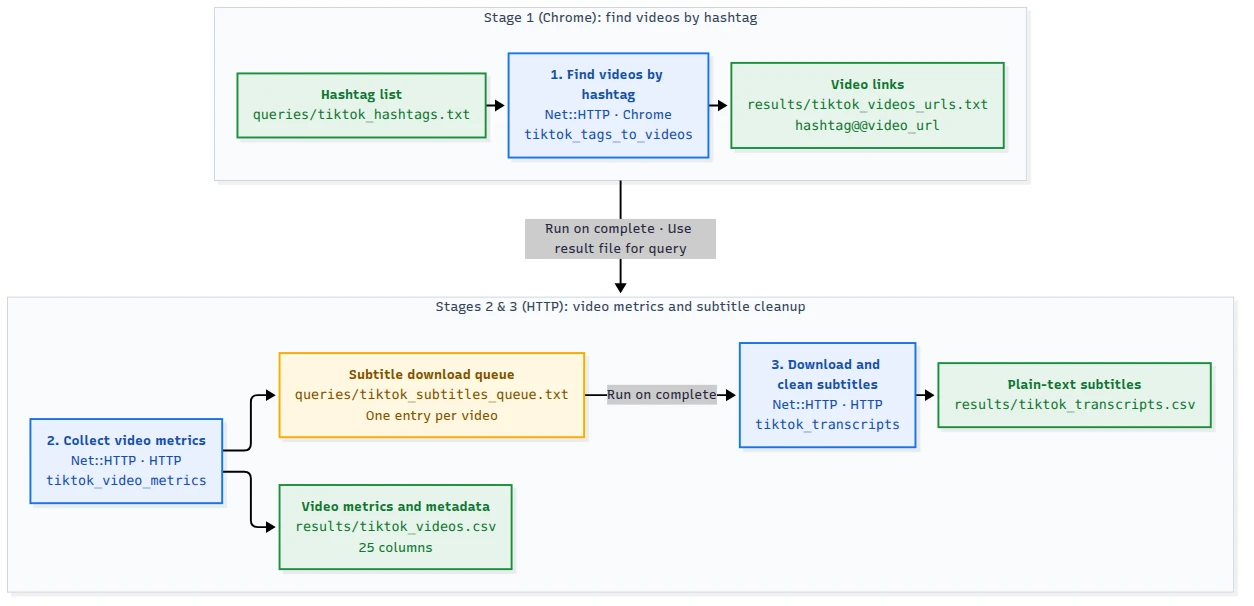
Step 1 collects video URLs in Chrome. Step 2 uses those URLs to export metrics and build a subtitle download queue. Step 3 reads the queue and writes a separate CSV with subtitle text. Steps 2 and 3 start automatically.
The bundled JavaScript helpers in Override tools.js write queries/tiktok_subtitles_queue.txt and repair text that was decoded with the wrong character encoding. The queue path is relative to A-Parser’s working directory. Check that both HTTP tasks use the same queue path in your setup.
Quick Start (Import the Ready-Made Preset)
What You Need Before Starting
- A-Parser Pro or Enterprise — the Lite edition does not include the built-in Net::HTTP scraper.
- Working proxies: The scraper presets use the
defaultproxy checker. - A thread configuration for Chrome: Go to
Settings → Config Presetsand create a configuration for Chrome. For a small VPS, set the thread count to 3 and save the preset as3 threads. The HTTP tasks can use the built-indefaultconfiguration with 20 threads.
Run It in 5 Steps
- Create
queries/tiktok_hashtags.txtinside your A-Parser instance folder and enter your hashtags one per line without#(for example, using this test list):
tiktokshop
aitools
personalfinance
smallbusiness
marketingtips
skincare
productivity
ugccreator
- Import the preset bundle: Copy the Base64 string from the spoiler at the top of the article and paste it into
Task Editor → Import preset. The bundle imports three task presets, threeNet::HTTP scraper presets, and the code for Override tools.js. - Check your proxy settings: If you use a different proxy checker, select it in each imported Net::HTTP preset (
tiktok_tag_chrome,tiktok_http_utf8, andtiktok_webvtt_utf8). - Check the thread settings: In the Task Editor:
- For
tiktok_tags_to_videos, select3 threadsas the task’s Config preset. - In Steps 1 and 2, check that Options → Run on complete → Config preset is set to
default(20 threads). This setting applies to the next task.
- Test and run: Use Test Task to try
tiktok_tags_to_videoson one hashtag. If the test returns video URLs, start the full task. Steps 2 and 3 run automatically and write the CSVs toresults/tiktok_videos.csvandresults/tiktok_transcripts.csv.
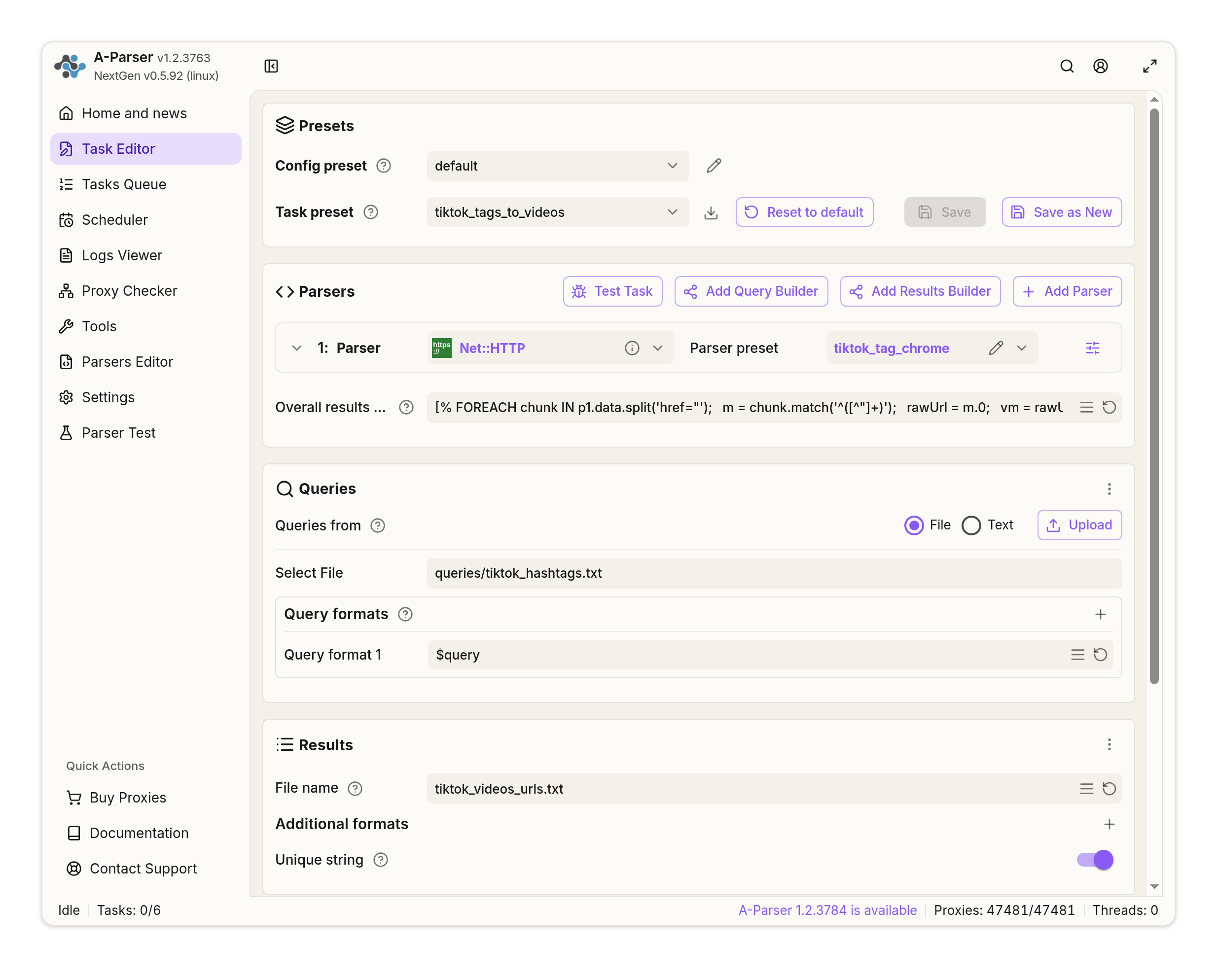
Task tiktok_tags_to_videos in A-Parser’s Task Editor after importing the preset bundle: Net::HTTP with the tiktok_tag_chrome preset, queries/tiktok_hashtags.txt as the query file, tiktok_videos_urls.txt as the output file, and the Test Task button.
Manual Setup and Templates
Below are the full settings and templates for all three tasks in case you want to inspect the logic, customize output columns, or rebuild the chain from scratch.
Step 1 (tiktok_tags_to_videos): Collect Video URLs by Hashtag
Scraper preset settings (Net::HTTP → tiktok_tag_chrome):
- Engine:
Chrome (Slow, JavaScript Enabled) - Chrome Headless:
on(required on headless servers without a GUI) - Chrome Wait Until:
networkidle2 - Emulate browser headers:
on - Use proxy:
on(preset defaults todefault; switch to your active proxy checker) - Request timeout:
90s (gives Chrome extra time to render pages when several tabs are loading at once) - Request retries:
2 - Query format:
https://www.tiktok.com/tag/$query
Task settings:
- Queries: Set Queries from to File, then use Select File to choose
queries/tiktok_hashtags.txt. - Config preset:
3 threads(or higher based on server resources) - Results → Unique string:
on(removes duplicatehashtag@@video_urllines while keeping the same URL under different hashtags) - Do log:
on - Results → File name:
tiktok_videos_urls.txt - Options → Run on complete:
tiktok_video_metrics; set Config preset todefault. Use results file as queries file:on
Overall result format (Task Editor → Parsers):
[% FOREACH chunk IN p1.data.split('href="');
  m = chunk.match('^([^"]+)');
  rawUrl = m.0;
  vm = rawUrl.match('(@[A-Za-z0-9_.]+/video/[0-9]+)');
  IF vm.0;
    query.orig _ "@@https://www.tiktok.com/" _ vm.0 _ "\n";
  END;
END -%]
This writes results/tiktok_videos_urls.txt with lines in the format:
aitools@@https://www.tiktok.com/@samdespo/video/7647302714682248469
Each line starts with the original hashtag, followed by @@ and the video URL, so later tasks can keep track of the hashtag. If you only need the URLs, turn off Run on complete in Step 1 before starting it.
Step 2 (tiktok_video_metrics): Extract Video Metrics and Build the Subtitle Queue
When a video page includes the data in <script id="__UNIVERSAL_DATA_FOR_REHYDRATION__">, the HTTP engine can extract it without launching Chrome.
Scraper preset settings (Net::HTTP → tiktok_http_utf8):
- Engine:
HTTP (Fast, JavaScript Disabled) - Detect charset on content:
on - Emulate browser headers:
on - Use HTTP/2 transport:
off(video pages returned HTTP200over HTTP/1.1 in our test) - Use proxy:
on - Request timeout:
60s - Request retries:
10 - Query format:
[% query.orig.split('@@').last %](requests only the video URL while keeping the hashtag available inquery.orig)
Task settings:
- Queries: Step 1 passes
results/tiktok_videos_urls.txtdirectly to Step 2. To run Step 2 manually, copy the file toqueries/tiktok_videos_urls.txt, set Queries from to File, then use Select File to choose it. - Config preset:
default(20 threads) - Results → Unique string:
off(preserves rows for every hashtag if a video matched two tags) - Do log:
on - Results → File name:
tiktok_videos.csv - Options → Run on complete:
tiktok_transcripts; set Config preset todefault. Use results file as queries file:off(keep disabled, because Step 3 readsqueries/tiktok_subtitles_queue.txtrather thantiktok_videos.csv) - Results → ⋮ → Prepend text: Paste the CSV header below, then press Enter once in the multiline editor.
hashtag,video_url,status,video_id,published_date,duration_sec,author_username,author_followers,views,likes,saves,comments,shares,save_to_like_pct,save_to_view_pct,engagement_rate_pct,er_full_pct,viral_multiplier,music_id,music_title,music_original,has_subtitles,subtitles_lang,subtitles_url,description
Overall result format (Task Editor → Parsers):
[% USE date;
ht = query.orig.split('@@').first;
vurl = query.orig.split('@@').last;
m = p1.data.match('<script[^>]+id="__UNIVERSAL_DATA_FOR_REHYDRATION__"[^>]*>([\s\S]*?)</script>');
IF !m.0;
  tools.CSVline(ht, vurl, 'NO_UNIVERSAL_DATA', '', '', '', '', '', '', '', '', '', '', '', '', '', '', '', '', '', '', 0, '', '', '');
ELSE;
  raw = m.0.replace('__DEFAULT_SCOPE__', 'scope');
  raw = raw.replace('webapp.video-detail', 'videoDetail');
  TRY;
    u = tools.parseJSON(raw);
    v = u.scope.videoDetail.itemInfo.itemStruct;
    IF !v.stats;
      tools.CSVline(ht, vurl, 'NO_VIDEO_STRUCT', '', '', '', '', '', '', '', '', '', '', '', '', '', '', '', '', '', '', 0, '', '', '');
    ELSE;
      pub_date = '';
      IF v.createTime;
        pub_date = date.format(v.createTime, format => '%Y-%m-%d');
      END;

      views_n = tools.js.toNum(v.stats.playCount);
      likes_n = tools.js.toNum(v.stats.diggCount);
      saves_n = tools.js.toNum(v.stats.collectCount);
      comments_n = tools.js.toNum(v.stats.commentCount);
      shares_n = tools.js.toNum(v.stats.shareCount);
      followers_n = tools.js.toNum(v.authorStats.followerCount);

      save_like_pct = 0;
      IF likes_n > 0;
        save_like_pct = (saves_n / likes_n) * 100;
      END;

      save_view_pct = 0;
      er_pct = 0;
      er_full_pct = 0;
      IF views_n > 0;
        save_view_pct = (saves_n / views_n) * 100;
        er_pct = ((likes_n + comments_n + shares_n) / views_n) * 100;
        er_full_pct = ((likes_n + saves_n + comments_n + shares_n) / views_n) * 100;
      END;

      viral_mult = 0;
      IF followers_n > 0;
        viral_mult = views_n / followers_n;
      END;

      sub_url = v.video.subtitleInfos.0.Url;
      sub_lang = v.video.subtitleInfos.0.LanguageCodeName;
      has_sub = 0;
      IF sub_url;
        has_sub = 1;
        # Optional: uncomment both the IF and its matching END, then set the view threshold.
        # IF views_n > 1000;
        qline = ht _ '@@' _ vurl _ '@@' _ sub_lang _ '@@' _ sub_url;
        _void = tools.js.appendUniqueSubQueue(tools.task.id, vurl, qline, 'queries/tiktok_subtitles_queue.txt');
        # END;
      END;

      clean_music = tools.js.cleanText(v.music.title);
      clean_desc = tools.js.cleanText(v.desc);

      tools.CSVline(ht, vurl, 'OK', v.id, pub_date, v.video.duration, v.author.uniqueId, followers_n, views_n, likes_n, saves_n, comments_n, shares_n, save_like_pct, save_view_pct, er_pct, er_full_pct, viral_mult, v.music.id, clean_music, v.music.original, has_sub, sub_lang, sub_url, clean_desc);
    END;
  CATCH;
    tools.CSVline(ht, vurl, 'JSON_ERROR', '', '', '', '', '', '', '', '', '', '', '', '', '', '', '', '', '', '', 0, '', '', tools.error);
  END;
END -%]
JavaScript helpers for Step 2
The preset bundle already includes this code. If you’re setting up the task manually, enable Options → ⋮ → Override tools.js in the Task Editor and paste the JavaScript blocks below into that field.
toNum— converts counts stored as strings in TikTok’s JSON (such ascollectCount: "42547") into numbers before calculating ER.fixMojibakeandcleanText— repair text that was decoded with the wrong character encoding and prepare text fields for CSV.appendUniqueSubQueue— writes a deduplicated subtitle queue for Step 3.
// Convert counts stored as strings in TikTok’s JSON to numbers before calculating engagement rates.
Tools.prototype.toNum = function(val) {
    if (val === null || val === undefined || val === '') return 0;
    const n = Number(val);
    return Number.isFinite(n) ? n : 0;
};
fixMojibake: repair garbled descriptions and music titles
If UTF-8 bytes are misread as Latin-1, descriptions and music titles can contain garbled accents or emoji. This helper tries to decode each candidate segment as UTF-8 and keeps the original segment if decoding fails.
// Recover text from UTF-8 bytes that were misread as Latin-1.
Tools.prototype.fixMojibake = function(input) {
    const s = String(input === null || input === undefined ? '' : input);
    const decoder = new TextDecoder('utf-8', { fatal: true });
    let out = '';
    let i = 0;
    while (i < s.length) {
        if (s.charCodeAt(i) > 255) {
            out += s[i++];
            continue;
        }
        const start = i;
        let hasHighByte = false;
        while (i < s.length && s.charCodeAt(i) <= 255) {
            if (s.charCodeAt(i) > 127) hasHighByte = true;
            i++;
        }
        const chunk = s.slice(start, i);
        if (!hasHighByte) {
            out += chunk;
            continue;
        }
        const bytes = new Uint8Array(chunk.length);
        for (let j = 0; j < chunk.length; j++) {
            bytes[j] = chunk.charCodeAt(j);
        }
        try {
            out += decoder.decode(bytes);
        } catch (e) {
            out += chunk;
        }
    }
    return out;
};
cleanText: prepare descriptions and music titles for CSV
Inside A-Parser’s sandbox, this.fixMojibake(...) does not work (this is not bound to Tools), so the helper includes its own UTF-8 decoding logic. After decoding, it removes line breaks (\r, \n, \u2028, \u2029), replaces " with ', and collapses extra whitespace so each CSV record stays on one line.
// Repair garbled text, replace line breaks with spaces, and replace double quotes with apostrophes.
Tools.prototype.cleanText = function(input) {
    const s = String(input === null || input === undefined ? '' : input).replace(/[\r\n\t\u2028\u2029]+/g, ' ');
    const decoder = new TextDecoder('utf-8', { fatal: true });
    let fixed = '';
    let i = 0;
    while (i < s.length) {
        if (s.charCodeAt(i) > 255) {
            fixed += s[i++];
            continue;
        }
        const start = i;
        let hasHighByte = false;
        while (i < s.length && s.charCodeAt(i) <= 255) {
            if (s.charCodeAt(i) > 127) hasHighByte = true;
            i++;
        }
        const chunk = s.slice(start, i);
        if (!hasHighByte) {
            fixed += chunk;
            continue;
        }
        const bytes = new Uint8Array(chunk.length);
        for (let j = 0; j < chunk.length; j++) {
            bytes[j] = chunk.charCodeAt(j);
        }
        try {
            fixed += decoder.decode(bytes);
        } catch (e) {
            fixed += chunk;
        }
    }
    return fixed
        .replace(/[\r\n\t\u0085\u2028\u2029]+/g, ' ')
        .replace(/"/g, "'")
        .replace(/\s{2,}/g, ' ')
        .trim();
};
appendUniqueSubQueue: build the subtitle download queue
The helper finds the A-Parser root and writes queries/tiktok_subtitles_queue.txt. It clears the queue on its first call for a new task ID, then appends one entry per video URL. If Step 2 adds nothing to the queue, including when the view filter excludes every video, Step 3 can read the previous run’s file. If you expect an empty queue, turn off Run on complete in Step 2, delete the old queue file before starting, and run Step 3 only if Step 2 creates a new, nonempty queue.
// Clear the queue on the first call for a task ID, then append one row per video URL.
Tools.prototype.appendUniqueSubQueue = function(taskId, videoUrl, queueLine, outFile) {
    const fs = require('fs');
    const path = require('path');

    try {
        const raw = String(outFile || 'queries/tiktok_subtitles_queue.txt');
        let file = raw;

        if (!path.isAbsolute(raw)) {
            const rel = path.join.apply(path, raw.replace(/\\/g, '/').split('/').filter(Boolean));
            const isAParserRoot = function(dir) {
                return fs.existsSync(path.join(dir, 'files')) &&
                    (fs.existsSync(path.join(dir, 'queries')) || fs.existsSync(path.join(dir, 'results')));
            };

            const candidates = ['.', '..', '../..'];
            try {
                if (typeof process !== 'undefined' && process && process.execPath) {
                    candidates.push(path.dirname(process.execPath));
                }
            } catch (_) {}
            try {
                if (typeof __dirname === 'string' && __dirname) {
                    candidates.push(__dirname, path.resolve(__dirname, '..'), path.resolve(__dirname, '../..'));
                }
            } catch (_) {}
            candidates.push('/app', '/opt/aparser');

            file = rel;
            for (const base of candidates) {
                try {
                    if (isAParserRoot(base)) {
                        file = base === '.' ? rel : path.join(base, rel);
                        break;
                    }
                } catch (_) {}
            }
        }

        if (!globalThis.__ttSubSeenByTask) {
            globalThis.__ttSubSeenByTask = new Map();
        }
        const key = String(taskId || 'default');
        let seen = globalThis.__ttSubSeenByTask.get(key);

        if (!seen) {
            seen = new Set();
            globalThis.__ttSubSeenByTask.set(key, seen);
            fs.mkdirSync(path.dirname(file), { recursive: true });
            fs.writeFileSync(file, '', 'utf8');
        }

        const vurl = String(videoUrl || '').trim();
        if (!vurl || seen.has(vurl)) return 0;

        seen.add(vurl);
        fs.appendFileSync(file, String(queueLine) + '\n', 'utf8');
        return 1;
    } catch (e) {
        return -1;
    }
};
Step 3 (tiktok_transcripts): Download and Clean Subtitles
In the test run, TikTok returned either WebVTT with timestamps or a JSON object with an utterances array. For WebVTT, the template removes timing lines in HH:MM:SS.mmm format. For JSON, it joins the text from the utterances array. If a response looks like JSON but cannot be parsed, the template passes the raw response to the cleanup helper.
Scraper preset settings (Net::HTTP → tiktok_webvtt_utf8):
- Engine:
HTTP (Fast, JavaScript Disabled) - Detect charset on content:
on.cleanTranscriptrepairs remaining garbled text where it can. Withfatal: true, the decoder throws on invalid UTF-8; the helper catches the error and keeps the original segment. - Emulate browser headers:
on - Use HTTP/2 transport:
off - Use proxy:
on - Request timeout:
30s - Request retries:
5 - Query format:
[% query.orig.split('@@').last %](extracts the last field — the CDN subtitle URL)
Task settings:
- Queries: Set Queries from to File, then use Select File to choose
queries/tiktok_subtitles_queue.txt. - Config preset:
default(20 threads) - Results → Unique string:
off - Do log:
on - Results → File name:
tiktok_transcripts.csv - Results → ⋮ → Prepend text: Paste the CSV header below, then press Enter once in the multiline editor.
hashtag,video_url,subtitles_lang,http_code,transcript_text
Overall result format (Task Editor → Parsers):
[% parts = query.orig.split('@@');
ht = parts.item(0);
vurl = parts.item(1);
slang = parts.item(2);
jm = p1.data.match('^(\s*\{)');
IF jm.0;
  TRY;
    j = tools.parseJSON(p1.data);
    t = '';
    FOREACH u IN j.utterances;
      IF u.text; t = t _ ' ' _ u.text; END;
    END;
  CATCH;
    t = p1.data;
  END;
ELSE;
  t = p1.data.replace('^WEBVTT\s*', '');
  t = t.replace('[0-9]{2}:[0-9]{2}:[0-9]{2}[.][0-9]{3}\s*-->\s*[0-9]{2}:[0-9]{2}:[0-9]{2}[.][0-9]{3}[^\r\n]*', '');
END;
t = tools.js.cleanTranscript(t);
tools.CSVline(ht, vurl, slang, p1.code, t) -%]
JavaScript helpers for Step 3
The preset bundle already includes this code. If you’re setting up the task manually, enable Options → ⋮ → Override tools.js in the Task Editor and paste the JavaScript blocks below into that field.
fixMojibake: repair garbled subtitle text
If the CDN response does not specify a charset in the Content-Type header, UTF-8 can be misread as Latin-1 even with Detect charset on content enabled. The helper tries to recover the original text.
// Recover subtitle text from UTF-8 bytes that were misread as Latin-1.
Tools.prototype.fixMojibake = function(input) {
    const s = String(input === null || input === undefined ? '' : input);
    const decoder = new TextDecoder('utf-8', { fatal: true });
    let out = '';
    let i = 0;
    while (i < s.length) {
        if (s.charCodeAt(i) > 255) {
            out += s[i++];
            continue;
        }
        const start = i;
        let hasHighByte = false;
        while (i < s.length && s.charCodeAt(i) <= 255) {
            if (s.charCodeAt(i) > 127) hasHighByte = true;
            i++;
        }
        const chunk = s.slice(start, i);
        if (!hasHighByte) {
            out += chunk;
            continue;
        }
        const bytes = new Uint8Array(chunk.length);
        for (let j = 0; j < chunk.length; j++) {
            bytes[j] = chunk.charCodeAt(j);
        }
        try {
            out += decoder.decode(bytes);
        } catch (e) {
            out += chunk;
        }
    }
    return out;
};
cleanTranscript: prepare subtitle text for CSV
After the template extracts the text from WebVTT or JSON, this helper repairs garbled text without relying on this and flattens the text to one line. tools.CSVline writes it to the transcript_text column.
// Repair garbled subtitle text and flatten it to one line for the transcript_text field.
Tools.prototype.cleanTranscript = function(input) {
    const s = String(input === null || input === undefined ? '' : input).replace(/[\r\n\t\u2028\u2029]+/g, ' ');
    const decoder = new TextDecoder('utf-8', { fatal: true });
    let fixed = '';
    let i = 0;
    while (i < s.length) {
        if (s.charCodeAt(i) > 255) {
            fixed += s[i++];
            continue;
        }
        const start = i;
        let hasHighByte = false;
        while (i < s.length && s.charCodeAt(i) <= 255) {
            if (s.charCodeAt(i) > 127) hasHighByte = true;
            i++;
        }
        const chunk = s.slice(start, i);
        if (!hasHighByte) {
            fixed += chunk;
            continue;
        }
        const bytes = new Uint8Array(chunk.length);
        for (let j = 0; j < chunk.length; j++) {
            bytes[j] = chunk.charCodeAt(j);
        }
        try {
            fixed += decoder.decode(bytes);
        } catch (e) {
            fixed += chunk;
        }
    }
    return fixed
        .replace(/[\r\n\t\u0085\u2028\u2029]+/g, ' ')
        .replace(/\s{2,}/g, ' ')
        .trim();
};
Common Pitfalls and Customization Tips
- Expiring subtitle URLs. Starting Step 3 automatically reduces the risk that signed subtitle URLs expire before download. If an old queue no longer works, rerun Step 2 to fetch fresh URLs.
- JSON keys in Template Toolkit. Step 2 renames two keys before parsing the JSON so the template can read the result as
u.scope.videoDetail. Template Toolkit treats a leading underscore as private, uses dots to separate lookup components, and can read a hyphen as subtraction. - No
thisreferences insideTools.prototype.*. In A-Parser’s JS sandbox,thisinside an overridden helper does not point toTools, so callingthis.fixMojibake(...)aborts the template. Keep any custom helpers intools.jsself-contained. - No trailing line break in the result template. Do not add a line break after the closing
-%]. This keeps blank lines from appearing between CSV records. - Per-tag depth limit. Without scrolling, each
/tag/page returns the initial batch of cards (~30 videos per hashtag). For broader coverage in a niche, add related and long-tail hashtags toqueries/tiktok_hashtags.txt. - Filter subtitles or remove columns. To queue subtitles only for videos above a view threshold, uncomment both
IF views_n > 1000;and its matchingEND;, then set the threshold. If you remove a column, remove it from the header inPrepend textand from everytools.CSVline(...)call in Step 2, including the error branches. - URL-only or metrics-only runs. If you only need video URLs, disable
Run on completeon Step 1. If you only want video metrics without transcripts, disableRun on completeon Step 2.
11.11 Sale through the end of November 2026: get 30% off with promo code FESTIVAL11 on A-Parser licenses for new users, additional IPs for existing customers, and all weekly and monthly Premium Mix proxy packages (sale details).
Useful Links
- Choose A-Parser Pro or Enterprise
- Get A-Parser Premium proxies
- Net::HTTP documentation
- Template Toolkit and Tools (
$tools/tools.js) documentation - Additional Task Editor Options (
Run on complete) documentation