
Halloween on Pinterest Without Manual Sorting: 730 Images with A-Parser and Clef-Flash
A practical walkthrough: using results for the query halloween costumes as an example, we collect and classify hundreds of Pins without third-party scripts. In the latest real-world test, the workflow processed 730 images, 728 of which were successfully classified.
Pinterest Scraper in A-Parser: Collect Image URLs
Pinterest is a visual discovery platform where people look for ideas on home decor, fashion, recipes, gifts, and much more. For e-commerce businesses, content teams, and creative research, Pinterest search results can be a useful source of visual references and examples.
Around Halloween, searches for costumes, makeup, decorations, and party ideas are especially popular. In the latest real-world test, one of the eight search queries was halloween costumes, so seasonal Pins went into the same dataset for classification.
From a technical standpoint, collecting links to these Pins is straightforward. A-Parser’s built-in parser  SE::Pinterest works out of the box and collects results at high speed across multiple threads:
- Collect full-resolution image URLs: retrieve direct CDN links to full-resolution images (
https://i.pinimg.com/originals/...); - Automate deduplication: built-in string deduplication prevents the same images from being collected more than once.
The Bottleneck: Categorizing Collected Image Links at Scale
Scraping Pinterest results takes only a few minutes. The raw sample, however, depends heavily on the query: narrow topic searches tend to return relatively uniform content, while broad commercial niches inevitably produce a mix of product photos, casual snapshots, infographics, and humor.
For quick filtering and categorization at this scale, you can use decision models. This workflow uses the multimodal cloudflare/clef-flash model: instead of generating free-form text, it returns a category and score in a single forward pass.
Pinterest Image Classification: Why Clef-Flash Instead of a Standard LLM?
Why Text Models Are Not the Right Tool for Image Classification
Alongside conventional chat models, the OpenRouter ecosystem offers the specialized Decisions API protocol. Its early models include Jev by TypeSafe and Clef / Clef-Flash by Cloudflare.
This approach solves a practical problem: conversational LLMs are built to generate fluent language, not to filter data in high-volume batches. When asked to classify an image or text, a language model spends time generating tokens one by one, bills for the generated output, and can still break the JSON structure (especially with models that do not reliably enforce structured output; GPT supports Structured Outputs, but that is a topic for another article).
Decision models work differently: they take input data (a state) and a list of typed questions, evaluate them in one neural-network forward pass, and return results as strictly typed, machine-readable values:
- Choice — selects one category and provides probabilities for all options;
- Noul — gives the probability that a statement is true (a value from 0.0 to 1.0);
- Score — places an item on a specified scale.
The key cost difference is that output tokens are neither generated nor billed. In the latest test with ten categories, one request to cloudflare/clef-flash cost $0.0000528 (about 0.005 cents).
Image Classification and Scoring with Cloudflare Clef-Flash
Early decision models focused primarily on text, but Cloudflare’s multimodal Clef family added native image support: the model receives visual data directly in the request state and returns class probabilities.
OpenRouter offers cloudflare/clef-flash through several independent providers, including Cloudflare and DeepInfra. For reliable image handling, however, this preset routes requests exclusively to Cloudflare.
| Metric | Standard generative LLMs | Decision model (cloudflare/clef-flash) |
|---|---|---|
| How it works | Generates text token by token | Classifies and scores without generating text |
| Output mechanism | Autoregressive generation, one token at a time | Evaluation in a single neural-network forward pass |
| Typical latency | 2,000–4,500 ms (our estimate) | 80–250 ms (our inference estimate) |
| Output tokens | Billed at a separate rate | Free (no generated text) |
| Schema compliance | JSON formatting errors are possible | Structured, typed output |
| Cost per request | ~$0.002–$0.005 (estimate) | ~$0.00005 (measured in the real-world test) |
Clef-Flash does not generate prose as part of this workflow. It receives an image and a set of criteria, then returns probabilities in a fraction of a second—making it possible to filter thousands of images quickly with predictable costs.
Halloween test assets (730 Pins):
* Download the classification results (CSV) — the full dataset with Pin URLs, categories, probabilities, educational scores, and costs.
* Open the interactive image-preview table (HTML) — a filterable web report with class badges and thumbnails for every Pin.
Pinterest Scraper Workflow: A-Parser + Clef-Flash in Three Tasks
The workflow uses A-Parser’s built-in features only—no external scripts or additional infrastructure.
Pipeline: SE::Pinterest → Net::HTTP (download) → Net::HTTP (Clef-Flash) → CSV.
- The built-in SE::Pinterest parser collects direct image URLs.
- The first
Net::HTTPtask downloads the images and prepares them for the model. - The second
Net::HTTPtask sends the images to Clef-Flash, receives the classifications, and writes the results to CSV.
Here is how to configure the workflow in A-Parser.
Pinterest Image Classification Results: 730 Images, 10 Categories, and $0.04
The workflow was tested on a live A-Parser instance with 20 threads across eight search queries, including halloween costumes. Of 730 images, 728 were classified successfully (99.7%).
How to Read the Categories and Scores
To demonstrate Clef-Flash’s capabilities, each request asks the model two independent questions. It returns both the image’s main topic and a separate numeric score for educational content.
theme— the primary answer: which of the ten topic categories best describes the image;educational— a second output included here solely to demonstrate the workflow. It ranges from 0 to 1 and indicates how closely the image resembles an infographic, diagram, tutorial, or checklist.
A single API call therefore returns two kinds of results: a category choice (choice) and a numeric attribute score (noul). For example, a DIY image can be classified as diy_crafts and also receive a high educational score.
For Pinterest, the key distinction is the purpose of the text in an image:
- Text used for a joke, sarcasm, or reaction belongs in
meme; - Text that explains, teaches, or lays out a sequence of steps belongs in
educational_diagram.
Distribution Across the 10 Classes
The distribution is based on 728 successful responses. Category names match the theme values in the CSV: meme — memes; fashion_beauty — fashion and beauty; sports_football — sports and football; diy_crafts — DIY and crafts; educational_diagram — infographics and instructional diagrams; food_drink — food and drink; interior_design_home — interiors and home; travel_places — travel and landmarks; halloween — costumes, makeup, pumpkins, and holiday decor; other — other.
| Category | Images | Share |
|---|---|---|
fashion_beauty | 131 | 18.0% |
sports_football | 117 | 16.1% |
interior_design_home | 116 | 15.9% |
meme | 114 | 15.7% |
diy_crafts | 110 | 15.1% |
halloween | 98 | 13.5% |
food_drink | 40 | 5.5% |
educational_diagram | 2 | 0.3% |
other | 0 | 0.0% |
travel_places | 0 | 0.0% |
Classification Confidence and Educational-Content Scores
- Mean topic confidence: 0.8817 (88.2%).
- Median confidence: 0.9045 (90.5%).
- Share of responses with confidence above 0.80: 87.4%.
Model confidence by category
- Interiors: 0.961 (96.1%);
- Memes: 0.941 (94.1%);
- Food and drink: 0.914 (91.4%);
- Sports: 0.896 (89.6%);
- Fashion and beauty: 0.863 (86.3%);
- DIY and crafts: 0.818 (81.8%);
- Halloween: 0.792 (79.2%) — borderline images can also fit the fashion, makeup, or crafts categories, so a more forgiving confidence threshold may make sense for this class.
Halloween Costumes: Classification Examples
| Look 1 | Look 2 | Look 3 | Look 4 |
|---|---|---|---|
 Halloween: 0.921 (92.1%) Educational score: 0.023 |  Halloween: 0.929 (92.9%) Educational score: 0.021 |  Halloween: 0.704 (70.4%) Educational score: 0.008 |  Halloween: 0.862 (86.2%) Educational score: 0.025 |
Different Pin Types and High Educational Scores
| Meme | Sports | Interior | DIY tutorial | Infographic |
|---|---|---|---|---|
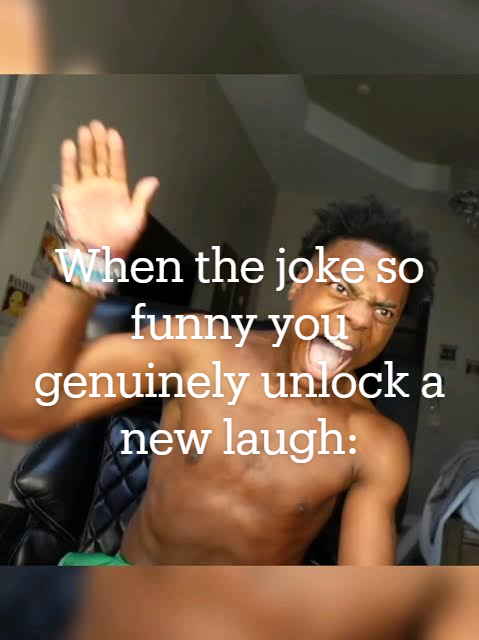 Meme: 0.973 (97.3%) Educational score: 0.009 | 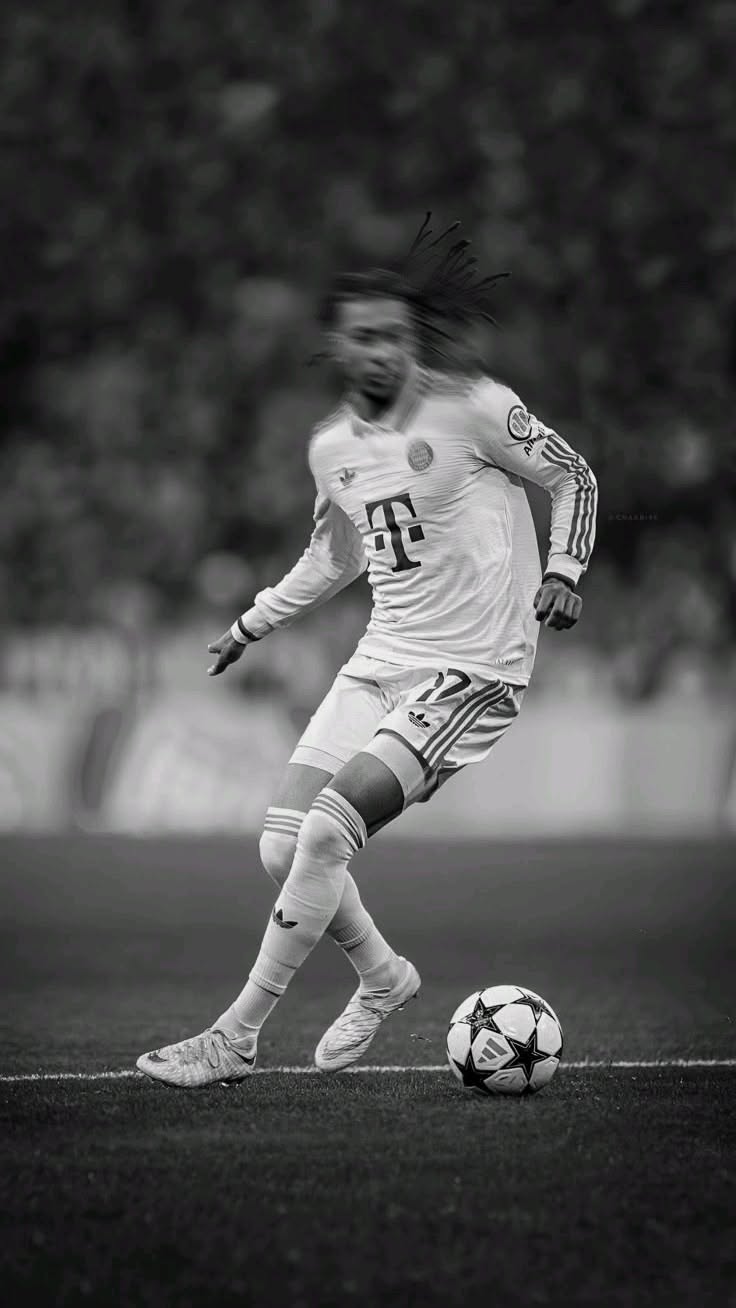 Sports: 0.968 (96.8%) Educational score: 0.016 |  Interior: 0.979 (97.9%) Educational score: 0.017 | 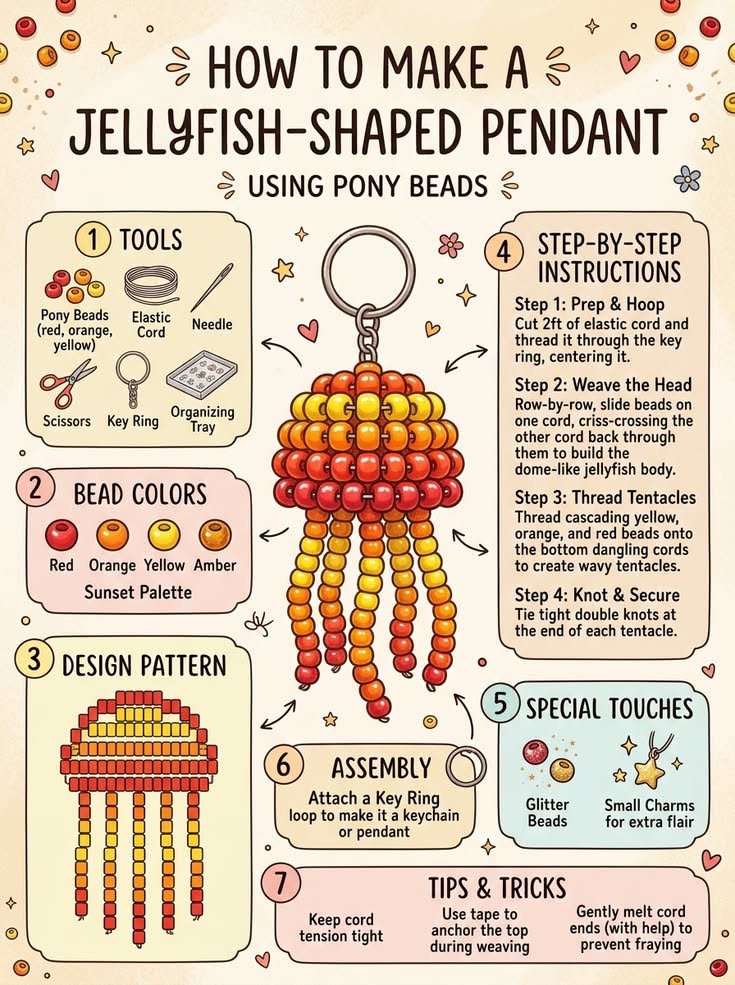 DIY: 0.604 (60.4%) Educational score: 0.965 (96.5%) |  Infographic: 0.466 (46.6%) Educational score: 0.962 (96.2%) |
Educational-Content Scores by Category
- Infographics and instructional diagrams: mean score 0.646 (64.6%); only two images were in the sample, so this result is not representative.
- DIY and crafts: mean score 0.421 (42.1%).
- Food and drink: mean score 0.189 (18.9%).
- Halloween: mean score 0.074 (7.4%).
- Fashion and beauty: mean score 0.034 (3.4%).
- Memes and sports: mean score 0.015 (1.5%).
Why Two Images Were Not Classified: Clef Limits
Two images failed classification in the main real-world test. Additional manual API checks showed that Clef has two independent limits:
- Image-dimension limit: a 3.7 MB Base64 image at 3355×5032 returned
image dimensions are too large. The error relates to pixel count, not file size. - Decoded-size limit: PNGs measuring 5.4 MB and 5.1 MB at moderate resolutions returned
image exceeds the decoded byte limit. - Control example: a 4.2 MB Base64 image at 1080×1920 was classified successfully.
These are observed practical ranges, not published hard limits: between 4.2 and about 6.7 MB for Base64 size, and between 4 and 17 megapixels for image dimensions. Check both. JPGs of just 2–3 MB but 17–35 megapixels also returned image dimensions are too large.
Actual Test Costs
- Total cost for 728 classifications: $0.038412 (about 3.8 cents).
- Average cost per classification: $0.0000528.
- Estimated cost at scale: at this rate, processing 100,000 images would cost approximately ~$5.28.
- Provider: Cloudflare for all 728 successful responses.
A-Parser Setup for Pinterest Image Scraping and Classification
Task 1. SE::Pinterest — Collect Full-Resolution Image URLs Through Proxies
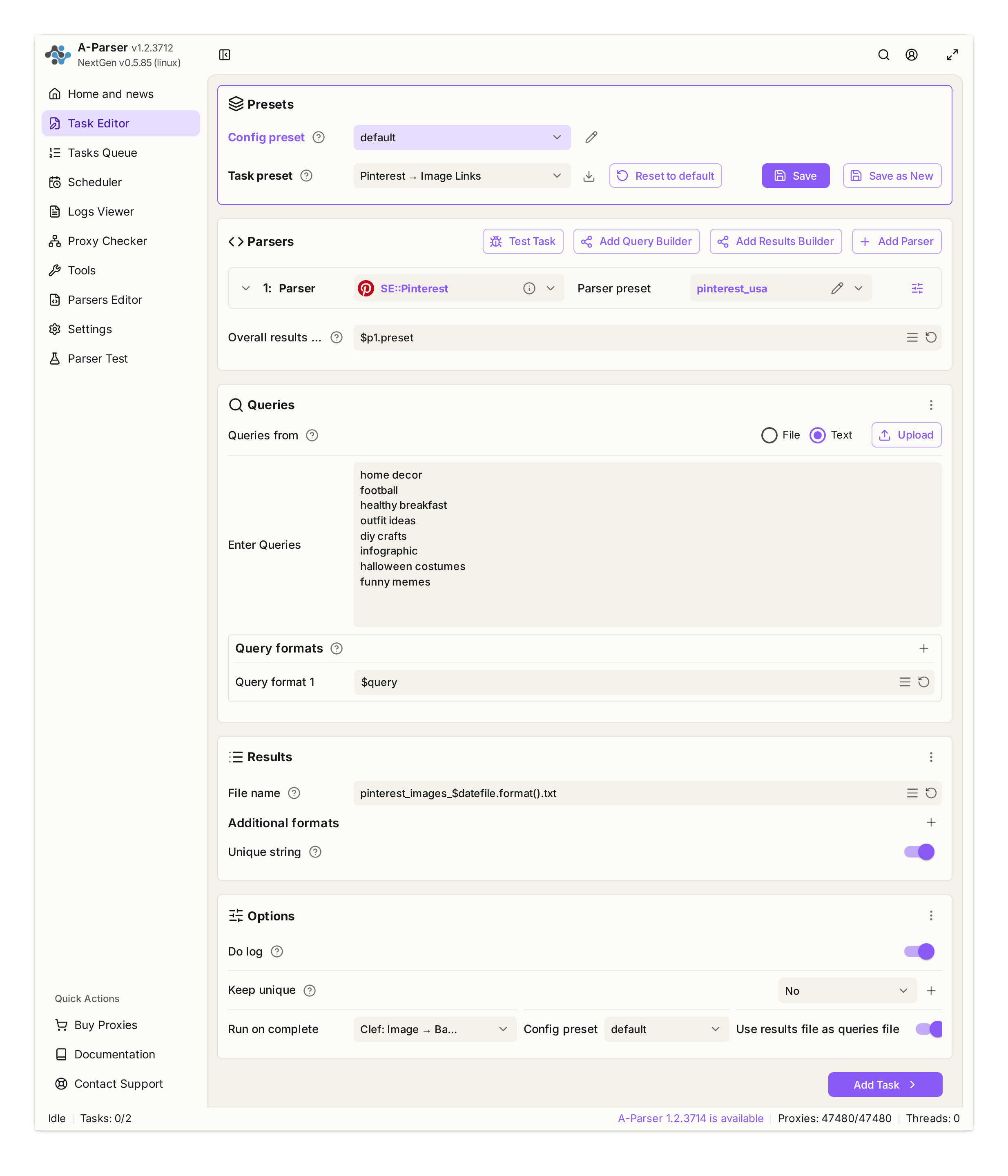
Task 1 in A-Parser’s editor: the built-in SE::Pinterest parser, query list, results file, and the next task to run on completion.
Parser:
SE::Pinterest.Proxies:
useproxy = 1,proxyretries = 10(uses the configured proxy pool).Queries: Enter one niche or keyword per line. The latest real-world test used eight queries:
home decor,football,healthy breakfast,outfit ideas,diy crafts,infographic,halloween costumes,funny memes.Results format:
$p1.preset(returns the direct full-size image links collected by the parser).Results file name:
pinterest_images_$datefile.format().txt.Deduplication: string deduplication (
string) is enabled to prevent collecting the same images more than once.Connect to Task 2: In the additional settings, set:
runTaskOnComplete:Clef: Image → Base64;useResultsFileAsQueriesFile:true(the “Use results file for queries” option).
Proxy note: Proxies are needed only for the first stage. Pinterest can return hundreds of Pins quickly, but at larger volumes it becomes sensitive to the source IP address, so
Task 2. Net::HTTP — Download Images, Filter GIFs, and Encode Base64
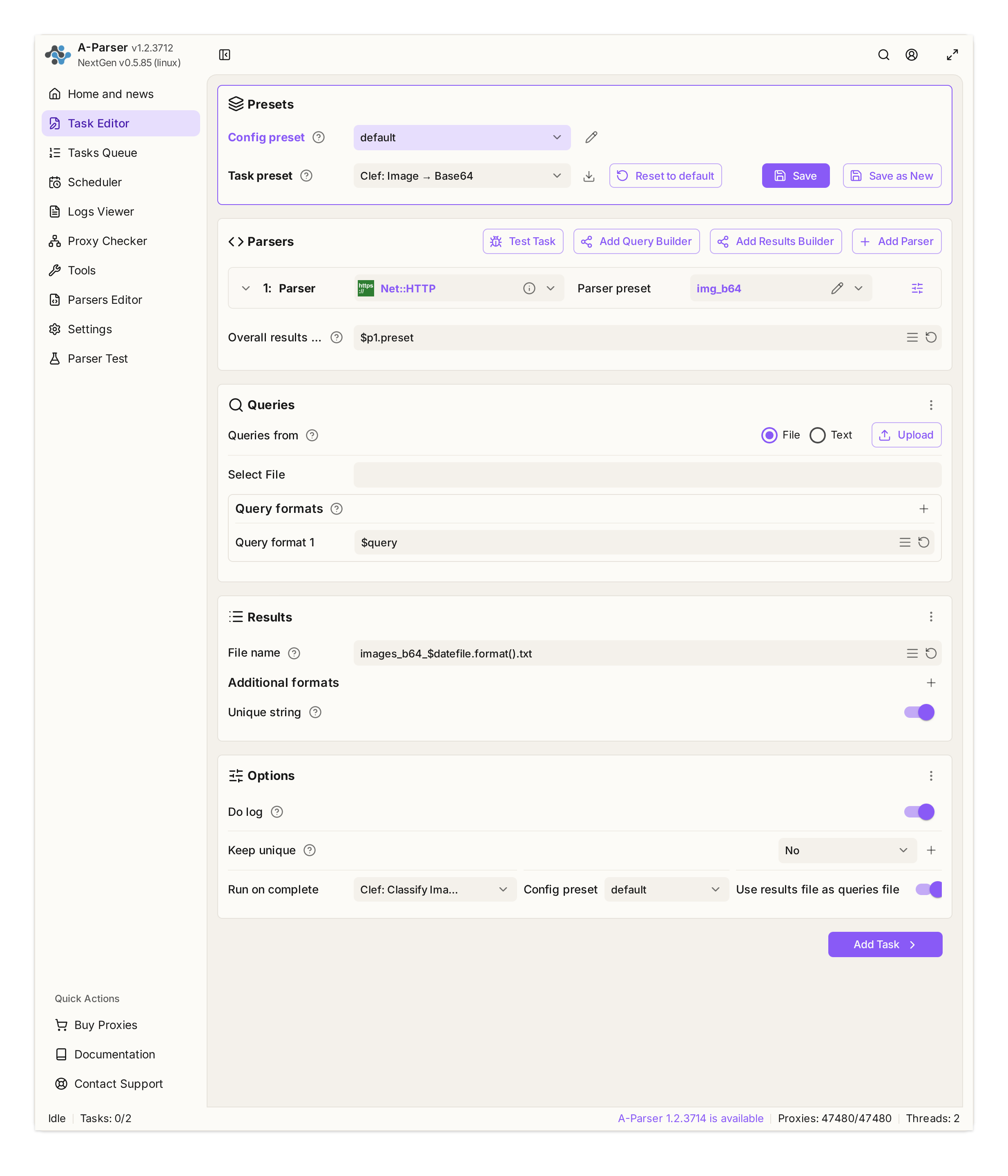
Task 2 in A-Parser’s editor: Net::HTTP, queries loaded from the results file, and the classification task launched when this task completes.
Parser:
Net::HTTP(presetimg_b64).Proxies:
useproxy = 0(downloads are made directly, without proxies).Reliability settings:
goodCode = 200,proxyretries = 10,requestdelay = 0,do_gzip = 1,max_size = 15728640(15 MB).Results file name:
images_b64_$datefile.format().txt.Connect to Task 3:
runTaskOnComplete:Clef: Classify Image;useResultsFileAsQueriesFile:true(the “Use results file for queries” option).
Result-format template (formatresult in the img_b64 preset):
[%][%][%]
[% IF h.match("^iVBOR") %][%][% ELSIF h.match("^UklGR") %][%][% ELSIF h.match("^R0lGOD") %][%][% END %]
[%][% query.orig %]@@[% t %]@@[% b %][% "\n" %][% END %]
How the template works:
tools.base64.encode(data)— A-Parser’s built-in function converts the binary response to Base64 in memory.h = b.substr(0, 12)— reads the Base64 prefix.iVBORindicates PNG,UklGRindicates WebP, andR0lGODindicates GIF.- GIF filtering: Clef does not support GIFs. The
[%]condition simply keeps GIFs out of the next stage—discarding them before they can trigger predictable API errors. - Avoiding 422 errors: Pinterest often serves WebP files with a
.jpgextension. Detecting the format from the Base64 signature ensures the API receives the correct MIME type.
What Gets Written to Disk, and How Large Is the Intermediate File?
- Image binaries are not saved to disk:
Net::HTTPdoes not save downloaded images as files. The response body is available to the template in memory asdataand is encoded to Base64 on the fly. - The results file is saved to disk: output lines in the
url@@mime@@base64format are written toimages_b64_$datefile.txt, which serves as the query queue for Task 3. If needed, the original image can be reconstructed losslessly from the Base64 portion of any line using its MIME type. - Disk-space use: Base64 increases data size by about one-third. For large jobs, allow enough disk space for both the source images and the results text file.
FAQ: Why Can’t Clef Accept Image URLs?
Why download and Base64-encode the image inside A-Parser with Net::HTTP instead of passing Clef the Pinterest CDN URL from Task 1 (https://i.pinimg.com/...)?
We tested an external URL using a real Pin featuring a DIY project (19c888...jpg). The results show why sending only a URL is unreliable: the API either rejects the request or responds without receiving the image pixels.

Baseline Test: Base64 Image Input The image was embedded in the request payload as a data:image/jpeg;base64,... URL (a 77 KB JPEG becomes 102 KB in Base64):
- Question: “Is this soccer?” Probability: 0.0094 (a clear negative). Input tokens: 1032; cost: $0.000039.
- Question: “Is this a DIY project?” Probability: 0.9747 (97.5% confidence). Input tokens: 1049; cost: $0.000040.
The model is actually seeing the pixels and returns decisive, contrasting scores: 0.01 versus 0.97. Input usage consistently exceeds 1,000 tokens.
What Happens When You Send a URL Instead of Base64? We tested the available ways of passing a web URL to the OpenRouter API:
One payload format is explicitly rejected (a URL in the
image_urlfield):Immediate HTTP 400 response in 0.09 seconds:
{"error":{"message":"Clef accepts only embedded base64 PNG, JPEG, or WebP data URL images","code":400}}The error message explicitly states that external URLs are not supported.The other seven tested payload formats return HTTP 200 OK, but control tests show that the model does not receive the image pixels:
| Request payload format | “Is this soccer?” (known score: 0.0094) | “Is this DIY?” (known score: 0.9747) | Tokens (input) |
|---|---|---|---|
{"type": "image", "image": "URL"} | 0.1902 (20× too high) | 0.2260 (misses an obvious match) | 222 / 239 |
state: ["URL"] | 0.2092 | 0.2578 | 210 / 227 |
| Plain text containing the URL | 0.1816 | 0.2295 | 213 / 230 |
Markdown link  | 0.2007 | 0.2146 | 216 / 233 |
{"type": "image", "image": {"url": "..."}} | 0.1924 | 0.2166 | 224 / 241 |
OpenAI-style {"type": "input_image", "image_url": "..."} | 0.1735 | 0.2932 | 224 / 241 |
| Text: “Look at the photo at this link and answer” | 0.5322 (50/50) | 0.5102 (50/50) | 224 / 241 |
Why HTTP 200 Does Not Prove the Image Was Processed
- The model receives the URL text, not the image:
When asked about soccer, the model returns 0.17–0.29 instead of 0.0094; for the DIY example, it returns about 0.20 instead of 0.9747. When directly prompted to “look at the photo at this link and answer,” scores land around 0.51–0.53. Without visual input, these results cannot be used to classify the image. - The token counter (
usage.input_tokens) helps reveal the issue:
Requests without an embedded image use 210–240 tokens and cost $0.0000085. With Base64, input usage exceeds 1,000 tokens and costs about $0.00004. This difference is a practical indicator that the model received visual data.
Key takeaway: In the tested formats, a direct web URL either produced a 400 error or returned HTTP 200 without sending image pixels to the model. In this workflow, images are downloaded with
Net::HTTP, encoded as Base64, and only then sent to the API.
Task 3. Net::HTTP — Send Images to Clef Through the OpenRouter Decisions API
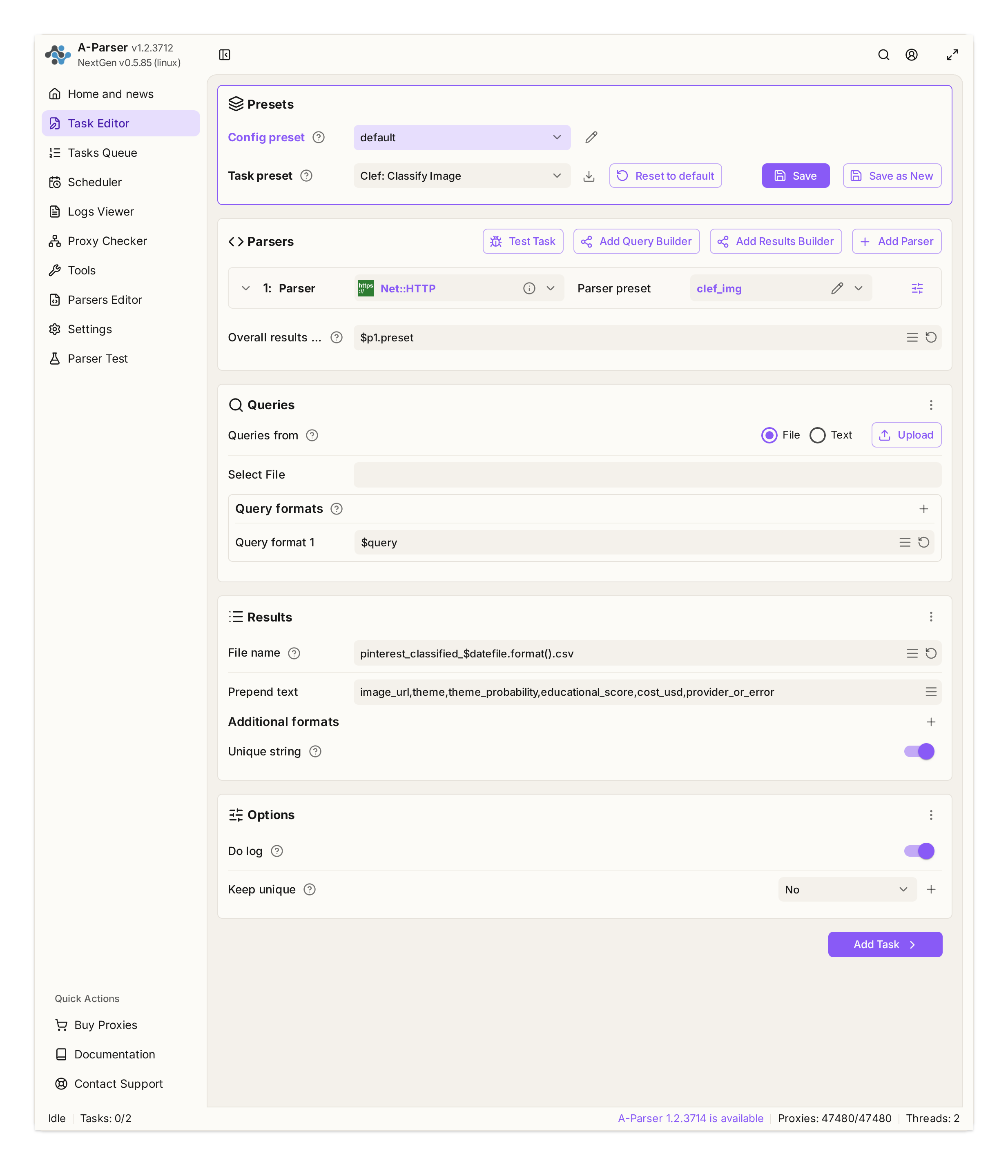
Task 3 in A-Parser’s editor: Net::HTTP, CSV output, and the classifier response fields.
- Parser:
Net::HTTP(presetclef_img). - Query format:
https://openrouter.ai/api/alpha/decisions - Method:
POST - Proxy:
useproxy = 0. - Retry settings:
goodCode = 200,proxyretries = 10,timeout = 60,do_gzip = 1. - Headers: Do not store a working API key in the
clef_imgparser preset. After import, open the “Clef: Classify Image” task → Parser actions → Add override → Additional headers. The checkbox is already enabled. ReplaceYOUR_OPENROUTER_KEYin the first line with your key; keep both header lines and do not add anHTTP:prefix:
Authorization: Bearer YOUR_OPENROUTER_KEY
Content-Type: application/json
The public preset already includes the headers override, with YOUR_OPENROUTER_KEY as a placeholder instead of a working key.
Handling 429 responses in
Net::HTTP:goodCode = 200marks HTTP 200 as successful, so a 429 response is treated as a failure and can be retried up to 10 times (proxyretries = 10). According to the OpenRouter documentation, 429s may come from the platform itself (free-model limits or DDoS protection) or from an upstream provider due to rate limits or capacity constraints.
The documentation does not specify whether DDoS protection is tied to an IP address, an API key, or a combination of signals. IP rotation is therefore not a universal fix: it will not increase a model quota or remove a provider-side restriction. For diagnosis, checkX-RateLimit-*headers on platform 429s,error.metadata.provider_codein provider responses, andRetry-Afterwhen present.
Dynamic POST body (POST Data): The Template Toolkit template dynamically inserts the image MIME type and Base64 data for each image:
{
  "model": "cloudflare/clef-flash",
  "provider": {
    "only": ["Cloudflare"]
  },
  "state": [
    "Pinterest pin photo attached for classification.",
    {
      "type": "image_url",
      "image_url": {
        "url": "data:image/[% query.orig.split('@@').item(1) %];base64,[% query.orig.split('@@').last %]"
      }
    }
  ],
  "questions": {
    "theme": {
      "type": "choice",
      "instructions": "What is the primary subject and category of this image?",
      "options": [
        "interior_design_home",
        "sports_football",
        "food_drink",
        "fashion_beauty",
        "diy_crafts",
        "educational_diagram",
        "travel_places",
        "meme",
        "halloween",
        "other"
      ],
      "criteria": {
        "interior_design_home": "Room interiors, furniture, living rooms, home decor, architecture",
        "sports_football": "Football match, soccer players, stadium, ball, jerseys, sports action",
        "food_drink": "Food dishes, healthy meals, baking, drinks, recipes, cooking process",
        "fashion_beauty": "Clothing outfits, style, makeup, hairstyle, manicure, nail art, accessories",
        "diy_crafts": "Handmade crafts, DIY projects, woodworking, handmade items, tools in use",
        "educational_diagram": "Infographics, explanatory charts, diagrams, step-by-step educational guides, instructional text posters",
        "travel_places": "Landscapes, travel destinations, scenic cities, nature, landmarks",
        "meme": "Internet memes, humorous image macros, funny reaction images, jokes, relatable social media humor",
        "halloween": "Halloween costumes, cosplay outfits, pumpkin carving, jack-o-lanterns, spooky decor, trick-or-treat, horror makeup, ghosts, witches, skeletons",
        "other": "Miscellaneous images, out-of-context personal selfies, software screenshots, abstract textures, uncategorized collages"
      }
    },
    "educational": {
      "type": "noul",
      "instructions": "Is this image educational, instructional, or an infographic explaining concepts?",
      "criteria": {
        "true": "Infographic, tutorial, guide, or diagram that teaches, explains, or demonstrates steps",
        "false": "Pure aesthetic photo, product visual, meme, lifestyle shot, or non-educational image"
      }
    }
  }
}
Using the Educational Score in a Template
The API’s educational.noul field is a number from 0.0 to 1.0, not a “yes/no” string. You can use it to filter results directly in an A-Parser template:
Example: branching on the score — write a label to the CSV for an image below the educational threshold or for an educational infographic, based on its score.
[% IF j.answers.educational.noul < 0.2 %]
  [% tools.CSVline(query.orig.split('@@').first, j.answers.theme.choice, "PRODUCT") %]
[% ELSE %]
  [% tools.CSVline(query.orig.split('@@').first, j.answers.theme.choice, "INFOGRAPHIC") %]
[% END %]
Parsing the Response and Writing CSV (formatresult in the clef_img preset):
[% TRY %]
  [%]
  [% IF j.answers %]
    [% tools.CSVline(query.orig.split('@@').first, j.answers.theme.choice, j.answers.theme.probabilities.item(j.answers.theme.choice), j.answers.educational.noul, j.usage.cost, j.provider) %]
  [% ELSE %]
    [%]
    [% tools.CSVline(query.orig.split('@@').first, "ERROR", 0, 0, 0, msg) %]
  [% END %]
[% CATCH %]
  [% tools.CSVline(query.orig.split('@@').first, "PARSE_ERROR", 0, 0, 0, tools.error) %]
[% END %]
Important: all three tasks keep the default “Results format” value ($p1.preset); the parser presets (img_b64 and clef_img) determine the actual output.
A-Parser and Clef-Flash: Common Errors and Limitations
Setup and testing surfaced five practical caveats not covered in the official documentation:
- Do not use the pipe character
|as a delimiter:
In Template Toolkit,|is reserved for filters. A call such asquery.split("|")splits the string character by character. The@@delimiter works reliably. - Force routing to the intended provider (
"provider": {"only": ["Cloudflare"]}):
OpenRouter hostsclef-flashthrough several providers (Cloudflare, DeepInfra, and Prime Intellect). Other upstreams returned400 Bad Requestwhen images were sent instate. Settingprovider.only: ["Cloudflare"]makes routing predictable. - Two independent model limits: decoded image size and dimensions:
These are separate API errors: PNGs of 5.4 MB and 5.1 MB at moderate resolutions returnedimage exceeds the decoded byte limit, while 2–3 MB JPGs at 17–35 megapixels returnedimage dimensions are too large. A 4.2 MB Base64 image at 1080×1920 succeeded. Observed practical ranges were 4.2–6.7 MB for Base64 size and 4–17 megapixels for dimensions; these are not guaranteed API limits. - GIF is not supported:
Clef does not support GIF. If a GIF is not filtered by its Base64 signature (R0lGOD), it may be sent with a JPEG MIME type and return422 payload does not match its content type. This preset filters GIFs during encoding. - Retries for 429 responses:
SetgoodCode = 200andproxyretries = 10. A-Parser will then retry any non-200 response, including429 Too Many Requests, up to 10 times.
Pinterest Image Scraping and Classification Use Cases
- Seasonal Halloween campaigns:
Thehalloween costumesquery quickly gathers costume, makeup, and group-costume ideas. Addinghalloweenas a class separates these Pins from general fashion, memes, and DIY, making the seasonal dataset easier to use for storefronts, email campaigns, and ad creative research. - E-commerce and product catalogs:
Collect trending products and product photography. Automatically filter out irrelevant visuals and memes so the resulting dataset focuses on product images, without manually reviewing thousands of Pins. - Media buying and creative research (Pinterest Ads, Facebook Ads, TikTok):
Thememeandfashion_beautycategories make it faster to collect creative references for research and later adaptation into Facebook Ads, Instagram Reels, and TikTok. - Content marketing and niche publications:
Automatically collect educational diagrams, blueprints, and checklists using a threshold such aseducational > 0.80. These visuals can support in-depth articles and niche-site content, where step-by-step infographics may help hold readers’ attention. - Batch labeling of media libraries:
Sort large media libraries into 10 categories. The workflow can be adapted to other image sources, including local folders, Google Images exports, or supplier catalogs. Estimate processing costs based on the size and type of each dataset; in this test, the cost was $0.0000528 per successful classification.
A-Parser Pinterest Scraper Preset: Import and Run
Below is an exportable A-Parser preset for a three-task workflow and ten categories, including halloween. It contains no working API key: the public bundle includes a placeholder in the task-level header override.
How to Run It
- In Task Editor, click the unlabeled button immediately to the right of the Task preset field, next to Browse task presets and just left of Reset to default → choose Import preset.
- On the “Paste preset or URL” step, paste the Base64 and click “Next”. On “Select items,” the wizard will mark
img_b64,clef_img, andpinterest_usawith “Will overwrite existing parser preset”; this is expected, so click “Next”. On “Select category,” choose “Import without category.” - In the “Clef: Classify Image” task, open Parser actions → Add override → Additional headers. The checkbox is already enabled. Replace
YOUR_OPENROUTER_KEYin the first line with your key, keep both lines, and do not add anHTTP:prefix; save the change. - Run the “Pinterest → Image Links” task. The other two tasks start automatically in sequence; the results are written to CSV.
Show preset code for import
eJztWntz27gR/yooJzexb2j5cXncqNOpHcVOfHUsV7bTyViuBiJBERZJsABo
W/Ho3/sA/Yj9JP0t+JBky8k1vbSXG83cgwAWu4t9/LAL6867FtpIlXntbd+z
3IzNiRZGWOO1L+683H17be9EZlZgYNm/fv4nO0z5SLAjmY2N53s51wZMsOHC
O91vtxtaWqu/B4Xhnn/n2UkuwE9BrJahAIkMMc61up10YhGMhcbcNU8KIgtF
xIvEetPLS98DG3ybA6VTTjo9ybdblYLN4im/FmcKi5FMxGz6AKNjnhLLmUaS
TmEGT0JuBZG3Isd5bb1lb4klD0NpYRqelCLphDM1zjP5D6ejsVpmI9BjqKUw
B1qlmLbCMaHJSa3yhffEjT2wKdz+v5Z7vHbEEyN8z0D/Aw5lwvsrElpzq3Q3
J50wf+epbC9JjsS1SGZkjv+rQiYhXLIXYdNhtXE5SfcBj2lzxHlR8NeNhg4N
Fzd61X032xWqIzUipw1x7kSm0mJsOqrIcPQt3xsLkTdWO1YgSpUWjZCKbyUb
UZiLjEJj5sW9fDa1cIgFxyxOBiqL5KhbhVtNWWRnCPVu1lFpngg6lddJRNSu
Ipti/BU34sUzSCqM6M2iaM9UjqGB17a6EEv4dZzUuQBGbimVmJ9OS+1zLRGk
z0nnFKadV6QyQ8CT5Lx3tKAiNhqr8m62r/U9f7pI8WKVChaKQOl+Fillh2DS
z2LBExtP2FALPo64sf1MFTaSlsEi3PSzUE5YoHlk8S2xcaR5HssAO7Ff3QiR
sUAZW6QCBFGRZROWCgzmYt4Zw9kbyTRSCHGMpv4cgjxq33n4OBa23X57dnZC
uJCOBkOieBQ0ynwt3T4HGhffsSH7E3MGbw2dmJbIAhWKNaQ6X2ffXYIkBsmw
ZYoh8ndty2fbO9WCxULfu8rFqO+VM4cHLG5BUhCv9b2/y/evur2+t0CdZw3x
/tHpIv35OHlzn/5GDPNHN/S2kjfd1/d2jGTUbDh+3ehl2R/urbrEaCktRxjv
7joG1cewpOh7/X62yMybPm7lkVJhR7lxZeGLna2ty0/sSPntwMiPczu87ecv
d3588Wzr10TyCr8RI18LwyvRKwz/pjC8k3BjZDQpwebbQvAvgNQHx30MUAOQ
o+gZfQJRcVU4s88Sd6+wMcDkIycPt9krwbXQ7EP3vDfonuwf97rnZ/u9wV/2
P/RxTlRWmd04A+8243meyMBt27wyKDA/ARiPA/lZ70OJU1cNorvj/XTaPZ5H
c0DhVYtn5gbaV7DpiDun7xOZibUZKrYM9LLA2d1dQGwrktpYf7a5ZWNcba0g
VjIQD+dRpw75UIIDXNRC9qRry7euz+8VYVFagict3L0JraEeHoFYldLB9xoG
0evNnbBffqVmhJNftQQFTAuXLm37khP2vf1ejy4un23V/4D5+r07pbN31nn7
ZfxP9nqn+4OHUko+7gDrv/TScdLKsJgLiNja3LQ3NxUwRKOGEbrF5SbP8W+S
x3wTpY80Dok+wXqowskcz7s+ICwUSd9r4wxBooowShDkm5QuG/g0MZ2m79Uu
IkJsUlkyoc+LPvKw3tT3kKGgNRY5W63OWie0HiyPlVWMW8uDWIQMR2RBmcBV
srRIGviT9qVO7p4bFDop9ZgbOkWqr75H6dB2q5sLdUDlr6e7u0/Xy5DdJj/8
sSyN/MdpoRfVDn1vOr0kySAzDugryS7e6+9G3TL+K10z3KxF0Gzqe3+LOepO
w7CXAUNTricMRdiVCCzjWchqsGMqAg0I3YH+XLJTecPpgpjDrlLpAe4EOcoG
VP2WdCZX2ppBUwK7SYzCQYh7flyN4VlwGwwFL+yknEMlPKgqYTeeS9xBKDkK
47RcsBqXfDLIEx6IijYVtfimbK60xlkRNc6EAd24WvLKasuPQHbqKZWyetn4
LCp0Jm2hgUmJvEaxwjQosDCr+X3GdRCDf0B0j1iCeB9UI+ZKTp8ZFQQAdRxm
IkgWojeUReozIgI6YVJMaN4xY9z586FRK9YhC6WJBalWNR4p/m+I2xh6+8yR
Y6yRrTnRBUrRCuJBwZpmuXuIOxINMQHKsn9xqk4SmCTlY1HkkMgJjKqpTAbO
XhlqMZgGGMUD4q/oen3obxLwFiGY4gqs2iGfvT78QGpReGJ0g9PdKF0eI65p
KaVMBXNwGUO58YnoITGHsyYLG8UtLJ9ReYc2LIaimKvI3QlFvjGcbND/2RxH
NiqoGPLZXI5hlp4dWI5bBU5bGqok/wiqm4A745fLiCCkduZ4k9BAwHoscNcc
WbCKPHdkPTYP4rw03v1ukVxrKKxmDsuLNIf9kOf62pnxigfjDbUB1lA5K6NM
jSd1SKMwp3W9gfKAWwp3ukcah49iiCLPSEQyCTRjgVrLgcQsKUubE39hy9YV
jApUrqqoAAYMA61cnlF7C1nOoOUipq/UWLiQTQCyw0RQzkiYOxXwVMlrIdlJ
4jsJMyY4mGjEgAUssaGijYCKJXIV/OQcZ0QSOWMbFdkb3CVwgoYxDS4MzHLq
U6GUczCcgakiq8ASrRaAU0HUiDw8nd4LvgcQTTXIYwB9aOZwdz7g7kUaTqKB
2GzuwaCMZJlRhuJ8gcitqZD7Hu5R0f0gFeDsAkkgibcLbieiygQoxenwvHRz
JcmUJCjBSTVYw7h8aSAkMZWYE5iMccR4LCwUdbewT5mN81l2LU1BUik0CF8j
4UCEke2dhExlG/O554xDlp5Ov87bZF0TiHBZbxuY61Vv+1vpbZt6zHf1UPnf
waxRmPjz94ABqgmfAHJQmNCvi8oBagBXIfez/1Gv/Lm+uD7ut9IYXzaNb/MH
jLu59heDpv/Fd/2o1RMjcVuyp943QXnQCB9qdQN+9RNBpOh6g84Amx5gX1NN
0Lwf4GZUKYB4YBOUW0g4oWEJiqyKm5Up7gHChhdbFFr8tkNljzvc9ovSG+6v
IM2OUuA7YXlPRDhTXAuj1qPu1BtlJzkQw3UiB9SJdGKkuXjHb0/oUoCMHZJq
9WRATdR2zSoU1857DR+ngha2Mvv2lgtHV/mjSeLQzqOphY591an/3jt1ChTq
K6g8dW9PVbSIbASJVWfuIgUlt6GJl4SxagS0yESwiKDN8zCF17Mfn7+sol9v
wGCUMQ3eRfV1+ssbf795w/o1366ATmOZnx2dvgcERbMUJb12PpODbxtcKVOu
eU8v39H9xb99tr3vIe2GS3ueWZlgjJrV9RxgsoMl93yxerZYPVusni1Wzxar
Z4vVs8Xq2WL1bPEFzxbUDw9GH2Ve1yXLq5dZ1SZQTFEzetI9PaO/Jjbdi1eV
MEOOWi9E/cGzAly9H7aoU8DsQqM1nf2y4//chz37XfZhq5++/Ic/fflqvU39
k5fPNTfVm9t85/IbbDi+HDDe7P9XeAHAWPxVKWBj8WelmHjEorh0NC8HpVw4
ISgf/J4vz7F7tpk9ci1JvqWneLG1JC+fIADy+v326ZMSh/vZ03XvwcPQDH7I
ylM6/pU5KV+26OmL3rWm038DkdYUWg==
Useful Links and Next Steps
- Choose A-Parser Pro or Enterprise
- A-Parser Documentation
- Pinterest Parser Documentation
- Get A-Parser Premium Proxies
For your first run, replace the test queries with your own search terms and check the first 20 CSV rows: image URLs, categories, and scores. If the results match your needs, increase the sample size.