Configuration via the Interface
A-Parser allows you to define configuration in a declarative style, as well as use the interface to create and edit presets without the need to modify the scrapers' source code.
static defaultConf
static defaultConf = {
    version: '0.0.1',
    results: {
        flat: [
            ['title', 'Title'],
        ],
        arrays: {
        }
    },
    results_format: "Title: $title\n",
    exampleKey: 'value',
};
Default scraper configuration; the config will be available in the class object via the this.conf property. The following fields are mandatory:
results- describes in a declarative style the results that this scraper can returnresults_format- sets the default result format
All other fields are optional; there is the following list of parameters that affect the scraper's operation:
| Parameter name | Type | Description (default value) |
|---|---|---|
| timeout | number | Maximum request timeout in seconds (60) |
| useproxy | boolean / 0 / 1 | Determines whether to use a proxy (1) |
| max_size | number | Maximum result file size (1 * 1024 * 1024) |
| proxyretries | number | Number of attempts for each request; if the request cannot be completed within the specified number of attempts, it is considered failed and skipped (10) |
| requestdelay | number / string | Delay between requests in seconds (0). You can also set a random value in a range, for example 10,30 - a delay from 10 to 30 seconds |
| proxybannedcleanup | number | Proxy ban time in seconds (600) |
| pagecount | number | Number of scraping pages (1) |
| parsecodes | { [code: string]: any } | Response code values for requests that will be considered successful (any) |
| queryformat | string | Query format ($query) |
You can also define custom fields that can be available for editing via the interface.
static editableConf
This setting defines the list of configuration fields that can be edited via the interface. The following field types exist in the interface:
textfield- a field for arbitrary input of numeric and string valuescheckbox- a flag with enabled/disabled statescombobox- a dropdown with a choice of one or more values- selection of multiple values is set via the
{ multiSelect: 1 }option
editableConf is an array where each element describes a corresponding configuration field:
static editableConf: [
    ...[
        fieldName: string,
        fieldConfig: [
            fieldType: 'textfield' | 'combobox' | 'checkbox',
            fieldLabel: string,
            fieldOptions?: {},
            ...fieldValues: [fieldValue: any, valueTitle: string][]
        ]
    ][]
];
Example of declaring editable fields:
static get editableConf() {
    let editableConf: typeof BaseParser.editableConf = [
        ['device',
            ['combobox', 'Device',
                ['desktop', 'Modern desktop computer (Windows 10, Chrome 84)'],
                ['mobile', 'Mobile device (iPhone X, iOS 11)']
            ]
        ],
        ['pagecount', ['combobox', 'Pages count']],
        ['linksperpage',
            ['combobox', 'Links per page',
                [10, '10'],
                [20, '20'],
                [30, '30'],
                [50, '50']
            ]
        ],
    ];

    for (let page = 1; page <= 25; page++)
        editableConf[1][1].push([page, page]);

    return editableConf;
}
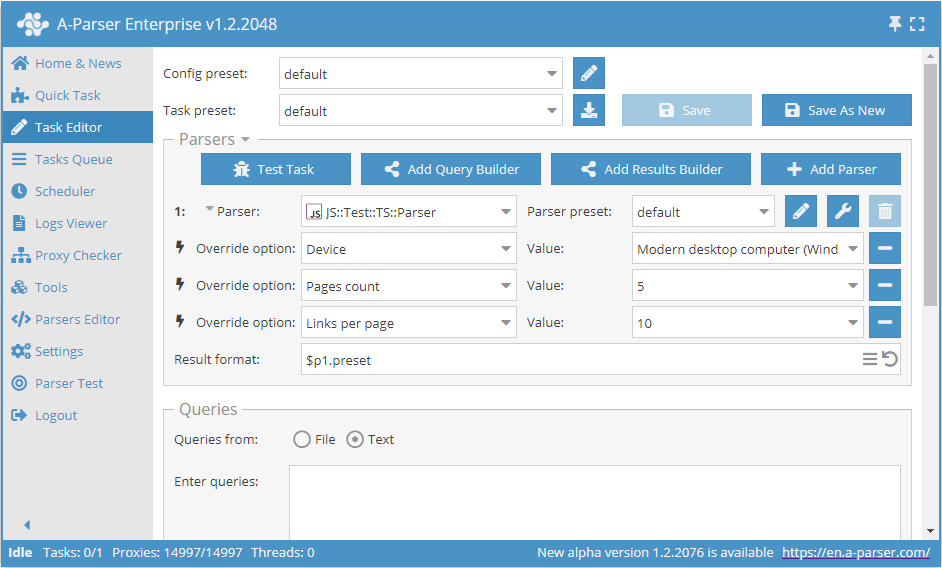
Note that in this example, a getter method is used for editableConf, which allows for additional processing, such as generating a list of pages. For simpler cases, you can set static class properties, similar to defaultConf
static parserOptions
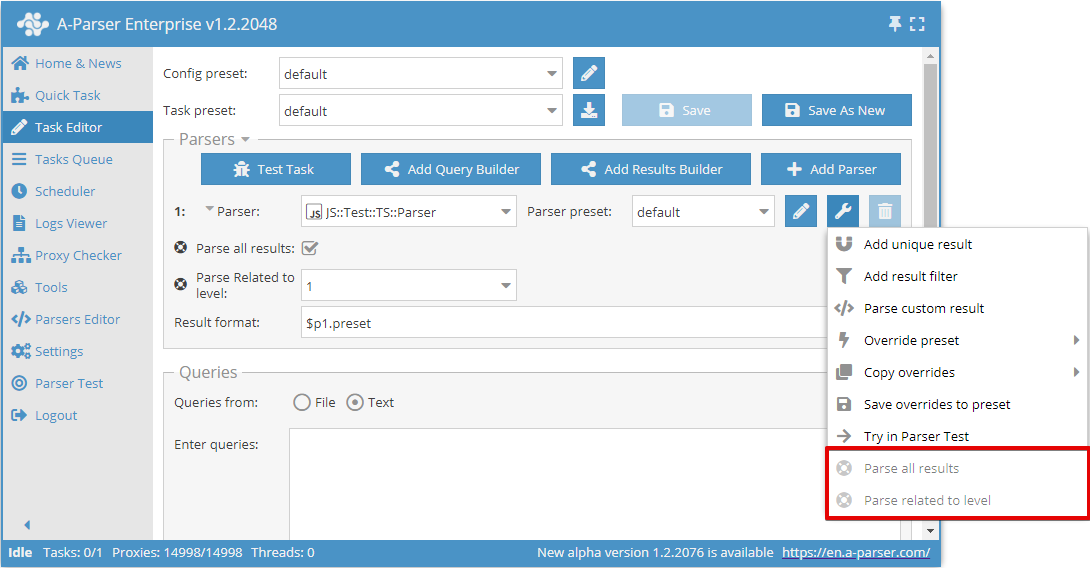
parserOptions is an alternative way to set settings; the list of options is displayed as additional items in the scraper's context menu.
Declaring options works similarly to editableConf:
static parserOptions: [
    ...[
        fieldName: string,
        menuTitle: string,
        fieldConfig: [
            fieldType: 'textfield' | 'combobox' | 'checkbox',
            fieldLabel: string,
            fieldOptions?: {},
            ...fieldValues: [fieldValue: any, valueTitle: string][]
        ]
    ][]
];
Example of declaring additional fields:
static parserOptions: typeof BaseParser.parserOptions = [
    ['parseAll', 'Parse all results',
        ['checkbox', 'Parse all results']
    ],
    ['parseLevel', 'Parse related to level',
        ['combobox', 'Parse Related to level', [1, 1], [2, 2], [3, 3]]
    ],
];