Chrome Management (puppeteer)

A-Parser allows using the Chrome (Chromium) browser as a downloading and rendering engine, utilizing the popular puppeteer library.
Key advantages of using puppeteer in conjunction with A-Parser:
- support for separate proxies for each browser tab
- multithreaded management of browser tabs
- request interception
- all A-Parser capabilities for queue management, query formation, and results processing
Using the Chrome browser opens up the following possibilities:
DOMandJavaScriptrendering- ability to interactively work with website elements:
- filling out forms
- clicking links
- drag & drop
- file uploads
- mouse emulation
- and much more; any standard actions can be automated
- easier bypassing of various anti-scraping protections, as the Chromium browser is as similar as possible to the one used by real users
- ability to work in
Headlessmode, i.e., without a graphical browser interface, which saves resources and allows running the browser on servers without a graphical environment
It should be noted that browser operation is much more demanding on resources (CPU, Memory) than regular A-Parser threads.
Depending on the complexity of the site, it is recommended to use no more than 1-2 threads (browser tabs) for each available processor core; for example, for 8-core processors — from 8 to 16 tabs.
Usage Example
Let's look at an example using the Chrome::ScreenshotMaker2 scraper:
- the scraper takes screenshots of sites at a specified size and can also downscale (resize) the image
- it can optionally use a proxy
- it creates a separate browser tab for each A-Parser thread
import { BaseParser, PuppeteerTypes } from 'a-parser-types';

let browser: PuppeteerTypes.Browser;
let jimp;

class JS_Chrome_ScreenshotsMaker2 extends BaseParser {
    static defaultConf: typeof BaseParser.defaultConf = {
        version: '0.2.1',
        results: {
            flat: [
                ['screenshot', 'PNG screenshot'],
            ]
        },
        results_format: '$screenshot',
        load_timeout: 30,
        width: 1024,
        height: 768,
        log_screenshots: 0,
        headless: 1,
    };

    static editableConf: typeof BaseParser.editableConf = [
        ['log_screenshots', ['checkbox', 'Log Screenshots']],
        ['width', ['textfield', 'Viewport Width']],
        ['height', ['textfield', 'Viewport Height']],
        ['resize_width', ['textfield', 'Resize Width']],
        ['resize_height', ['textfield', 'Resize Height']],
        ['headless', ['checkbox', 'Chrome Headless']],
    ];

    async init() {
        // initialize the browser
        browser = await this.puppeteer.launch({
            headless: this.conf.headless,
            logConnections: false,
            defaultViewport: {
                width: parseInt(this.conf.width),
                height: parseInt(this.conf.height),
            }
        });

        if (this.conf.resize_width) {
            // connect the jimp module if resizing the screenshot is necessary
            jimp = require('jimp');
        };
    };

    async destroy() {
        // close the browser upon completion of the task
        if (browser)
            await browser.close();
    }

    page: PuppeteerTypes.Page;

    async threadInit() {
        // create a browser page when initializing the thread
        this.page = await browser.newPage();

        // standard puppeteer methods
        await this.page.setCacheEnabled(true);
        await this.page.setDefaultNavigationTimeout(this.conf.timeout * 1000);

        // tell A-Parser to use a proxy for this page
        await this.puppeteer.setPageUseProxy(this.page);


        this.logger.put(`New page created for thread #${this.threadId}`);
    }

    async parse(set, results) {
        const self = this;
        const { conf, page } = self;

        for (let attempt = 1; attempt <= conf.proxyretries; attempt++) {
            try {
                self.logger.put(`Attempt #${attempt}`);

                // navigate to the page specified in the query
                await page.goto(set.query);
                // hide the scrollbar for the screenshot
                await page.evaluate(() => { document.querySelector('html').style.overflow = 'hidden'; });

                // get the screenshot
                results.screenshot = await page.screenshot();

                if (parseInt(conf.resize_width)) {
                    // resize the image if necessary
                    let image = await jimp.read(results.screenshot);
                    image.resize(parseInt(conf.resize_width), parseInt(conf.resize_height));
                    results.screenshot = await image.getBufferAsync('image/png');
                }

                self.logger.put(`Screenshot(${attempt}): OK, size: ${parseInt("" + (results.screenshot.length / 1024))}KB`);
                if (conf.log_screenshots)
                    self.logger.putHTML("<img src='data:image/png;base64," + results.screenshot.toString('base64') + "'>");

                results.success = 1;

                // close current connections as the browser uses keep-alive
                await self.puppeteer.closeActiveConnections();
                break;
            }
            catch (error) {
                self.logger.put(`Fetch page error: ${error}`);
                // close current connections as the browser uses keep-alive
                await self.puppeteer.closeActiveConnections();
                // change the proxy for the browser tab
                await self.proxy.next();
            }
        }

        return results;
    }
}
This example demonstrates the ease of using different proxies for each tab, as well as multithreaded operation (1 thread = 1 browser tab).
Description of methods
await this.puppeteer.launch(opts?)
This method is similar to the .launch method of the puppeteer library; it starts the Chromium browser with the necessary opts options. The main difference lies in the integration with A-Parser and proxy support for each tab, as well as the availability of additional options:
logConnections?: boolean
Enables logging of all connections (regardless of whether a proxy is used or not); the log output is separated by threads.
stealth?: boolean
Uses the puppeteer-extra plugin to mask Chromium as a real Chrome.
stealthOpts?: any
Additional options for the puppeteer-extra plugin.
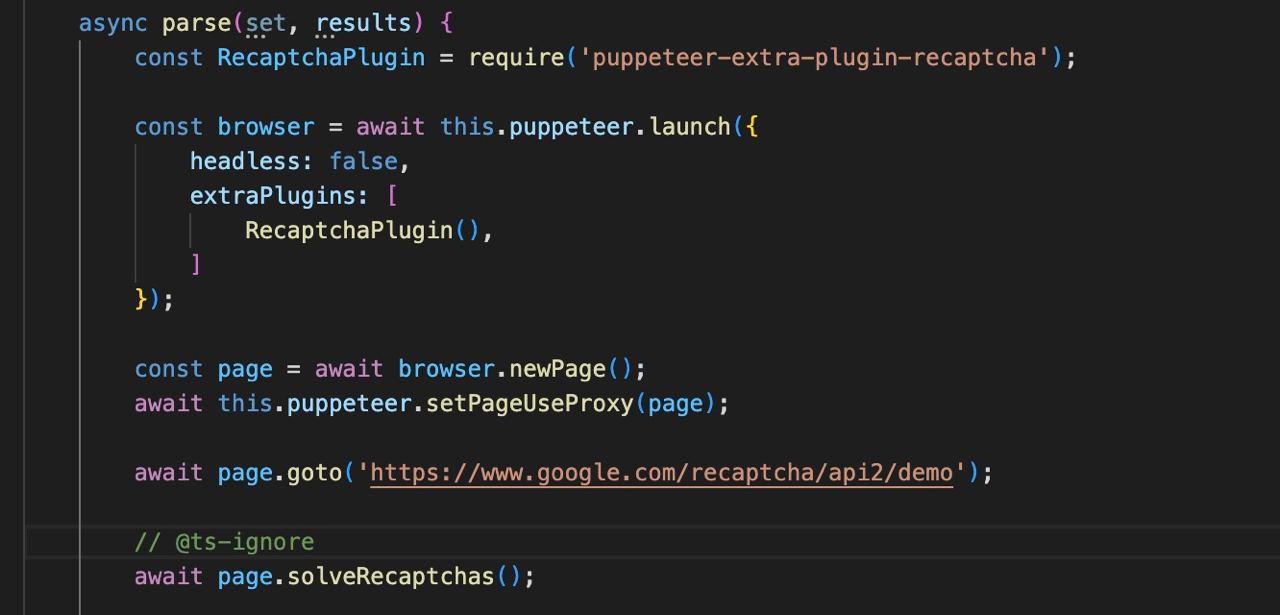
extraPlugins?: array
Use of additional plugins, such as puppeteer-extra/packages.
Other options
All other launch options can be found in the original puppeteer documentation.
await this.puppeteer.setPageUseProxy(page)
This method links a browser page to an A-Parser thread for correct proxy operation; it must be called immediately after creating the page:
const page = await browser.newPage();
await this.puppeteer.setPageUseProxy(page);
await this.puppeteer.closeActiveConnections(page?)
This method should be called after processing a request or before changing the proxy to process the next attempt.
By default, the Chrome browser keeps connections open to the sites it connects to; this method allows controlling the number of resources used and also reduces the load on the proxy.
The page argument is optional; when called without an argument, A-Parser will close connections for the tab associated with the current thread.
await this.puppeteer.logScreenshot()
The method logs a screenshot of the current page.