JavaScript Scrapers: Features Overview
JavaScript scrapers provide the ability to create your own full-featured scrapers with any level of complex logic using the JavaScript language. At the same time, JS scrapers can also use the full functionality of standard scrapers.
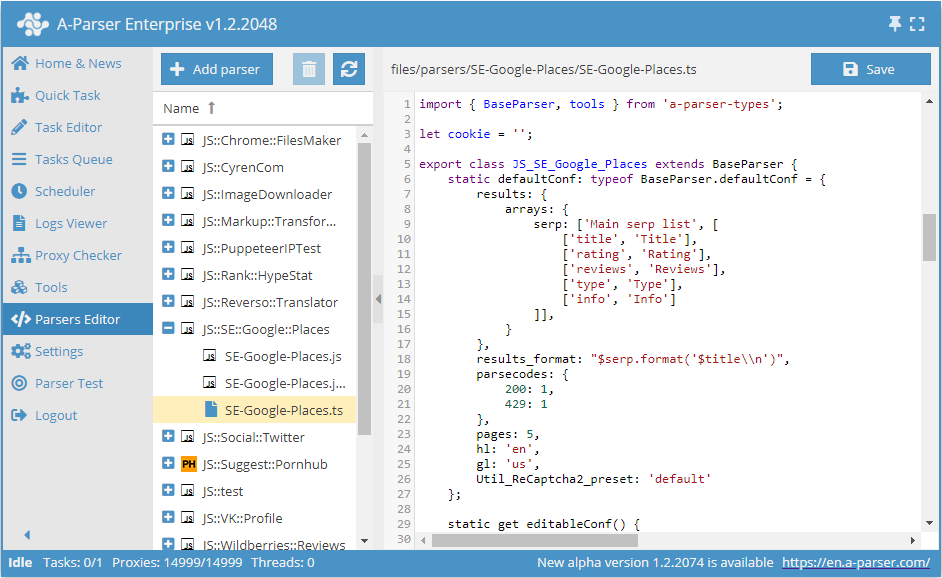
Features
Using the full power of A-Parser, you can now write your own scraper/register/poster with any level of complex logic. JavaScript with ES6 capabilities (v8 engine) is used for writing code.
The scraper code is as concise as possible, allowing you to focus on writing logic; A-Parser takes care of multithreading, networking, proxies, results, logs, etc. Code can be written directly in the scraper interface by adding a new scraper in the Scraper Editor. You can also use third-party editors, such as VSCode, to write scrapers.
Automatic versioning is used when saving scraper code via the built-in editor.
Working with JavaScript scrapers is available for Pro and Enterprise licenses.
Access to the JS Scraper Editor
If A-Parser is used remotely, the JS Scraper Editor is not available by default for security reasons. To enable access to it, you must:
- Set a password in the Settings -> Global Settings tab
- Add the following line to config/config.txt:
allow_javascript_editor: 1 - Restart A-Parser
Operating Instructions
In the Scraper Editor, create a new scraper and specify the scraper name. By default, a simple example will be loaded, based on which you can quickly start creating your own scraper.
If a third-party editor is used for writing code, you need to open the file of the scraper being edited in the /parsers/ folder. File structure of the installed program.
When the code is ready, save it and use it like a regular scraper: in the Task Editor, select the created scraper; if necessary, you can set the required parameters, thread config, file name, etc.
The created scraper can be edited at any time. All changes related to the interface will appear after re-selecting the scraper in the scraper list or restarting A-Parser; changes in the scraper logic are applied upon restarting the task with the scraper.
For each created scraper, a standard icon is displayed by default; you can add your own in png or ico format by placing it in the scraper folder in /parsers/:

General principles of operation
By default, a simple scraper example is created, ready for further editing.
- TypeScript
- JavaScript
import { BaseParser } from 'a-parser-types';

export class JS_v2_example extends BaseParser {
    static defaultConf: typeof BaseParser.defaultConf = {
        version: '0.0.1',
        results: {
            flat: [
                ['title', 'HTML title'],
            ]
        },
        max_size: 2 * 1024 * 1024,
        parsecodes: {
            200: 1,
        },
        results_format: '$query: $title\\n',
    };

    static editableConf: typeof BaseParser.editableConf = [];

    async parse(set, results) {
        this.logger.put("Start scraping query: " + set.query);

        let response = await this.request('GET', set.query, {}, {
            check_content: ['<\/html>'],
            decode: 'auto-html',
        });

        if (response.success) {
            let matches = response.data.match(/<title>(.*?)<\/title>/i);
            if (matches)
                results.title = matches[1];
        }

        results.success = response.success;

        return results;
    }
}
const { BaseParser } = require("a-parser-types");

class JS_v2_example_js extends BaseParser {
    static defaultConf = {
        version: '0.0.1',
        results: {
            flat: [
                ['title', 'HTML title'],
            ]
        },
        max_size: 2 * 1024 * 1024,
        parsecodes: {
            200: 1,
        },
        results_format: '$query: $title\\n',
    };

    static editableConf = [];

    async parse(set, results) {
        this.logger.put("Start scraping query: " + set.query);

        let response = await this.request('GET', set.query, {}, {
            check_content: ['<\/html>'],
            decode: 'auto-html',
         });

        if (response.success) {
            let matches = response.data.match(/<title>(.*?)<\/title>/i);
            if (matches)
                results.title = matches[1];
        }

        results.success = response.success;

        return results;
    }
}
The constructor is called once for each task. It is mandatory to set this.defaultConf.results and this.defaultConf.results_format; other fields are optional and will take default values.
The this.editableConf array defines which settings can be changed by the user from the A-Parser interface. The following field types can be used:
combobox- a dropdown selection menu. You can also create a selection menu for a standard scraper preset, for example:
['Util_AntiGate_preset', ['combobox', 'AntiGate preset']]
comboboxwith multiple selection capability. You need to additionally set the{'multiSelect': 1}parameter:
['proxyCheckers', ['combobox', 'Proxy Checkers', {'multiSelect': 1}, ['*', 'All']]]
checkbox- a checkbox for parameters that can only have 2 values (true/false)textfield- a text fieldtextarea- a text field with multi-line input
The parse method is an asynchronous function, and for any blocking operation, it must return await (this is the main and only difference from a regular function). The method is called for each query received for processing. set (a hash with the query and its parameters) and results (an empty template for results) are mandatory passed. It is also mandatory to return the filled results, having previously set the success flag.
Automatic versioning
The version has the format Major.Minor.Revision
- TypeScript
- JavaScript
this.defaultConf: typeof BaseParser.defaultConf = {
    version: '0.1.1',
    ...
}
this.defaultConf = {
    version: '0.1.1',
    ...
}
The Revision value (the last digit) is automatically incremented with each save. Other values (Major, Minor) can be changed manually, and you can also reset Revision to 0.
If for some reason it is necessary to change Revision only manually, then the version must be enclosed in double quotes ""
Bulk query processing
In some cases, it may be necessary to take several queries from the queue at once and process them in one go. This mode is used in built-in scrapers when data for several keys needs to be requested in one pass (in a batch).
To implement the same functionality in a JS scraper, you need to set the value bulkQueries: N in this.defaultConf, where N is the required number of queries in a batch. In this case, the scraper will take queries in batches of N pieces, and all queries of the current iteration will be contained in the set.bulkQueries array (including all standard variables: query.first, query.orig, query.prev, etc.). Below is an example of such an array:
[
    {
        "first": "test",
        "prev": "",
        "lvl": 0,
        "num": 0,
        "query": "test",
        "queryUid": "6eb301",
        "orig": "test"
    },
    {
        "first": "check",
        "prev": "",
        "lvl": 0,
        "num": 1,
        "query": "check",
        "queryUid": "774563",
        "orig": "check"
    },
    {
        "first": "third query",
        "prev": "",
        "lvl": 0,
        "num": 2,
        "query": "third query",
        "queryUid": "2bc8ed",
        "orig": "third query"
    }
]
Results during bulk processing must be filled in the results.bulkResults array, where each element is a results object. Elements in results.bulkResults are arranged in the same order as in set.bulkQueries.
Useful links
📄️ bulkQueries Example
Example of using bulkQueries with a built-in scraper call
🔗 Examples and Discussion
Forum thread with examples and discussion of JS scraper functionality
🔗 JS Scrapers Catalog
Section in the resource catalog dedicated to JS scrapers
🔗 Overview of Basic ES6 Features
Article on habrahabr dedicated to an overview of basic ES6 features