A-Parser Integration with Redis: Advanced API
Comparison with HTTP API
A-Parser Redis API was designed to replace the oneRequest and bulkRequest methods for a more performant implementation and to support additional use cases:
- the request and result server is Redis
- ability to request results asynchronously or in blocking mode
- ability to connect many scrapers (on the same or on different servers) to process requests through a single entry point
- ability to set the number of threads for request processing and view operation logs
- ability to organize timeouts for operations
- automatic Expire of unclaimed results
Discussion thread on the forum
Pre-setup
Unlike the A-Parser HTTP API, to use the Redis API you must preconfigure and run a job with the  API::Server::Redis scraper:
- install and run the Redis server (locally or remotely)
- create a preset for the API::Server::Redis scraper and specify:
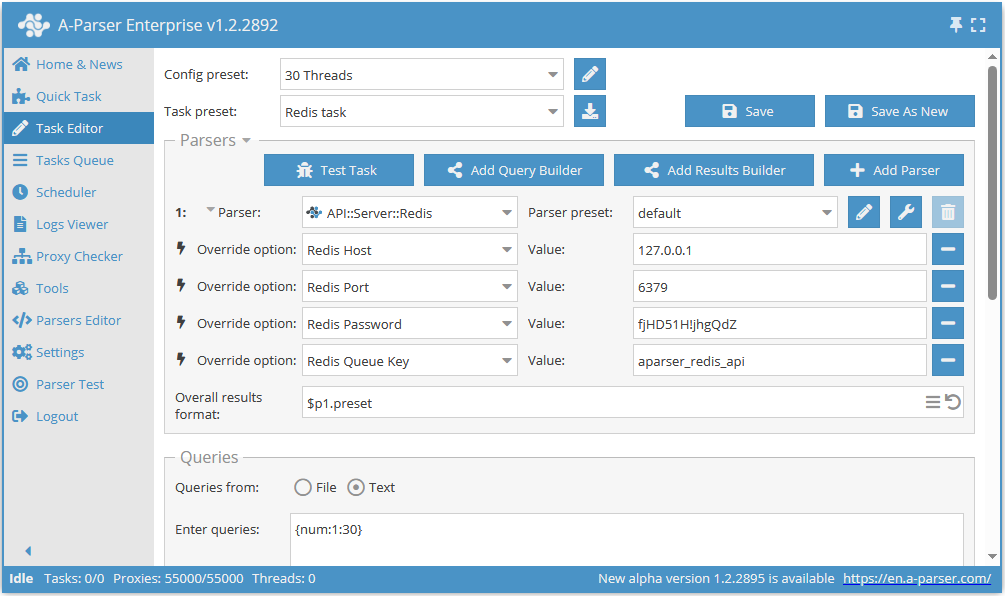
Redis Host- Redis server address, default127.0.0.1Redis Port- Redis server port, default6379Redis Queue Key- the name of the key for exchanging data with A-Parser, defaultaparser_redis_api; you can create separate queues and process them with different jobs or different copies of A-ParserResult Expire(TTL)- result lifetime in seconds, used for automatic tracking and deletion of unclaimed results, default3600seconds (1 hour)
- add a job with the API::Server::Redis scraper
- as queries, you need to specify
{num:1:N}, whereNmust match the number of threads specified in the job - you can also enable logging, which will allow viewing the log for each request
- as queries, you need to specify
Example of configuring a job with API::Server::Redis
Running A-Parser together with Redis using docker-compose
With this startup method, as the Redis server address (Redis Host) you can specify the service name instead of an IP address; in the examples below, this is redis
If A-Parser has not been run via docker-compose before
- Download and unpack the distribution (you need to get a one-time link in the Members Area as described here):
curl -O https://a-parser.com/members/onetime/ce42f308eaa577b5/aparser.tar.gz
tar zxf aparser.tar.gz
rm -f aparser.tar.gz
Create a file
docker-compose.ymland place the following content into it:- Basic option without a password and without opening the port, Redis will be available only inside the Docker network
version: '3'

services:
  a-parser:
    image: aparser/runtime:latest
    command: ./aparser
    restart: always
    volumes:
      - ./aparser:/app
    ports:
      - 9091:9091

  redis:
    image: redis:latest
restart: always- Option with a password and with the port opened, Redis will be accessible from outside, so using a password is strongly recommended
version: '3'

services:
  a-parser:
    image: aparser/runtime:latest
    command: ./aparser
    restart: always
    volumes:
      - ./aparser:/app
    ports:
      - 9091:9091

  redis:
    image: redis:latest
    restart: always
    command: redis-server --requirepass YOUR_REDIS_PASSWORD
    ports:
      - 6379:6379
Instead of HERE_IS_PASSWORD_FOR_REDIS come up with and specify the password that will be used to authenticate to Redis.
Start the containers:
docker compose up -d
If A-Parser has already been run via docker-compose before
Edit the
docker-compose.ymlfile, adding the following content to the end:- Basic option without a password and without opening the port, Redis will be available only inside the Docker network
  redis:
    image: redis:latest
restart: always- Option with a password and with the port opened, Redis will be accessible from outside, so using a password is strongly recommended
  redis:
    image: redis:latest
    restart: always
    command: redis-server --requirepass YOUR_REDIS_PASSWORD
    ports:
      - 6379:6379
Instead of HERE_IS_PASSWORD_FOR_REDIS come up with and specify the password that will be used to authenticate to Redis.
Start the containers:
docker compose up -d
If A-Parser was already running and its configuration has not changed, it will not be restarted; Docker will simply add and start Redis.
Executing requests
Redis API operation is based on Redis Lists (lists); list operations allow you to enqueue an unlimited number of requests (limited by RAM), and also retrieve results in blocking mode with timeout (blpop) or in asynchronous mode (lpop).
- all settings, except
useproxy,proxyCheckerandproxybannedcleanup, are taken from the preset of the invoked scraper +overrideOpts - the
useproxy,proxyCheckerandproxybannedcleanupsettings are taken from the preset ofAPI::Server::Redis + overrideOpts
A request is added to Redis with the lpush command; each request consists of an array [queryId, parser, preset, query, overrideOpts, apiOpts] serialized using JSON:
parser,preset,querycorrespond to the same fields for the API requestoneRequestqueryId- is generated with the request; we recommend using a sequential ID from your database or a good random; you can retrieve the result by this IDoverrideOpts- overriding settings for the parser presetapiOpts- additional API processing parameters
When queries are made via Redis, the result formatting stage is skipped, since the entire result is transmitted as JSON for further programmatic processing.
redis-cli
Example of executing requests; for testing you can use redis-cli:
127.0.0.1:6379> lpush aparser_redis_api '["some_unique_id", "Net::HTTP", "default", "https://ya.ru"]'
(integer) 1
127.0.0.1:6379> blpop aparser_redis_api:some_unique_id 0
1) "aparser_redis_api:some_unique_id"
2) "{\"data\":\"<!DOCTYPE html><html.....
Various use cases
Asynchronous check for the result
lpop aparser_redis_api:some_unique_id
Will return the result if it has already been processed or nil if the request is still being processed
Blocking result retrieval
blpop aparser_redis_api:some_unique_id 0
This request will be blocked until the result is available; you can also specify a maximum timeout for receiving the result, after which the command will return nil
Saving results to a single queue
By default A-Parser saves the result for each request under its unique key aparser_redis_api:query_id, which allows multithreaded processing by sending requests and receiving results separately for each thread
In some cases you need to process results in a single thread as they arrive; in this case it is more convenient to save results into a single results queue (the key must be different from the requests key)
To do this, specify the key output_queue for apiOpts:
lpush aparser_redis_api '["some_unique_id", "Net::HTTP", "default", "https://ya.ru", {}, {"output_queue": "aparser_results"}]'
Retrieving a result from the shared queue:
127.0.0.1:6379> blpop aparser_results 0
1) "aparser_results"
2) "{\"queryId\":\"some_unique_id\",\"results\":{\"data\":\"<!DOCTYPE html><html class=...
Implementation example (SpySERP use case)
Suppose we create a SaaS service that evaluates domain parameters; for simplicity we will check the domain registration date
Our service consists of 2 pages:
/index.php- landing page containing the domain input form/results.php?domain=google.com- page with the service results
To improve user experience we want our service pages to load instantly, while the data wait looks natural and shows a loader
When requesting results.php we first send a request to the A-Parser Redis API, forming a unique request_id:
lpush aparser_redis_api '["request-1", "Net::Whois", "default", "google.com", {}, {}]'
After that we can render the page for the user and display a loader in the data area; because there are no delays the server response will be limited only by the Redis connection speed (usually around 10ms)
A-Parser will start processing the request before the user's browser receives the first content; after the browser loads the required resources and scripts, we can display the result by sending an AJAX request to get the data:
/get-results.php?request_id=request-1
The get-results.php script performs a blocking Redis request with a 15-second timeout:
blpop aparser_redis_api:request-1 15
And returns the response as soon as it is received from A-Parser; if we get a null result due to timeout, we can display a data retrieval error to the user
Thus, by sending the request to A-Parser when the page is first opened (/results.php), we reduce the user's waiting time for data (/get-results.php) by the time the user's browser spends waiting for content, loading scripts, and executing the AJAX request