A-Parser 模板运行特性
模板测试
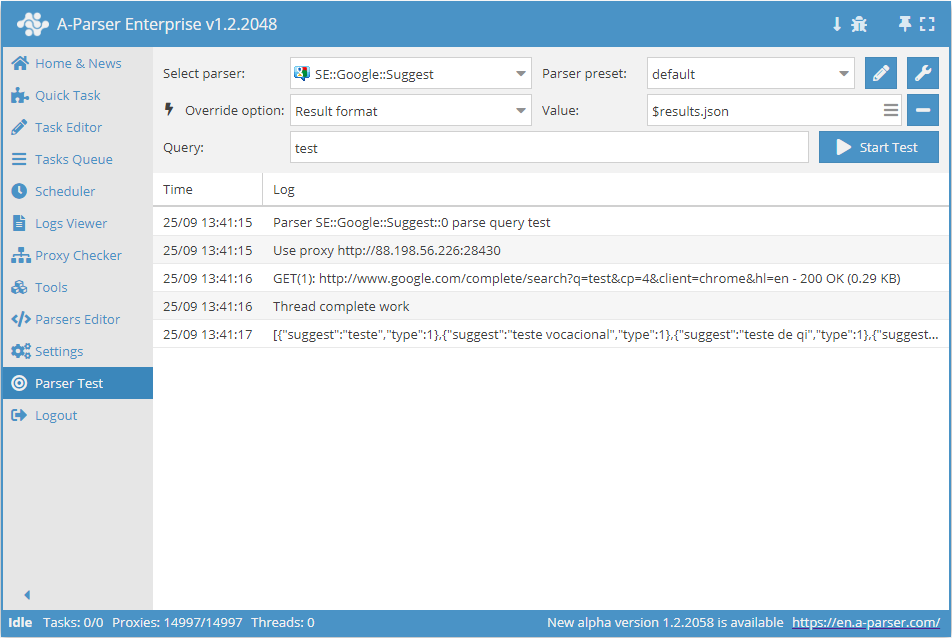
为了调试和测试模板,A-Parser 提供了一个专用工具:模板测试
针对数组的 .format 方法
在 A-Parser 中,大多数结果都以带有嵌套元素的数组形式呈现。从技术角度来说,结果是以哈希数组的形式呈现的,其中每个哈希都具有固定的键。我们以  SE::Google 爬虫工具为例来说明:在结果中,它包含一个
 $serp 数组,其中有 $link、$anchor 和 $snippet(以及其他项):
"serp" : [
{
"link" : "http://www.speedtest.net/",
"anchor" : "Speedtest.net by Ookla - The Global Broadband Speed <b>Test</b>",
"snippet" : "<b>Test</b> your Internet connection bandwidth to locations around the world with this <br>interactive broadband speed <b>test</b> from Ookla."
},
{
"link" : "http://www.speakeasy.net/speedtest/",
"anchor" : "Speakeasy Speed <b>Test</b>",
"snippet" : "Speakeasy Speed <b>Test</b> - Broadband Speed <b>Test</b>. Go to MegaPath Speed <b>Test</b> ... <br>02:38:36 PM Your IP: The Speakeasy Speed <b>Test</b> requires Flash v7 or higher."
},
{
"link" : "http://en.wikipedia.org/wiki/Test_cricket",
"anchor" : "<b>Test</b> cricket - Wikipedia, the free encyclopedia",
"snippet" : "<b>Test</b> cricket is the longest form of the sport of cricket. <b>Test</b> matches are played <br>between national representative teams with "<b>Test</b> status", as determined by the ..."
}
]
为了方便地遍历和输出此类数组中的数据,创建了 .format 方法,它允许按特定格式连接数组的所有元素,例如通过换行符连接所有链接:
$serp.format('$link\n')
结果将使每个链接保存为新的一行:
http://www.speedtest.net/
http://www.speakeasy.net/speedtest/
http://en.wikipedia.org/wiki/Test_cricket
输出摘要(snippet):
$serp.format('$snippet\n')
<b>Test</b> your Internet connection bandwidth to locations around the world with this <br>interactive broadband speed <b>test</b> from Ookla.
Speakeasy Speed <b>Test</b> - Broadband Speed <b>Test</b>. Go to MegaPath Speed <b>Test</b> ...<br>02:38:36 PM Your IP: The Speakeasy Speed <b>Test</b> requires Flash v7 or higher.
<b>Test</b> cricket is the longest form of the sport of cricket. <b>Test</b> matches are played <br>between national representative teams with "<b>Test</b> status", as determined by the ...
同时输出链接、锚点和摘要:
$serp.format('Link: $link, Anchor: $anchor, Snippet: $snippet\n')
Link: http://www.speedtest.net/, Anchor: Speedtest.net by Ookla - The Global Broadband Speed <b>Test</b>, Snippet: <b>Test</b> your Internet connection bandwidth to locations around the world with this <br>interactive broadband speed <b>test</b> from Ookla.Link: http://www.speedtest.net/, Anchor: Speedtest.net by Ookla - The Global Broadband Speed <b>Test</b>, Snippet: <b>Test</b> your Internet connection bandwidth to locations around the world with this <br>interactive broadband speed <b>test</b> from Ookla.
Link: http://www.speakeasy.net/speedtest/, Anchor: Speakeasy Speed <b>Test</b>, Snippet: Speakeasy Speed <b>Test</b> - Broadband Speed <b>Test</b>. Go to MegaPath Speed <b>Test</b> ... <br>02:38:36 PM Your IP: The Speakeasy Speed <b>Test</b> requires Flash v7 or higher.Link: http://www.speakeasy.net/speedtest/, Anchor: Speakeasy Speed <b>Test</b>, Snippet: Speakeasy Speed <b>Test</b> - Broadband Speed <b>Test</b>. Go to MegaPath Speed <b>Test</b> ... <br>02:38:36 PM Your IP: The Speakeasy Speed <b>Test</b> requires Flash v7 or higher.
Link: http://en.wikipedia.org/wiki/Test_cricket, Anchor: <b>Test</b> cricket - Wikipedia, the free encyclopedia, Snippet: <b>Test</b> cricket is the longest form of the sport of cricket. <b>Test</b> matches are played <br>between national representative teams with "<b>Test</b> status", as determined by the ...Link: http://en.wikipedia.org/wiki/Test_cricket, Anchor: <b>Test</b> cricket - Wikipedia, the free encyclopedia, Snippet: <b>Test</b> cricket is the longest form of the sport of cricket. <b>Test</b> matches are played <br>between national representative teams with "<b>Test</b> status", as determined by the ...
在格式中还可以使用原始查询(或其他可用变量),从而实现查询与数组每个元素的对应关系:
$serp.format('$query: $link\n')
test: http://www.speedtest.net/
test: http://www.speakeasy.net/speedtest/
test: http://en.wikipedia.org/wiki/Test_cricket
针对对象的 .json 方法
众所周知,A-Parser 中的所有数据都以变量形式呈现。存在一种将此类数据序列化(转换为 String 类型)为 JSON 格式的方法:.json。例如:
$results.json
结果文件名中的静态模板标志
isStaticTemplate() 标志允许将结果文件名中的动态模板变为静态。
工作原理:在结果文件名中使用此标志时,模板将在任务启动时执行一次,从而被视为静态。这使得文件命名更加灵活,同时保留了通过 API 方法 getTaskResultsFile 获取其链接的能力。
使用示例:
[% isStaticTemplate(); tools.js.eval('Date.now()') %]
可用变量
变量插值
默认情况下,模板记录在 [% 和 %] 标签之间,标签之外的所有内容均为普通文本,将原样传输到结果中。
A-Parser 额外启用了变量插值,允许通过 $ 符号在文本中访问变量。
此外,\n 也会被插值为显式的换行符。
示例:
查询 $query 的总结果数:$query: $totalcount\n
$query 和 $totalcount 的位置将替换为相应变量的值,\n 将替换为换行符。
不使用插值的等效写法:
查询 [% query %] 的总结果数:[% query %]: [% totalcount; "\n" %]
请注意,在 Template Toolkit 模板中,变量记录时不带 $ 前缀。
模板使用案例
查询格式化
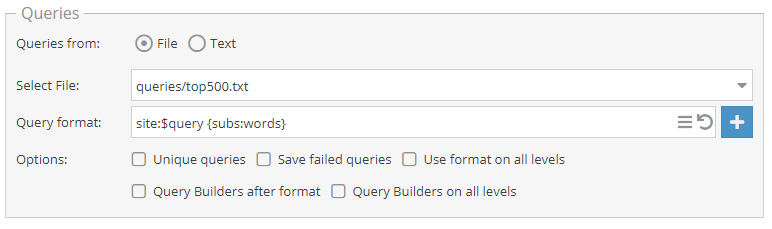
在此示例中,将为 Alexa top500.txt 文件中的每个域名添加搜索指令 site:,并通空格添加来自 words.txt 文件的占位符。
结果格式化

在此示例中,将输出查询、搜索结果数量以及相关关键词数量。此外还将输出采集到的锚点列表。
结果过滤时的模板
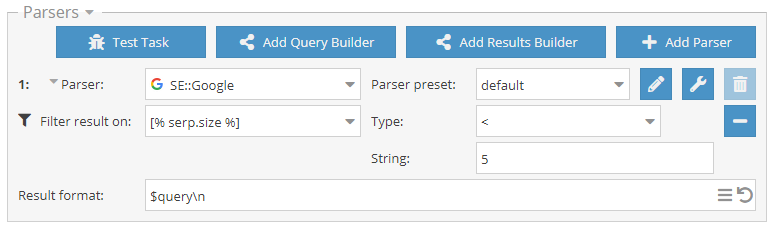
为了能够设置模板,应在下拉列表中选择 Custom Template。
在此示例中,作为结果仅输出那些采集到的结果少于 5 条的查询。
使用“使用正则”选项时的模板
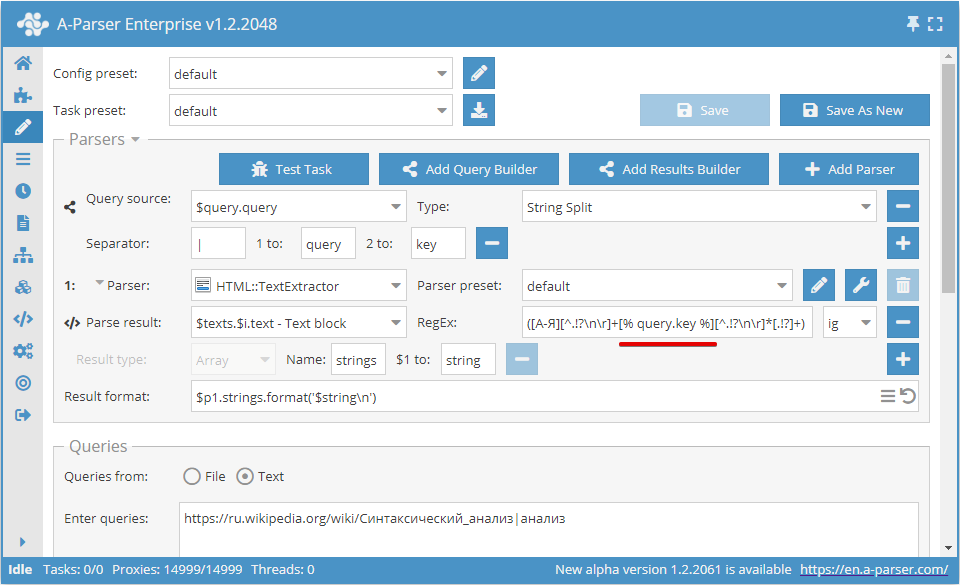
在此示例中,爬虫工具将采集包含查询第二个参数所传单词的句子。 工作算法如下:查询由查询构造器按指定分隔符拆分为链接和单词;爬虫工具访问链接,提取文本;查询中的单词被代入正则表达式,并用其采集句子。
下载示例
eJyNVE1T2zAQ/StUEwYo1EkoDK0vncA003YCoSScHLejxmtXjWwZSYZkQv57d2XH
diiHXmTp6b3d1X54zSw3C3OrwYA1zA/WLHd75rMIYl5Iy05YzrUBTdcB+zK9Hvn+
FJb289JqPrdKI6Pmrpld5YDqeWGsSu/AlCZ0ufEDZlFqEKEvC+kmgSUKDoNZ0Tvr
997R5zQOgx/em0+zWTab6fA42N97KECvvAWs9vZ37t4GuA+Pj1hlalr6F0nttUK4
1nyFoPve8JQwY7XIElNT6Y0VyMJNGNb4UOmUU1Y6ed+rVF7swMODTglgQAdHjakJ
f4SpQkksJDTwEE+V907ELdDt1tKRZ5eULR5FwgqVcVn6pbCaWO4zgclAfaaQS3kR
YIZapQi5rJbgahtzwDruTNkunPZ7qWF+zKWBE2Yw1CHHQKKXN8KC5ljjcU7xIL5m
KhtIOYJHkA3N2b8shIywTwYxir5Wwtcp439sbOrntV09gn7SGENtxZ0ux9eNKlIj
lWyTIUUqLJ7NlSoyKlcPwQVAXufshmip0lC7qSxX3nEUcsgiZDYlG+QNtPMMNzBG
FXpOpsskn2wnoGyKSS4FVcQATlGZEPZMJEWF2Uqwranfao8tBwjOVRaLZIzJ0CKC
bTMU2RRnd5xdqTSXQDnKCimxxAbumlYbmKqkdGge+1J85VzsTL1VSppvk/LZuRYY
8DkFmGJV2l4rk3Mu5f3dqH3DmvbEw29rc+N3u7rwnsRC5BAJ7imddOnUdVPfp/X9
B7dGtJ6dun3PrdwhLc7Zhduft3DesvDxZ0sctfa/WqSL5/8hMXqfhURhtTD7VKnq
p1j/Otev/hr99QZ79I+5LdlUBOIihtU02IDM72/+Ar1q4iA=
爬虫工具设置中的模板
预设宏设置
在 A-Parser 中可以设置模板宏和预设变量,它们将全局适用于所有模板。可以在Settings -> Advanced Settings中指定全局宏。
默认情况下,那里已经包含了 $datefile 对象的预定义,该对象用于格式化结果文件名的时间。
添加和使用宏
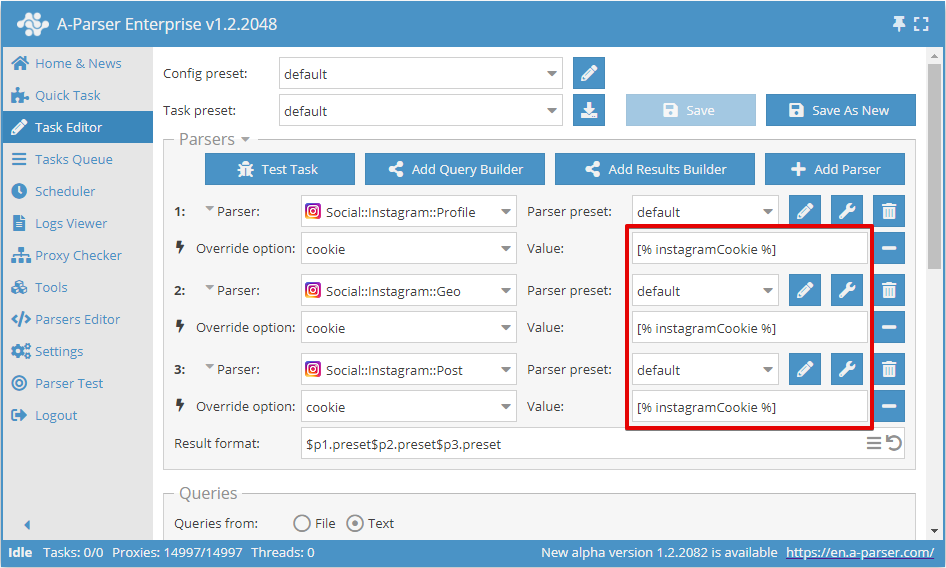
本示例展示了全局变量的设置。例如,当需要在多个 Instagram 爬虫工具中使用相同的 Cookie 时,这会非常有用。
设置示例:
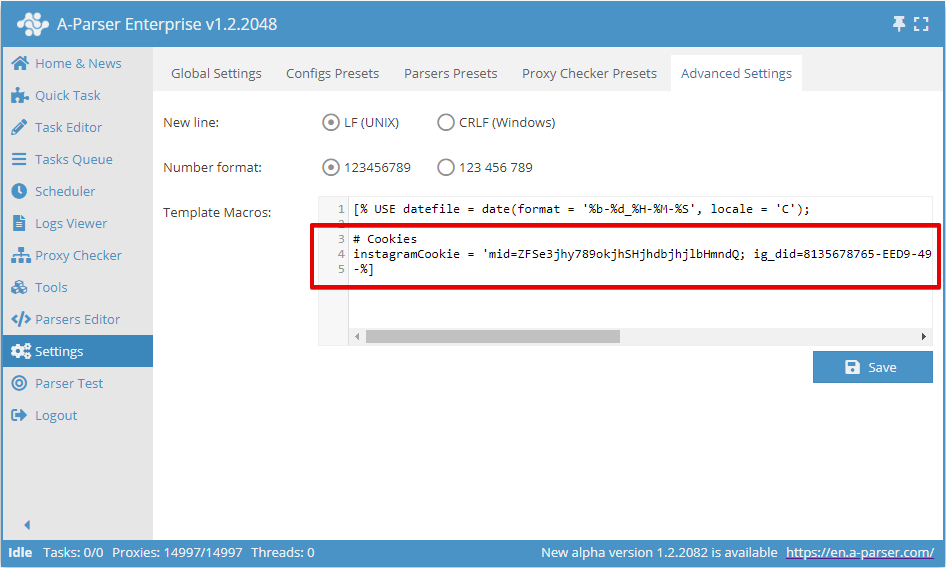
请注意模板结束括号的语法 -%]。这是为了删除换行符,否则在使用任何模板时,开头都会添加一个空行。
使用示例: