Features of Templates in A-Parser
Template Testing
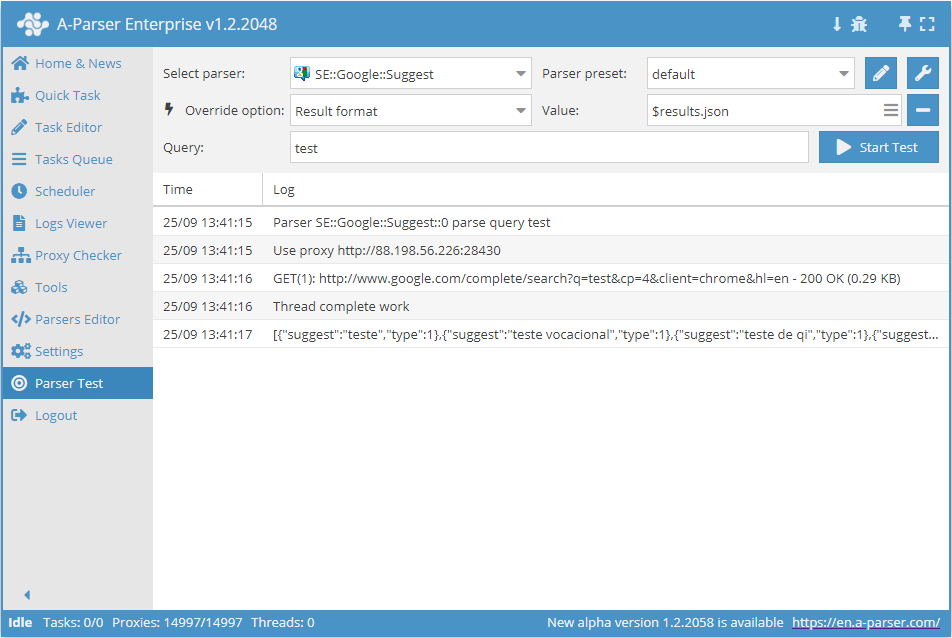
For debugging and testing templates in A-Parser, there is a special tool: Template Testing
The .format method for arrays
In A-Parser, most results are represented as arrays with nested elements. Technically speaking, the results are represented as an array of hashes, where each hash has fixed keys. Let's look at this using the example of the scraper  SE::Google; in the results, it contains an array
 $serp with elements $link, $anchor, and $snippet (and others):
"serp" : [
{
"link" : "http://www.speedtest.net/",
"anchor" : "Speedtest.net by Ookla - The Global Broadband Speed <b>Test</b>",
"snippet" : "<b>Test</b> your Internet connection bandwidth to locations around the world with this <br>interactive broadband speed <b>test</b> from Ookla."
},
{
"link" : "http://www.speakeasy.net/speedtest/",
"anchor" : "Speakeasy Speed <b>Test</b>",
"snippet" : "Speakeasy Speed <b>Test</b> - Broadband Speed <b>Test</b>. Go to MegaPath Speed <b>Test</b> ... <br>02:38:36 PM Your IP: The Speakeasy Speed <b>Test</b> requires Flash v7 or higher."
},
{
"link" : "http://en.wikipedia.org/wiki/Test_cricket",
"anchor" : "<b>Test</b> cricket - Wikipedia, the free encyclopedia",
"snippet" : "<b>Test</b> cricket is the longest form of the sport of cricket. <b>Test</b> matches are played <br>between national representative teams with "<b>Test</b> status", as determined by the ..."
}
]
For convenient iteration and output of data from such an array, the .format method was created, which allows joining all array elements according to a specific format, for example, all links via a newline:
$serp.format('$link\n')
Which results in saving each link on a new line:
http://www.speedtest.net/
http://www.speakeasy.net/speedtest/
http://en.wikipedia.org/wiki/Test_cricket
Snippet output:
$serp.format('$snippet\n')
<b>Test</b> your Internet connection bandwidth to locations around the world with this <br>interactive broadband speed <b>test</b> from Ookla.
Speakeasy Speed <b>Test</b> - Broadband Speed <b>Test</b>. Go to MegaPath Speed <b>Test</b> ...<br>02:38:36 PM Your IP: The Speakeasy Speed <b>Test</b> requires Flash v7 or higher.
<b>Test</b> cricket is the longest form of the sport of cricket. <b>Test</b> matches are played <br>between national representative teams with "<b>Test</b> status", as determined by the ...
Links, anchors, and snippets simultaneously:
$serp.format('Link: $link, Anchor: $anchor, Snippet: $snippet\n')
Link: http://www.speedtest.net/, Anchor: Speedtest.net by Ookla - The Global Broadband Speed <b>Test</b>, Snippet: <b>Test</b> your Internet connection bandwidth to locations around the world with this <br>interactive broadband speed <b>test</b> from Ookla.Link: http://www.speedtest.net/, Anchor: Speedtest.net by Ookla - The Global Broadband Speed <b>Test</b>, Snippet: <b>Test</b> your Internet connection bandwidth to locations around the world with this <br>interactive broadband speed <b>test</b> from Ookla.
Link: http://www.speakeasy.net/speedtest/, Anchor: Speakeasy Speed <b>Test</b>, Snippet: Speakeasy Speed <b>Test</b> - Broadband Speed <b>Test</b>. Go to MegaPath Speed <b>Test</b> ... <br>02:38:36 PM Your IP: The Speakeasy Speed <b>Test</b> requires Flash v7 or higher.Link: http://www.speakeasy.net/speedtest/, Anchor: Speakeasy Speed <b>Test</b>, Snippet: Speakeasy Speed <b>Test</b> - Broadband Speed <b>Test</b>. Go to MegaPath Speed <b>Test</b> ... <br>02:38:36 PM Your IP: The Speakeasy Speed <b>Test</b> requires Flash v7 or higher.
Link: http://en.wikipedia.org/wiki/Test_cricket, Anchor: <b>Test</b> cricket - Wikipedia, the free encyclopedia, Snippet: <b>Test</b> cricket is the longest form of the sport of cricket. <b>Test</b> matches are played <br>between national representative teams with "<b>Test</b> status", as determined by the ...Link: http://en.wikipedia.org/wiki/Test_cricket, Anchor: <b>Test</b> cricket - Wikipedia, the free encyclopedia, Snippet: <b>Test</b> cricket is the longest form of the sport of cricket. <b>Test</b> matches are played <br>between national representative teams with "<b>Test</b> status", as determined by the ...
In the format, you can also use the original query (or other available variables), which allows setting a correspondence between the query and each array element:
$serp.format('$query: $link\n')
test: http://www.speedtest.net/
test: http://www.speakeasy.net/speedtest/
test: http://en.wikipedia.org/wiki/Test_cricket
The .json method for objects
As is known, all data in A-Parser is represented as variables. There is a serialization method (conversion to String type) for such data into JSON format: .json. For example:
$results.json
Static template flag in Result file name
The isStaticTemplate() flag allows making a dynamic template in the Result file name static.
Principle of operation: when using this flag in the Result file name, the template will be executed once at the start of the task and will thus be considered static. This allows for more flexible file naming while maintaining the ability to get links to them via the API method getTaskResultsFile.
Usage example:
[% isStaticTemplate(); tools.js.eval('Date.now()') %]
Available variables
When forming the result file name
Variable interpolation
By default, templates are written between [% and %] tags; everything outside the tags is plain text that will be passed to the result as is.
A-Parser additionally includes variable interpolation, which allows accessing variables in text via the $ symbol.
In addition, \n is also interpolated as an explicit line break.
Example:
Total results for query $query: $totalcount\n
The values of the corresponding variables will be substituted in place of $query and $totalcount, and \n will be replaced by a line break.
Equivalent notation without using interpolation:
Total results for query [% query %]: [% totalcount; "\n" %]
Please note that in Template Toolkit templates, variables are written without the $ prefix.
Template Use Cases
Query formatting
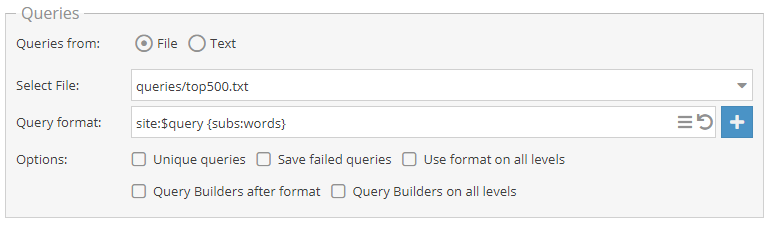
In this example, the search operator site: will be added to each domain from the Alexa top500.txt file, and substitutions from the words.txt file will be added after a space.
Result formatting

In this example, the query, the number of results in the SERP, and the number of related keywords will be output. A list of collected anchors will also be displayed.
Templates in result filtering
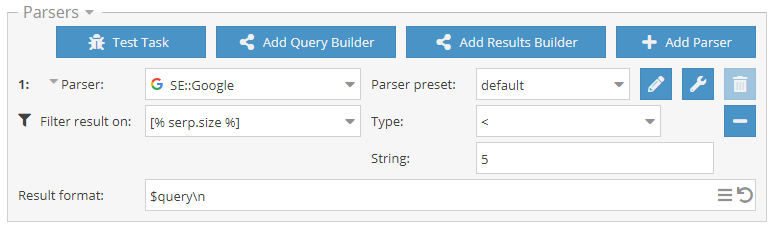
To be able to specify a template, select Custom Template from the dropdown list.
In this example, only those queries for which fewer than 5 results were collected will be output as a result.
Templates when using the Use Regex option
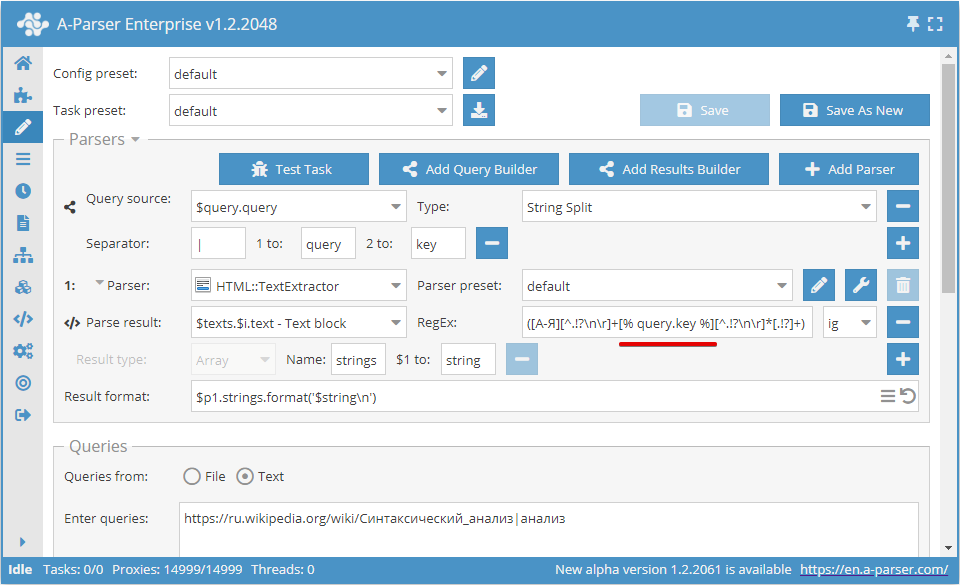
In this example, the scraper will collect sentences that contain the word passed as the second argument of the query. The algorithm is as follows: the query is split by the Query Builder using the specified separator into a link and a word; the scraper follows the link, selects the text; the word from the query is substituted into the regular expression, and sentences are collected with it.
Download example
How to import an example into A-Parser
eJyNVE1T2zAQ/StUEwYo1EkoDK0vncA003YCoSScHLejxmtXjWwZSYZkQv57d2XH
diiHXmTp6b3d1X54zSw3C3OrwYA1zA/WLHd75rMIYl5Iy05YzrUBTdcB+zK9Hvn+
FJb289JqPrdKI6Pmrpld5YDqeWGsSu/AlCZ0ufEDZlFqEKEvC+kmgSUKDoNZ0Tvr
997R5zQOgx/em0+zWTab6fA42N97KECvvAWs9vZ37t4GuA+Pj1hlalr6F0nttUK4
1nyFoPve8JQwY7XIElNT6Y0VyMJNGNb4UOmUU1Y6ed+rVF7swMODTglgQAdHjakJ
f4SpQkksJDTwEE+V907ELdDt1tKRZ5eULR5FwgqVcVn6pbCaWO4zgclAfaaQS3kR
YIZapQi5rJbgahtzwDruTNkunPZ7qWF+zKWBE2Yw1CHHQKKXN8KC5ljjcU7xIL5m
KhtIOYJHkA3N2b8shIywTwYxir5Wwtcp439sbOrntV09gn7SGENtxZ0ux9eNKlIj
lWyTIUUqLJ7NlSoyKlcPwQVAXufshmip0lC7qSxX3nEUcsgiZDYlG+QNtPMMNzBG
FXpOpsskn2wnoGyKSS4FVcQATlGZEPZMJEWF2Uqwranfao8tBwjOVRaLZIzJ0CKC
bTMU2RRnd5xdqTSXQDnKCimxxAbumlYbmKqkdGge+1J85VzsTL1VSppvk/LZuRYY
8DkFmGJV2l4rk3Mu5f3dqH3DmvbEw29rc+N3u7rwnsRC5BAJ7imddOnUdVPfp/X9
B7dGtJ6dun3PrdwhLc7Zhduft3DesvDxZ0sctfa/WqSL5/8hMXqfhURhtTD7VKnq
p1j/Otev/hr99QZ79I+5LdlUBOIihtU02IDM72/+Ar1q4iA=
Templates in scraper settings
Example of random user-agent substitution
Configuring preset macros
In A-Parser, you can configure template macros and preset variables that will be available globally for all templates. Global macros can be specified in Settings -> Advanced Settings.
By default, it already contains a predefinition of the $datefile object, which is used for time formatting for the result file name.
Adding and using a macro
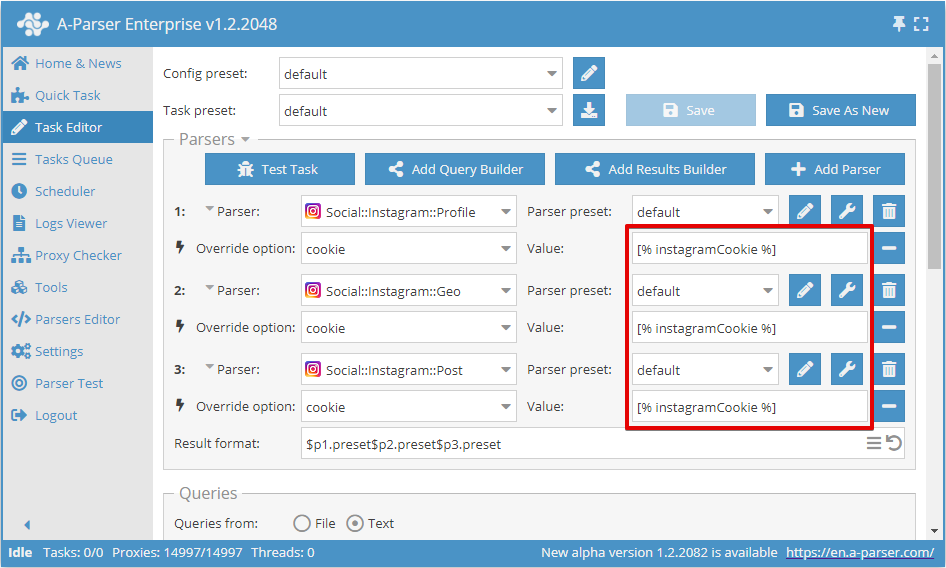
This example shows how to set a global variable. This can be useful, for example, if you need to use the same cookies in several Instagram scrapers.
Setting example:
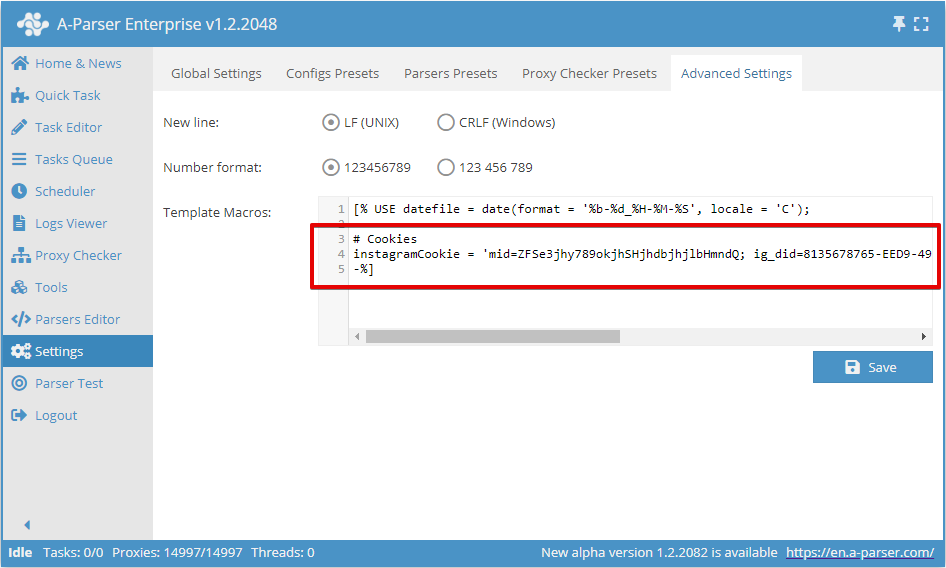
Note the syntax of the closing template bracket -%]. This is needed to remove the line break; otherwise, an empty line will be added at the beginning when using any template.
Usage example: