Result Representation and Formatting
Available formats for saving results
To format results in A-Parser, the Template Toolkit template engine is used, which allows you to easily save scraping results in various formats:
- In text files as a list: one result per line, via a separator, in an arbitrary format
- In
CSVfiles with the possibility of further import into Excel, Google Docs, etc. - In
XML,JSON, and other data storage formats - In
HTMLby generating pages "on the fly" - In the format of
SQLdumps for direct import into a database or by writing directly to an SQLite database - In binary format for saving images (
jpg, png, gif,...), documents (pdf, docx,...), executable files and archives (exe, dmg, zip,...), and any other types of data
Editing the result format
Result format - allows you to format results to the desired view using templates; it is applied to each query-results combination.
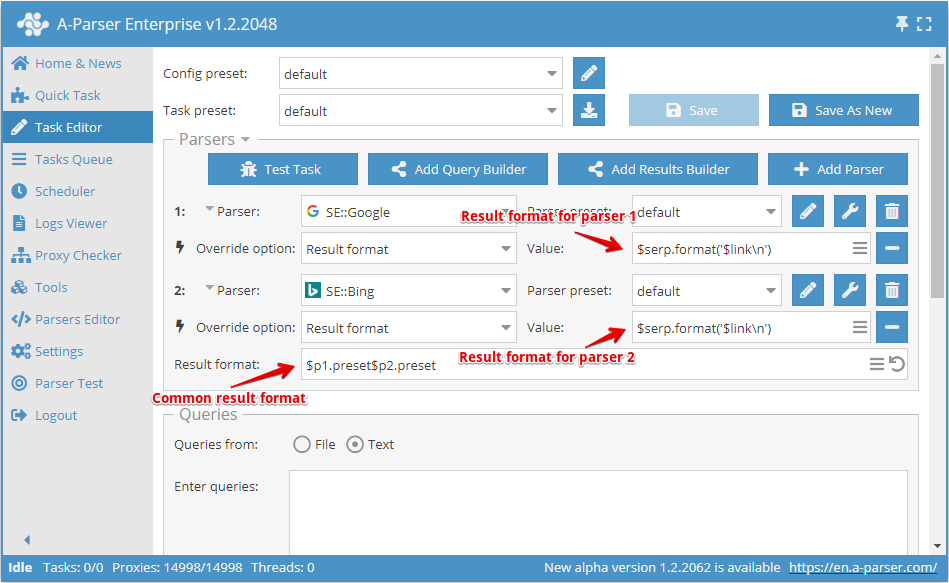
- General result format is set in the
Result formatfield - Result format for each scraper can be set separately in the scraper settings in
Result format
A-Parser supports working with several scrapers in one task; in the general result format, it is necessary to specify which scraper to output the result from:
$p1- results from the first scraper ( SE::Google in the screenshot),
 $p2- results from the second scraper ( SE::Bing in the screenshot)
- The serial number of the scraper is displayed to the left of the scraper selection field
$p1.presetand$p2.presetimplies that it is necessary to take the result format value from the settings of the corresponding scrapers- In this example,
$p1.presetcan be replaced with$p1.serp.format('$link\n')which will have the same effect, while the result format from the settings will no longer be used
Result format can be specified in a convenient multi-line editor by clicking on the corresponding icon in the editing field:
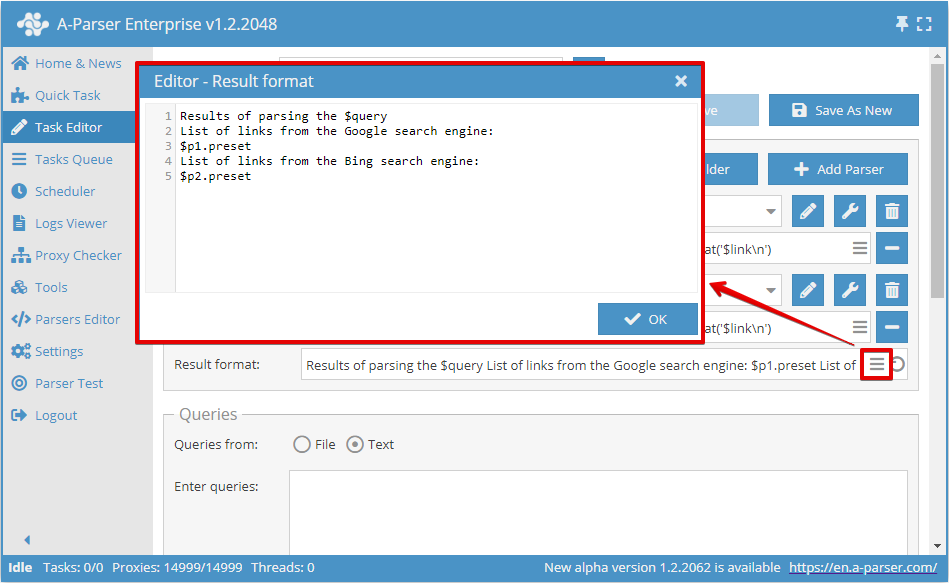
The following variables are available in the general result format:
$query- query after formatting$query.*- all variables related to the query, described in the article Query templates$p1, $p2, ...- variables for accessing scraping results for each scraper separately (Viewing possible results for each scraper)$p1.query, $p2.query, ...- queries after formatting taking into account the query format specified in the settings of each scraper
Prepend and append text
A separate Prepend/Append text is specified for each result file:
- For forming the header of a CSV file
- For the opening and closing tags of an XML file
- For the header, top, and footer of HTML files
- For any other application options
To activate this feature, you must click the More options button at the bottom of the Task Editor
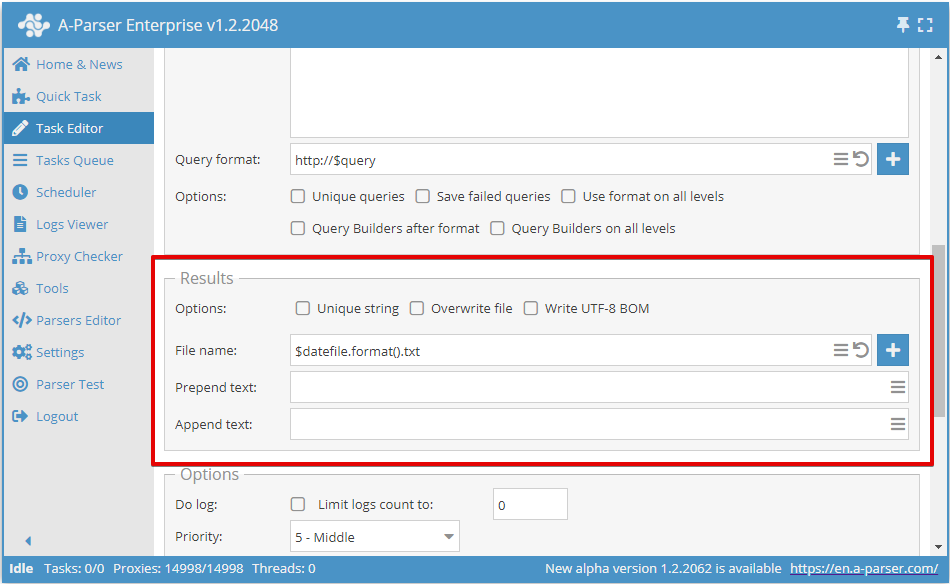
The use of the Template Toolkit template engine is supported in the prepend and append text; available variables:
$query- query after formatting$query.*- all variables related to the query, described in the article Query templates
Important! These variables are available only when saving each query to a separate file or when using these same variables in the Result file name format.
Result file name formatting
A-Parser also allows using templates in the names of resulting files, which allows automatically creating files and folders based on the current date, by query serial number, by the query itself, and in any other format.
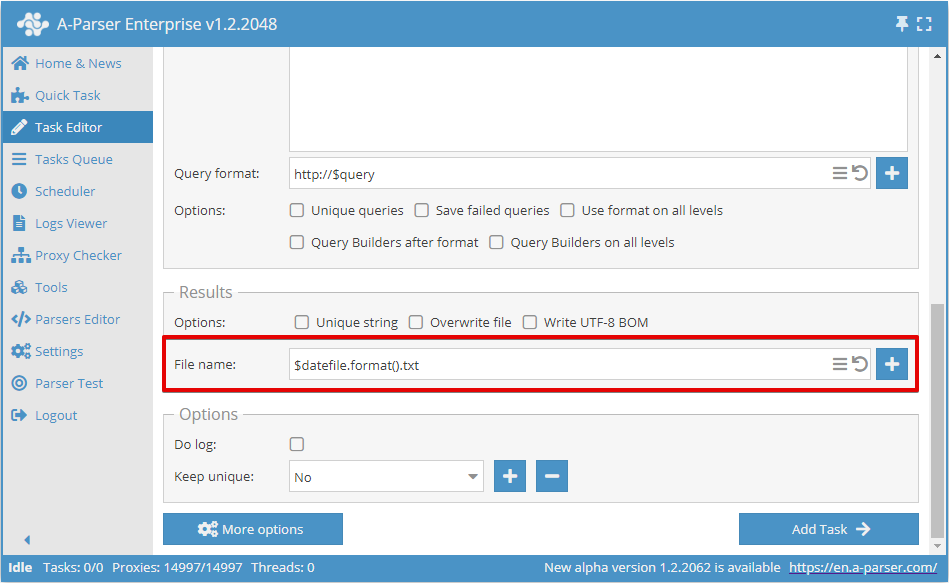
The following variables are supported in the File name field:
- All variables available for the General result format
$queriesfile- path and name of the file with queries; if queries are specified via the form, it will contain queries_from_text.txt$datefile- a date plugin object of the Template Toolkit template engine, configured to the date format%b-%d_%H-%M-%S; when formatted, it outputs the current time and date as May-08_20-08-38, the format can be changed in Additional settings
By default, the file name is created by the date and time at the moment the task starts
Complex example
reports/$queriesfile/${query}.txt
- A reports folder will be created
- A subfolder with the name of the queries file will be created
- As many files as there are queries used in the task will be created in the subfolder; the query itself with the
.txtextension will be used as the file name
The variable $query is written in the format ${query} in order to prevent interpolation of the .txt extension as part of the variable; more details in the documentation for the Template Toolkit template engine
⏩ Video. Naming result files
In this video, we will provide several examples of naming the result file:
- Numbering the result file in accordance with queries.
- Numbering the result file + part of the query name.
- Naming the result file by query if the query is a link.
Viewing available results
Each scraper has its own set of results; you can view the list of available results by hovering over the scraper with the pointer; a list of simple results and arrays, with a list of nested elements, will be displayed in the tooltip:
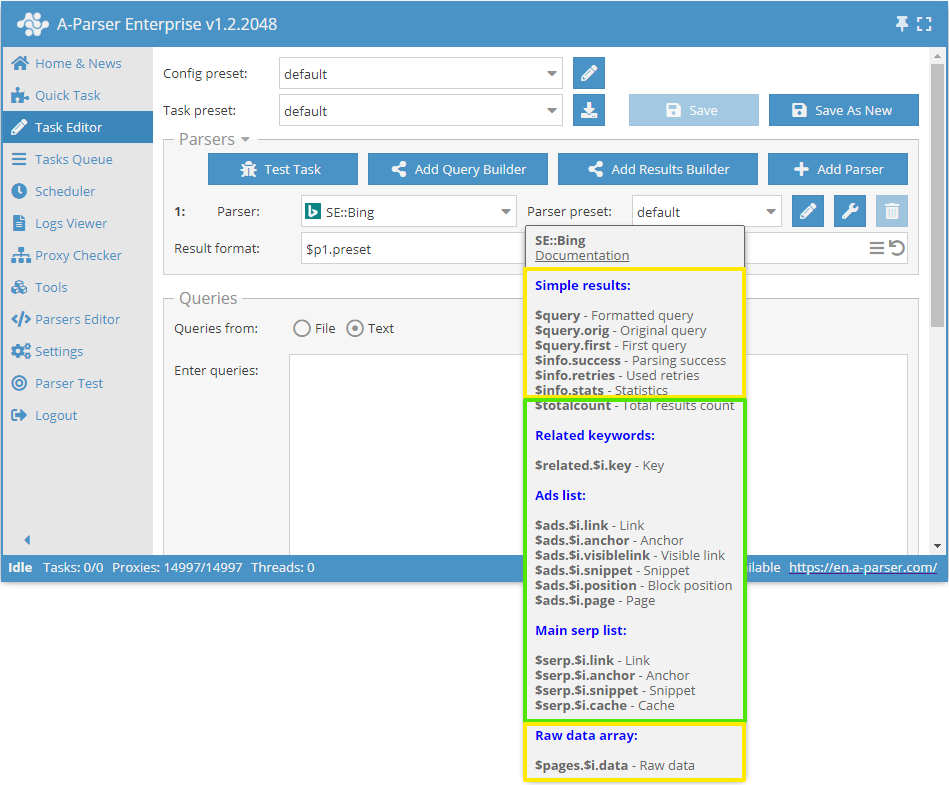
Results common to all scrapers are marked in Yellow:
$query- query passed to the scraper after formatting$query.orig- original query (as it was in the file or in the query input field)$query.first- first query when using nested scraping options (Parse all results or Parse to level)$info.success- information about the success of scraping this query$info.retries- number of attempts used for this query$info.stats- scraper operation statistics for this query$pages.$i.data- array with raw responses from the server for the possibility of self-extracting additional information
SE::Bing scraper:$totalcount- number of search results$adswith elements$link,$anchor,$visiblelink,$snippet,$position, and$page- array with a list of ads$related.$i.key- array with a list of related keywords$serpwith elements$link,$anchor,$snippet,$cache- array with the main search engine results
Note that for arrays, the variable $i is explicitly specified, meaning that there are several elements and they can be accessed by index (position number) or iterated through each element in a loop.
The result $pages.$i.data will automatically be changed to $data for those scrapers that do not "page through" within a single request. For example like  DeepL::Translator.
Results representation
A-Parser was created for scraping information of any kind; for this, 2 types of results were introduced:
- Simple results (Flat)
- Result arrays (Array)
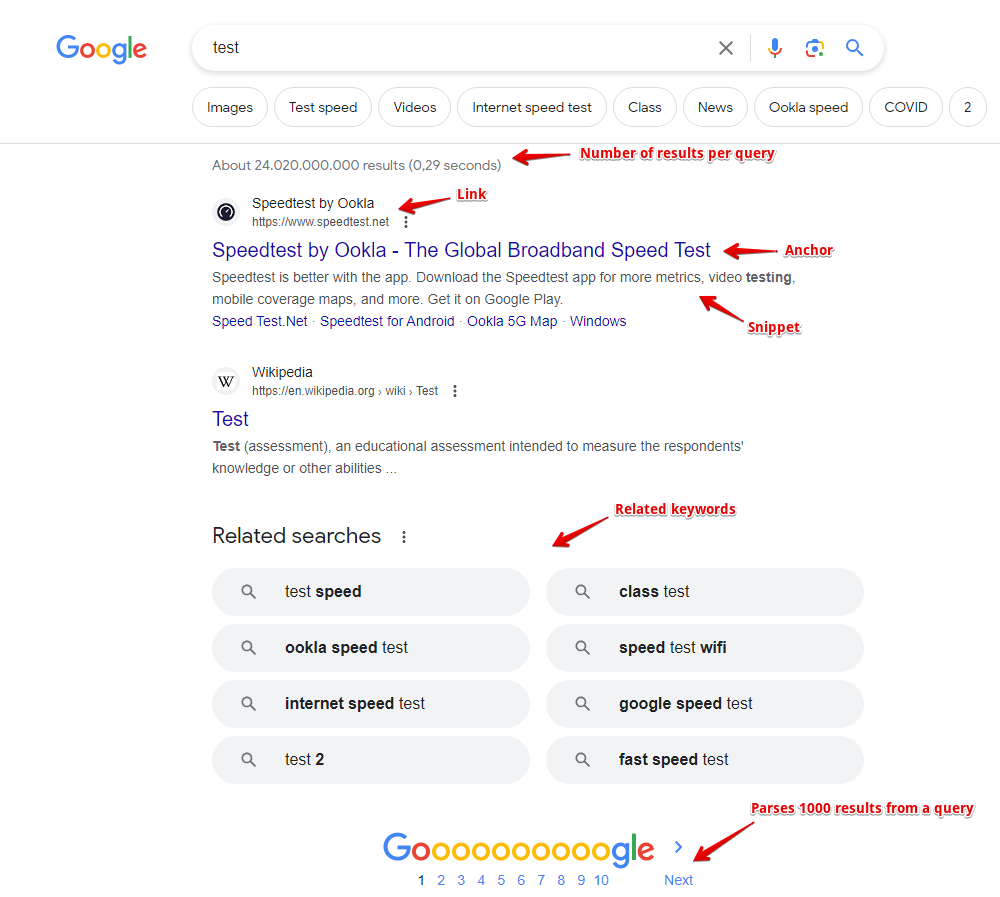
Let's consider each type using the SE::Google scraper as an example, screenshot of the output:
Simple results
Simple results - when one query corresponds to one result, examples:
- Number of results for a query ($totalcount)
- Whether the query is a typo ($misspell, not shown in the screenshot)
Other examples:
- The value of the translated text ($translated) in the DeepL::Translator scraper
- Number of referring domains ($domains), trust value ($trustflow), backlinks ($backlinks), etc., in the
 Rank::MajesticSEO scraper
Single results are saved in regular variables (prefix $ + name in Latin)
Result arrays
Result arrays - when one query corresponds to a list of results, each element of the list in turn can contain several nested elements. Let's analyze it using the example of Google search results - it is represented in the scraper by the $serp array; for clarity, we will use a table and record the first 5 search results:
| Link ($link) | Anchor ($anchor) | Snippet ($snippet) |
|---|---|---|
| http://www.speedtest.net/ | Speedtest.net by Ookla - The Global Broadband Speed Test | Test your Internet connection bandwidth to locations around the world with this interactive broadband speed test from Ookla. |
| http://en.wikipedia.org/wiki/Test_cricket | Test cricket - Wikipedia, the free encyclopedia | Test cricket is the longest form of the sport of cricket. Test matches are played between national representative teams with "Test status", as determined by the ... |
| http://www.speakeasy.net/speedtest/ | Speakeasy Speed Test | Saturday 03-May 2014, 11:04:29 AM Your IP: The Speakeasy Speed Test requires Flash v7 or higher. Please update your browser. See Pricing Or Call Today |
| http://www.humanmetrics.com/cgi-win/jtypes2.asp | Personality test based on C. Jung and I. Briggs Myers type theory | Humanmetrics Jung Typology Test™ instrument uses methodology, questionnaire, scoring and software that are proprietary to Humanmetrics, and shall not be ... |
| http://test-ipv6.com/ | Test your IPv6. | This will test your browser and connection for IPv6 readiness, as well as show you your current IPV4 and IPv6 address. ... Test your IPv6 connectivity. JavaScript ... |
Each search result position is recorded in an array with 3 nested elements - link ($link), anchor ($anchor), snippet ($snippet)
Another example is a list of related keywords, which is saved in the $related array:
| Keyword ($key) |
|---|
| test wwe |
| depression test |
| test my speed |
| wonderlic test |
| test personality |
| act test |
| jiggle test |
| bipolar test |
As you can see, there is only one nested element in this array - keyword ($key)
Numbering of array elements starts from 0, example of accessing individual array elements:
$serp.0.link- first link from the search results$serp.3.anchor- fourth anchor from the search results$related.0.key- first related keyword
Formatting of simple results and arrays will be described in more detail below
Formatting principles
After the scraper has collected data in simple results and arrays, they need to be displayed (saved to a file) in the required format. For convenience and functionality, A-Parser uses the Template Toolkit template engine. Let's examine frequently used constructions; for this, we will use the Template testing tool. Select a project for the SE::Google scraper:
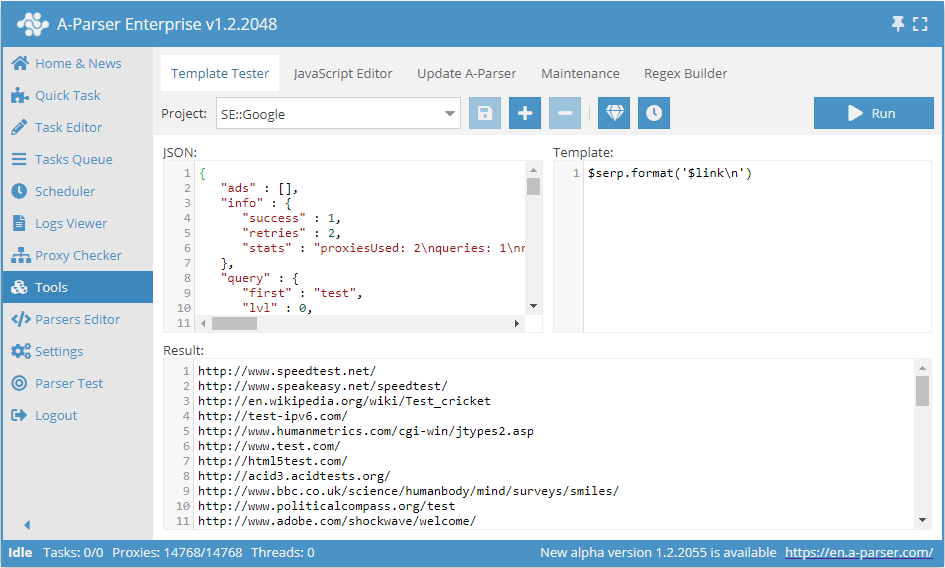
The screenshot shows 3 fields:
- JSON - internal representation of data in the scraper
- Template - the template according to which the result is formatted
- Result - directly converted data according to the specified template; the result will be written to the file in this form
By changing the template, we can change the look of the result; consider the following template:
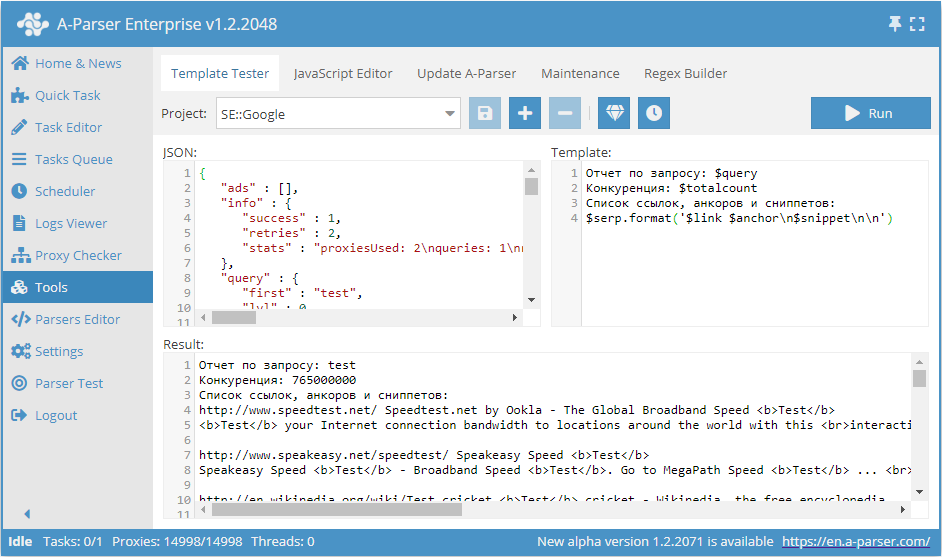
Text in the Template field:
Report for query: $query
Competition: $totalcount
List of links, anchors, and snippets:
$serp.format('$link $anchor\n$snippet\n\n')
Let's highlight the basic rules:
- Regular text is output to the result as is, without changes
- To output simple results, it is necessary to output a variable containing the desired result with the
$prefix in the right place - The
.formatmethod is used for formatting arrays; more about it below \nis responsible for a line break
Formatting arrays
Let's analyze the construction:
$serp.format('$link $anchor\n$snippet\n\n')
This entry means that for the $serp array, it is necessary to call the .format method with the parameter '$link $anchor\n$snippet\n\n'. The .format method joins all array elements into a string according to the template specified in the parameter; the template itself means: for each element of the $serp array, output the link and anchor separated by a space, then output the snippet from a new line, followed by two more line breaks, resulting in an empty line between results.
Using the template engine
Outputting variables
To use the template engine, you need to insert [% %] tags and enter the logic you want to execute inside the tags.
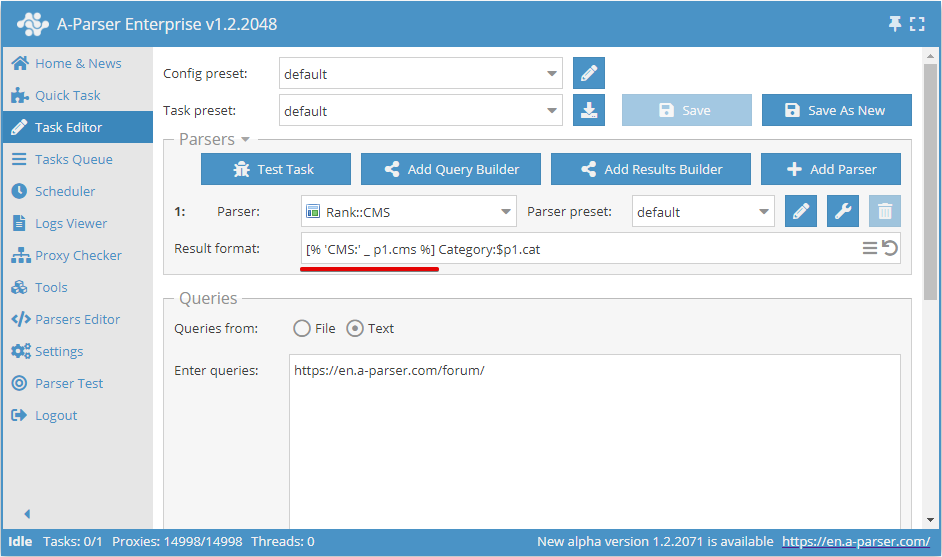
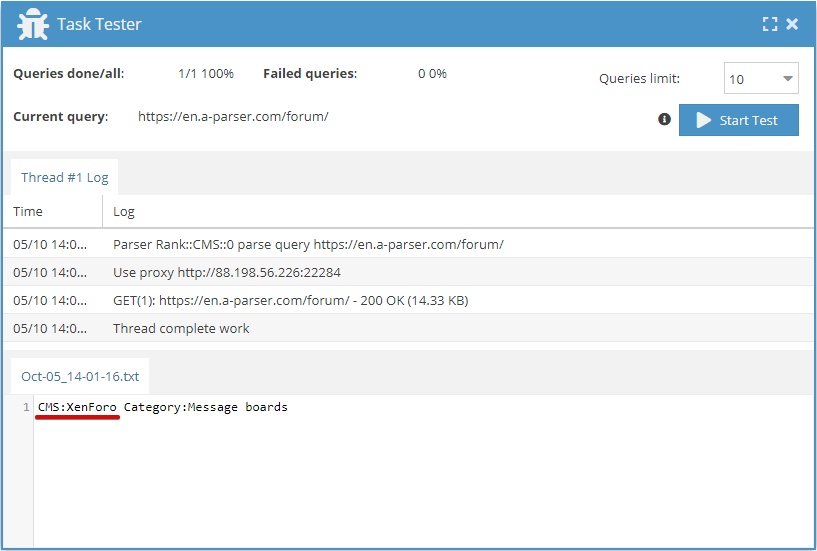
Iterating through an array
To output array elements, you need to use the FOREACH construction:
[% FOREACH i IN p1.list;
  i.cms _ "\n";
END %]
More information and examples on the template engine in Features of templates in A-Parser.
Examples
Outputting competition
Output of competition for a query (number of results for a query) for all search engine scrapers (SE::Google,  SE::Yandex...).
Result format:
$query: $totalcount\n
Example result:
test: 3910000000
viagra: 278000000
pvc windows: 3220000
...
Scraping links
Outputting links from search engine results.
Result format:
$serp.format('$link\n')
Example result:
http://www.speedtest.net/
http://www.speakeasy.net/speedtest/
http://en.wikipedia.org/wiki/Test_cricket
http://www.humanmetrics.com/cgi-win/jtypes2.asp
http://html5test.com/
http://test-ipv6.com/
...
Scraping suggestions
Outputting search engine suggestions.
Result format:
$results.format('$suggest\n')
Example result:
test server tanks online
gia tests in russian language
pancake dough recipe
testicle
pizza dough with milk
Outputting data about the query
In  Net::HTTP and scrapers based on it, the following output is additionally available:
$proxy- proxy on which the query was executed$headers- response headers$code- response code$reason- response status
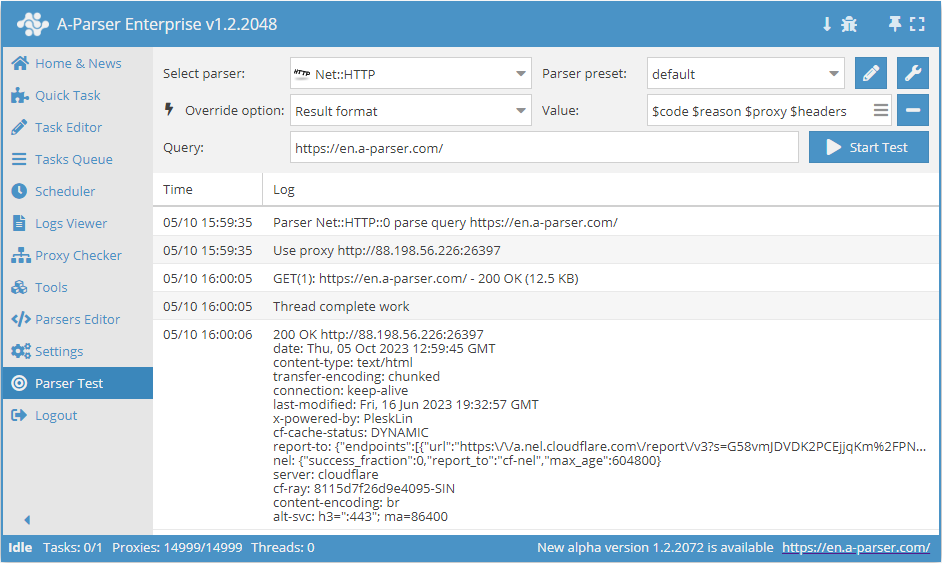
Outputting variable values in JSON
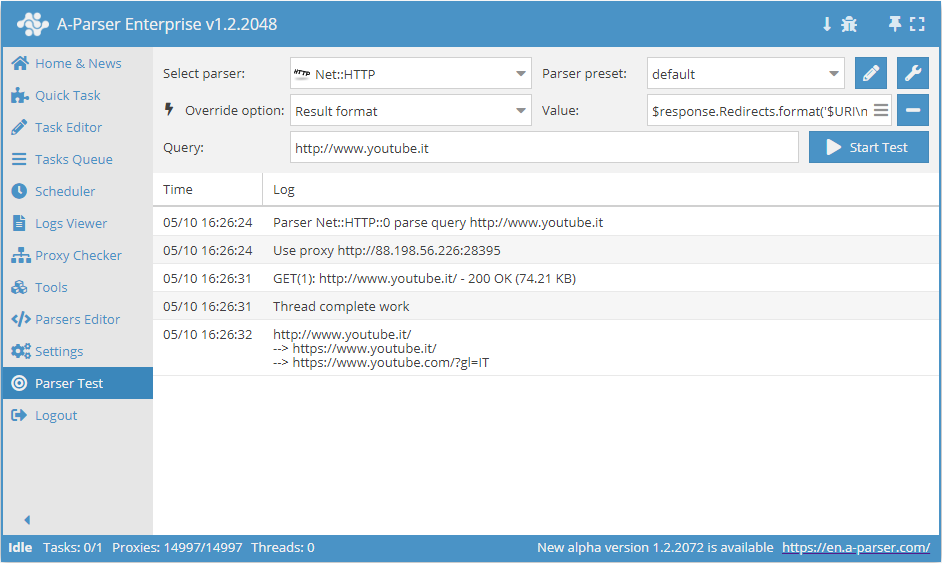
Output of all query redirects
The $response variable is available for this task, which allows obtaining any request variables, including all previous redirects.
Result format:
$response.Redirects.format('$URI\n--> ')$response.URI
Scraper output:
Output to JSON using the template engine for date recording
The example shows the output of  Net::Whois scraper results in JSON format.
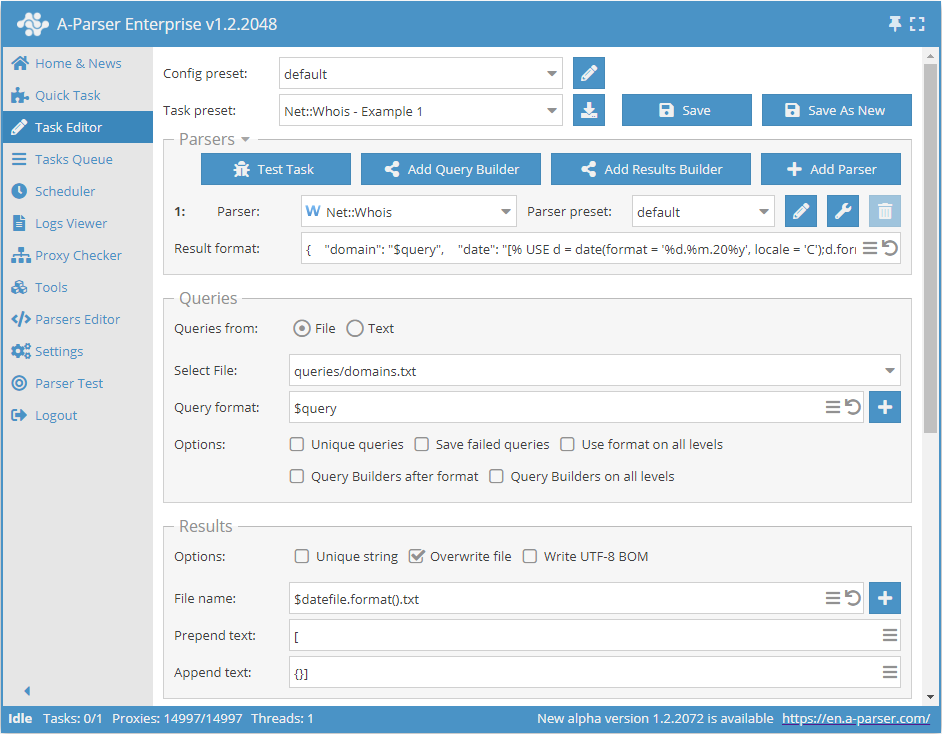
The result will include the domain being checked, the date at the time of the check, and the check result. As seen in the Result format, the date is obtained using the Template Toolkit template engine.
Result format:
{
  "domain": "$query",
  "date": "[% USE d = date(format = '%d.%m.20%y', locale = 'C');d.format() %]",
  "expire": "$p1.expire_date",
},
Result example:
[{
   "domain": "a-parser.com",
   "date": "05.05.2021",
   "expire": "25.02.2022",
},
{}]
Download example
How to import an example into A-Parser
eJxtVG1v2jAQ/ivWCUQrZaxM2pdM+0BRkTYx6ErRPgQ0efWFeXXszHYYVZT/3nMS
EtruQyTf23P33EtK8Nw9uluLDr2DOCkhr98QwxJ9HP/4baRj79jNkWe5QjaBCHJu
HdrgnZw5kUFgygvlYbeLgFDo6ebGZjyglVvNGNuCMBmXegsxvQd/C7RPW4hONu6x
sSRDtlnfMME+s6C8SGsYkkZDMR5m4w9Xw6dRxJR54FQUqWejy09i3LhdXLLhrkfF
Yy5tizvIJ+NG/tkkI6eKPugKXvMD3hsqOJUKe/WcpCXPkAyDEBmsXbqxP3py5UJI
L43mqmEdOtR3YqMl0aV4bcg3MJfo5tZkfa66HaeOJW17gCCKOvZ7EwNxypXDCByV
OucUKl5bpEfLvbGrPNRD+hKMniq1wAOq3q3Gvy6kEjTOaUpBX9rA/7us3mBUHb3z
VAe0/yzVALG3BYHUwvXqWx8kzMLsibj4RbSVzKQn2c1MocOuXJHyETHvWrYMLcuM
xS5LA9zmpvXNUQtyTPqJTfNWV1Y7eEXkxWBeKh+MTuV+RRSsFHjyLPQ93clKz0y4
gsBMF0rRYBze9Qsyde0ggtC18E3wrE4R2Lf3EoE3Rrmva9KF+7KSFvBjKDCjXp5n
bSFp69XmbnFugbOlqrMnJ/F9c3Ku3tLAkNZ3b2ixiFq16865+weU50cdlxWN64+7
bZwCdK2MgDrkaBYQT6pnHsF5pA==
Checking a site for presence in Google News by keyword
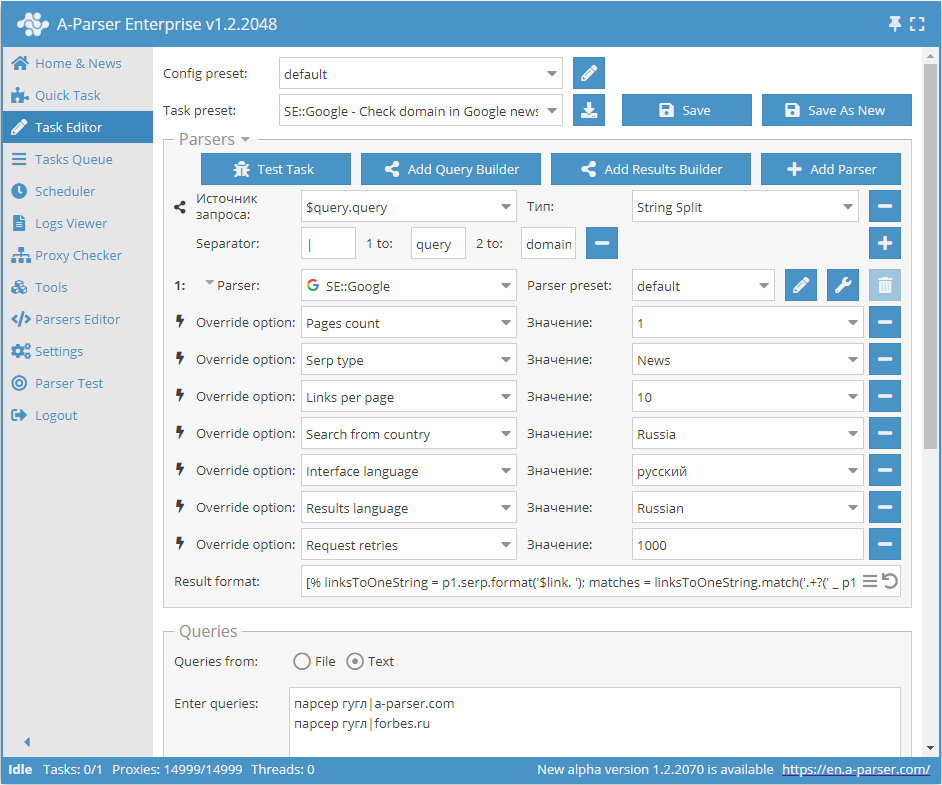
Result format:
[% linksToOneString = p1.serp.format('$link. ');
matches = linksToOneString.match('.+?(' _ p1.query.domain _ ').+?');

IF matches.0;
  p1.query.orig _';yes' _ "\n";
ELSE;
  p1.query.orig _';no' _ "\n";
END %]
Result example:
google scraper|a-parser.com;no
google scraper|forbes.ru;yes
Download example
How to import an example into A-Parser
eJylVVFv2jAQ/iuR1YpWo1EQ7UuqaaIMpk6stKV9AoRccqQeju3aCQVR/vvOTkjS
ruNlEoq4u+++O9+dz1uSUrM0txoMpIaE4y1R7j8JyagXhj+kjDl4Z173GeZLL5IJ
ZcLDX2EQ8Go8WNNEcSBNoqg2oC3PuOaOhggWNOMpaW5JulGA7HIFWrPIGlmEsqIx
zGUmEENWlGeIae3+DccwqkIS8WrIATRnYmkUumCQGn9wwCXmNfr7x0Psz3Wozg4m
omtQTkU8O4xXWq43GlLNwNQ8W0EQkN102iTYLKyr6UudUNu08fFEuNM+yKGAETqK
2PvqqZZvK+YvHO6kcWQxvtc4vZwIVMyfwSDqo6PvTCcN/8u3k4Y3sywvGeiNX8zB
DAnQ5lg+CTvzJmSCFuLM132viOQHqCi5pGYIbVxuwDTeufQGo95nQCE/4G6+T8Tx
lJTFGNEVPEgsxoK54dvXCKUbmtj6HUU0BWvdF+TUT9d28mgUsZRJQXleUTvKVZUf
BXvJx00i1maFbelrmaAqBUfgUt13Y0yOnEyQInO+d7kPCReUG2gSg6n2KSYSlZZU
Z2hgKWiaSj1UNh1Ub4kUHc4HsAJe+Tv6q4zxCK9dZ4FO14Xj55DhXxy78nT1UDiG
rxpzKFmcdDX8VXlFciBjPHj0hMfmLGEpyqbrrnBIAlQuAVRZshtbskRqKMMUzEV0
XEEKhJ35qmMdVaneHcMtKiMzPbfUeY2b+ztk3PSNFGe2IQZwKeUFIW8WJG1f9i75
IJPprmpyLQYq51IsWDwsruV+HDLxgGtzKLrSLj5bJpFxjk02cF8NW8cUTbVCdd6P
zl0XwlZyvyQxScnNz1F+cqUZ5nxhE0ywMfWoBeWccv54P6hbSDWgKEyy4Ly9cN/A
fs/zb8tpLnKN54S2E9rV//bTGz3L97o/lwneuf/iwvv2hBsAt55NO4VYYh9sN939
CUkvf0vssoO1oiKCKL8SO9ej4oEp36tt/ZkJtzucy9/mNgfZqlsI6rB9BofOPil/
AGn6WSM=
Outputting timestamp value in date format
Sometimes it happens that there is no regular date in the results, but there is a timestamp value as in the  Social::Instagram::Tag scraper. This value can be represented in date format using the Template-Toolkit template engine.
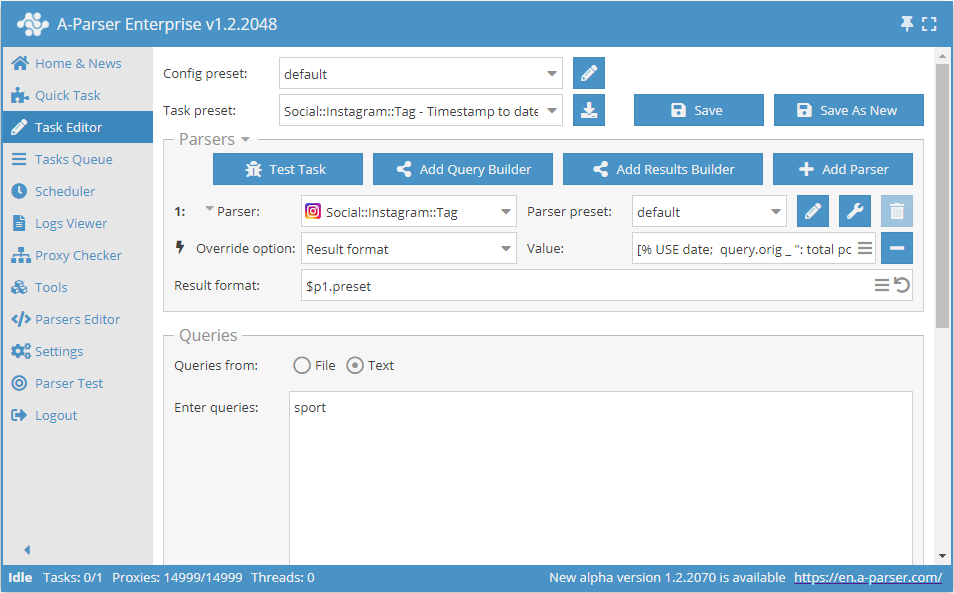
Result format:
[% USE date;

query.orig _ ": total posts - " _ postscount _ "\nPosts:\n";

FOREACH i IN posts;
    d = date.format(i.time, format => '%d.%m.20%y');
    i.link _ " - " _ d _ ":\n";
    i.text _ "\n";
END %]
Result example:
sport: total posts - 96500663
Posts:
https://www.instagram.com/p/COfJHshAkeD/ - 05.05.2021:
Quelques exemples de notre nouvelle campagne de communication personnalisable avec le nom des clubs 😀

Vous préférez quel visuel : 1, 2, 3, 4, 5 ? 🤔

#clubnormand #tennis #padel #beachtennis #tenniscourt #padelcourt #beachtenniscourt #lnt #LigueNormandieTennis #🎾 #sport #normandie #normandietourisme
https://www.instagram.com/p/COfJG7olavg/ - 05.05.2021:
💥 Sau màn lật đổ “Bà già” thành công, Nửa xanh thành Milan chính thức vượt qua Nửa đỏ về số lần lên đỉnh nước Ý nhiều nhất lịch sử.
-----------------------------
➖ Website: https://webthethao247.com/
➖ https://g.page/webthethao247?share
#wtt247 #webthethao247 #thethao #sport #bongda #SerieA #InterMilan #Juventus #ACMilan
https://www.instagram.com/p/COfJG1Hg7ax/ - 05.05.2021:
Which Skill was better 1 or 2? 🤔👇
Follow @ftb4ll for more 💥
Follow @ftb4ll for more 💥
Follow @ftb4ll for more 💥
________________________________________
Leave a Like 👍🏽
Subscribe for more 🔔
Leave your thoughts in the Comments  💬
________________________________________
❌Ignore the Tags ❌
#football #soccer #fussball #futbol #fifa #championsleague #bundesliga #ucl #footballmemes #goal #transfer #sports #penalty #ultimateteam #pacybits #fut #ultras #laliga #freekick #referee #sport #calcio #messi #ronaldo #skills #premierleague #foul #footballseason
https://www.instagram.com/p/COfIlXqhfAa/ - 05.05.2021:
Be Fuckin’ Ready 🤣🤣🤣

Get ready to fly!!!! 🏐🏐🏐🏐

Follow - @crackonkings

#beachball #nalin&kane #trance #music #90s #onyerhead #festival #party #afterparty #love #summer #uk #happy #sesh #crackon #football #sport #festivaloutfit #festivalfashion #sun #dj #dancing #club #festivalgirl #house #techno #rave
...
Download example
How to import an example into A-Parser
eJx1VNtuGjEQ/RXLCkoj0VVSqS9bpRKhoFJRNuXyxKLKxQa58dqO7aVBiH/vjPeW
pM0+7RzPzDlzsU80MP/g753wIniark/Uxn+a0oXZSqbSdKJ9YHvHijRdsj15T5ay
EAAVlgRDOAuCiCewlKB9apnzwmGm9RsJwImLHStVoP0TDUcrgMschHOSYwbJwd4Z
V7AASqIbPTBVotu6R1aLUeT8lOtcP5bCHRPj5J78JDlNQVBgiljjgwehOQU4GltT
6hB98lzfI5LCT05jlnE2Hw2GX4kkk1nljnDg5DYyJZWYdzIJUHifVCa5/Uwuezzp
FcmH697x8gpiCHwyUVI/RKpGAa/ENYSVVxBPraAIj2ZfSG9Dz5tNn1aF+3Fkgrov
7E1Sz6U9XLCDWBrslYydb2LAmrECu3WB6vG0qeAqCU+YgXEugzSaqYoBx9WxrrR8
jN3WBnyxxVL4sTMFQKi6Bo+NujW9iDaFFGWM/VHF0HTHlBd96kHqmIEQ/vpEBuFY
MC6zqAfwEzV6oNRUHITq3GL+u1IqDrs12EHQpA78v0v2T45zW95zKti6Pw40tFmi
dZd976K4mZo9VM5/Qd1KFjKA7Ye4T4BeA/gghG17NsOeFcaJlqbOXLPDTbNC44p3
IxvYDnpRxouxvAS3Ru/kPquvTeNZ6iVc50wPDV5HrEuXSsFYvJh36zHw9RjQ6AS+
Dh5GCiy9ua40GKP8t0Ul1ToJ6/cRBRbQyeesdcotU2o1nz4/wUAfjM30yLlX44uL
Qb01Drm2sLx7A2sFpZ037cvSPlWnt96X9HSGuf3291UAFonugEG3PAyFpjfnvwdy
t1Y=