Multiple scrapers in one task
Features
A-Parser supports query processing by several scrapers at once, which allows you to:
- Scrape results from several search engines simultaneously
- Analyze domains by multiple parameters
- Simultaneously collect keywords from suggestions of different search engines and Yandex.Wordstat
- Collect Whois and DNS information for domains
- Many other use cases
Adding a scraper
To add a new scraper, simply click the Add Parser button in the Task Editor:
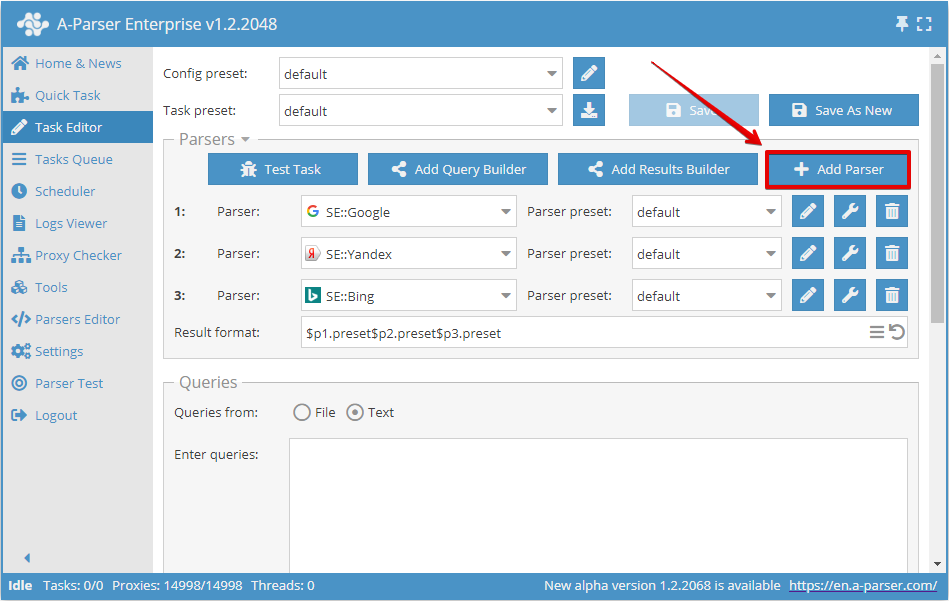
Each scraper is numbered; results for each scraper in the Results Builder and during result formatting are available via shortcuts:
$p1, $p2... - where the number indicates the scraper index.
In the general result format, results for each scraper are output sequentially by default, in the format specified in the settings of each scraper
Using multiple scrapers in one task increases the overall scraping speed because the number of simultaneous requests to a single scraper decreases, which accordingly reduces the frequency of proxy bans or captcha displays.
Each scraper scrapes the original query or its variation when using the Query Builder, and has its own query format in the settings; however, you cannot pass the results of a previous scraper as queries to another scraper (this feature is planned for the future).
Domain analysis example
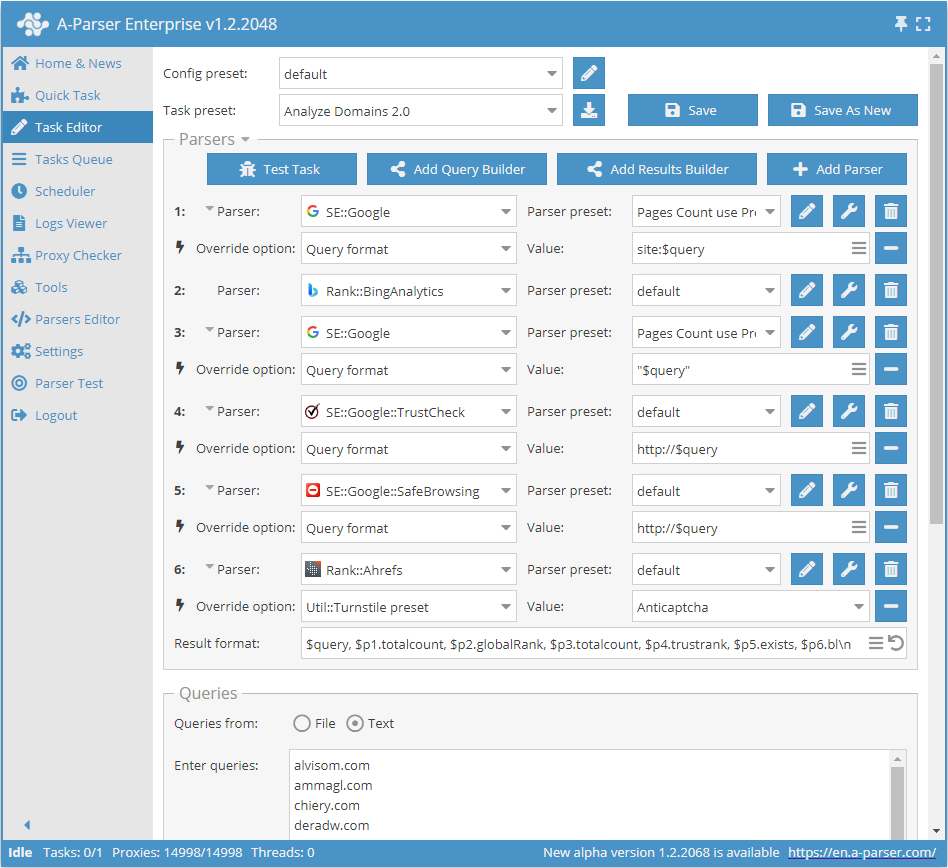
In this example, we use a list of domains that will soon expire (become available for registration again) as queries; we are interested in selecting domains with good parameters, so we used six different scrapers:
 SE::Google - query to Google in site:$query format, to find the number of indexed pages
- Rank::BingAnalytics - to find the global domain rank
- SE::Google - query to Google in "$query" format, to find the number of domain mentions
 SE::Google::TrustCheck - to find how much Google trusts the site
 SE::Google::SafeBrowsing - to find if the site is marked as unsafe
 Rank::Ahrefs - to find the number of backlinks leading to the domain via the Ahrefs service
In the result format, we output the original query (domain) and the results from each scraper in the order we need:
$query, $p1.totalcount, $p2.globalRank, $p3.totalcount, $p4.trustrank, $p5.exists, $p6.bl\n
Download example
How to import an example into A-Parser
eJy1Vd1v2zYQ/1cMIg/bYKhxuvZBb47X7ANZ7dnOU1wEjHSSWVMkS1J2PCP/++5I
yrLTFOiADXrR8b5+v7vj8cA8dxs3s+DAO5bfH5gJ/yxnY8Xl/m8Y/KIbLpQbXGWX
bMgMtw4smd6zxYc8/1XrWgIqZrwGN5joVvlB62Aws/ppz4YH5vcGMJzegrWiJFNR
ovylBbuvtG24x6Mtly1ZOeEhvwg69vxpeM/mXG3y/FqoOuDxonBoXkLFW+kZWfwP
KFYsQlixCKJPkedL2zo/WUOxOcHxbxOsvTf5mzenRE9zLHgF11bvHNL+b7PEco7X
Fir3XZHvvJAPy9Yqhz/wkKajzzFW2BJufLHmmOHTkKEBRnQ3EUyeKjkcXJhR5rXn
sqDmkHyV1VI/ckmYSH77Qv9z5qnWNqnfZfAknHf0/z57lKuVYsd0C76FpcZ0lQhz
0KFA6SNvCOhFyT2QNot1+uHHzD8RE16WwguN0xUx02z3PO6U+BKIKo22xEWAu7G6
wSMPIUAg2PG9T4RxNFkbfP+KPiyvuHQwZA6h3nAEUr7U4Oxb7rWdGsKD5wem1VjK
W9iC7M1C/OtWyBIv4rhCp9+T4+sm069iPB/pnabCzu8sYjhGCdL19M/eq9S3uu6K
IUUjPMouXDc8pf2wATDHmn0ks0ZbOKZJkVN23DsGFI1Z37Kx6Y/OaJy15fyw0KoS
9TSNbmfZqiUut6ma6MZIIF6qlRLb4mDej8fYpTaQ0AN86TwJKRDW8cowr7V0fywi
VGMFjt87AthgJU+zppAFl/JufnuqIUfntZmqD9a+aF8YDMblVjjdZIVuVoo3Da9l
/C/WAmsT/7EQvNzFf5Ca21KrJDnP7b7mUfrcqoIWaJSkrrGBLukaTphsFJCLg1Ik
lRO1Es6kZG6jpeEqSbu1qCVXZZT2equtXycojDh7qDXeBuwI7p/u9Ti+N4fT7Y3S
6+sbFacLrtsp3WuktK/QA2dmROWfxG00Rzahhm+HrJapSRi+SMM6Ck3D8GGXAxaf
/YRHazIFwl6Gdw+l3W6X1QEi8aLGiwZ0i0HeXw7jgpx3Wa8eju9nPyjIxEQiCFBV
BnOhIy4PyyOROAhgDUWOktRYO7wzUcII+Ll4h0aETfkl38AiHoZ4uNs80RjRzVQb
ZzAe8iWql3HN/QY83pkuXTe6iM125YrWFhCZ8yVIvg/RS9iKAgItt8GR7fweuVJQ
FhK4ag1VhJCEPsWbeuxWPrjo13u3u1PVZty51Gp0l9QL9ozr5rXHPz+g4hsP8le6
s4c0aM8eQDzBo89uFseSNkBKgKskFnb0/A8Hayy4
⏩ Video example of creating a preset with several scrapers
This video tutorial demonstrates how to create a preset for scraping niche domains by a keyword from Google search results and obtaining various parameters for those domains.
The tutorial covers:
- Scraping Google search results
- Outputting unique results as main domains
- Obtaining parameters such as:
- whether the domain is registered or not
- domain registration and expiration dates
- website language
- title and description
- website quality index
- Alexa Global Rank position
- country with the most traffic according to Alexa
- Alexa rank position in that country