 SE::Google::SafeBrowsing - Check domain in Google blacklist
Overview of the scraper
Google Safe Browsing scraper allows you to check a domain against the Google blacklist. Using the Google Safe Browsing scraper, you can check your own domain databases for presence in the Google blacklist. You can learn more about this status in Google Search Help.
A-Parser functionality allows you to save scraping settings for future use (presets), set scraping schedules, and much more.
Thanks to A-Parser multithreading, the request processing speed can reach 3800-4000 requests per minute.
Saving results is possible in any format and structure you need, thanks to the built-in powerful Template Toolkit which allows applying additional logic to results and outputting data in various formats, including JSON, SQL, and CSV.
Collected data
- Presence in the list of suspicious sites

Use Cases
- Checking a list of domains for being blacklisted by Google
- Monitoring your own domains for being blacklisted by Google
Queries
You must specify the URL of the target site as queries, for example:
http://a-parser.com/
http://www.yandex.ru/
http://facebook.com/
http://youtube.com/
http://perfect-soft.net/
Output results examples
A-Parser supports flexible result formatting thanks to the built-in Template Toolkit, which allows it to output results in arbitrary forms, as well as structured ones like CSV or JSON
Exporting the blacklist check list
Result format:
$query: $exists\n
Example result showing the URL and whether it is in the Google blacklist:
http://youtube.com/: 0
http://www.yandex.ru/: 0
http://a-parser.com/: 0
http://perfect-soft.net: 1
http://facebook.com/: 0
Outputting results to a CSV table
The built-in utility $tools.CSVLine allows creating correct tabular documents ready for import into Excel or Google Sheets.
General result format:
[% tools.CSVline(query.orig,p1.exists) %]
File name:
$datefile.format().csv
Initial text:
Site,Check result
Example result:
Site,Check result
http://youtube.com/,0
http://www.yandex.ru/,0
http://a-parser.com/,0
http://perfect-soft.net,1
http://facebook.com/,0
The Result format uses the Template Toolkit to output the query and the blacklist check.
In the result file name, simply change the file extension to csv.
To make the "Prepend text" option available in the Task Editor, you need to activate "More options". In "Prepend text", write the column names separated by commas and make the second line empty.
Saving in SQL format
Result format:
[% "INSERT INTO volumes VALUES('" _ query.query _ "', '" _ exists _ "')\n" %]
Example result:
INSERT INTO serp VALUES('http://www.yandex.ru/', '0')
INSERT INTO serp VALUES('http://a-parser.com/', '0')
INSERT INTO serp VALUES('http://perfect-soft.net', '1')
INSERT INTO serp VALUES('http://facebook.com/', '0')
INSERT INTO serp VALUES('http://youtube.com/', '0')
Dump results to JSON
Common result format:
[% IF notFirst;
  ",\n";
ELSE;
  notFirst = 1;
END;

obj = {};
obj.query = p1.query.orig;
obj.exists = p1.exists;

obj.json %]
Initial text:
[
Final text:
]
Example result:
[{"query":"http://www.yandex.ru/","exists":"0"},
{"query":"http://youtube.com/","exists":"0"},
{"query":"http://facebook.com/","exists":"0"},
{"query":"http://a-parser.com/","exists":"0"},
{"query":"http://perfect-soft.net","exists":"1"}]
To make the "Prepend text" and "Append text" options available in the Task Editor, you need to activate "More options".
Results processing
A-Parser allows processing results directly during scraping; in this section, we have provided the most popular cases for the SE::Google::SafeBrowsing scraper
Saving domains with validation value "1"
Add a filter and select the check value variable $exists - Listed as suspicious from the dropdown list. Select type: String equal. Next, in String, enter the value we need: 1. With such a filter, you can remove all results with an unwanted value.
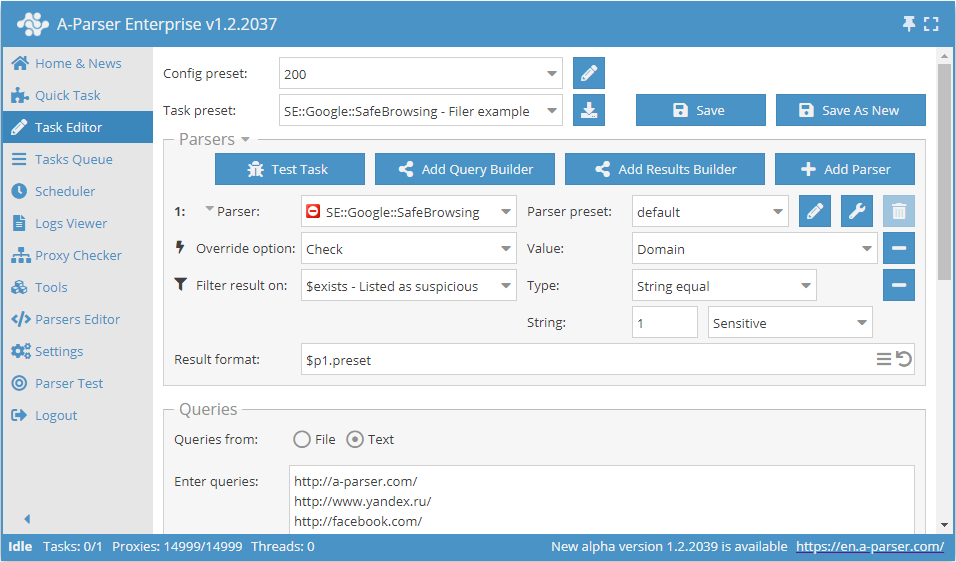
Download example
How to import an example into A-Parser
eJx1VEuP2jAQ/ivI4tBKEMqhl9wAlaoVXbYLe2I5mGTCujger+3wUJT/3rETEth2
b57H983bJXPcHuyjAQvOsnhTMh3eLGarb3H8HXEvIY5XPIOpwZMVat8b9uZCgunB
medaAhswzY0F4/GbD2HklkLGC+nYoGTuooFi4BGMEannECnJySskBxKOXBbenmLO
hWJVh8iEdGDIhdL0XDGDs7CU+6AxrWs/eCu4vGEa0xu1E6hIsKAsq7bbK4udo8m5
J+vrcdR0oDWu+BHWWMeGTu2b8MBzT95PuQNvjbJA9Olz5M6egaep8DG5rCP4FnVR
n5V4C8kpJF96GgF2bjAnlYNA4JWXa3Yb1g8yI4oiYH/XGBZnXFoYMEupzjklkr63
CGoNd2iWoQekLxmqiZQLOILs3AL/tBAypXlOMgL9aID/d1n+w1G15d2GojmfDOXQ
sgRpuvzVoVJc4N7PfEd1S5ELR7KdYaH8YL6Q8gCg2549+J7laKAN0zA30WmnNSi/
VN3IJrpT3ZVxN5Z7ZYIqE/tls6hXz0Kt6XCWaob+BHxdqpCSxmLhqVuPiW3G4IUu
wffgWQjhS78eCHOI0v5c1alqI2j9vvoEc+rkbdSGMuFSPj8tbi2sWykSXp3T8WjE
h/WpRgnmoxfVaE+nU3ThKoVzZIpOnfEEdoiHe+cLFq7Ywb1Sg8kgcUOLmYtUOJ6E
TmKPtKzUsGrb/hHtV1N+/FPEZUX78Mc+1hDfPA8gHU3BhhMeV38BeN+pvw==
See also: Results filters
Possible settings
| Parameter name | Default value | Description |
|---|---|---|
| Check | Domain | Choice of check type (Domain / Full link) |