Using Regular Expressions
General Information
In A-Parser, Perl/JavaScript-compatible regular expressions are used, which can be applied:
- When scraping arbitrary information from any websites
- In the Query Builder to extract or replace part of a query
- In the Results Builder to transform any results
- When using Filters
- In the RegEx Builder
- When checking the availability of the next page in the
 Net::HTTP scraper
Detailed documentation on regular expressions can be found in the following sources:
- Regular expressions on Wikipedia
- Universal encyclopedia of PCRE standard regular expressions
- Sharing regexes thread on the forum
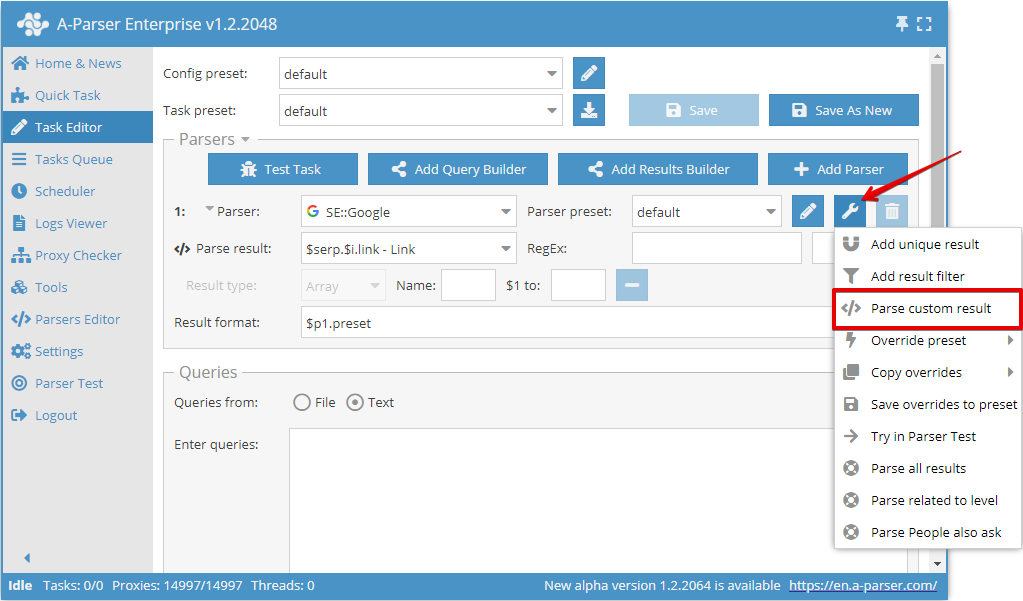
In A-Parser, it is possible to process any result using a regular expression; for this, the Parse custom results option is used:
Usage specifics and flags
- Regular expressions are written without
//delimiters - The following flags are supported:
- i - case-insensitive search
- s - dot matches all characters, including line breaks
- g - global search or replacement
Additionally, you can specify a flag directly in the regex, for example, searching for the word test in each line of the entire text (or page source code, depending on what the regex is applied to) using the m flag (multi line - symbols ^ and $ work as the beginning and end of the line, respectively):
(?m)^(.+?test.+?)$
Extraction of arbitrary information
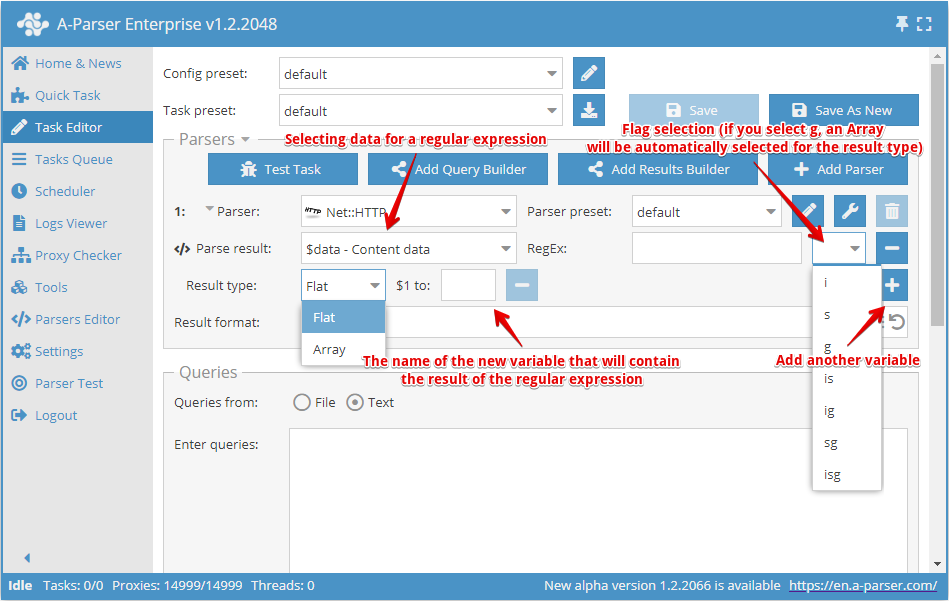
Using the Parse custom results option or the Results Builder, it is possible to use regular expressions to extract arbitrary information from scraping results, for example, from the HTML source code of pages or from already prepared results
- For Parse result, a result from the scraper is selected; this can be a simple result or an array
- The regular expression is specified without delimiters, followed by the option to specify a flag
- In Result type, specify the result type -
Flat(simple result) orArray(array). If an array is selected as the source result or the g flag of the regular expression is used, the result will always be saved in an array. In the Name field, specify the array name - Each capturing group of the regular expression can be saved as a separate element; the element name is entered in the corresponding field $1 to, $2 to... - where the number indicates the capturing group number
- In the RegEx field, you can use the template engine, which allows using the query as part of the regular expression
Created new results can be used in result formatting, in the results builder, in filtering and deduplication of results, or in the next Parse custom results option.
This option is similar to the results builder when using RegEx Match
Example of scraping image links from source HTML code
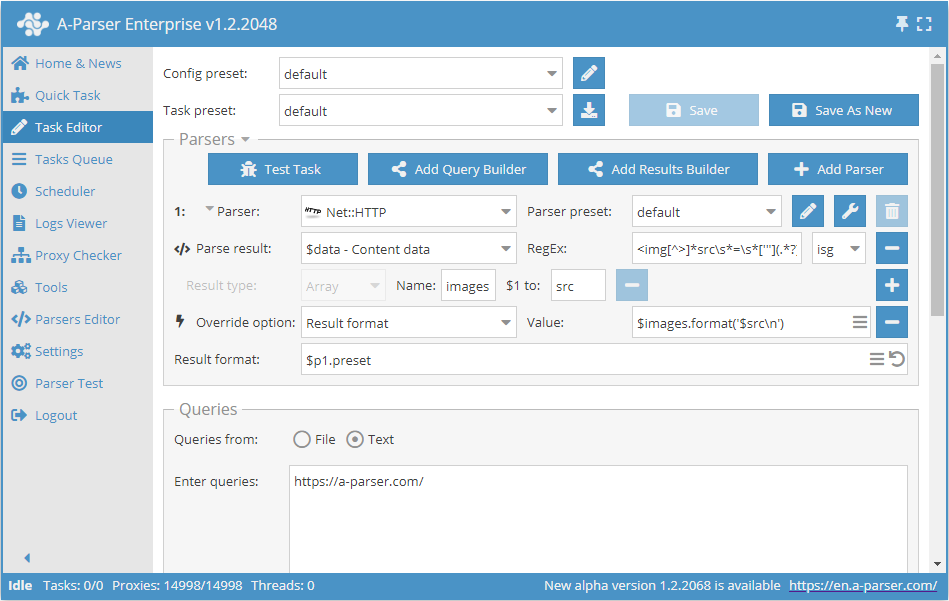
To solve this task, we use the Net::HTTP scraper to obtain the page source code.
Applying the regular expression with flags isg to $data (downloaded page), we save the result to the src elements of the images array.
In the result format, we specify to output all src elements separated by a line break.
As a result of scraping for the query http://a-parser.com/, we will get the following list in the result file:
/img/lang/en.png
/img/lang/ru.png
img/[email protected]
https://files.a-parser.com/img/site/tour_ru/V1qpV.png
https://files.a-parser.com/img/site/tour_ru/tour_ru_1_all_parsers_list.png
https://files.a-parser.com/img/site/tour_ru/tour_ru_1_quick_task.png
https://files.a-parser.com/img/site/tour_ru/tour_ru_2_task_editor_easy.png
https://files.a-parser.com/img/site/tour_ru/tour_ru_3_task_editor_analyze_domains.png
https://files.a-parser.com/img/site/tour_ru/tour_ru_4_task_editor_parse_emails.png
https://files.a-parser.com/img/site/tour_ru/tour_ru_5_queue_fast_google.png
https://files.a-parser.com/img/site/tour_ru/tour_ru_6_queue_spyserp.png
https://files.a-parser.com/img/site/tour_ru/tour_ru_7_javascript_parser.png
https://files.a-parser.com/img/site/tour_ru/tour_ru_8_scheduler.png
https://files.a-parser.com/img/site/tour_ru/tour_ru_9_settings.png
https://files.a-parser.com/img/site/tour_ru/tour_ru_10_proxies.png
https://files.a-parser.com/img/site/tour_ru/tour_ru_11_templates.png
https://files.a-parser.com/img/site/tour_ru/tour_ru_12_task_tester.png
https://files.a-parser.com/img/site/tour_ru/tour_ru_13_parser_test.png
https://files.a-parser.com/img/site/tour_ru/tour_ru_14_api.png
https://files.a-parser.com/img/site/tour_ru/tour_ru_15_resources.png
data/avatars/s/0/12.jpg?1507557563
data/avatars/s/0/12.jpg?1507557563
data/avatars/s/13/13392.jpg?1570706020
data/avatars/s/16/16560.jpg?1586782475
data/avatars/s/1/1240.jpg?1537376153
styles/uix/xenforo/avatars/avatar_s.png
data/avatars/s/0/371.jpg?1412969226
styles/uix/xenforo/avatars/avatar_s.png
//mc.yandex.ru/watch/26891250
Download example
How to import an example into A-Parser
eJxtVN9v2jAQ/l8sJArqYH3YS7Stokhomxgwmj5BJlnkyLz612yHFUX533d2Egfa
vYDv7rvvvvNdXBFH7bPdGLDgLEl2FdHhTBKSw5GW3JFboqmxYHx4R1bgkuRLmm7Q
HxEVcWcNmHMorVNiC7ZJNM0BuaijwS7gBc2PTBS7n5+zsTWH/d6OP/mf3XBPspvJ
+H4UTh08bZiZLSJh66LG0DM6w/+KigATtAAbkV4zwSIkq3uR6gTGsBwQxXK0j8oI
6kwn+kR56WGDhmvShG+GgyBWDkekzrJYYBGiHq7vJu3dxeAjPUGqfAnGoXcv0Gr1
DvBmwEe7MqOJe/EMNM+ZY0pS3lTwnfRVnyT7E0RKhVg8GgZ2YZRAl4NA4J3nTt2O
DIJNkKIMuT+aHJIcKbdwSyxKXVAUkr+OMAeGOmXW2utBf0WUnHG+hBPwHhb4H0rG
c1yV2RGTvraJ/4es33DUsb3LUjisvwY1RJZgPay/91m5WqqiuwzOBHNo27kqpR/M
e3Q+A+h4ZysPE8pALNMyt9Xxa9Ag/Wb0I5vp3nXVxtVYrp0HJY+sWLfb1iFLmeIn
t5ZzJTQH35csOcexWNj26zGz7Ri80Qt8nTwPJa4+VqcUt98eG6naMFy/D16gwJu8
rNpSHijnT9vlZYT0K4XGL+e0TaZT+q55BiYHJabEJzooFK4UtlVn8ZGIT0l18VQk
VY1j+m03Dcb35BHow8uxOAOS3NX/AFJvlP8=
Regex constructor
Starting from version 1.2.78, the Regex constructor was added.
It can be found on the Tools -> Regex Builder tab. You can also send the received page code directly from Test parsing. To do this, you need to enable debug mode and click the Go to RegEx Builder link.
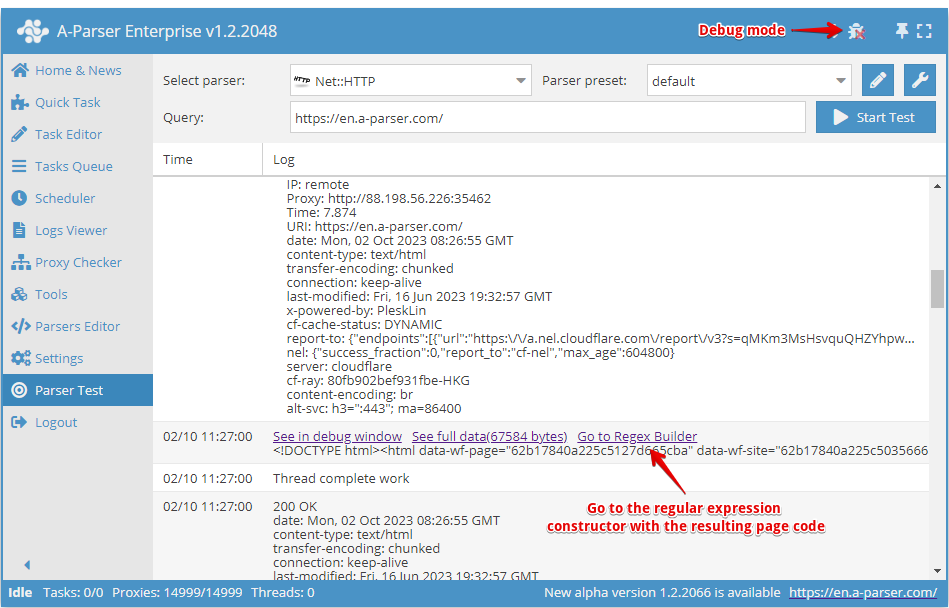
In the constructor, it is possible to choose the programming language in which the obtained regular expressions will be used.
To work with the constructor, you need to paste the source text into the field on the left (or it will be inserted automatically from Test parsing when clicking Go to Regex Builder). On the right, configure the parameters of the future regular expression.
To compose a simple Regular expression (for example, to get a title), it is enough to specify the necessary elements of the regular expression.
- In the Before group field, enter the characters that are located before the information we need
- In the After group field, enter the characters that are located after the required data
- In the Group starts with field, specify the characters with which the searched string should begin
- In the Group ends with field, specify the characters that should be at the end of the searched string
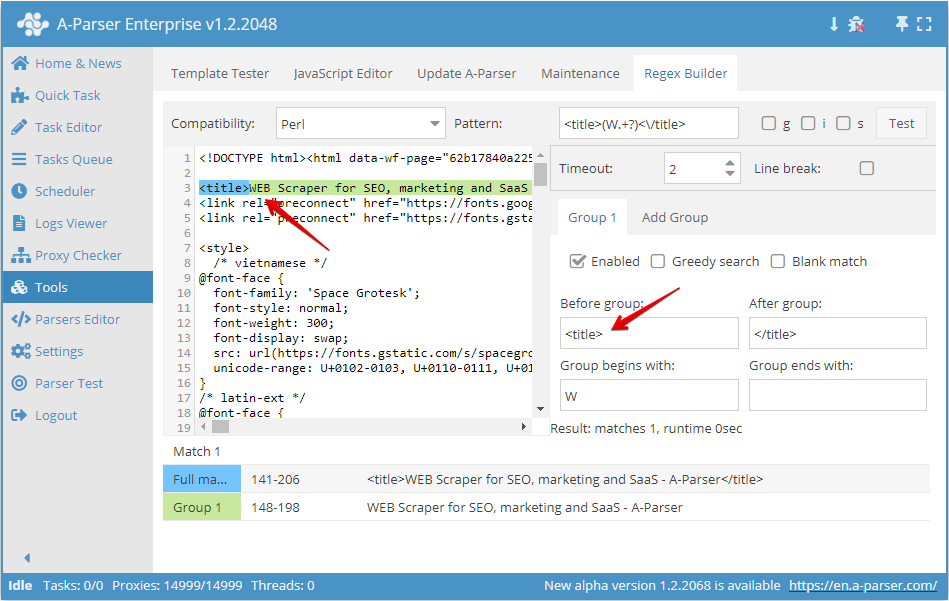
As you can see in the screenshot above, we are building a regular expression that will select the site title. We will place <title> before the group and </title> after the group, and also, for example, specify that the target string starts with the letter W.
For full testing of the obtained regular expression, it is possible to enable the necessary flags: g, s, and i.
You can also compose more complex regular expressions with 2 or more groups.
For example, let's try to compose a regular expression for collecting all links and anchors in a <li> list. For this, we need to enable the g flag and add one more search group, since the first group will contain the links and the second the anchors.
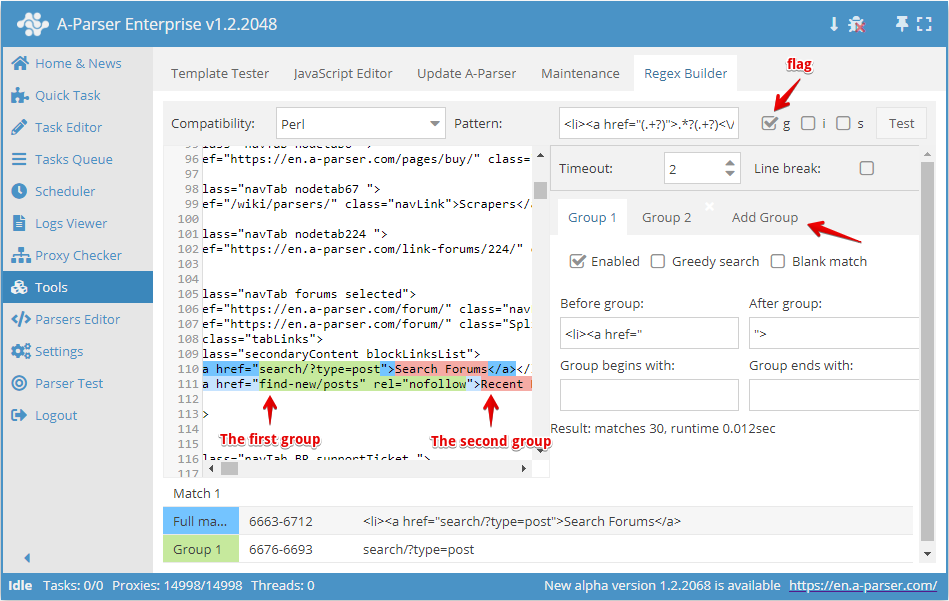
After setting the necessary parameters for both groups, we get the regular expression:
<li><a href="(.+?)">(.+?)<\/a
To check the regular expression, click the Test button:
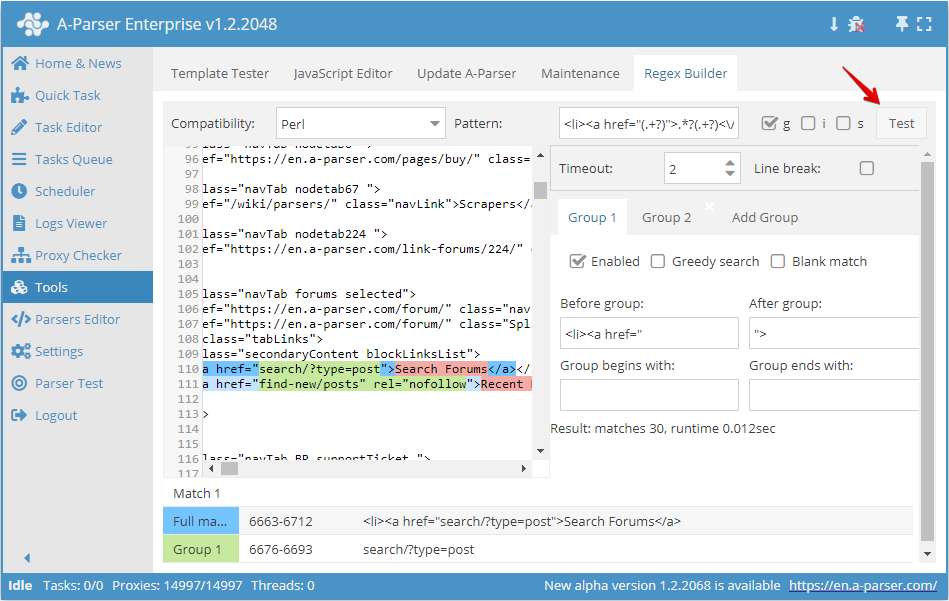
After executing the regular expression, the result of its work is displayed below: the full string and captured groups. When double-clicking on any element in the result table, the initial text scrolls to the location of this match.
Useful links
🔗 Regex for the little ones
My name is Vitaly Kotov and I know a little about regular expressions. Below I will explain the basics of working with them...
🔗 Regular expressions (regexp) — basics
Regular expressions are a mechanism for searching and replacing text. In a string, a file, multiple files...
🔗 ⏩Scraping an industrial equipment catalog
Example of using regexes in scraping an industrial equipment catalog
🔗 ⏩Scraping the Booking.com resource
Example of using regexes in scraping the Booking.com resource
🔗 ⏩Searching for contact pages
Example of using regexes in scraping contact pages