 SecurityTrails::Domain - Domeingegevens verzamelen van SecurityTrails
Overzicht van de scraper
SecurityTrails is 's werelds grootste opslagplaats voor historische DNS-gegevens. Gegevens voor beveiligingsbedrijven, onderzoekers en teams die DNS-records moeten detailleren, verdachte wijzigingen moeten vinden en toekomstige frauduleuze of criminele activiteiten moeten voorkomen.
De functionaliteit van A-Parser maakt het mogelijk om instellingen voor gegevensextractie op te slaan voor toekomstig gebruik (presets), schema's voor gegevensextractie in te stellen en nog veel meer. U kunt automatische query-vermenigvuldiging, subquery-substitutie uit bestanden, het doorlopen van alfanumerieke combinaties en lijsten gebruiken om het maximaal mogelijke aantal resultaten te verkrijgen.
Het opslaan van resultaten is mogelijk in de vorm en structuur die u nodig heeft, dankzij de ingebouwde krachtige sjabloon-engine Template Toolkit waarmee u extra logica op de resultaten kunt toepassen en gegevens in verschillende formaten kunt uitvoeren, waaronder JSON, SQL en CSV.
Verzamelde gegevens
- Alexa rank
- Apex domain
- Host
- Aantal subdomeinen
- A records
- TXT records
- AAAA records
- Ns records
- SOA records
- MX records
- CNAME records
- CNAME records pointed here
- MX records pointed here
- NS records pointed here
- Subdomeinen
- historical A
- historical AAAA
- historical MX
- historical NS
- historical SOA
- historical TXT
Mogelijkheden
Selectie van de sectie Mode waaruit gegevens worden verzameld:
Subdomain
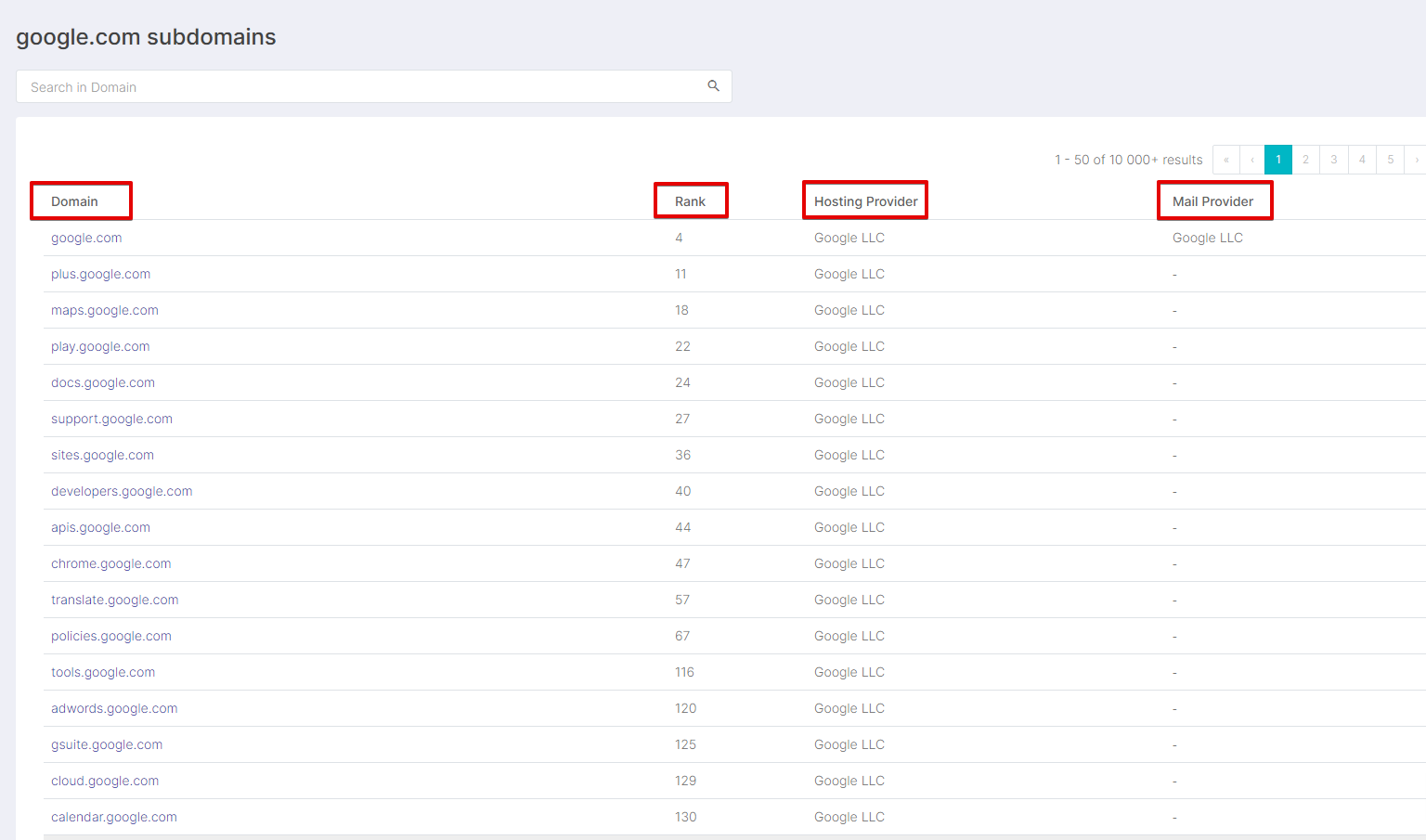
- https://securitytrails.com/list/apex_domain/google.com
History
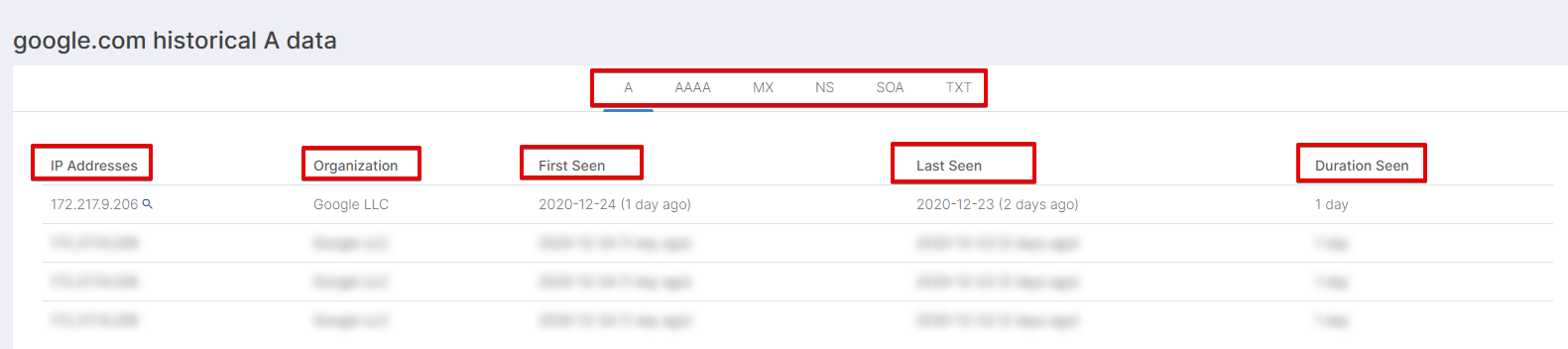
- https://securitytrails.com/domain/google.com/history/a
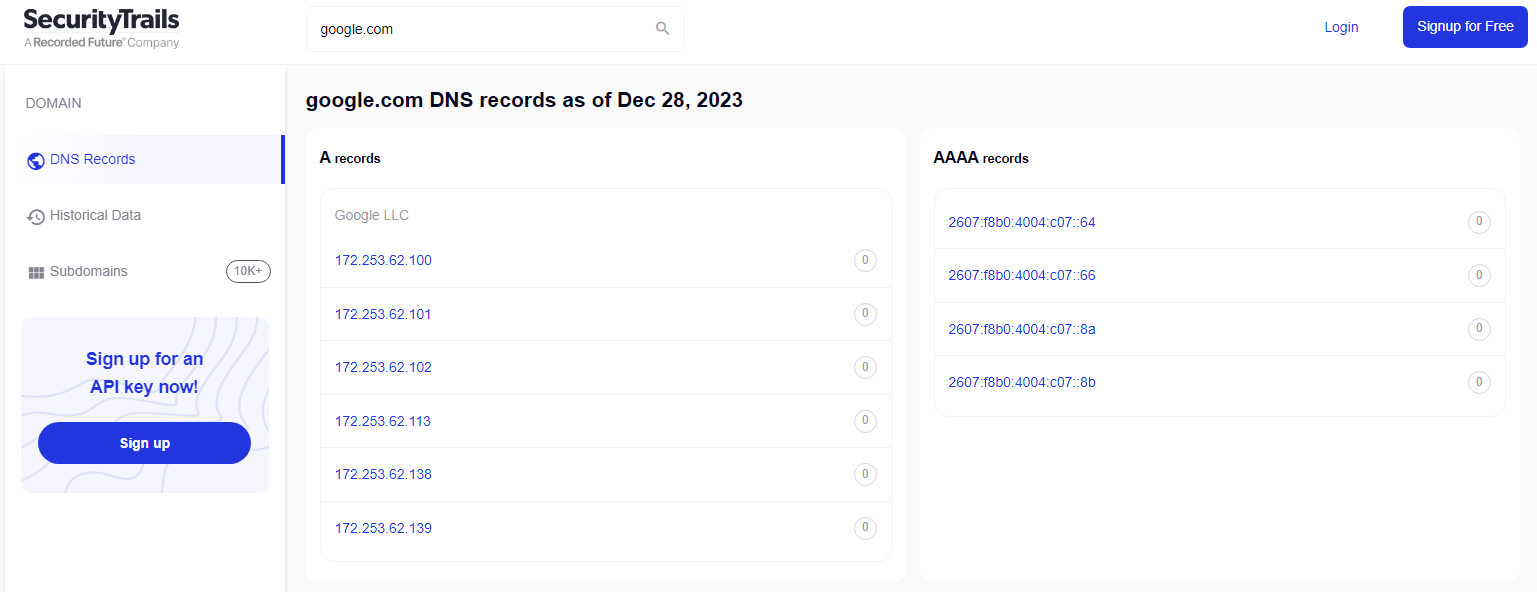
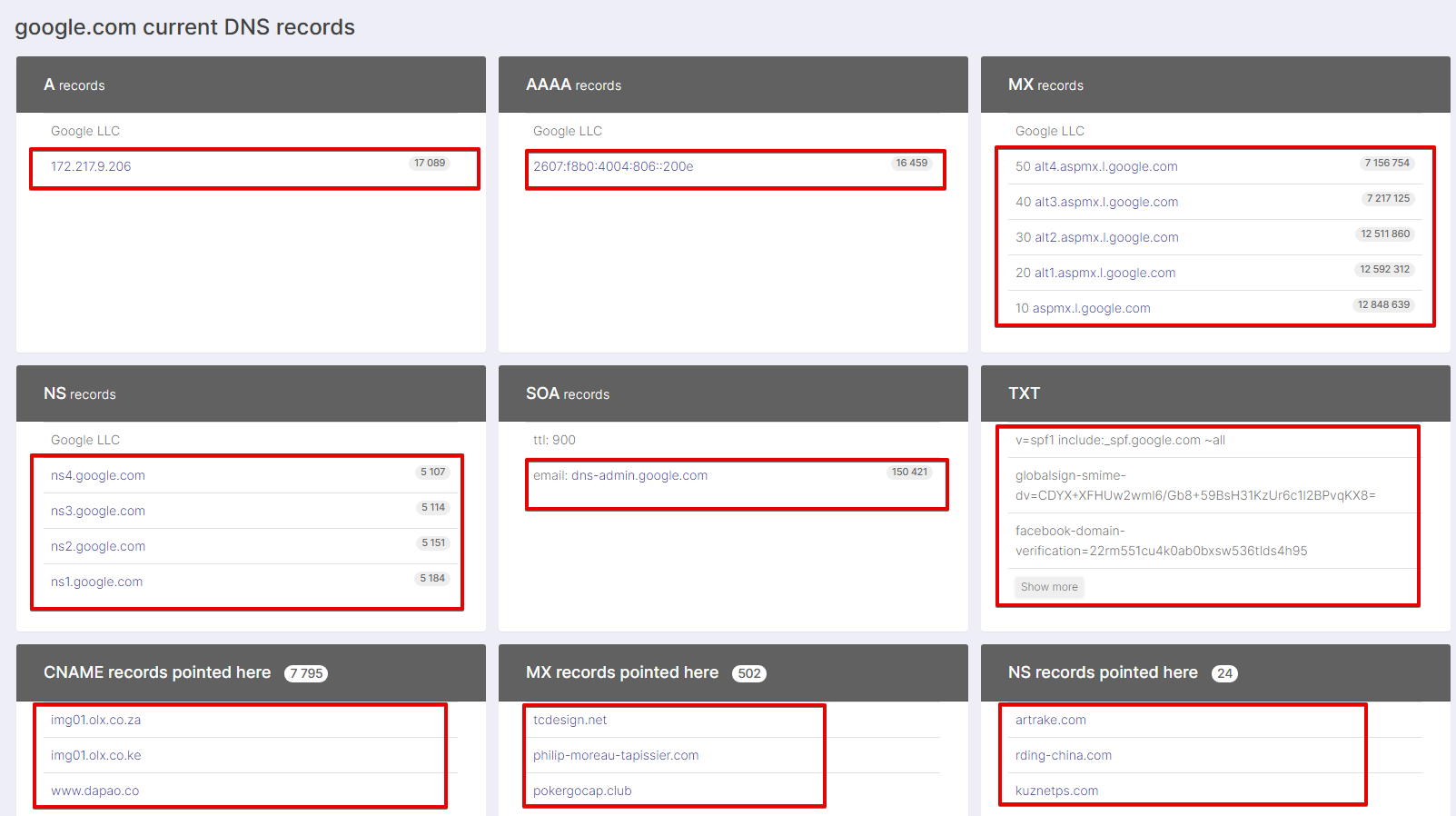
- https://securitytrails.com/domain/google.com/dns
Gebruiksscenario's
- Verkrijgen van subdomeinen en hun Rank
- Verzamelen van informatie over de hostingprovider van subdomeinen
- Verkrijgen van de e-mailprovider van subdomeinen
- Verzamelen van geschiedenis over A, AAAA, MX, NS, SOA, TXT
- Verzamelen van DNS-records van het domein A, AAAA, MX, NS, SOA, TXT
Query's
Als query's moeten domeinen worden opgegeven, bijvoorbeeld:
google.com
Opties voor resultaatweergave
A-Parser ondersteunt flexibele formattering van resultaten dankzij de ingebouwde sjabloon-engine Template Toolkit, waardoor resultaten in een vrije vorm kunnen worden weergegeven, evenals in een gestructureerde vorm zoals CSV of JSON.
Standaard uitvoer
Resultaatformaat:
$query - $alexa - $apex_domain
Voorbeeld van resultaat:
google.com - 1 - google.com
Resultaatweergave voor aRecords
Resultaatformaat:
$aRecords.format('$ip, $stats\n')
Voorbeeld van resultaat:
142.250.73.238, 18037
Resultaatweergave voor txt records
Resultaatformaat:
$txt.format('$record\n')
Voorbeeld van resultaat:
v=spf1 include:_spf.google.com ~all
google-site-verification=wD8N7i1JTNTkezJ49swvWW48f8_9xveREV4oB-0Hf5o
globalsign-smime-dv=CDYX+XFHUw2wml6/Gb8+59BsH31KzUr6c1l2BPvqKX8=
facebook-domain-verification=22rm551cu4k0ab0bxsw536tlds4h95
docusign=1b0a6754-49b1-4db5-8540-d2c12664b289
docusign=05958488-4752-4ef2-95eb-aa7ba8a3bd0e
apple-domain-verification=30afIBcvSuDV2PLX
Resultaatweergave voor aaaaRecords
Resultaatformaat:
$aaaaRecords.format('$ip, $stats\n')
Voorbeeld van resultaat:
2607:f8b0:4004:82a::200e, 17294
Resultaatweergave voor nsRecords
Resultaatformaat:
$nsRecords.format('$ns, $stats\n')
Voorbeeld van resultaat:
ns4.google.com, 5226
ns3.google.com, 5233
ns2.google.com, 5268
ns1.google.com, 5298
Resultaatweergave for mxRecords
Resultaatformaat:
$mxRecords.format('$p, $host, $stats\n')
Voorbeeld van resultaat:
aspmx.l.google.com, 13227170, 10
alt4.aspmx.l.google.com, 7665791, 50
alt3.aspmx.l.google.com, 7726366, 40
alt2.aspmx.l.google.com, 12894431, 30
alt1.aspmx.l.google.com, 12975832, 20
Resultaatweergave voor soaRecords
Resultaatformaat:
$soaRecords.format('$ttl, $email, $stats\n')
Voorbeeld van resultaat:
dns-admin.google.com, 147485, 900
Resultaatweergave voor soaRecords in CSV
Resultaatformaat:
[% FOREACH soaRecords;
    tools.CSVline(ttl, email, stats);
END %]
Voorbeeld van resultaat:
dns-admin.google.com,147485,900
Uitvoer van informatie over subdomeinen
Resultaatformaat:
$subdomains.format('$domain, $alexa, $hosting, $mail\n')
Voorbeeld van resultaat:
google.com, 4, Google LLC, Google LLC
plus.google.com, 11, Google LLC,
maps.google.com, 18, Google LLC,
play.google.com, 22, Google LLC,
docs.google.com, 24, Google LLC,
support.google.com, 27, Google LLC,
sites.google.com, 36, Google LLC,
developers.google.com, 40, Google LLC,
apis.google.com, 44, Google LLC,
chrome.google.com, 47, Google LLC,
translate.google.com, 57, Google LLC
Uitvoer van informatie over subdomeinen in een CSV-tabel
Resultaatformaat:
[% FOREACH subdomains;
    tools.CSVline(domain, alexa, hosting, mail);
END %]
Voorbeeld van resultaat:
google.com,4,"Google LLC","Google LLC"
plus.google.com,11,"Google LLC",
maps.google.com,18,"Google LLC",
play.google.com,22,"Google LLC",
docs.google.com,24,"Google LLC",
support.google.com,27,"Google LLC",
sites.google.com,36,"Google LLC",
developers.google.com,40,"Google LLC"
Dump van resultaten naar JSON
Algemeen resultaatformaat:
[% IF notFirst;
  ",\n";
ELSE;
  notFirst = 1;
END;

obj = {};
obj.query = query;
obj.subdomains = [];

FOREACH item IN p1.subdomains;
    obj.subdomains.push({
        domain = item.domain
        alexa = item.alexa
        hosting = item.hosting
        mail = item.mail
    });
END;

obj.json %]
Begintekst:
[
Eindtekst:
]
Voorbeeld van resultaat:
[{
    "query": "google.com",
    "subdomains": [
        {
            "domain": "google.com",
            "mail": "Google LLC",
            "hosting": "Google LLC",
            "alexa": 4
        },
        {
            "domain": "plus.google.com",
            "mail": "",
            "hosting": "Google LLC",
            "alexa": 11
        },
        {
            "domain": "maps.google.com",
            "mail": "",
            "hosting": "Google LLC",
            "alexa": 18
        }
    ]
}]
Om de opties "Prepend text" en "Append text" beschikbaar te maken in de Taakeditor, moet u "More options" activeren.
Mogelijke instellingen
| Parameter | Standaardwaarde | Beschrijving |
|---|---|---|
| Mode | History | Sectie van de website waaruit gegevens worden verzameld |