 Cloudflare::Radar - Cloudflare Radar スクレイパー
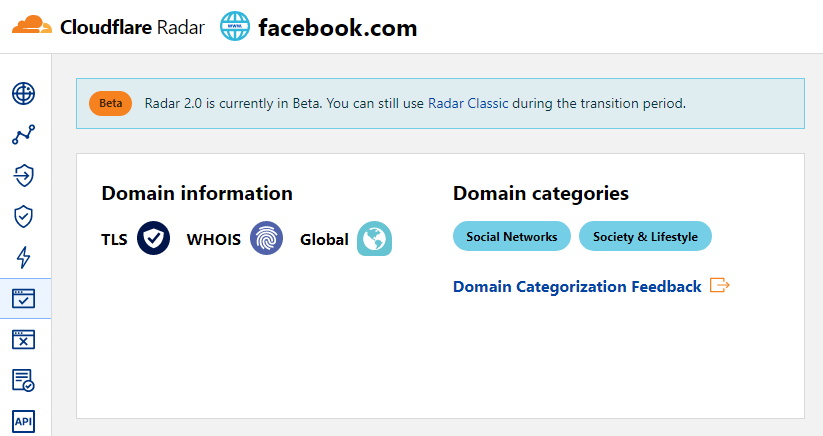
スクレイパーの概要
Cloudflare Radarスクレイパーを使用すると、ドメイン名からサイトのカテゴリを素早く特定できます。
組み込みの強力なテンプレートエンジン Template Toolkit により、結果にロジックを適用したり、JSON、SQL、CSVを含む様々な形式でデータを出力したりするなど、必要な形式や構造で結果を保存することが可能です。
収集データ
データは radar.cloudflare.com サービスから収集されます:
- サイトのカテゴリ
ユースケース
- ドメインがどのサイトカテゴリに属しているかの特定
クエリ
クエリとしてドメインのリストを指定する必要があります。例:
a-parser.com
yandex.ru
google.com
vk.com
facebook.com
youtube.com
結果の出力例
A-Parserは、組み込みのテンプレートエンジン Template Toolkit により柔軟な結果のフォーマットをサポートしており、任意の形式や、CSVやJSONなどの構造化された形式で結果を出力できます。
デフォルト出力
結果のフォーマット:
$query: $categories.format('$name, ')\n
カテゴリとその説明が表示される結果の例:
a-parser.com: Business, Business & Economy,
yandex.ru: News & Media, Entertainment,
vk.com: Social Networks, Society & Lifestyle,
youtube.com: Video Streaming, Entertainment,
facebook.com: Social Networks, Society & Lifestyle,
google.com: Search Engines, Technology,
CSVテーブルへの出力
結果のフォーマット:
[% FOREACH categories;
    tools.CSVline(name, desc);
END %]
結果の例:
Business,"Sites related to business."
"Business & Economy","Sites that are related to business, economy, finance, education, science and technology."
"Social Networks","Sites that facilitate interaction and networking between people."
"Society & Lifestyle","Sites related to lifestyle that are not included in other categories like fashion, food & drink etc."
"Social Networks","Sites that facilitate interaction and networking between people."
"Society & Lifestyle","Sites related to lifestyle that are not included in other categories like fashion, food & drink etc."
"Search Engines","Sites that allow users to search for content using keywords."
Technology,"Sites related to technology that are not included in the science category."
"News & Media","Sites related to news and media."
Entertainment,"Sites related to entertainment that are not includeded in other categories like Comic books, Audio streaming, Video streaming etc."
JSONへの結果ダンプ
共通結果形式:
[% IF notFirst;
  ",\n";
ELSE;
  notFirst = 1;
END;

obj = {};
obj.query = query;
obj.categories = [];

FOREACH item IN p1.categories;
    obj.categories.push({
        name = item.name
        desc = item.desc
    });
END;

obj.json %]
開始テキスト:
[
終了テキスト:
]
結果の例:
[{"query":"yandex.ru","categories":[{"desc":"Sites related to news and media.","name":"News & Media"},{"desc":"Sites related to entertainment that are not includeded in other categories like Comic books, Audio streaming, Video streaming etc.","name":"Entertainment"}]},{"query":"google.com","categories":[{"desc":"Sites that allow users to search for content using keywords.","name":"Search Engines"},{"desc":"Sites related to technology that are not included in the science category.","name":"Technology"}]},{"query":"a-parser.com","categories":[{"desc":"Sites related to business.","name":"Business"},{"desc":"Sites that are related to business, economy, finance, education, science and technology.","name":"Business & Economy"}]}]
ヒント
「Prepend text」と「Append text」のオプションをタスクエディタで利用するには、「More options」を有効にする必要があります。
設定可能な項目
| パラメータ名 | デフォルト値 | 説明 |
|---|---|---|
| Bypass CloudFlare with Chrome Max Pages | 10 | Chrome経由でCFをバイパスする際の最大ページ数 |
| Bypass CloudFlare with Chrome Headless | ☑ | このオプションが有効な場合、Chrome経由でCFをバイパスする際にブラウザは表示されません |
| Use session | ☑ | 良好なセッションを保存し、エラーを減らしてさらに高速なスクレイピングを可能にします。 |