 Shop::Yandex::Market - Yandex.Market 商品爬虫工具
爬虫工具概览
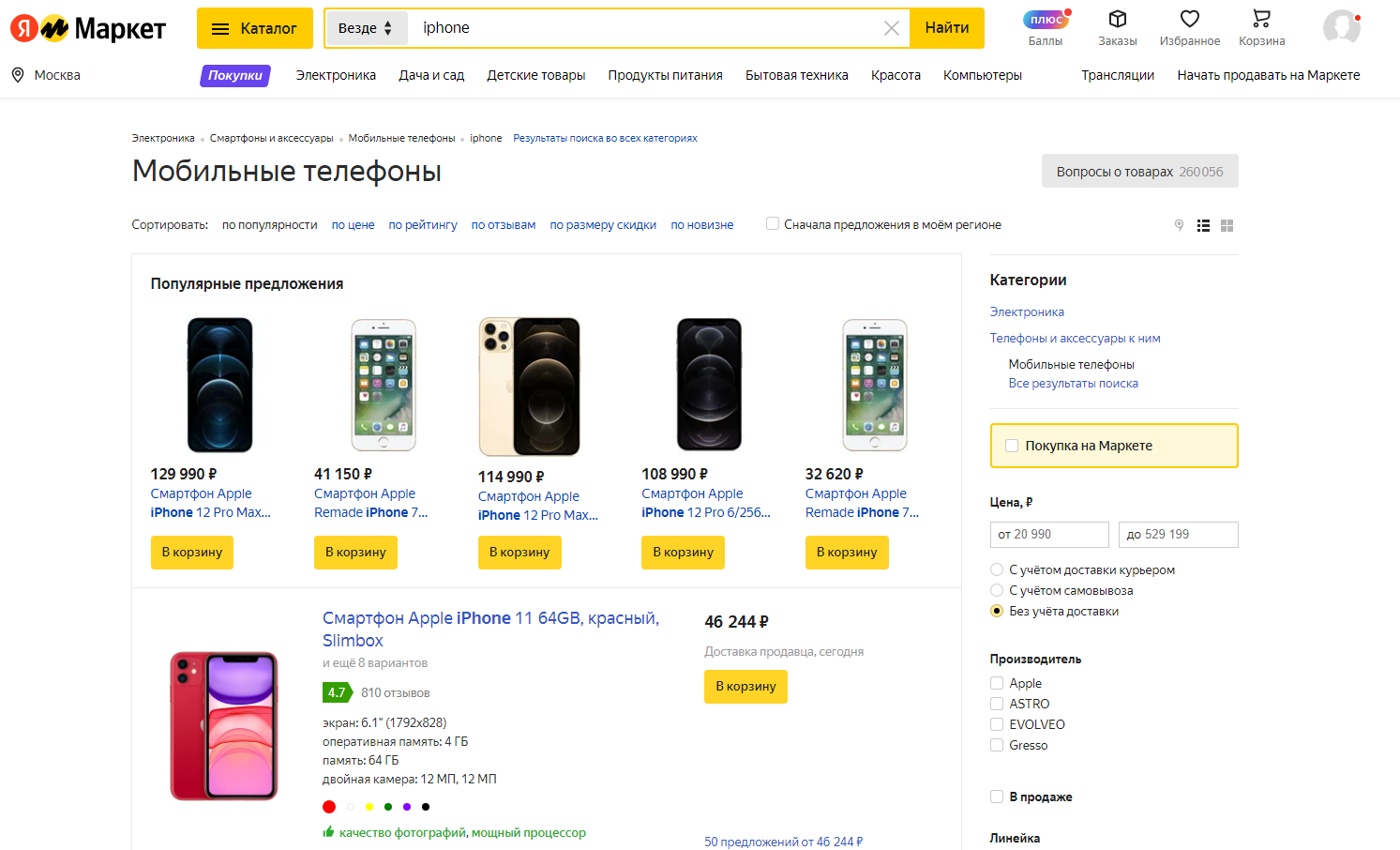
使用 Yandex Market 商品爬虫工具,您可以从商品详情页获取数据、采集商品链接库、监控商品价格动态、卖家数量变化、采集评分等级和评论数量,以及采集商品图片。
A-Parser 的功能允许保存数据抓取设置以便后续使用(预设),设置数据抓取计划等等。您可以使用自动查询扩展、从文件中替换子查询、遍历数字字母组合和列表,以获取尽可能多的结果。
采集的数据
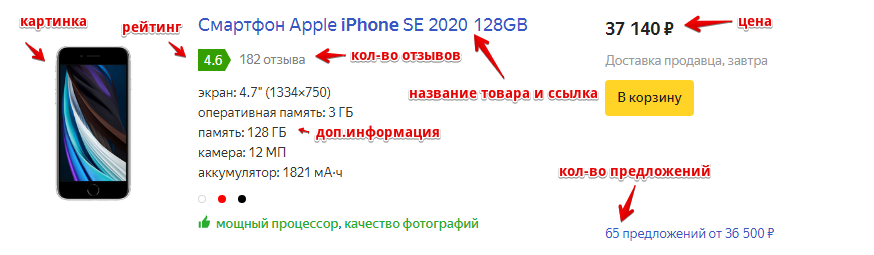
- 商品名称
- 商品链接
- 商品图片
- 价格和历史价格
- 币种
- 评分和评论数
- 卖家数量
- 附加信息
- 商品购买量和浏览量
应用场景
- 采集商品链接
- 评估商品受欢迎程度
- 监控价格动态和商品流行趋势
查询
在查询中需要指定关键词或分类链接,例如:
xiaomi redmi note
https://market.yandex.ru/catalog/54726/list?local-offers-first=0&deliveryincluded=0&onstock=1
结果输出示例
A-Parser 凭借内置的 Template Toolkit 模板引擎支持灵活的结果格式化,这使其能够以任意形式输出结果,包括 CSV 或 JSON 等结构化格式。
输出商品名称、最低价格和评分
结果格式:
$products.format('名称: $title, 最低价格: $amountfrom, 评分: $rating\n')
结果示例:
名称: 智能手机 Apple iPhone 11 64GB, 最低价格: 46 244,  评分: 4.7
名称: 智能手机 Apple iPhone Xr 64GB, 最低价格: 36 990,  评分: 4.7
名称: 智能手机 Apple iPhone 12 64GB, 最低价格: 60 840,  评分: 4.7
名称: 智能手机 Apple iPhone SE 2020 64GB, 最低价格: 33 490,  评分: 4.5
名称: 智能手机 Apple iPhone Xr 128GB, 最低价格: 43 450,  评分: 4.7
输出到 CSV 表格
结果格式:
[% FOREACH item IN products;
    tools.CSVline(item.cardlink, item.title, item.amountfrom, item.rating, item.commentscount);
END %]
结果示例:
https://market.yandex.ru/product--smartfon-apple-iphone-11-64gb/558171067?nid=54726&show-uid=16206538929466307988916001&context=search&text=iphone&sku=101106266737,"智能手机 Apple iPhone 11 64GB","46 244",4.7,810
https://market.yandex.ru/product--smartfon-apple-iphone-xr-64gb/175941311?nid=54726&show-uid=16206538929466307988916002&context=search&text=iphone&sku=101103379766,"智能手机 Apple iPhone Xr 64GB","36 990",4.7,624
https://market.yandex.ru/product--smartfon-apple-iphone-12-64gb/722976004?nid=54726&show-uid=16206538929466307988916003&context=search&text=iphone&sku=101077347750,"智能手机 Apple iPhone 12 64GB","60 840",4.7,103
https://market.yandex.ru/product--smartfon-apple-iphone-se-2020-64gb/661221015?nid=54726&show-uid=16206538929466307988916004&context=search&text=iphone&sku=101099789863,"智能手机 Apple iPhone SE 2020 64GB","33 490",4.5,358
页眉文本:
商品链接, 商品名称, 最低价格, 评分, 评论数量
提示
在 结果格式 中应用 Template Toolkit 模板引擎 以在 FOREACH 循环中输出 $products 数组。
要在任务编辑器中使用“Prepend text”选项,需要激活“More options”。 在“Prepend text”中填入以逗号分隔的列名,并将第二行留空。
保存为 SQL 格式
结果格式:
[% FOREACH item IN products;
    "INSERT INTO products VALUES('" _ item.title _ "', '"; item.cardlink _ "', '"; item.amountfrom _ "', '"; item.rating _ "')\n";
END %]
结果示例:
INSERT INTO products VALUES('智能手机 Apple iPhone 11 64GB', 'https://market.yandex.ru/product--smartfon-apple-iphone-11-64gb/558171067?nid=54726&show-uid=16206542754162480526716001&context=search&text=iphone&sku=101106266737', '46 244', '4.7')
INSERT INTO products VALUES('智能手机 Apple iPhone Xr 64GB', 'https://market.yandex.ru/product--smartfon-apple-iphone-xr-64gb/175941311?nid=54726&show-uid=16206542754162480526716002&context=search&text=iphone&sku=101103379766', '36 990', '4.7')
INSERT INTO products VALUES('智能手机 Apple iPhone 12 64GB', 'https://market.yandex.ru/product--smartfon-apple-iphone-12-64gb/722976004?nid=54726&show-uid=16206542754162480526716003&context=search&text=iphone&sku=101077347750', '60 840', '4.7')
INSERT INTO products VALUES('智能手机 Apple iPhone SE 2020 64GB', 'https://market.yandex.ru/product--smartfon-apple-iphone-se-2020-64gb/661221015?nid=54726&show-uid=16206542754162480526716004&context=search&text=iphone&sku=101099789863', '33 490', '4.5')
将结果转储为 JSON
通用结果格式:
[% IF notFirst;
  ",\n";
ELSE;
  notFirst = 1;
END;

obj = {};
obj.query = query;
obj.items = [];

FOREACH item IN p1.products;
    obj.items.push({
        link = item.cardlink
        name = item.title
        amountfrom = item.amountfrom
    });
END;

obj.json %]
起始文本:
[
结束文本:
]
结果示例:
[
    {
        "query": "https://market.yandex.ru/catalog--mobilnye-telefony/54726/list?text=iphone&hid=91491&was_redir=1&rt=10&cpa=0&onstock=0&local-offers-first=0",
        "items": [
            {
                "link": "https://market.yandex.ru/product--smartfon-apple-iphone-11-64gb/558171067?nid=54726&show-uid=16206548825917275667016001&context=search&text=iphone&sku=101106266737",
                "amountfrom": "46 244",
                "name": "智能手机 Apple iPhone 11 64GB"
            },
            {
                "link": "https://market.yandex.ru/product--smartfon-apple-iphone-xr-64gb/175941311?nid=54726&show-uid=16206548825917275667016002&context=search&text=iphone&sku=101103379766",
                "amountfrom": "36 990",
                "name": "智能手机 Apple iPhone Xr 64GB"
            },
            {
                "link": "https://market.yandex.ru/product--smartfon-apple-iphone-12-64gb/722976004?nid=54726&show-uid=16206548825917275667016003&context=search&text=iphone&sku=101077347750",
                "amountfrom": "60 840",
                "name": "智能手机 Apple iPhone 12 64GB"
            },
            {
                "link": "https://market.yandex.ru/product--smartfon-apple-iphone-se-2020-64gb/661221015?nid=54726&show-uid=16206548825917275667016004&context=search&text=iphone&sku=101099789863",
                "amountfrom": "33 490",
                "name": "智能手机 Apple iPhone SE 2020 64GB"
            }
        ]
    }
]
提示
要在任务编辑器中使用“Prepend text”和“Append text”选项,需要激活“More options”。
可用设置
| 参数 | 默认值 | 描述 |
|---|---|---|
| AntiGate preset | default | 选择预设  Util::AntiGate,更多设置详情见此 Util::AntiGate,更多设置详情见此 |
| AntiGate preset for old captcha | default | 类似于 AntiGate preset,但仅用于普通(旧式,单张图片形式)验证码。如果此处未选择预设,则此类验证码将使用在 AntiGate preset 中选择的预设。 |
| Auto-Solve ClickCaptcha | ☐ | 自动识别点击验证码(不使用外部服务) |
| Experimental img captcha max count | 1 | 每次尝试的最大重复图片验证码数量 |
| Pages count | 5 | 要抓取的页数 |
| Search region ID | Not set | 用于数据抓取的地区 |