 Rank::Ahrefs - Ahrefs Backlink Checker Scraper
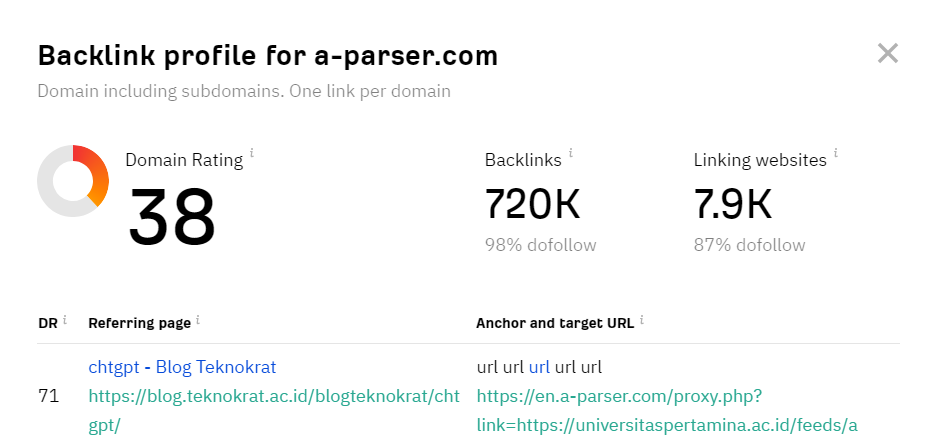
Ahrefs scraper overview
The Ahrefs scraper is one of the most popular tools for SEO specialists for tasks such as backlink research, traffic estimation, and competitor search query analysis. Thanks to it, you can get complete information about domain rating, the number of backlinks, and referring domains. Using the Ahrefs scraper, you can perform bulk multithreaded competitor analysis.
Saving results is possible in the form and structure you need, thanks to the built-in powerful Template Toolkit which allows you to apply additional logic to the results and output data in various formats, including JSON, SQL, and CSV.
Collected data
Data is collected from the page https://ahrefs.com/ru/backlink-checker.
To work, you need to connect the  Util::Turnstile recaptcha solving service.
- Domain and URL rating
- Number of backlinks and the percentage of dofollow backlinks
- Number of referring domains and the percentage of dofollow among them
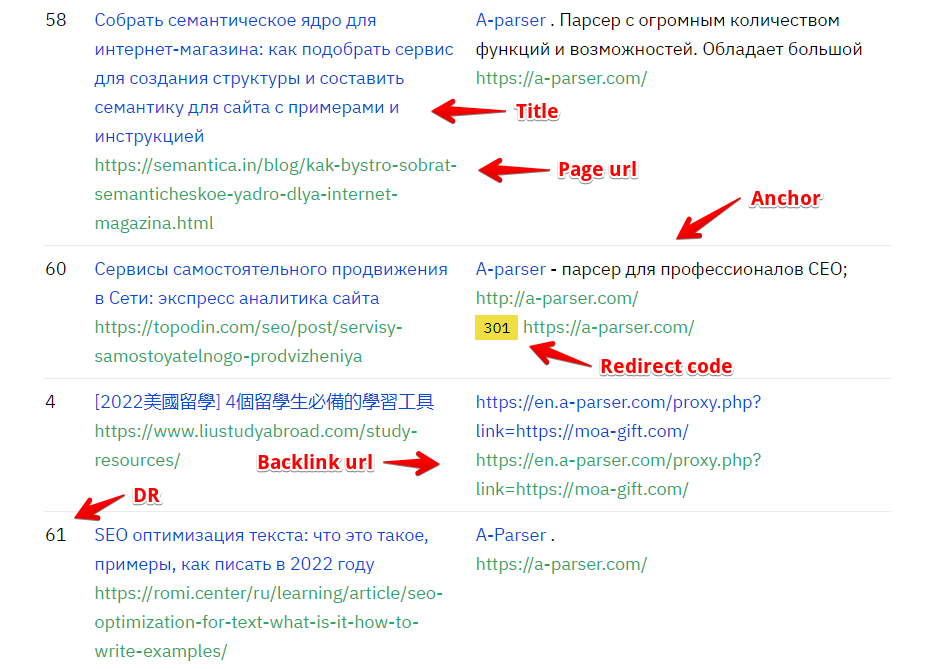
- List of TOP100 backlinks
- Page link
- Page title
- DR
- Url
- Link anchor
- Redirect code
- Array of JSON objects with redirect data
Use cases
- Obtaining summary information about a domain
- Estimating the number of backlinks
- Domain evaluation
Queries
You should specify a list of domains as queries, for example:
a-parser.com
yandex.ru
google.com
vk.com
facebook.com
youtube.com
Output results examples
A-Parser supports flexible result formatting thanks to the built-in Template Toolkit, which allows it to output results in any form, as well as in structured formats like CSV or JSON.
Default output
Result format:
$query: $rating\n
The result will display the domain and its rating:
a-parser.com: 39
yandex.ru: 94
vk.com: 95
facebook.com: 100
youtube.com: 99
google.com: 98
Outputting main domain data
Result format:
$query, $url_rating $rating, $bl, $bl_dofollow, $domains, $domains_dofollow
Example result:
a-parser.com, 21, 35, 218702, 96, 569, 53
Outputting backlink data to a CSV table
Result format:
[% FOREACH backlink IN backlinks;
   tools.CSVline(backlink.page,backlink.title,backlink.dr,backlink.url,backlink.anchor,backlink.redirect_code);
END %]
Example result:
https://in-scale.ru/blog/rassylka-telegram/,"Telegram mailing - how to do it in bulk + 9 best programs",54,https://a-parser.com/?ref=21341,A-Parser,0
https://coba.tools/seo/monitoring-pozitsiy,"Online services and programs for checking website positions in search",31,https://a-parser.com/,"Go to website",0
https://pricecontrol.biz/9-prepyatstvij-pri-parsinge-sajtov/,"Competitor price scraping 2023 from Price Control",16,https://a-parser.com/,https://a-parser.com/,0
https://www.unisender.com/ru/blog/idei/parsery-dlya-sbora-dannyh-s-sajtov/,"How to quickly collect data from websites",76,https://a-parser.com/,A-Parser,0
https://www.ashmanov.com/education/articles/poiskovye-podskazki-yandeks/,"Website promotion with search suggestions in Yandex",68,https://a-parser.com/parsers/,A-parser,0
https://www.calltouch.ru/blog/luchshie-servisy-i-boty-dlya-parsinga-telegram/,"Telegram channel scraper: overview of the best services and bots for collecting and processing data from chats, posts, and users | Calltouch.Blog",72,https://a-parser.com/parsers/,A-Parser,0
https://seonomad.net/ru/seotools/tekst-ru,"Text Ru. Description, reviews, analogs",24,https://a-parser.com/?ref=29414,A-parser,0
In the Result format, the Template Toolkit is used to output elements of the $backlinks array in a FOREACH loop.
Dump results to JSON
Common result format:
[% IF notFirst;
  ",\n";
ELSE;
  notFirst = 1;
END;

obj = {};
obj.items = [];

FOREACH item IN p1.backlinks;
    obj.items.push({
        dr = item.dr
        page = item.page
        title = item.title
    });
END;

obj.json %]
Initial text:
[
Final text:
]
Example result:
[{
    "items": [
        {
            "page": "https://forum.compucoin.org/showthread.php?tid=612923&pid=1137290",
            "dr": 34,
            "title": "GypeKetarert wsvpz"
        },
        {
            "page": "https://forum.compucoin.org/showthread.php?tid=612923&pid=1137290",
            "dr": 34,
            "title": "GypeKetarert wsvpz"
        },
        {
            "page": "https://forum.compucoin.org/showthread.php?tid=612923&pid=1137290",
            "dr": 34,
            "title": "GypeKetarert wsvpz"
        },
        {
            "page": "https://forum.compucoin.org/showthread.php?tid=612923&pid=1137290",
            "dr": 34,
            "title": "GypeKetarert wsvpz"
        }
    ]
}]
To make the "Prepend text" and "Append text" options available in the Task Editor, you need to activate "More options".
Possible settings
| Parameter | Default value | Description |
|---|---|---|
| Util::Turnstile preset | default | Selection of Util::Turnstile preset for captcha bypass. You must first configure the Util::Turnstile scraper - specify your access key and other parameters, then select the created preset here. |
| Turnstile pass proxy | ☐ | Passing proxy to the solving service. Read more. |
| Do not search for sitekey | ☑ | Experimental option, disables sitekey captcha search, which in turn speeds up task launch. In case of problems like an invalid sitekey, this option should be disabled. |
| Mode | *.domain/* | Selection of domain type, only two types: URL and *.domain/*. URL - exact address, *.domain/* - domain with all its subdomains |
| Additional headers | Ability to specify custom request headers |