 SE::Google::Position - Check website rankings by keywords in Google
Scraper Overview
A scraper for checking website rankings by keywords in Google. Thanks to the SE::Google::Position scraper, you can automatically check rankings in Google search results using your own domain databases. Using the SE::Google::Position scraper, you can easily, accurately, and quickly determine a website's position in Google.
A-Parser functionality allows you to save SE::Google::Position scraper settings for future use (presets), set scraping schedules, and much more. You can use automatic substitution of subqueries from files.
Saving results is possible in any form and structure you need, thanks to the built-in powerful Template Toolkit template engine, which allows applying additional logic to results and outputting data in various formats, including JSON, SQL, and CSV.
Scraper Use Cases
🔗 Working with API, Part 1
Example of working with the A-Parser API using the SE::Google::Position scraper
🔗 Another example of SE::Google::Position operation
Determining site position by keyword, as seen in a user's browser
🔗 Overview of representation options
The article examines 4 different result representation options: text, CSV, JSON, HTML
🔗 How to find positions by keywords?
Getting to know the SE::Google::Position scraper and checking the ranking of a keyword in search results
Collected Data
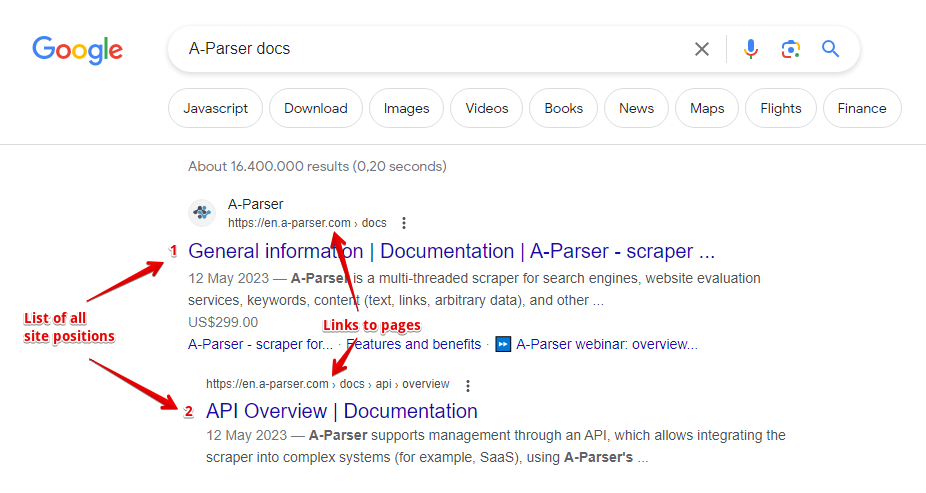
- Website position and page link
- List of all website positions and page links
Capabilities
- All features of the
 SE::Google scraper
 - Automatically stops scraping when the website is found
- Supports subdomain search
- Ability to compare the target position by domain, by main domain, and by full link
- Collecting positions for multiple domains at once
Use Cases
- Checking rankings of your own websites and competitors' websites
- Searching for high-traffic website pages
Queries
As queries, you must specify the target website domain and the search query separated by a space, for example:
lenta.ru news
lenta.ru news online
If you need to check one website against a list of queries, you can specify the domain in the Query format:
lenta.ru $query
Or just use a list of keywords. To use multiple domains in a query at once, specify a comma-separated list of domains followed by a space and the keyword, for example:
lenta.ru,ria.ru,notfound.com news feed
Results will be recorded in the $bulkcheck array.
The Stop when found option is also supported; scraping will end if positions are found for all domains.
Query Substitutions
You can use built-in macros for automatic substitution of subqueries from files; for example, if we want to check websites/a website against a keyword database, we specify several main queries:
ria.ru
lenta.ru
rbc.ru
yandex.ru
In the query format, specify the substitution macro for additional words from the Keywords.txt file; this method allows checking a database of websites against a database of keys and obtaining positions as a result:
$query {subs:Keywords}
This macro will create as many additional queries as there are in the file for each original search query, which in total will give [number of original queries (domains)] x [number of queries in the Keywords file] = [total number of queries] as a result of the macro's operation.
Output Results Examples
A-Parser supports flexible result formatting thanks to the built-in Template Toolkit template engine, allowing it to output results in arbitrary forms, as well as structured ones like CSV or JSON.
Exporting Position List
Obtaining the result in the form:
target domain - key: position number in search results
Result format:
$domain - $key: $position\n
Result example:
lenta.ru - news: 6
lenta.ru - news online: 7
...
Simultaneous Check of Multiple Domains (Batch Check)
Information for all domains during simultaneous checking of multiple domains is contained in the $bulkcheck array.
Result format:
$bulkcheck.format('$domain - $position\n')
Query example:
lenta.ru,ria.ru,notfound.com news feed
Result example:
lenta.ru - 1
ria.ru - 3
notfound.com - 0
Links + Anchors + Snippets with Position Output
Outputting Links, Anchors, and Snippets to a CSV Table
Saving Related Keywords
Keyword Competition
Checking Link Indexing
Saving in SQL Format
Dumping Results to JSON
Results Processing
A-Parser allows processing results directly during scraping; in this section, we have provided the most popular cases for the SE::Google::Position scraper.
Saving Domains Without Zero Positions
The example of simultaneous checking of multiple domains (see above in output results variants) was taken as a basis and a filter was added.
Add a filter and select the position output variable in the dropdown list. Select type: >. Next, enter 0 in Number. With such a filter, you can remove all results with a zero position.
Download example
How to import the example into A-Parser
eJx1VNtu2zAM/RVDCNAVyIJ2a4HBDwPSYhk2ZE3Wy1OaB9WiUy2y6Ely2szwv4+S
ZTvtuhdZJA/Jw4tcM8ft1i4NWHCWpaualeHOUnbzJU2/Im4UpOkSrXQSdfI+ueE7
SAQWXGqbPEn3iJVLePIHDCZlhLExK7mxYHzI1ZuRCCIg55VybFwzty+BUuIOjJEC
yCgFyTmagjsiFGBsx1XlYaOHSm2zR8i2kxbx7mjUMiJ+o47E/b0+OmbN/6NXFkqD
z/shcs6VhQOPXCoHhuyRQrpifWpfY1fLehyht63f5wOyJ3THMsBSZkFb1qzXXUQ7
C/x9TeXpJLa+N/pW32LLAwb1jKQrXoROCO7AW7tGHE/cs4/AhQjUuGoz+EEMWe+0
/B3IaSQsXY0EOzNYkMpBCOCV+47dio2C7Autgu/P1ie2bMwsUZ1xIiJeWyS1hTs0
i9AD0tcM9VSpOexADbAQ/6KSStDWTHNy+hYd34Ys/onR9OUdpqKZPxni0EcJ0sXi
x+AlcI4bqlw8UN1KFtKRbC+x0i7ObwtQ9j278j0r0ECfJkaO2ekxlaD9gg0jm5aD
6kUZL8byUpmhzuVmEZe2Q1b6ll7sQl9iUSrwdelKqbFf5uthPaY2jsELA8HXzpch
hS+9e4rMISr7/aalWhpJ63fuCRbUycOsMWTGlbq7nh9a2LBSJCjQjk9MNTYyfDS6
nDorJhkWyX11cvZRhBPC+WG4n52Gs9V8aqEP4Twf3KLZzyijl7BB2lHqU7Puf0D9
r61++zeU1g2twC+7bOG+Xx5MOmq8DYjT5i+HCcki
See also: Results Filters
Link Deduplication
Link Deduplication by Domain
Extracting Domains
Removing Tags from Anchors and Snippets
Filtering Links by Inclusion
Possible Settings
Supports all settings of the SE::Google scraper, as well as additionally:
| Parameter Name | Default Value | Description |
|---|---|---|
| Pages count | 1 | Number of search result pages to scrape (from 1 to 10) |
| Result format | $domain - $key: $position\n | Default result output format |
| Stop when found | ☑ | Stop scraping if the domain is found, will not proceed to subsequent pages |
| Match type | Exact domain | Ability to compare the target position by domain, by main domain, and by full link (Exact domain / Top level domain / Exact url) |