 Rank::Archive - Scraper for first and last website caching dates in the Web Archive
Scraper overview
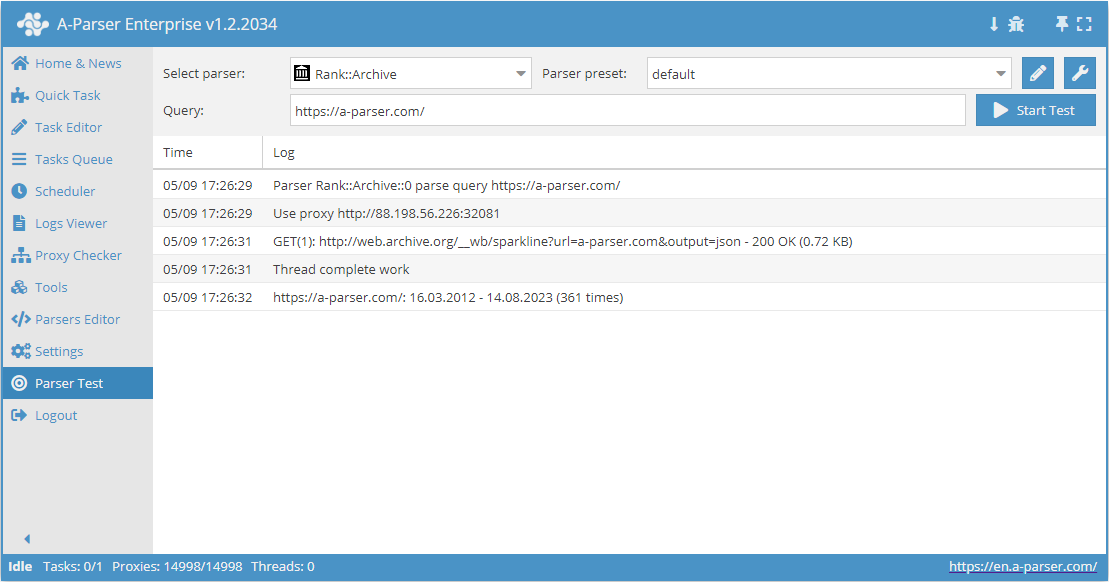
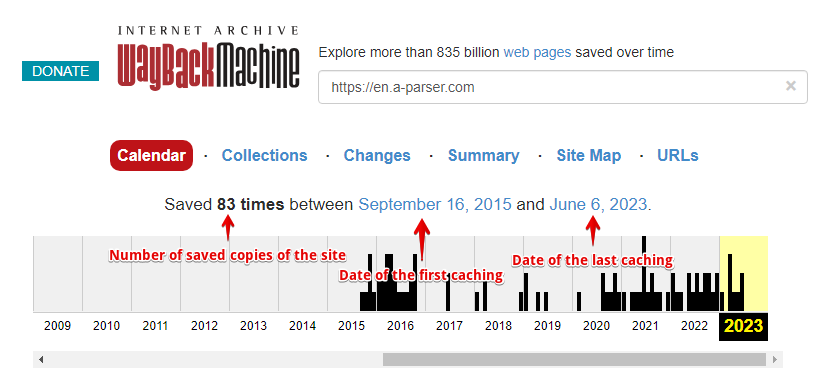
 Rank::Archive – Web Archive scraper, determines the date of the first and last caching, as well as the number of saved copies of the site.
A-Parser functionality allows you to save scraping settings for the Rank::Archive scraper for future use (presets), set scraping schedules, and much more.
Saving results is possible in any format and structure you need, thanks to the built-in powerful Template Toolkit which allows applying additional logic to results and outputting data in various formats, including JSON, SQL, and CSV.
Collected data
- First crawl date
- Last crawl date
- Number of saved site snapshots
Use cases
- Checking for the presence of a site copy in the web archive, as well as the indexing dates of the first and last copies
- Domain evaluation: a large number of site copies in the web archive may indicate high site traffic
Queries
You should specify the domain of the site you are looking for as queries, for example:
a-parser.com
www.yahoo.com
google.com
vk.com
youtube.com
Output results examples
A-Parser supports flexible result formatting thanks to the built-in Template Toolkit, which allows it to output results in any form, as well as in structured formats like CSV or JSON
Default output
Result format:
$query: $first - $last ($times times)\n
The result displays the site, the indexing dates of the first and last copies, and the number of saved site snapshots:
vk.com: 11.05.2000 - 21.05.2014(8965 times)
youtube.com: 28.04.2005 - 21.05.2014(28150 times)
a-parser.com: 16.03.2012 - 17.05.2014(56 times)
google.com: 11.11.1998 - 21.05.2014(34575 times)
www.yahoo.com: 17.10.1996 - 20.05.2014(28537 times)
Saving in SQL format
Result format:
[% "INSERT INTO archive VALUES('" _ query _ "', '" _ first _ "', '" _ last _ "', '" _ times _ "')\n" %]
Result example:
INSERT INTO archive VALUES('http://a-parser.com/', '16.03.2012', '16.01.2021', '290')
INSERT INTO archive VALUES('http://yandex.ru/', '06.12.1998', '25.03.2021', '141421')
INSERT INTO archive VALUES('http://facebook.com/', '12.12.1998', '25.03.2021', '4877156')
INSERT INTO archive VALUES('http://vk.com/', '11.05.2000', '25.03.2021', '172132')
INSERT INTO archive VALUES('http://google.com/', '11.11.1998', '25.03.2021', '5969502')
INSERT INTO archive VALUES('http://youtube.com/', '28.04.2005', '25.03.2021', '2309673')
Dump results to JSON
Common result format:
[% IF notFirst;
  ",\n";
ELSE;
  notFirst = 1;
END;

obj = {};
obj.query = query;
obj.first = p1.first;
obj.last = p1.last;
obj.times = p1.times;

obj.json %]
Initial text:
[
Final text:
]
Result example:
[
    {"first":"12.12.1998","query":"http://facebook.com/","last":"25.03.2021","times":4877156},
    {"first":"06.12.1998","query":"http://yandex.ru/","last":"25.03.2021","times":141421},
    {"first":"16.03.2012","query":"http://a-parser.com/","last":"16.01.2021","times":290},
    {"first":"28.04.2005","query":"http://youtube.com/","last":"25.03.2021","times":2309673},
    {"first":"11.11.1998","query":"http://google.com/","last":"25.03.2021","times":5969502},
    {"first":"11.05.2000","query":"http://vk.com/","last":"25.03.2021","times":172132}
]
To make the "Prepend text" and "Append text" options available in the Task Editor, you need to activate "More options".