 SE::Google::KeywordPlanner::SearchVolume - estimation of search volume and other keyword metrics from Google Keyword Planner
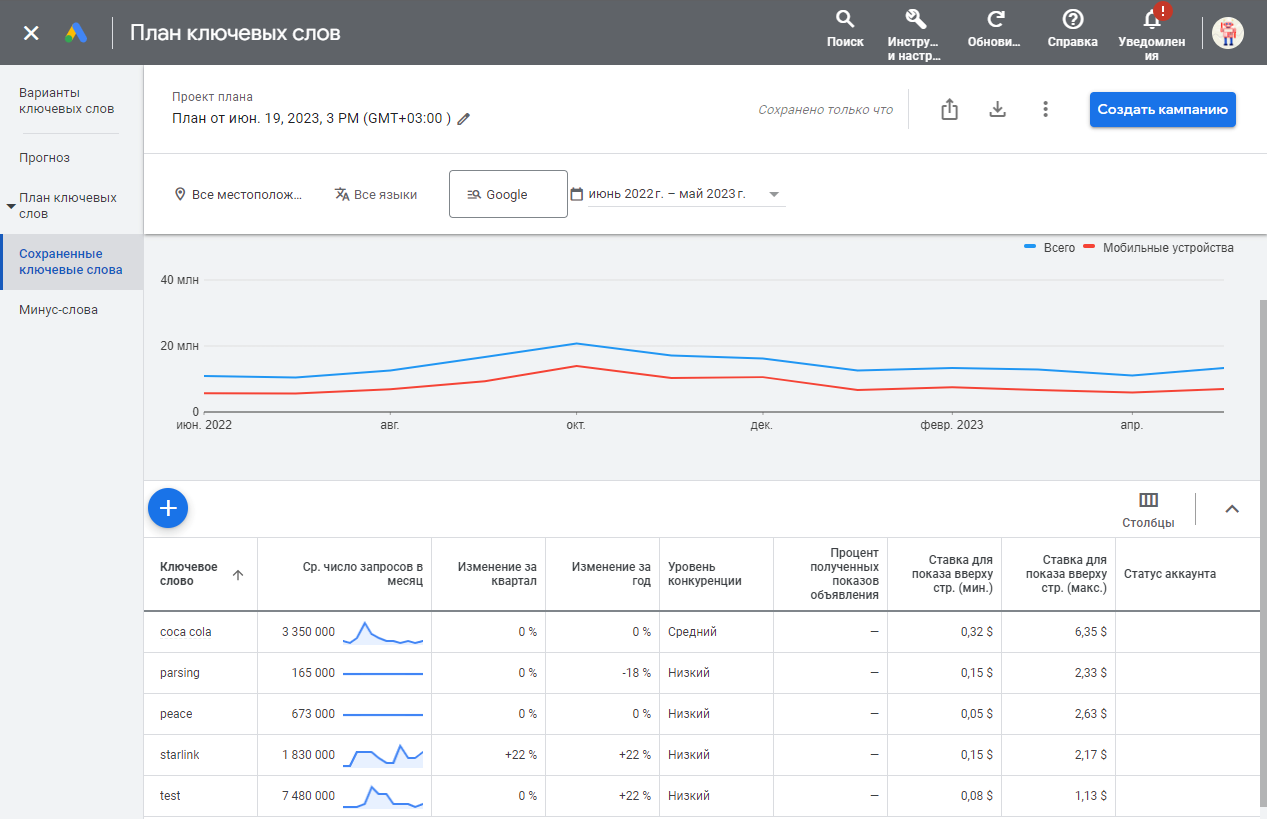
Overview of the scraper
 SE::Google::KeywordPlanner::SearchVolume – a scraper for estimating search volumes of keywords from Google Keyword Planner. A wide range of data is available for use: average monthly searches, quarterly and yearly changes in volume, minimum and maximum bids, and competition level. In the scraping settings, you can specify the language, location, advertising network, and data sampling period. A batch mode is also available, allowing you to retrieve data for up to 10,000 keywords in a single request to the service, thereby significantly speeding up the scraping process.
Thanks to the multithreaded operation of A-Parser combined with bulk mode, the request processing speed can reach several tens of thousands of requests per minute.
A-Parser functionality allows you to save scraping settings for the SE::Google::KeywordPlanner::SearchVolume scraper for further use (presets), set a scraping schedule, and much more.
Saving results is possible in the form and structure you need, thanks to the built-in powerful Template Toolkit template engine, which allows applying additional logic to the results and outputting data in various formats, including JSON, SQL, and CSV.
Collected data
- Average monthly searches for the target keyword
- Quarterly change
- Year-over-year change
- Competition level
- Minimum and maximum bids
- Search volume trends for the selected period
- Month and year
- Total number of requests
- Number of requests from mobile devices only (unavailable in bulk mode)
Capabilities
- Support for authorization via login-password or by substituting cookies and headers
- Determination of $volume accuracy degree - exact/rounded value
- Bulk mode is supported and enabled by default
- Multi-account support (to select the required account, its
ocid(uscid)must be specified)
Use cases
- Collecting average monthly searches, minimum and maximum bids, competition assessment
- Trend analysis
Configuration
There are two options for configuring the scraper:
- specify the email/password for the Keyword Planner account
- authorize in the browser and copy the required values
Be cautious with the number of threads. It is recommended to specify a small number of threads; scraping without a proxy is quite possible in this case.
Authorization via email and password
You need to override the E-mail and Password options by specifying the credentials for your Keyword Planner account. A campaign must be created on the account.
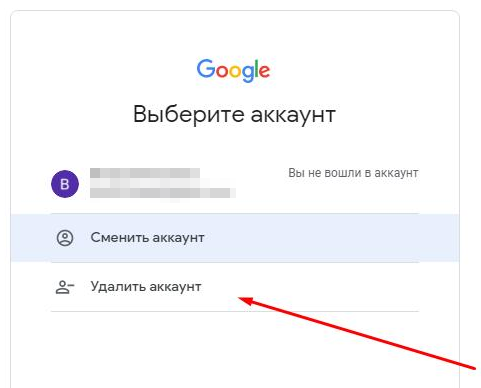
Spoiler: (Solution) Login failed TypeError: Cannot read property '1' of null
In case of this error, you need to remove your Google account from the browser and log in again.
Browser authorization and header substitution in the scraper
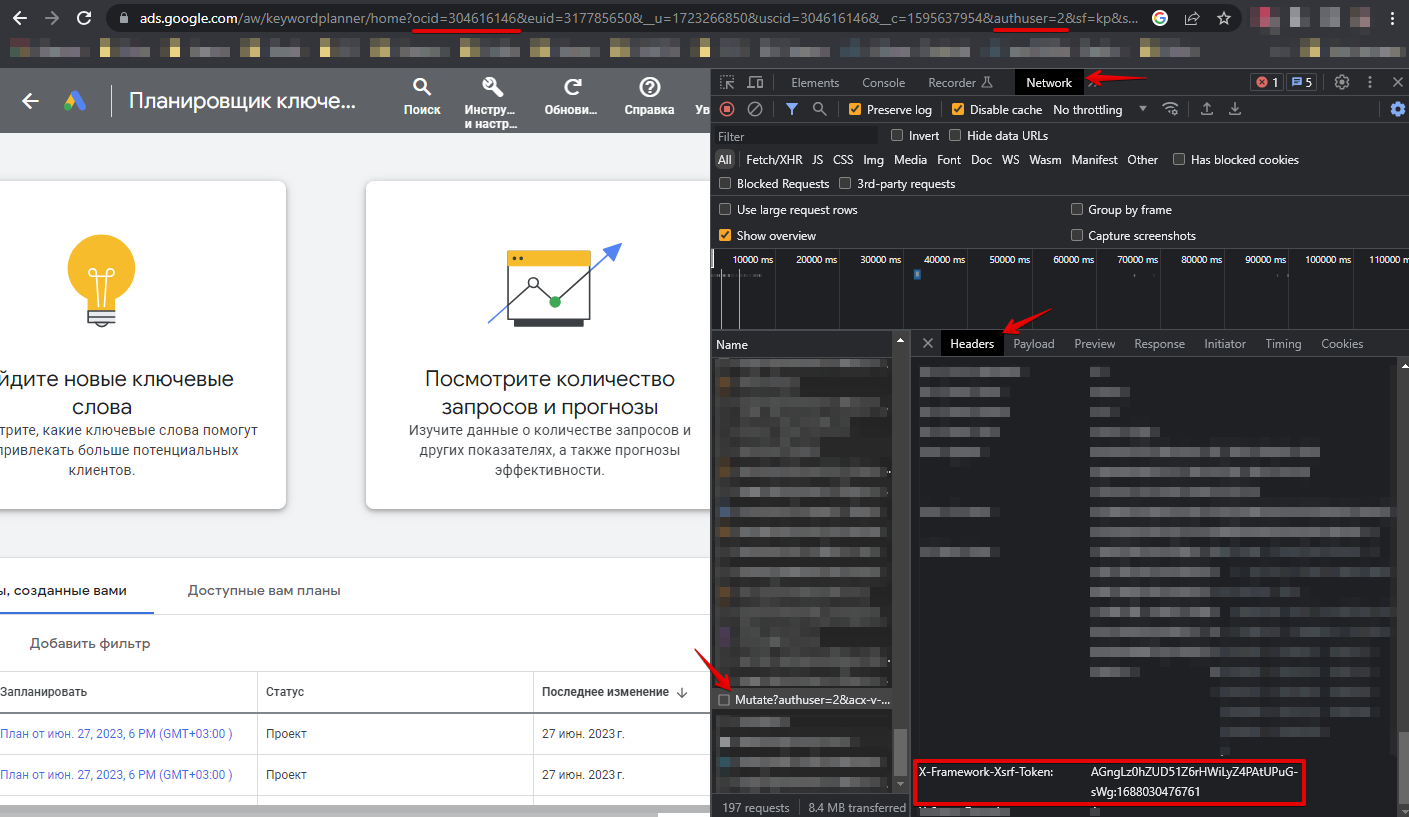
You need to authorize in the browser at https://ads.google.com/aw/keywordplanner/home, create the first campaign if not done previously, take the following data, and specify it in the scraper settings:
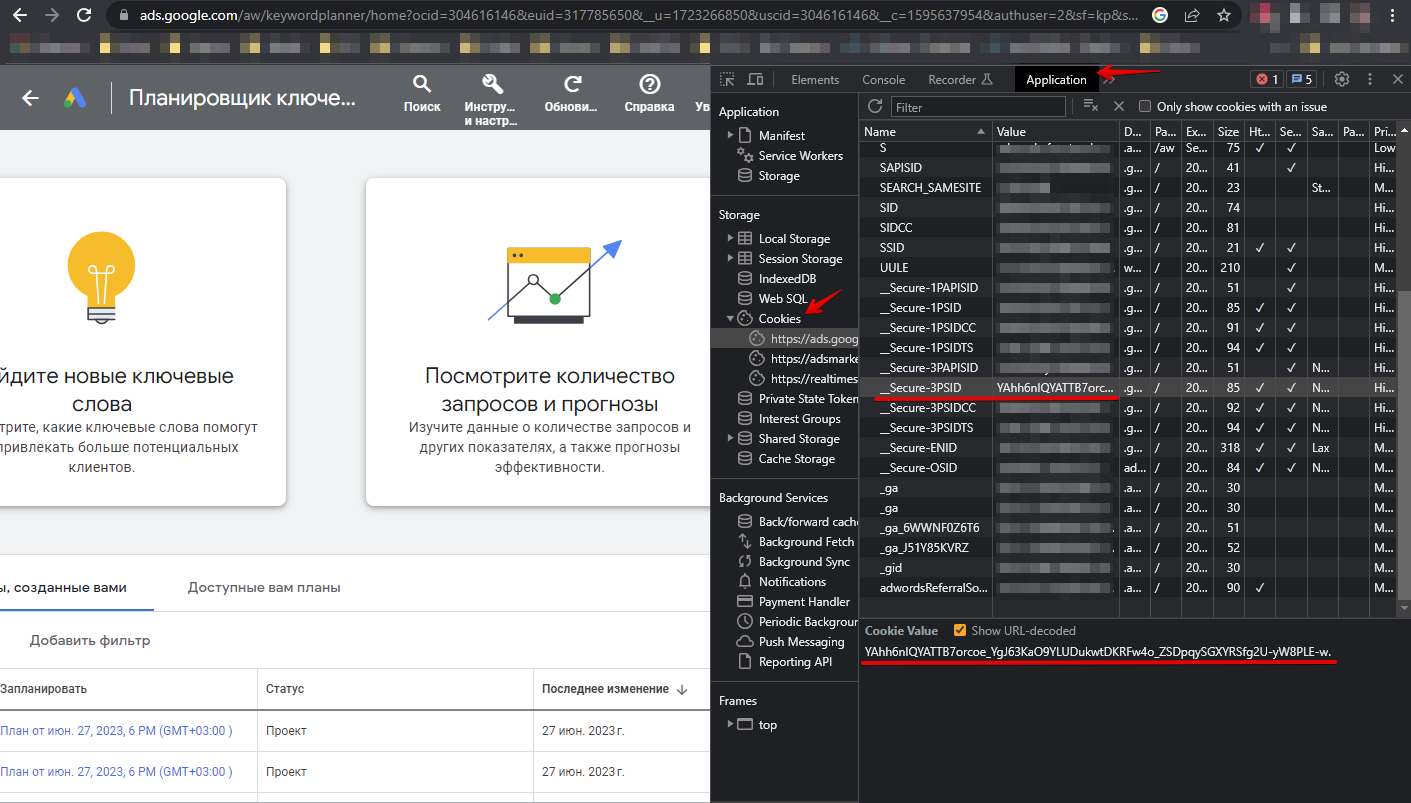
Cookies can be specified in two ways:
- Specify all cookies in the All cookies option
- Specify values from cookies for the __Secure-3PSID, __Secure-3PSIDTS options (__Secure-3PSIDTS must be specified if authuser on the account is 0)
Other headers:
- Value of the x-framework-xsrf-token header
- Value of the ocid or uscid parameter from the URL
- Value of the authuser parameter from the URL
Spoiler: How to find the required parameters
Queries
Keywords should be specified as queries, one keyword per line. Example queries:
coca-cola
parsing
peace
starlink
test
Bulk (packet) mode is supported, which is activated by the Bulk (packet) mode option. In this mode, the scraper will send packets of 10,000 keywords in a request to the service. In this mode, data on the number of requests from mobile devices ($trends.$i.mobile) is not collected. Bulk mode is enabled by default.
Query substitutions
You can use built-in macros for automatic substitution of subqueries from files; for example, if we want to add a list of other words to each query, we specify several main queries:
fantasy
tower defense
rpg
In the query format, we specify a macro for substituting additional words from the keywords.txt file; this method allows increasing query variability manifold:
{subs:keywords} $query
This macro will create as many additional queries as there are in the file for each original search query, which in total will result in [number of original queries] x [number of queries in the Keywords file] = [total number of queries] as a result of the macro's operation.
For example, if the keywords.txt file contains:
free
online
As a result, the substitution macro will turn 3 main queries into 6:
free fantasy
online fantasy
free tower defense
online tower defense
free rpg
online rpg
Output results examples
A-Parser supports flexible result formatting thanks to the built-in Template Toolkit template engine, which allows it to output results in arbitrary form, as well as in structured form, such as CSV or JSON.
Default output
Result format:
$query: $volume\n
Example result with the output of a keyword and its average monthly search volume:
coca-cola: 3350000
parsing: 165000
peace: 673000
starlink: 1830000
test: 7480000
Output to a CSV table
General result format:
[% tools.CSVline(query, p1.volume, p1.min_bid, p1.max_bid) %]
File name:
$datefile.format().csv
Initial text:
Keyword,Volume,"Min bid","Max bid"
In the General result format, the Template Toolkit template engine and the tools.CSVline tool are used for data output.
In the result file name, you simply need to change the file extension to csv.
To make the "Prepend text" option available in the Task Editor, you need to activate "More options". In "Prepend text", write the column names separated by commas and make the second line empty.
Saving in SQL format
Result format:
[% "INSERT INTO volumes VALUES('" _ query _ "', '" _ volume _ "')\n" %]
Example result:
INSERT INTO volumes VALUES('perfume', '50000')
INSERT INTO volumes VALUES('eyfel perfume', '5000')
INSERT INTO volumes VALUES('memo marfa', '5000')
Dump results to JSON
Common result format:
[% IF notFirst;
  ",\n";
ELSE;
  notFirst = 1;
END;

obj = {};
obj.keyword = query;
obj.volume = p1.volume;

obj.json %]
Initial text:
[
Final text:
]
Example result:
[{"keyword":"perfume","volume":"50000"},
{"keyword":"eyfel perfume","volume":"5000"},
{"keyword":"memo marfa","volume":"5000"}]
More details about outputting results to JSON are described in this article.
Possible settings
| Parameter | Default value | Description |
|---|---|---|
| All cookies | Specifying all cookies | |
| Cookie "__Secure-3PSID" | "__Secure-3PSID" cookie | |
| Cookie "__Secure-3PSIDTS" | "__Secure-3PSIDTS" cookie | |
| Header "x-framework-xsrf-token" | "x-framework-xsrf-token" header | |
| Url parameter "ocid"("uscid") | "ocid"("uscid") parameter | |
| Url parameter "authuser" | 0 | "authuser" parameter |
| E-mail for authorization in Keyword Planner | ||
| Password | Password for authorization in Keyword Planner | |
| Recovery e-mail | Recovery e-mail | |
| Browser headless (debug auth) | ☑ | Headless mode for the browser used for login-password authorization |
| Log Login Screenshot (debug auth) | ☐ | Creating a screenshot of the authorization page and outputting it to the task log |
| Date from | Last 12 months | Date from |
| Date to | Last 12 months | Date to |
| Language | English | Language |
| Search networks | Google | Search network |
| Location code | Location (here you need to specify the location id, which can be taken from the first column of this table (copy)) | |
| Delete created plan | ☑ | Delete created plan |
| Bulk (packet) mode | ☑ | Enabling bulk mode |