 SE::Yandex::WordCraft - WordCraft Scraper. Query selection and market analysis
Scraper overview
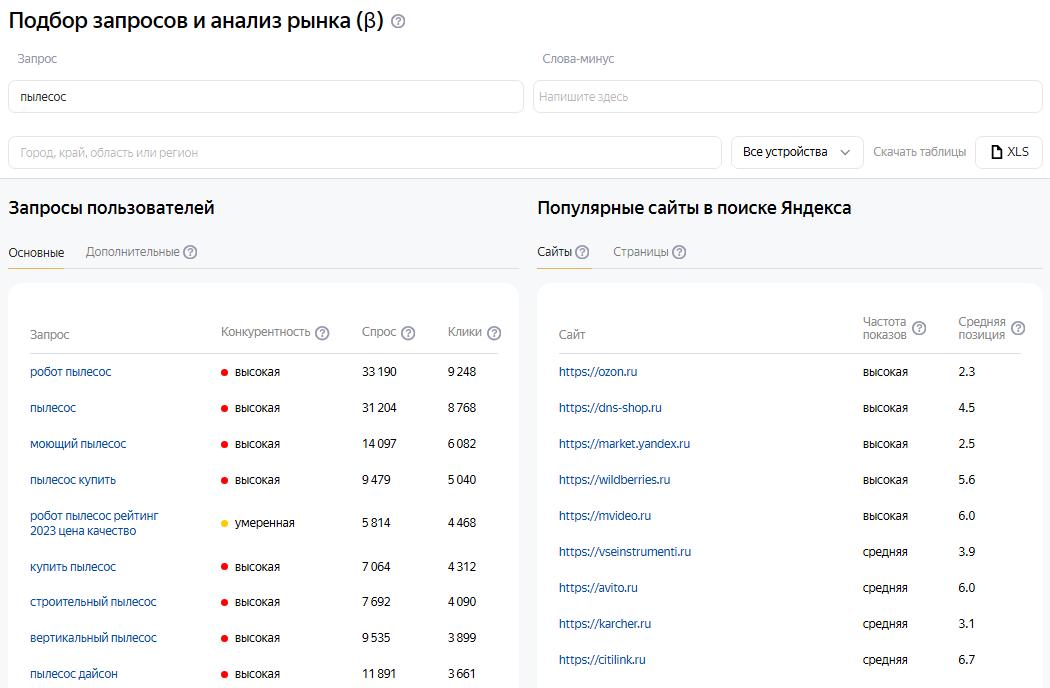
Yandex WordCraft is a part of the Yandex Webmaster service, which allows you to select target queries for promotion and advertising, considering popularity and the competitive environment. Hundreds of millions of unique queries are available for analysis. Demand, impressions, clicks, and positions are provided as monthly averages for the past year.
The Yandex WordCraft query scraper supports automatic query multiplication, so you can be sure to get the maximum number of results from the search results.
A-Parser functionality allows you to save scraping settings for future use (presets), set scraping schedules, and much more. You can use automatic query multiplication, substitution of subqueries from files, iteration of alphanumeric combinations and lists to obtain the maximum possible number of results when scraping Yandex Wordstat.
Saving results is possible in the form and structure you need, thanks to the built-in powerful Template Toolkit templating engine, which allows you to apply additional logic to the results and output data in various formats, including TXT, JSON, SQL, and CSV.
Accounts
To use the  SE::Yandex::WordCraft scraper, Yandex accounts are required. Accounts can be registered using the
  SE::Yandex::Register scraper or simply by adding existing accounts to the
 files/SE-Yandex/accounts.txt file in the supported format.
Alternatively, you can enable "on-the-fly" account registration.
To use session-based authorization, the data string must be in this format:
[email protected];MAQT78Z31Rinx4H;{"answer":"qmfhsxdcrk","proxy":"185.104.120.45:3128","session_id":"3:1748440908.5.0.1748440867459:ZXBxpg:47e4.1.2:1|2191075974.41.2.2:41.3:1748440908|3:10308131.797655.5pfkoRZWgLJGntKTlcUhYdysNfk"}
Collected data
- User queries (main):
- Query, competitiveness, demand, clicks
- User queries (additional):
- Query, competitiveness, demand, clicks
- Popular sites in Yandex search (sites):
- Site, impression frequency, average position
- Popular sites in Yandex search (pages):
- URL, impression frequency, average position, number of queries, title
Use cases
- Keyword competitiveness assessment (demand, clicks)
- Finding new keywords of similar topics
- Collecting large keyword databases of various topics
- Any other cases involving scraping Yandex Webmaster WordCraft in one form or another
Queries
As queries, you must specify keywords exactly as if you were entering them directly into the WordCraft search field, for example:
vacuum cleaner
seo
Result output options
A-Parser supports flexible result formatting thanks to the built-in templating engine Template Toolkit, which allows it to output results in an arbitrary form, as well as in a structured one, such as CSV or JSON
Default output
Example of outputting a list of user queries (main). Result format:
User queries general: $uqg.format('$query,$compet,$demand,$clicks\n')
Resulting list:
vacuum cleaner,HIGH,33190,9248
vacuum cleaner,HIGH,31204,8768
vacuum cleaner,HIGH,14097,6082
...
vacuum cleaner,HIGH,791,656
To output results using the General result format you need to specify the scraper number in the task - $p1. (parser 1) or p1. if the Template Toolkit templating engine. is used. For example:
User queries general: $p1.uqg.format('$query,$compet,$demand,$clicks\n')
See Editing result format for what the General result format is
Output to CSV table
Example of outputting a list of user queries (main) to a CSV table. Result format:
[%
    FOREACH uqg;
        tools.CSVline(query,compet,demand,clicks);
    END;
%]
Example of outputting a list of user queries (additional) to a CSV table. Result format:
[%
    FOREACH uqa;
        tools.CSVline(query,compet,demand,clicks);
    END;
%]
Example of outputting a list of popular sites in Yandex search (sites) to a CSV table. Result format:
[%
    FOREACH rs;
        tools.CSVline(site,popul,position);
    END;
%]
Example of outputting a list of popular sites in Yandex search (pages) to a CSV table. Result format:
[%
    FOREACH rp;
        tools.CSVline(url,popul,position,queries,title);
    END
%]
See also: Result filters
Options
- Parse queries for Rivals pages - when this option is enabled, popular queries are collected for each of the links in Rivals pages. The collected data is recorded as a JSON object in the variable
$rp.$i.queries_json. Enabling this option significantly increases scraping time, as the scraper makes many additional subqueries.
Possible settings
| Parameter | Default value | Description |
|---|---|---|
| AntiGate preset | default | You must first configure the  Util::AntiGate scraper - specify your access key and other parameters, then select the created preset here Util::AntiGate scraper - specify your access key and other parameters, then select the created preset here |
| AntiGate preset for Login | default | AntiGate preset for login. You must first configure the Util::AntiGate scraper with parameters, then select the created preset here |
| Accounts | Only from "accounts.txt" | Choosing the method of working with accounts: Always auto register - always automatically register accounts "on the fly", you need to select a configured preset in the SE::Yandex::Register preset parameter. Auto register if no more in "accounts.txt" - existing accounts from accounts.txt are used first, and if they run out, automatic registration "on the fly" is used, for which you need to select a configured preset in the SE::Yandex::Register preset parameter. Only from "accounts.txt" - use only existing accounts from accounts.txt, and if they run out, wait for the specified time (Wait new accounts in "accounts.txt" parameter) for new ones to appear. Only by session_id from "accounts.txt" - authorization by cookies. |
| Wait new accounts in "accounts.txt" | 0 | Waiting time for new accounts to appear in accounts.txt |
| Remove bad accounts | Always, except wrong login/password | Automatic removal of "bad" accounts: Always - always remove. Always, except wrong login/password - always remove, except when Yandex reported that an incorrect login/password was specified. The fact is that Yandex can give such a message when an IP is banned for a perfectly working account, so optionally you can leave such accounts for reuse. Never - never remove. Regardless of the selected option, accounts are not removed in case of proxy/browser errors |
| SE::Yandex::Register preset | default | Choosing a settings preset for SE::Yandex::Register |
| Use sessions | ☑ | Use sessions |
| Do not reset session if authorization passed | ☑ | Do not reset session on errors if the scraper is already authorized |
| SE::Yandex::Register preset | default | Choosing a settings preset for SE::Yandex::Register |