 SE::Yandex::Video - Yandex Video scraper
Scraper overview
Yandex Video search scraper. Thanks to the SE::Yandex::Video scraper, you will be able to obtain databases of video links. You can use queries in the same form as you enter them into the Yandex search bar.
A-Parser functionality allows you to save Yandex scraper settings for future use (presets), set a scraping schedule, and much more. You can use automatic query multiplication, substitution of subqueries from files, brute-force of alphanumeric combinations and lists to obtain the maximum possible number of results.
Saving results is possible in the form and structure you need, thanks to the built-in powerful Template Toolkit which allows you to apply additional logic to the results and output data in various formats, including JSON, SQL, and CSV.
Collected data
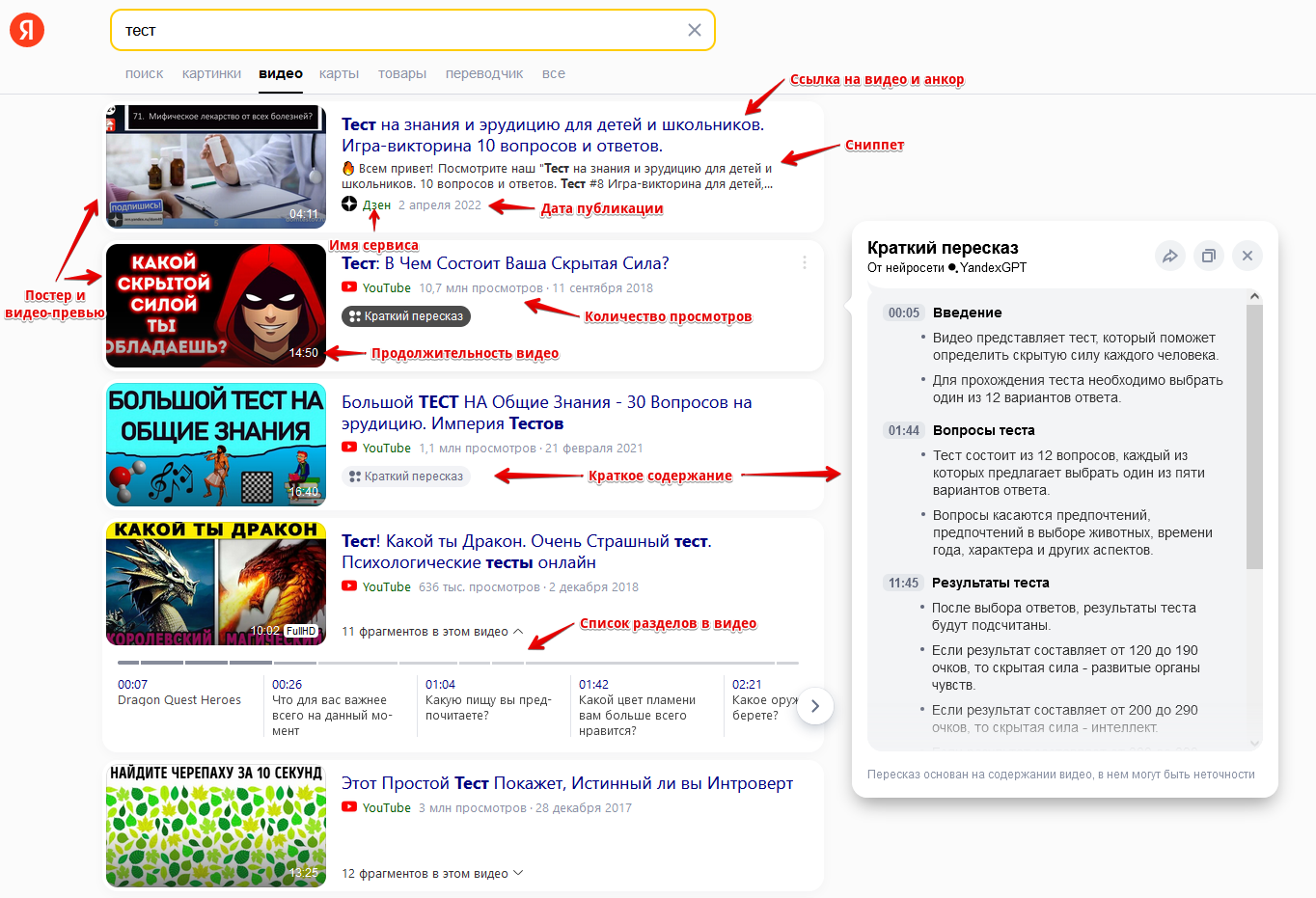
- Video links
- Anchors
- Snippets
- Name of the service where the video is hosted
- Duration, number of views, and publication date
- Links to poster and video preview
- Brief video summary
- List of chapters in the video
- Embed code for websites
Features
- Filter support (short, recent)
- Selection of the number of result pages
- Session support
Use cases
- Collecting videos to populate your blogs, tubes, doorways...
- Collecting text data
Queries
Search phrases should be specified as queries, for example:
Cats
Football
Waterfall
Speak in english
cars
Query substitutions
You can use built-in macros for query multiplication, for example, if we want to get a very large database of forums, we specify several main queries in different languages:
forum
forum
foro
论坛
In the query format, we specify character iteration from a to zzzz; this method allows for maximum rotation of search results and obtaining many new unique results:
$query {az:a:zzzz}
This macro will create 475254 additional queries for each original search query, which in total will give 4 x 475254 = 1901016 search queries—an impressive figure, but no problem at all for A-Parser. At a speed of 2000 queries per minute, such a task will be processed in just 16 hours.
Output results examples
A-Parser supports flexible result formatting thanks to the built-in Template Toolkit, which allows it to output results in arbitrary form, as well as in structured formats like CSV or JSON.
Default output
Result format:
$serp.format('$link\n')
Result example:
http://www.youtube.com/v/lcYzh7IjJj0
http://www.youtube.com/watch?v=VD2h2YUY_WQ
http://www.youtube.com/watch?v=UPOUE8ObCy8
http://www.youtube.com/watch?v=Ha9Q1kHqCHA
http://www.youtube.com/watch?v=P5rlifhgewY
https://zen.yandex.ru/video/watch/61099fa859eaef364db8b3cd?f=video
http://www.youtube.com/v/-cvEA8897Fc?fs=0
https://zen.yandex.ru/video/watch/625ed4e3099b9b7b81b17e3b?f=video
http://rutube.ru/video/016773a106036e9d3cd619ace97011e0/
http://rutube.ru/video/e54b2392b7dd3fe57fed6002aba5f833/
http://rutube.ru/video/8fe868740089c3557d6d54e86ceca6a1/
http://www.youtube.com/v/OuOK2fEPdMU
http://www.youtube.com/watch?v=UcbmVFYp4Lg
http://www.youtube.com/watch?v=JgJE4oQf-Gs
http://www.youtube.com/watch?v=ektN1-ptnDE
Output in CSV table
Result format:
[% FOREACH item IN serp;
    tools.CSVline(query, item.link, item.anchor, item.prevPoster, item.duration, item.views);
END %]
Result example:
test,http://www.youtube.com/v/lcYzh7IjJj0,"<b>Test</b>  on IQ using 10 photos",https://avatars.mds.yandex.net/get-vthumb/4322300/5f649751351f727400bfd1be494fd6b4/564x318_1,07:09,"2.5M views"
test,http://www.youtube.com/watch?v=VD2h2YUY_WQ,"Online <b>Test</b> Pad -how to create a <b>test</b>",https://avatars.mds.yandex.net/get-vthumb/1023253/fffa43fb9402c436d6881537bb9aee9a/564x318_1,05:38,"16,6 K views"
test,http://www.youtube.com/watch?v=UPOUE8ObCy8,"Simple educational <b>test</b>.  Online <b>Test</b> Pad",https://avatars.mds.yandex.net/get-vthumb/3435353/fa94c2b60d9bb0fa8cda2d469b6dcf0a/564x318_1,04:16,"76,5 K views"
test,http://www.youtube.com/watch?v=Ha9Q1kHqCHA,"Creating <b>tests</b> with Online <b>Test</b> Pad #2",https://avatars.mds.yandex.net/get-vthumb/2032788/4ffd2b149fbfc3de17b67ef92290028e/564x318_1,07:00,"1704 views"
test,http://www.youtube.com/watch?v=P5rlifhgewY,"This IQ-<b>test</b> of 5 Questions Will Show Your Intelligence Level",https://avatars.mds.yandex.net/get-vthumb/4507451/f3475d744f7841b40912dd933dce65c1/564x318_1,08:01,"606K views"
test,https://zen.yandex.ru/video/watch/61099fa859eaef364db8b3cd?f=video,"Spotlight 4 grade. Final <b>test</b>.  Exit <b>test</b>",https://avatars.mds.yandex.net/get-vthumb/3304426/beaeeaba5bfc6c00bcae50c4fa7cf236/564x318_1,09:39,
test,http://www.youtube.com/v/-cvEA8897Fc?fs=0,"English grammar <b>test</b>",https://avatars.mds.yandex.net/get-vthumb/2428342/b5b8a32f0260ce4ac785b6a4f1a8b006/564x318_1,12:35,"597 K views"
test,https://zen.yandex.ru/video/watch/625ed4e3099b9b7b81b17e3b?f=video,"ONLY FEW Know These Answers ""Brain <b>Test</b>"" #1",https://avatars.mds.yandex.net/get-vh/5811343/2a00000180429688a113593b8944b066f53d/564x318_1,17:07,
test,http://rutube.ru/video/016773a106036e9d3cd619ace97011e0/,"How to beat Brain <b>Test</b> 2?  Answers for all levels",https://avatars.mds.yandex.net/get-vthumb/4407993/aa07260f286afde40d15abad02f816af/564x318_1,1:29:03,
test,http://rutube.ru/video/e54b2392b7dd3fe57fed6002aba5f833/,"Brain <b>Test</b> Full walkthrough № 4 Diving into the world of puzzles",https://avatars.mds.yandex.net/get-vthumb/467972/c078458de66e698c5680527352261b9d/564x318_1,26:23,
test,http://rutube.ru/video/8fe868740089c3557d6d54e86ceca6a1/,"SpeedTest - Internet speed testing",https://avatars.mds.yandex.net/get-vthumb/3446066/7cca0b8914479dcfe294b06246ea6df8/564x318_1,05:16,"223K total views"
Saving in SQL format
Result format:
[%  FOREACH serp;
    "INSERT INTO serp VALUES('" _ query _ "', '";
    link _ "', '";
    snippet.replace("\n", '\n') _ "', '";
    summary.replace("\n", '\n') _ "')\n";
END %]
Result example:
INSERT INTO serp VALUES('test', 'http://www.youtube.com/v/lcYzh7IjJj0', '', '00:25 Riddle with boards\nQuestion: how many boards are here?\nAnswer: none, because extra lines are drawn to the boards and one board smoothly transitions into another\n01:10 Riddle with elephant legs\nQuestion: how many legs does an elephant have?\nAnswer: an elephant has one leg located at the back, and all other legs are not real\n02:00 Riddle with a woman at the window\nQuestion: what is the difference between these two images?\nAnswer: there is a mouse hole in the lower right corner')
INSERT INTO serp VALUES('test', 'http://www.youtube.com/watch?v=VD2h2YUY_WQ', '', '00:01 Introduction\nThe video tells about the online test pad website where you can create tests, surveys, crosswords, and logic games.\nFirst, you need to register using email.\n00:35 Creating a test\nAfter registration, you can create your own tests, surveys, crosswords, and logic games.\nThe video demonstrates creating a test from scratch.\n01:06 Question options\nThe video shows how to create different question options: single choice, text input, fill in the blanks, and others.\nExamples of questions and answers for each option are demonstrated.')
INSERT INTO serp VALUES('test', 'http://www.youtube.com/watch?v=P5rlifhgewY', '', '00:00 Introduction\nThe video is an IQ test consisting of five questions that will help determine the level of intelligence.\n04:00 Test results\nIf the first answer options are chosen, then the happiness level is high and intelligence is average.\nIf the second answer options are chosen, then the intelligence level is high and the happiness level is average.\nIf different answer options are chosen, then the level of intelligence and happiness is at the golden mean.\n07:08 Conclusion\nThe video encourages sharing the test results with friends and subscribing to the channel.\nIf they get 50 thousand likes, they will prepare another test.')
INSERT INTO serp VALUES('test', 'https://zen.yandex.ru/video/watch/625ed4e3099b9b7b81b17e3b?f=video', '"Brain <b>Test</b>" ► Walkthrough ENJOY Watching :) Links: Music in Video: https://www.youtube.com/watch?v=5qap5aO4i9A Discord Server ► https://discord.gg/4JWEu9URwB YouTube ►...', '')
INSERT INTO serp VALUES('test', 'http://rutube.ru/video/016773a106036e9d3cd619ace97011e0/', 'Passed Brain <b>Test</b> 2. Sharing answers for all levels. Brain <b>Test</b> 2 all parts: Losing weight with Nastya Prison Break Agent James Blond The Smarty Family Monster Hunter Vanya...', '')
INSERT INTO serp VALUES('test', 'http://rutube.ru/video/e54b2392b7dd3fe57fed6002aba5f833/', 'https://www.youtube.com/channel/UCgpWRYOfFZ0whXZ8F26KbUg YouTube channel https://t.me/DimaDaimont telegram channel https://www.donationalerts.com/r/dimadaimont2 help with development...', '')
Dump results to JSON
Common result format:
[% IF notFirst;
  ",\n";
ELSE;
  notFirst = 1;
END;

obj = {};
obj.query = query;
obj.videos = [];

FOREACH item IN p1.serp;
    obj.videos.push({
        link = item.link
        anchor = item.anchor
        snippet = item.snippet
        service = item.service
        embed = item.embed
    });
END;

obj.json %]
Initial text:
[
Final text:
]
Result example:
[{
"videos": [
{
"embed": "<iframe src=\"//www.youtube.com/embed/lcYzh7IjJj0?enablejsapi=1&wmode=opaque\" frameborder=\"0\" scrolling=\"no\" allowfullscreen=\"1\" allow=\"autoplay; fullscreen; accelerometer; gyroscope; picture-in-picture\" aria-label=\"Video\"></iframe>",
"link": "http://www.youtube.com/v/lcYzh7IjJj0",
"snippet": "",
"anchor": "<b>Test</b> on IQ using 10 photos",
"service": "YouTube"
},
{
"embed": "<iframe src=\"//www.youtube.com/embed/VD2h2YUY_WQ?enablejsapi=1&wmode=opaque\" frameborder=\"0\" scrolling=\"no\" allowfullscreen=\"1\" allow=\"autoplay; fullscreen; accelerometer; gyroscope; picture-in-picture\" aria-label=\"Video\"></iframe>",
"link": "http://www.youtube.com/watch?v=VD2h2YUY_WQ",
"snippet": "",
"anchor": "Online <b>Test</b> Pad -how to create a <b>test</b>",
"service": "YouTube"
},
{
"embed": "<iframe src=\"//www.youtube.com/embed/UPOUE8ObCy8?enablejsapi=1&wmode=opaque\" frameborder=\"0\" scrolling=\"no\" allowfullscreen=\"1\" allow=\"autoplay; fullscreen; accelerometer; gyroscope; picture-in-picture\" aria-label=\"Video\"></iframe>",
"link": "http://www.youtube.com/watch?v=UPOUE8ObCy8",
"snippet": "",
"anchor": "Simple educational <b>test</b>. Online <b>Test</b> Pad",
"service": "YouTube"
},
{
"embed": "<iframe src=\"//www.youtube.com/embed/Ha9Q1kHqCHA?enablejsapi=1&wmode=opaque\" frameborder=\"0\" scrolling=\"no\" allowfullscreen=\"1\" allow=\"autoplay; fullscreen; accelerometer; gyroscope; picture-in-picture\" aria-label=\"Video\"></iframe>",
"link": "http://www.youtube.com/watch?v=Ha9Q1kHqCHA",
"snippet": "",
"anchor": "Creating <b>tests</b> with Online <b>Test</b> Pad #2",
"service": "YouTube"
}
],
"query": "test"
}]
To make the "Prepend text" and "Append text" options available in the Task Editor, you need to activate "More options".
Possible settings
| Parameter | Default value | Description |
|---|---|---|
| Pages count | 5 | Number of pages to scrape |
| New videos | ☐ | Recent videos |
| Short videos | ☐ | Short videos |