 SE::Google::KeywordPlanner::Ideas - scraper for keyword ideas from Google Keyword Planner
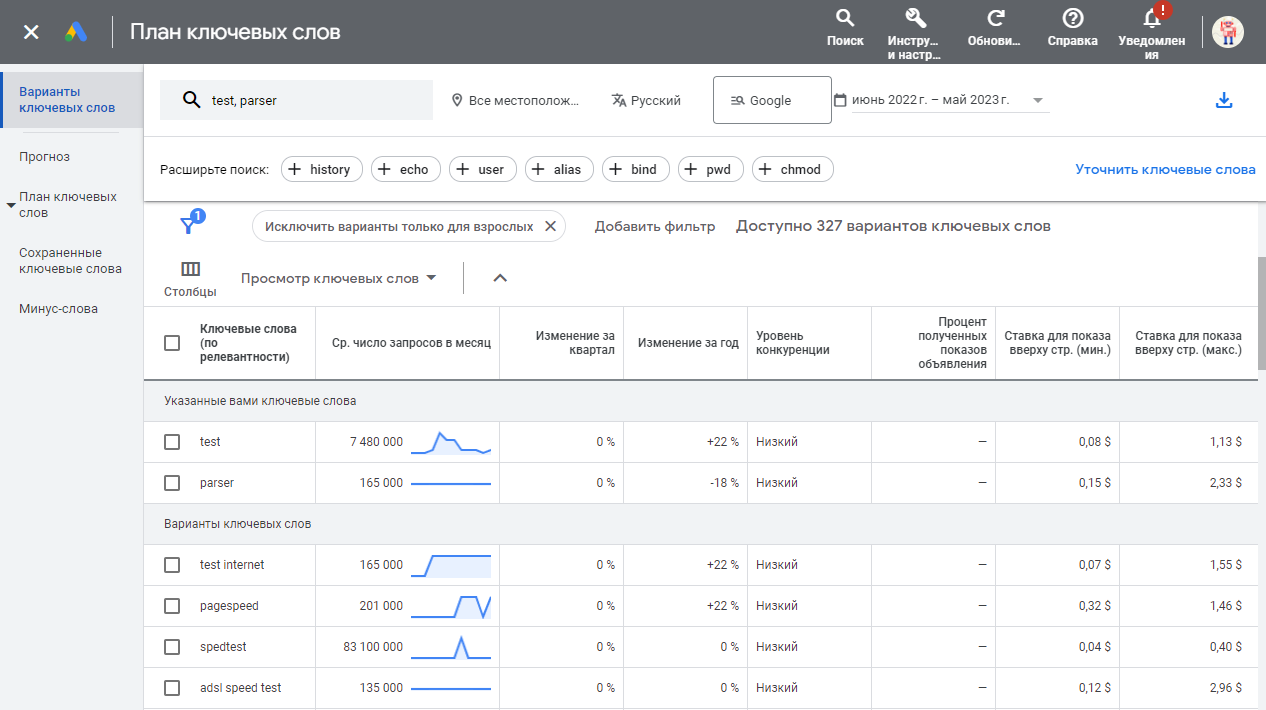
Scraper overview
 SE::Google::KeywordPlanner::Ideas – scraping keyword ideas and suggestions from Google Keyword Planner. A wealth of data is available for use: scraping suggestion lists, assessing keyword competition, collecting average monthly searches, minimum and maximum bids, and finding new keywords of similar topics. In the scraping settings, you can specify the language, region, location, and data sampling period. A batch mode is also available, allowing you to retrieve data for up to 20 keywords in a single request to the service, thereby significantly speeding up scraping.
Thanks to A-Parser multithreading, the request processing speed can reach several thousand requests per minute.
A-Parser functionality allows you to save SE::Google::KeywordPlanner::Ideas scraping settings for future use (presets), set scraping schedules, and much more.
Saving results is possible in the form and structure you need, thanks to the built-in powerful Template Toolkit which allows applying additional logic to the results and outputting data in various formats, including JSON, SQL, and CSV.
Collected data
- Average monthly searches for the target keyword
- Suggestion lists
- Keyword variants
- Average monthly searches
- Competition
- Minimum and maximum bids
- Trends for each obtained variant
Capabilities
- Support for authorization via login-password or by substituting cookies and headers
- Determination of $volume accuracy degree - exact/rounded value
- Batch mode is supported, more details in the Queries section
- Multi-account support (to select the required account, its
ocid(uscid)must be specified) - Scraping search volume data for each keyword monthly for a specified period (
$ideas.$i.trends). Data is presented in JSON, an example of its output to the result is in the screenshot below:
Spoiler: Screenshot
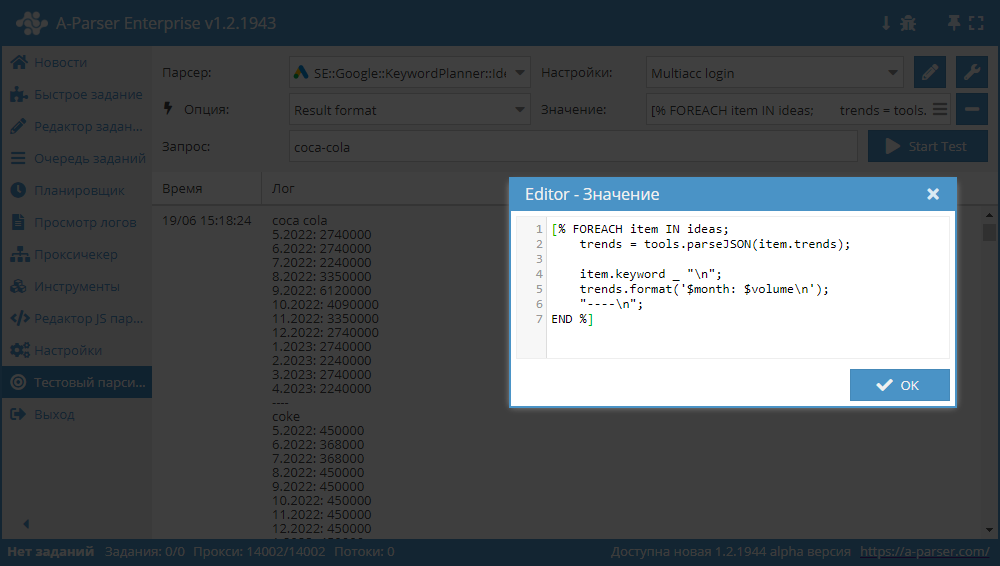
Template:
[% FOREACH item IN ideas;
    trends = tools.parseJSON(item.trends);

    item.keyword _ "\n";
    trends.format('$month: $volume\n');
    "----\n";
END %]
Use cases
- Scraping suggestion lists
- Assessing competition for keywords
- Collecting average monthly searches, minimum and maximum bids
- Searching for new keywords of similar topics
Configuration
There are two options for configuring the scraper:
- specify email/password for the Keyword Planner account
- authorize in the browser and copy the required values
Be cautious with the number of threads. It is recommended to specify a small number of threads, while scraping without a proxy is quite possible.
Authorization via email and password
You need to override the E-mail and Password options by specifying your Keyword Planner account details. A campaign must be created on the account.
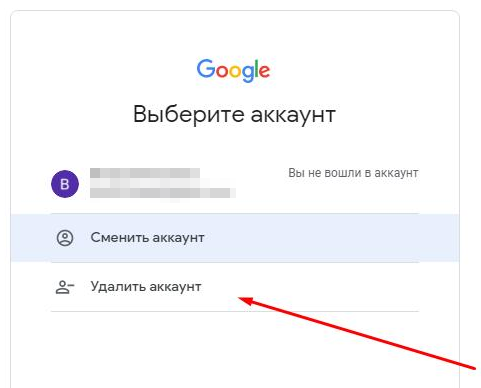
Spoiler: (Solution) Login failed TypeError: Cannot read property '1' of null
In case of this error, you need to remove your Google account from the browser and log in again.
Browser authorization and header substitution in the scraper
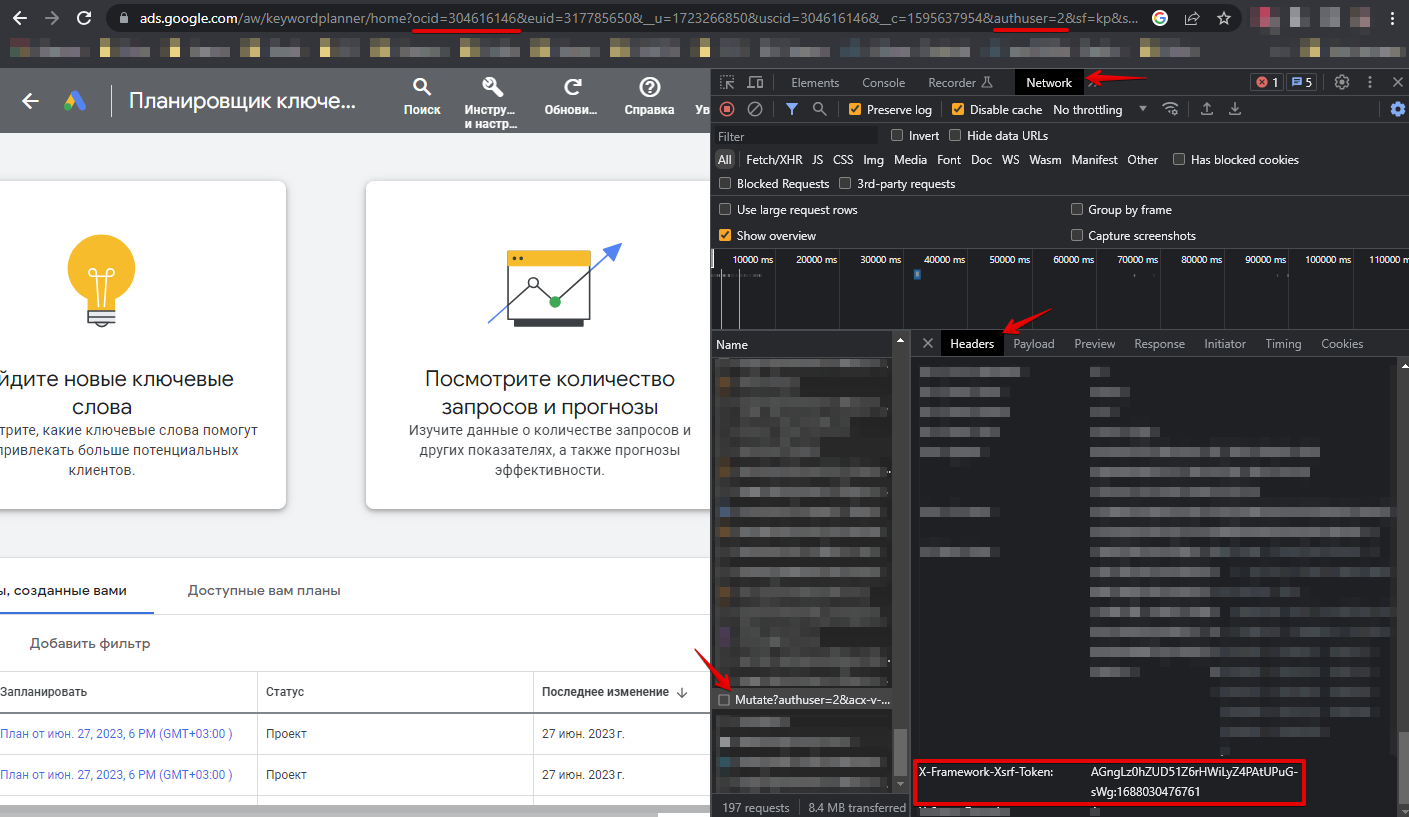
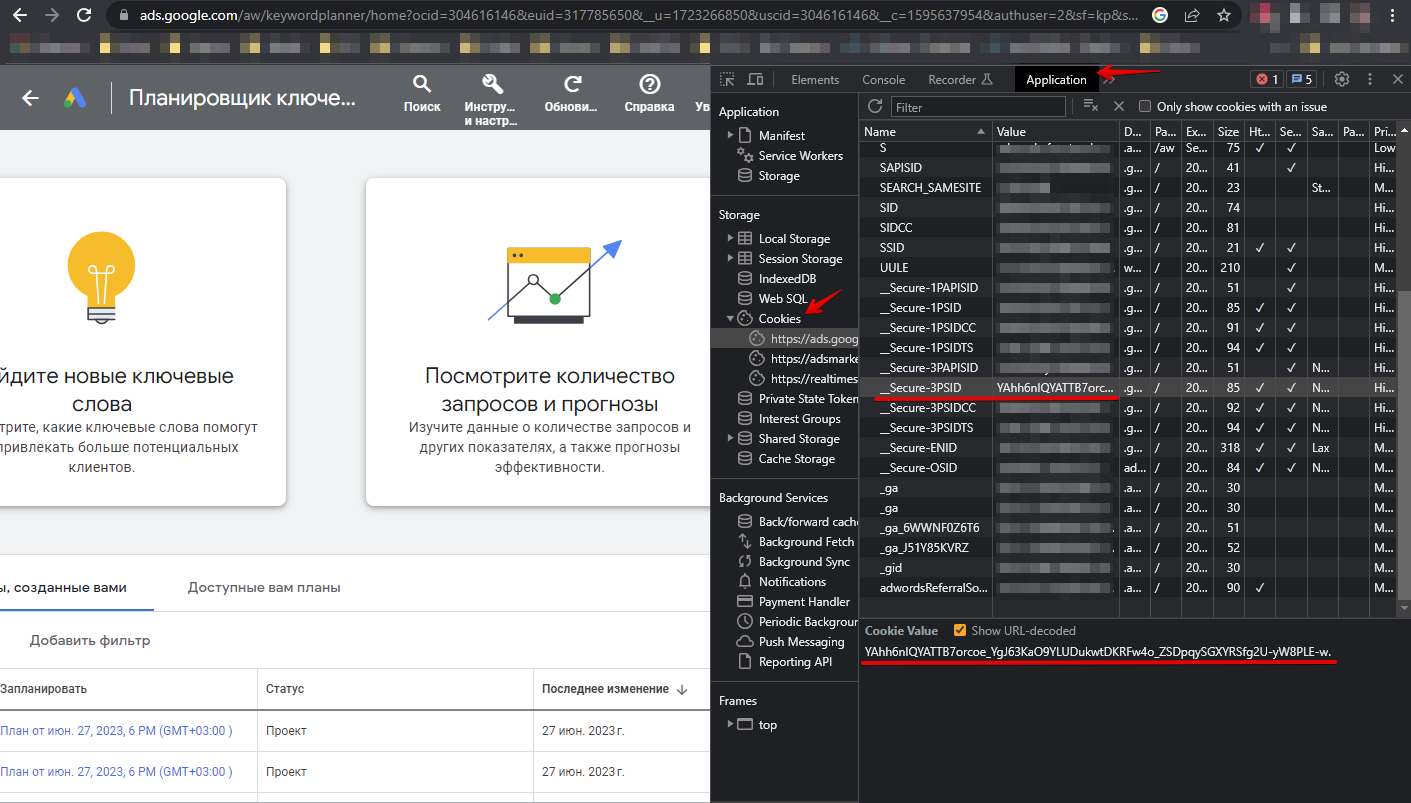
You need to authorize in the browser at https://ads.google.com/aw/keywordplanner/home, create the first campaign if not done previously, take the following data and specify it in the scraper settings:
Cookies can be specified in two ways:
- Specify all cookies in the All cookies option
- Specify values from cookies for the __Secure-3PSID, __Secure-3PSIDTS options (__Secure-3PSIDTS needs to be specified if authuser on the account is 0)
Other headers:
- Value of the x-framework-xsrf-token header
- Value of the ocid or uscid parameter from the URL
- Value of the authuser parameter from the URL
Spoiler: How to find the necessary parameters
Queries
Depending on the Query type parameter value, queries can take different forms. Below are the possible options, examples are shown, and features of the results obtained are described.
Keyword
Queries should be in the form of keywords, one keyword per line. Example queries:
test
scraper
Windows 11
how to grow a tree
Bulk (packet) mode is supported, which is activated by the Bulk (packet) mode option. In this mode, the scraper will send packets of 20 keywords in a request to the service, which changes the logic of filling results:
$volumewill be filled for each keyword$ideasand$suggestswill be filled only for the first keyword, but these arrays will contain all results in total for all keywords used in this packet
Site + keyword
Queries should be in the form of a website followed by a space and a keyword. Example queries:
speedtest.com Network speed
a-parser.com parser
Bulk (packet) mode is also supported; to use it, you need to list keywords separated by commas, example:
4pda.to android,ios,firmware
google.com google,ads,advertising,search for sites on the internet
$volumefor this type of queries in bulk mode is not scraped
Entire site
Domains should be specified as queries, one per line. For example:
apple.com
microsoft.com
$volumefor this type of queries is not scraped
URL
Links should be specified as queries, one per line. For example:
https://a-parser.com/docs/parsers/se-google-keywordplanner
https://developer.mozilla.org/en-US/docs/Learn/Getting_started_with_the_web/JavaScript_basics
$volumefor this type of queries is not scraped
Query substitutions
You can use built-in macros for automatic substitution of subqueries from files, for example, we want to add some list of other words to each query, let's specify several main queries:
fantasy
tower defense
rpg
In the query format, we will specify a substitution macro for additional words from the keywords.txt file; this method allows increasing query variability manifold:
{subs:keywords} $query
This macro will create as many additional queries as there are in the file for each original search query, which in total will give [number of original queries] x [number of queries in the Keywords file] = [total number of queries] as a result of the macro operation.
For example, if the keywords.txt file contains:
free
online
As a result, the substitution macro will turn 3 main queries into 6:
free fantasy
online fantasy
free tower defense
online tower defense
free rpg
online rpg
Output results examples
A-Parser supports flexible result formatting thanks to the built-in Template Toolkit, which allows it to output results in any form, as well as in structured form, such as CSV or JSON
Default output
Result format:
$ideas.format('$keyword\n')
Example result:
coca cola
iphone 11 pro
winter
iphone 11 pro max
winter season
iphone11
iphone 11 price
apple iphone 11
iphone 11pro
coke
11 pro max
iphone 11 pro price
iphone 11 max
iphone pro max
iphone 11 128gb
11 pro
iphone 11 pro max price
apple iphone 11 pro
apple iphone 11 pro max
new iphone 11
iphone 11 max pro
apple 11 pro
iphone 11 deals
iphone 11 pro max 256gb
diet coke
first day of winter
iphone 11 pro 256gb
coke zero
iphone pro 11
apple 11 pro max
Output in CSV table
Result format:
[% FOREACH i IN ideas;
    tools.CSVline(i.keyword, i.volume, i.min_bid, i.max_bid);
END %]
File name:
$datefile.format().csv
Initial text:
Keyword,Volume,"Min bid","Max bid"
In the Result Format, the Template Toolkit is used to output the $ideas array in a FOREACH loop.
In the result file name, you just need to change the file extension to csv.
To make the "Prepend text" option available in the Task Editor, you need to activate "More options". In "Prepend text", we write column names separated by commas and make the second line empty.
Saving in SQL format
Result format:
[% FOREACH ideas;
    "INSERT INTO ideas VALUES('" _ keyword _ "', '" _ volume _ "')\n";
END %]
Example result:
INSERT INTO ideas VALUES('perfume', '50000')
INSERT INTO ideas VALUES('eyfel perfume', '5000')
INSERT INTO ideas VALUES('memo marfa', '5000')
INSERT INTO ideas VALUES('duxi', '5000')
INSERT INTO ideas VALUES('kenzo intense', '5000')
INSERT INTO ideas VALUES('climat lancome', '5000')
INSERT INTO ideas VALUES('v canto', '5000')
INSERT INTO ideas VALUES('majda bekkali', '5000')
INSERT INTO ideas VALUES('v canto ricina', '500')
INSERT INTO ideas VALUES('v canto stramonio', '5000')
INSERT INTO ideas VALUES('terenzi kirke', '500')
INSERT INTO ideas VALUES('duhi', '500')
INSERT INTO ideas VALUES('max mara le parfum', '500')
INSERT INTO ideas VALUES('stramonio v canto', '500')
INSERT INTO ideas VALUES('sheikh parfum', '500')
INSERT INTO ideas VALUES('jacques zolty', '500')
INSERT INTO ideas VALUES('aj arabia', '500')
INSERT INTO ideas VALUES('christian lacroix bazar', '500')
INSERT INTO ideas VALUES('juliette has a gun romantina', '500')
INSERT INTO ideas VALUES('vilhelm parfumerie mango skin', '500')
INSERT INTO ideas VALUES('v canto mirabile', '500')
INSERT INTO ideas VALUES('donna karan dkny be delicious', '500')
INSERT INTO ideas VALUES('arteolfatto', '500')
INSERT INTO ideas VALUES('aquawoman rochas', '500')
INSERT INTO ideas VALUES('angel and demon givenchy', '500')
INSERT INTO ideas VALUES('venenum kiss', '500')
INSERT INTO ideas VALUES('v canto mandragola', '500')
INSERT INTO ideas VALUES('angel demon givenchy', '500')
INSERT INTO ideas VALUES('hugo boss boss ma vie pour femme', '500')
INSERT INTO ideas VALUES('nina ricci mademoiselle ricci', '500')
Dump results to JSON
General result format:
[% data = [];
FOREACH p1.ideas;
    item = {};
    item.keyword = keyword;
    item.volume = volume;
    data.push(item);
END %]$data.json\n
Example result:
[{"keyword":"perfume","volume":"50000"},{"keyword":"eyfel perfume","volume":"5000"},{"keyword":"memo marfa","volume":"5000"},{"keyword":"duxi","volume":"5000"},{"keyword":"kenzo intense","volume":"5000"},{"keyword":"climat lancome","volume":"5000"},{"keyword":"v canto","volume":"5000"},{"keyword":"majda bekkali","volume":"5000"},{"keyword":"v canto ricina","volume":"500"},{"keyword":"v canto stramonio","volume":"5000"},{"keyword":"terenzi kirke","volume":"500"},{"keyword":"duhi","volume":"500"},{"keyword":"max mara le parfum","volume":"500"},{"keyword":"stramonio v canto","volume":"500"},{"keyword":"sheikh parfum","volume":"500"},{"keyword":"jacques zolty","volume":"500"},{"keyword":"aj arabia","volume":"500"},{"keyword":"christian lacroix bazar","volume":"500"},{"keyword":"juliette has a gun romantina","volume":"500"},{"keyword":"vilhelm parfumerie mango skin","volume":"500"},{"keyword":"v canto mirabile","volume":"500"},{"keyword":"donna karan dkny be delicious","volume":"500"},{"keyword":"arteolfatto","volume":"500"},{"keyword":"aquawoman rochas","volume":"500"},{"keyword":"angel and demon givenchy","volume":"500"},{"keyword":"venenum kiss","volume":"500"},{"keyword":"v canto mandragola","volume":"500"},{"keyword":"angel demon givenchy","volume":"500"},{"keyword":"hugo boss boss ma vie pour femme","volume":"500"},{"keyword":"nina ricci mademoiselle ricci","volume":"500"},{"keyword":"mmmm juliette has a gun","volume":"500"},{"keyword":"v canto lucrethia","volume":"500"},{"keyword":"mango skin vilhelm parfumerie","volume":"500"},{"keyword":"dalissime salvador dali","volume":"500"},{"keyword":"molecula 02","volume":"50000"},{"keyword":"lucia parfum","volume":"500"},{"keyword":"boadicea pure narcotic","volume":"500"},{"keyword":"terenzi andromeda","volume":"500"}]
More details about outputting results to JSON are described in this article.
Possible settings
| Parameter | Default value | Description |
|---|---|---|
| All cookies | Specifying all cookies | |
| Cookie "__Secure-3PSID" | Cookie "__Secure-3PSID" | |
| Cookie "__Secure-3PSIDTS" | Cookie "__Secure-3PSIDTS" | |
| Header "x-framework-xsrf-token" | Header "x-framework-xsrf-token" | |
| Url parameter "ocid"("uscid") | Parameter "ocid"("uscid") | |
| Url parameter "authuser" | 0 | Parameter "authuser" |
| Email for authorization in Keyword Planner | ||
| Password | Password for authorization in Keyword Planner | |
| Recovery e-mail | Recovery email | |
| Browser headless (debug auth) | ☑ | Headless mode for the browser used for login-password authorization |
| Log Login Screenshot (debug auth) | ☐ | Creating a screenshot of the authorization page and outputting it to the task log |
| Date from | Last 12 months | Date from |
| Date to | Last 12 months | Date to |
| Language | English | Language |
| Search networks | Google | Search network |
| Currency | USD | Currency |
| Location code | Location (here you need to specify the location id, which can be taken from the first column of this table (copy)) | |
| Query type | Keyword | Query type |
| Exclude brand names in results | ☐ | Brand filter |
| Exclude adult ideas | ☑ | Adult content filter |
| Bulk (packet) mode | ☐ | Enabling batch mode |