 Util::ReCaptcha2 - reCAPTCHA recognition
Overview of the scraper
This scraper is used only as a plug-in component in other scrapers where it may be necessary to solve Google ReCaptcha v2, for example:  SE::Google,
  SE::Google::Images,
  SE::Google::ByImage, as well as custom JavaScript scrapers.
The principle of this scraper is to send reCAPTCHA data (usually the sitekey and the URL of the page where the reCAPTCHA was obtained) to a solving service and receive a token consisting of numbers and letters in response. The correctness of the solution depends solely on the solving service; as a rule, services almost always solve reCAPTCHAs correctly.
The process of connecting and configuring this scraper is described in detail in the article ReCaptcha Settings
Scraper use cases
🔗 ReCaptcha in JS scrapers
Example of a JS scraper for working with ReCaptchas
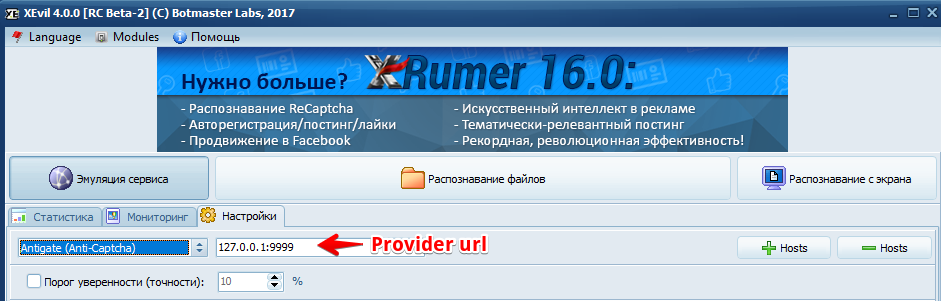
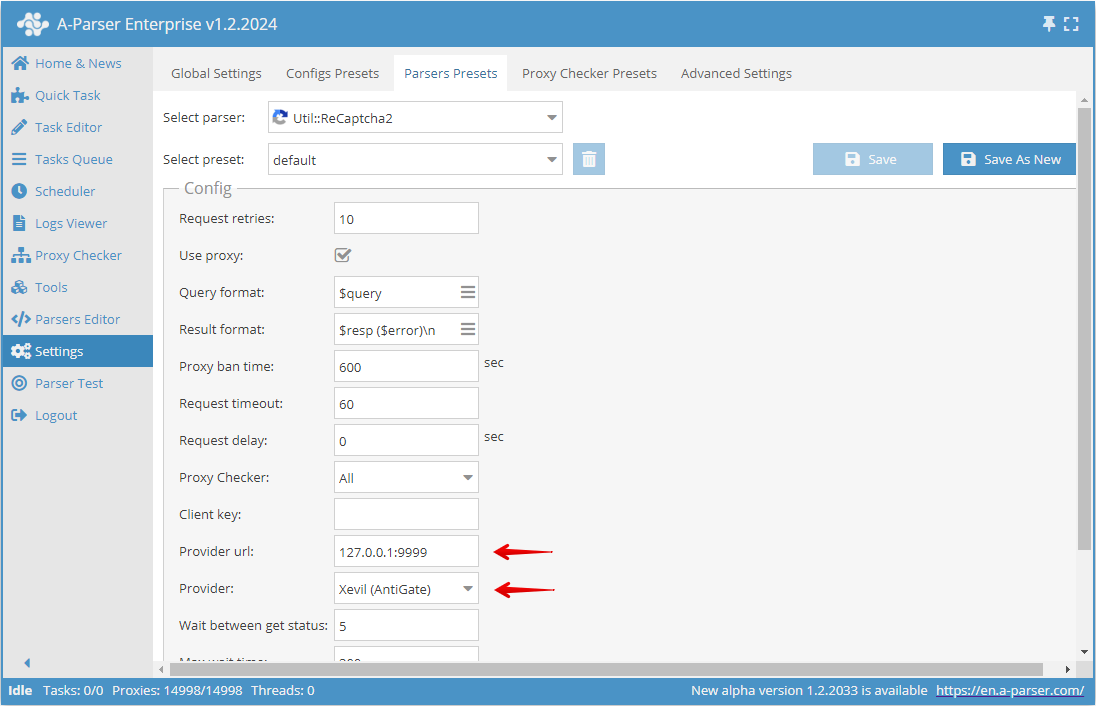
Example of setting up solving via Xevil
In Xevil, it is recommended to select the API type Antigate (Anti-Captcha). In the  Util::ReCaptcha2 settings, you need to specify the Xevil
 ip:port in Provider url:
In Provider select Xevil (AntiGate):
Features
- Support for the following services: AntiCaptcha, RuCaptcha, 2captcha, XEvil, CapMonster, CapMonster.cloud, CapSolver, captchas.io, NextCaptcha
- Ability to configure response timeout and status check delay
Use cases
- Recognition of reCAPTCHAs in built-in scrapers, where solving captchas is optionally or mandatory to obtain results
- Recognition of reCAPTCHAs in custom JS scrapers
Queries
The scraper accepts two types of queries:
sitekeyurlsitekeyurlproxyuser-agent
Parameters are separated by a space and mean:
sitekey- the reCAPTCHA sitekeyurl- the page where the reCAPTCHA is locatedproxy- the proxy through which the reCAPTCHA was obtained. The parameter must be in the formatlogin:pass@ip:port@typefor proxies with authorization orip:port@typefor proxies without authorization- type can be
http,https,socks4,socks5
- type can be
user-agent- the user-agent with which the reCAPTCHA was obtained
Output results examples
$resp- the reCAPTCHA response$error- if an error occurred, its description
ReCaptcha token output
Result format:
$resp
Result example:
03AGdBq24qfVWiRMofkMHuxaaW024vkt2Oc4Nnt4WXs3PdV0fJlpDystp444u_rG8HvuJUgN3n-upnHJXeQODxHjn_X9JdRlKEzhDnatYyehxN00WDWN_37LKwdHOgER2TrdB7XBKqrz5rko_CGWea6R1Lfe3eKmkoOeHkTyn8H3ZI90wcSvZR8gSztvq5EZWpGdNgLq15w84F92-PR8S051gUH2Ls82An0N4iiAIcTFrOTQZizqfIjgVzCzqHhSaigIPGy6j8-3nt1sac7q6Xn26fKLsQzd4hZDmrlem5rNoK-IQHEb_AUJ6r4UxQZQ-z4hk9wPpzdeiCi81sxWEX5YI-cn4cWYFsoWutv_DYvZy87Iog7u1VELGWvjT3XwkY3MyDZzpUfauyCGSd5oouLDhV5YnRPfMm-gWQUSRpt28z5xbVbwGSAfmMLEpFboCgKZdUhb-IdAiKHGA4oSXB3RhOA9TQZR-ETVqyUG8A4wJEXdCvEHU7Uhw
Possible settings
The Provider parameter is used to select the service.
For online services (AntiCaptcha, RuCaptcha, 2captcha, CapMonster.cloud, CapSolver, captchas.io), the Client key parameter must be set.
| Parameter | Default value | Description |
|---|---|---|
| Client key | Client key for online solving services | |
| Provider url | Provider URL, allows overriding the domain. Multiple URLs can be specified separated by commas; the scraper will use each of them in random order. Can be empty; the scraper automatically uses the required one depending on the selected solving service | |
| Provider | AntiCaptcha | Solving service |
| Wait between get status | 5 | Delay between status checks |
| Max wait time | 300 | Maximum solving wait time |