 Rank::KeysSo - keys.so Scraper
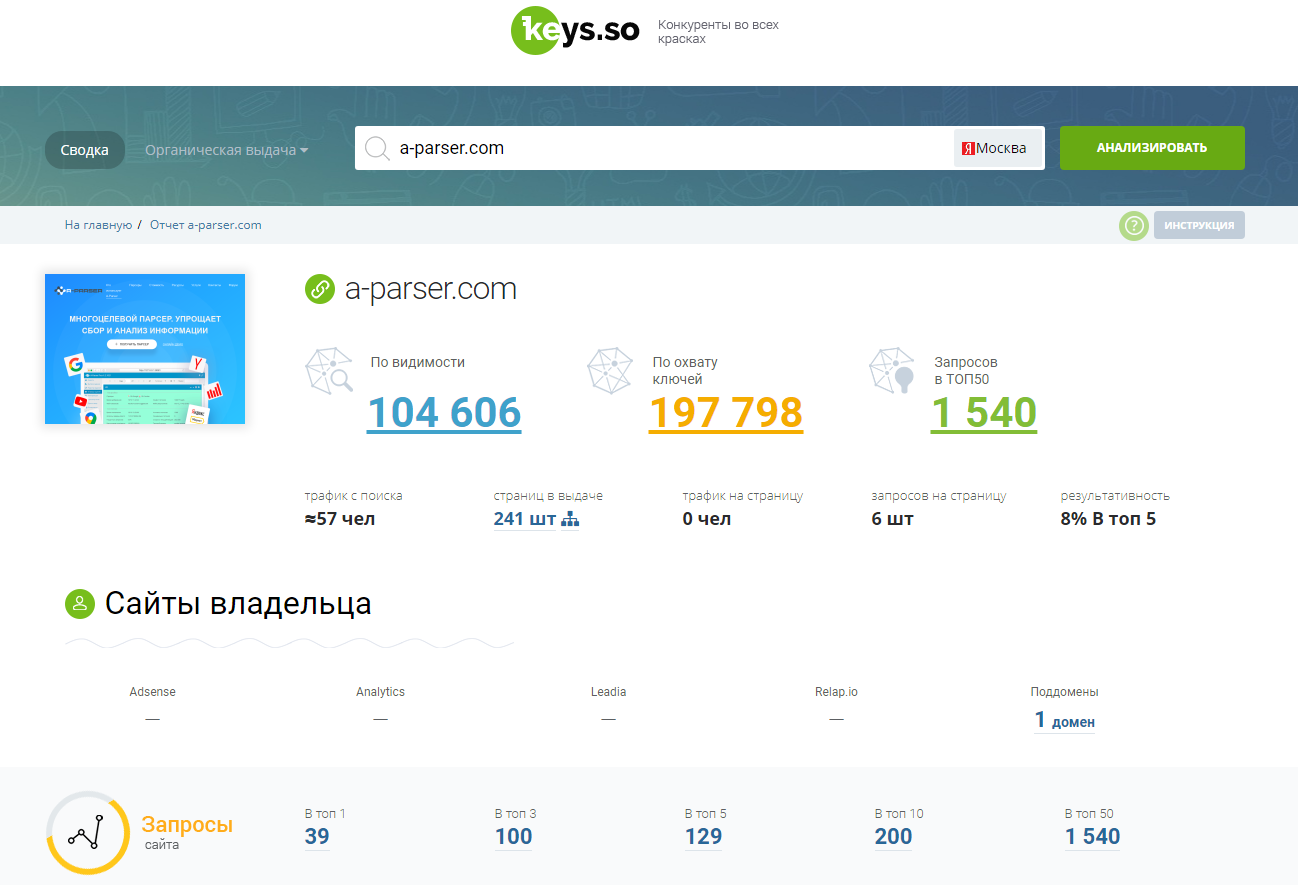
Scraper overview
Keys.so is a competitive intelligence tool. The service allows you to identify a list of your site's competitors, see which queries they rank for in search, and which queries trigger their ads. The largest database of queries in the Russian-speaking segment of the internet is available, with over 80 million keywords.
A-Parser functionality allows you to save scraping settings for future use (presets), set scraping schedules, and much more. You can use automatic query multiplication, substitution of subqueries from files, and iteration of alphanumeric combinations and lists to obtain the maximum possible number of results.
Saving results is possible in any form and structure you need, thanks to the built-in powerful Template Toolkit template engine, which allows you to apply additional logic to results and output data in various formats, including JSON, SQL, and CSV.
Collected data
- Visibility rating in the Russian-speaking internet
- Keyword coverage rating
- Number of pages in TOP-50
- Search traffic (Estimated number of users from organic search per day)
- Number of pages in search results
- Traffic per page
- Number of queries per page
- Performance score (Percentage of keywords from TOP-50 ranking in TOP-5)
- Number of sites owned by the domain owner in Adsense, Analytics, Leadia, and Relap.io
- Number of subdomains owned by the domain owner
- Number of queries in top-1, top-3, top-5, top-10, top-50
- Pages in organic search results (gets the page link and number of keywords)
- List of competitors (domain link, number of common keywords, domain similarity degree, Yandex traffic)
- Keywords (query, frequency, position)
For sites with contextual advertising:
- Context traffic (Estimated traffic from context without considering any targeting. Product of exact frequency and CTR forecast, divided by 30 days)
- Budget estimate (Estimated budget without considering any targeting. Product of exact frequency, CTR forecast, and cost per click)
- Number of ads in context
- Number of queries in context
- Number of queries per ad
- Ads in context (Ad and number of queries)
- Competitors in context (Domain, number of common queries, total queries, number of ads)
- Site queries in context (Query, frequency, position, placement, cost per click)
Capabilities
- Choice of search region for Google and Yandex
- Scraping with authorization (via cookie substitution)
Use cases
- Obtaining visibility rating in the Russian-speaking internet and keyword coverage
- Obtaining the amount of traffic per page
- Obtaining the number of queries in top-1, top-3, top-5, top-10, top-50
- Finding site competitors
- Obtaining a list of queries for which a site ranks in search
- Obtaining a site's contextual advertising ads
- Obtaining competitors in context
- Collecting data on regional search results for Google and Yandex
Queries
You must specify a domain as a query, for example:
a-parser.com
Output results examples
A-Parser supports flexible result formatting thanks to the built-in Template Toolkit template engine, which allows it to output results in any form, as well as in structured formats like CSV or JSON
Default output
Result format:
Query - $query, By vision in runet - $by_vis, By keys - $by_keys, Requests in top 50 - $in_top50, Search traf - $search_traff\n
Result example:
Query - a-parser.com, By vision in runet - 104606, By keys - 197798, Requests in top 50 - 1540, Search traf - 57
Competitor list output
Result format:
$comp_keys.format('$links, $total_keys, $similarity, $traff_y\n')
Result example:
http://youtube.com, 1360, 0.00, 8286326
http://habr.com, 1174, 0.04, 116283
http://vc.ru, 1172, 0.06, 40749
http://zen.yandex.ru, 923, 0.00, 5944772
http://spark.ru, 870, 0.33, 2062
http://zennolab.com, 828, 2.78, 216
http://web-data-extractor.net, 819, 35.11, 53
Competitor list output in CSV
Result format:
[% FOREACH comp_keys;
  tools.CSVline(links, total_keys, similarity, traff_y);
END %]
Result example:
http://vk.com,5316893,12.18,8682202
http://youla.ru,5222139,84.47,231703
http://moskva.tiu.ru,4812708,59.84,323103
http://youtube.com,4543041,8.27,8286326
http://moskva.regmarkets.ru,4106292,61.62,13983
http://ozon.ru,3783344,46.81,580266
Competitor list dump to JSON
Common result format:
[% IF notFirst;
  ",\n";
ELSE;
  notFirst = 1;
END;

obj = {};
obj.query = query;
obj.competitors = [];

FOREACH item IN p1.comp_keys;
    obj.competitors.push({
        links = item.links
        total_keys = item.total_keys
        similarity = item.similarity
        traff_y = item.traff_y
    });
END;

obj.json %]
Initial text:
[
Final text:
]
Result example:
[
    {
        "query": "avito.ru",
        "competitors": [
            {
                "traffic": "8682202",
                "similarity": "12.18",
                "total_keys": "5316893",
                "links": "http://vk.com"
            },
            {
                "traffic": "231703",
                "similarity": "84.47",
                "total_keys": "5222139",
                "links": "http://youla.ru"
            },
            {
                "traffic": "323103",
                "similarity": "59.84",
                "total_keys": "4812708",
                "links": "http://moskva.tiu.ru"
            }
        ]
    }
]
To make the "Prepend text" and "Append text" options available in the Task Editor, you need to activate "More options".
Keyword list output
Result format:
$key_phrases.format('$req, $base_freq, $va_freq, $pos\n')
Result example:
a parser, 2870, 332, 1
a parser download torrent, 183, 181, 1
aparser, 435, 118, 1
a parser torrent, 285, 103, 1
a parser, 423, 101, 1
a parser com, 221, 87, 1
google search results scraper, 66, 61, 1
a parser mass position checker, 53, 52, 1
Keyword list output in CSV
Result format:
[% FOREACH key_phrases;
  tools.CSVline(req, base_freq, va_freq, pos);
END %]
Result example:
"avito",59415062,9034027,1
"avito moscow",1782404,451582,1
"avito saint petersburg",634665,343183,1
avito,1207134,307012,1
"avito voronezh",629468,286035,1
Keyword list dump to JSON
Common result format:
[% IF notFirst;
  ",\n";
ELSE;
  notFirst = 1;
END;

obj = {};
obj.query = query;
obj.phrases = [];

FOREACH item IN p1.key_phrases;
    obj.phrases.push({
        req = item.req
        base_freq = item.base_freq
        va_freq = item.va_freq
        pos = item.pos
    });
END;

obj.json %]
Initial text:
[
Final text:
]
Result example:
[
    {
        "query": "avito.ru",
        "phrases": [
            {
                "base_freq": "59415062",
                "req": "avito",
                "va_freq": "9034027",
                "pos": "1"
            },
            {
                "base_freq": "1782404",
                "req": "avito moscow",
                "va_freq": "451582",
                "pos": "1"
            },
            {
                "base_freq": "634665",
                "req": "avito saint petersburg",
                "va_freq": "343183",
                "pos": "1"
            }
        ]
    }
]
To make the "Prepend text" and "Append text" options available in the Task Editor, you need to activate "More options".
Organic search pages output
Result format:
$organic_pages.format('$pages, $keys\n')
Result example:
http://a-parser.com/, 315
http://a-parser.com/wiki/parsers/, 115
http://a-parser.com/a-parser-for-e-commerce/, 56
http://a-parser.com/wiki/js-parsers/, 44
http://a-parser.com/wiki/html-emailextractor/, 40
http://a-parser.com/resources/21/, 39
http://a-parser.com/threads/1809/, 35
http://a-parser.com/threads/4253/, 32
Organic search pages output in CSV
Result format:
[% FOREACH organic_page;
    tools.CSVline(pages, keys);
END %]
Result example:
http://a-parser.com/, 315
http://a-parser.com/wiki/parsers/, 115
http://a-parser.com/a-parser-for-e-commerce/, 56
http://a-parser.com/wiki/js-parsers/, 44
http://a-parser.com/wiki/html-emailextractor/, 40
http://a-parser.com/resources/21/, 39
http://a-parser.com/threads/1809/, 35
http://a-parser.com/threads/4253/, 32
Organic search pages dump to JSON
Common result format:
[% IF notFirst;
  ",\n";
ELSE;
  notFirst = 1;
END;

obj = {};
obj.query = query;
obj.organic = [];

FOREACH item IN p1.organic_pages;
    obj.organic.push({
        pages = item.pages
        keys = item.keys
    });
END;

obj.json %]
Initial text:
[
Final text:
]
Result example:
[
    {
        "query": "avito.ru",
        "organic": [
            {
                "keys": "4652",
                "pages": "http://avito.ru/"
            },
            {
                "keys": "4563",
                "pages": "http://avito.ru/moskva/avtomobili"
            },
            {
                "keys": "4484",
                "pages": "http://avito.ru/moskva/kvartiry/sdam-ASgBAgICAUSSA8gQ"
            }
        ]
    }
]
To make the "Prepend text" and "Append text" options available in the Task Editor, you need to activate "More options".
Ads in context output
Result format:
$ads_context.format('$aheader, $atext, $acount\n')
Result example:
PC and Laptop Repair in Moscow, on Site! Since 2015 on Avito – Bronze status. Accepting requests 24/7! · Computers & Laptops. Tablets & Smartphones. Routers & WI - FI, 38658
Book a room on Avito. Travel together with Avito, Hotels and inns - many offers specifically for you. Now on Avito., 20122
Find a job in Moscow. On Avito Job, Fresh vacancies in Moscow. Avito - #1 classifieds service in Russia!, 20110
Ads in context output in CSV
Result format:
[% FOREACH ads_context;
  tools.CSVline(aheader, atext, acount);
END %]
Result example:
PC and Laptop Repair in Moscow","on Site! Since 2015 on Avito – Bronze status. Accepting requests 24/7! · Computers & Laptops. Tablets & Smartphones. Routers & WI - FI",38658
"Book a room on Avito. Travel together with Avito","Hotels and inns - many offers specifically for you. Now on Avito.",20122
"Find a job in Moscow. On Avito Job","Fresh vacancies in Moscow. Avito - #1 classifieds service №1 in Russia!",20110
"Dogs on Avito. Buy or take for free.","Hundreds of thousands of ads. Make profitable deals across Russia with Avito!",17306
Ads in context dump to JSON
Common result format:
[% IF notFirst;
  ",\n";
ELSE;
  notFirst = 1;
END;

obj = {};
obj.query = query;
obj.ads = [];

FOREACH item IN p1.ads_context;
    obj.ads.push({
        header = item.aheader
        text = item.atext
        count = item.acount
    });
END;

obj.json %]
Initial text:
[
Final text:
]
Result example:
[
    {
        "ads": [
            {
                "count": "38658",
                "text": "on Site! Since 2015 on Avito – Bronze status. Accepting requests 24/7! · Computers & Laptops. Tablets & Smartphones. Routers & WI - FI",
                "header": "PC and Laptop Repair in Moscow"
            },
            {
                "count": "20122",
                "text": "Hotels and inns - many offers specifically for you. Now on Avito.",
                "header": "Book a room on Avito. Travel together with Avito"
            },
            {
                "count": "20110",
                "text": "Fresh vacancies in Moscow. Avito - #1 classifieds service №1 in Russia!",
                "header": "Find a job in Moscow. On Avito Job"
            }
        ],
        "query": "avito.ru"
    }
]
To make the "Prepend text" and "Append text" options available in the Task Editor, you need to activate "More options".
Competitors in context output
Result format:
$comp_context.format('$link, $common, $req, $ads\n')
Result example:
http://uslugi.yandex.ru, 340399, 11188812, 30632
http://superjob.ru, 180179, 885168, 19065
http://mvideo.ru, 174070, 2840150, 344731
http://pleer.ru, 166815, 2577993, 238284
http://ru.jobsora.com, 124103, 596184, 99781
http://citilink.ru, 114529, 1903350, 94937
http://goods.ru, 113373, 2684645, 328750
http://pokupki.market.yandex.ru, 81527, 2657498, 326255
Competitors in context output in CSV
Result format:
[% FOREACH comp_context;
    tools.CSVline(link, common, req, ads);
END %]
Result example:
http://uslugi.yandex.ru, 340399, 11188812, 30632
http://superjob.ru, 180179, 885168, 19065
http://mvideo.ru, 174070, 2840150, 344731
http://pleer.ru, 166815, 2577993, 238284
http://ru.jobsora.com, 124103, 596184, 99781
http://citilink.ru, 114529, 1903350, 94937
http://goods.ru, 113373, 2684645, 328750
http://pokupki.market.yandex.ru, 81527, 2657498, 326255
Competitors in context dump to JSON
Common result format:
[% IF notFirst;
  ",\n";
ELSE;
  notFirst = 1;
END;

obj = {};
obj.query = query;
obj.competitors = [];

FOREACH item IN p1.comp_context;
    obj.competitors.push({
        link = item.link
        common = item.common
        req = item.req
        ads = item.ads
    });
END;

obj.json %]
Initial text:
[
Final text:
]
Result example:
[
    {
        "query": "avito.ru",
        "competitors": [
            {
                "ads": "30632",
                "link": "http://uslugi.yandex.ru",
                "req": "11188812",
                "common": "340399"
            },
            {
                "ads": "19065",
                "link": "http://superjob.ru",
                "req": "885168",
                "common": "180179"
            },
            {
                "ads": "344731",
                "link": "http://mvideo.ru",
                "req": "2840150",
                "common": "174070"
            },

        ]
    }
]
To make the "Prepend text" and "Append text" options available in the Task Editor, you need to activate "More options".
Site queries in context output
Result format:
$wreq_context.format('$request, $freq, $va_freq, $pos, $placement, $price\n')
Result example:
job in chelyabinsk, 202530, 40163, 3, Spec., 4
algebra grade 8 dorofeev, 217307, 18467, 2, Guar., 2
far cry 3, 113266, 23218, 5, Guar., 3
job in barnaul, 128775, 26402, 3, Spec., 4
harry potter and the chamber of secrets movie 2002, 36482, 30450, 2, Guar., 5
mazda 6, 554463, 25248, 6, Guar., 19
assassin s creed, 535915, 29419, 5, Guar., 5
avito ryazan, 325994, 137938, 3, Guar., 13
Site queries in context output in CSV
Result format:
[% FOREACH wreq_context;
    tools.CSVline(request, freq, va_freq, pos, placement, price);
END %]
Result example:
"job in chelyabinsk",202530,40163,3,"Spec.",4
"algebra grade 8 dorofeev",217307,18467,2,"Guar.",2
"far cry 3",113266,23218,5,"Guar.",3
"job in barnaul",128775,26402,3,"Spec.",4
"harry potter and the chamber of secrets movie 2002",36482,30450,2,"Guar.",5
"mazda 6",554463,25248,6,"Guar.",19
"assassin s creed",535915,29419,5,"Guar.",5
"avito ryazan",325994,137938,3,"Guar.",13
"avito ryazan region",72077,19586,2,"Guar.",20
Site queries in context dump to JSON
Common result format:
[% IF notFirst;
  ",\n";
ELSE;
  notFirst = 1;
END;

obj = {};
obj.query = query;
obj.wreq = [];

FOREACH item IN p1.wreq_context;
    obj.wreq.push({
        request = item.request
        freq = item.freq
        va_freq = item.va_freq
        pos = item.pos
        placement = item.placement
        price = item.price
    });
END;

obj.json %]
Initial text:
[
Final text:
]
Result example:
[
    {
        "query": "avito.ru",
        "wreq": [
            {
                "request": "job in chelyabinsk",
                "placement": "Spec.",
                "freq": "202530",
                "va_freq": "40163",
                "price": "4",
                "pos": "3"
            },
            {
                "request": "algebra grade 8 dorofeev",
                "placement": "Guar.",
                "freq": "217307",
                "va_freq": "18467",
                "price": "2",
                "pos": "2"
            },
            {
                "request": "far cry 3",
                "placement": "Guar.",
                "freq": "113266",
                "va_freq": "23218",
                "price": "3",
                "pos": "5"
            }
        ]
    }
]
To make the "Prepend text" and "Append text" options available in the Task Editor, you need to activate "More options".
Possible settings
| Parameter | Default value | Description |
|---|---|---|
| Search DB | Yandex Moscow | Search database selection |
| Cookie "userlogin=" | In this field, you must specify the value of the userlogin cookie, taken from the browser after authorization |