 SE::Bing - Bing search engine scraper
Scraper overview
Bing search engine results scraper. Thanks to the SE::Bing scraper, you will be able to obtain huge databases of links ready for further use. You can use queries in the same form as you enter them in the Bing search bar, including search operators (contains, intitle, language, site, etc.). More details on the official Advanced search keywords page.
A-Parser functionality allows you to save Bing scraper settings for future use (presets), set scraping schedules, and much more. You can use automatic query multiplication, substitution of subqueries from files, brute-force of alphanumeric combinations and lists to get the maximum possible number of results.
Saving results is possible in the form and structure you need, thanks to the built-in powerful Template Toolkit which allows you to apply additional logic to results and output data in various formats, including JSON, SQL, and CSV.
Scraper use cases
🔗 Scraping Bing search results
Scraping Bing with automatic query expansion (Parse all results)
🔗 Scraping top 10 and tag content
Multi-level scraping. Scraping the top 10 and the content of title and description tags for these sites
🔗 JS scraper based on Bing scraper
Creating JS scrapers. Receiving results from a standard scraper
🔗 Scraping all results in Bing
Scraping with intelligent query substitution via Template Toolkit and tools.query.add
🔗 Deduplication in Bing
Scraping unique URLs by keyword with domain deduplication, including the ability to specify the maximum number of URLs per domain
🔗 Multiple scrapers in a preset
The preset shows an example of using multiple scrapers
Collected data
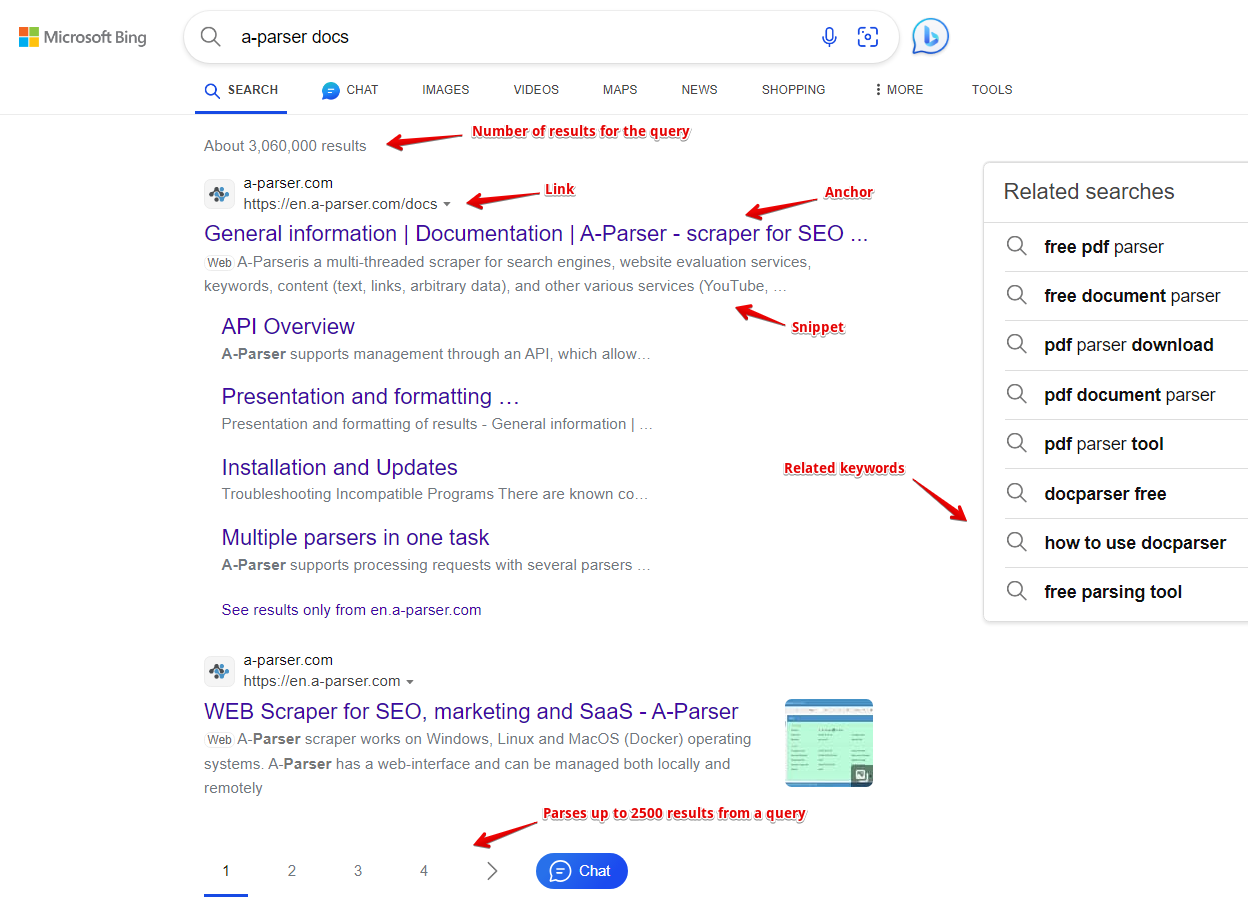
- Number of results for the query
- Links, anchors, and snippets from the search results
- List of related keywords
- Links, visible links, anchors, snippets, and ad position from the advertising results
Capabilities
- Support for all Bing search operators (site:, ip:, etc.). More details on search operators on the official Advanced search keywords page.
- Scrapes the maximum number of results provided by Bing - up to 200 pages of results
- Can automatically scrape more than 1000 results per query - substitutes additional characters (option Parse all results)
- Ability to parse to level by related keywords (Parse related to level)
- Ability to search for related keywords
- Ability to scrape links to cached pages
- Ability to scrape mobile search results
- Support for data loading during scrolling in mobile layout
The following scrapers work based on the Bing scraper:
 SE::Bing::Position - determining the positions of any sites in search results for a list of queries
Use cases
- Collecting link databases - for A-Poster, XRumer, AllSubmitter, etc.
- Assessing competition for keywords
- Searching for backlinks (mentions) of sites
- Checking site indexing
- Searching for vulnerable sites
- Searching for sites on the same IP address
- Any other options involving Bing scraping in one form or another
Queries
As queries, you should specify search phrases exactly as if they were entered directly into the Bing search form, for example:
test
windows Moscow
site:http://lenta.ru
ip:222.36.12.12
Query substitutions
You can use built-in macros for query multiplication, for example, if we want to get a very large database of forums, we specify several main queries in different languages:
forum
forum
foro
论坛
In the query format, we specify a character brute-force from a to zzzz, this method allows for maximum rotation of search results and obtaining many new unique results:
$query {az:a:zzzz}
This macro will create 475254 additional queries for each original search query, which in total will give 4 x 475254 = 1901016 search queries, an impressive figure, but it is not a problem at all for A-Parser. At a speed of 2000 queries per minute, such a task will be processed in just 16 hours.
Using operators
You can use search operators in the query format, so it will be automatically added to each query from your list:
site:$query
Output results examples
A-Parser supports flexible result formatting thanks to the built-in Template Toolkit, which allows it to output results in an arbitrary form, as well as in structured formats like CSV or JSON
Exporting a list of links
Links + anchors + snippets with position output
Outputting links, anchors, and snippets to a CSV table
Saving related keywords
Keyword competition
Checking link indexing
Saving in SQL format
Dumping results to JSON
Results processing
A-Parser allows processing results directly during scraping; in this section, we have listed the most popular cases for the Bing scraper
Link deduplication
Link deduplication by domain
Extracting domains
Removing tags from anchors and snippets
Filtering links by inclusion
Possible settings
| Parameter name | Default value | Description |
|---|---|---|
| Pages count | 10 | Number of pages to scrape (from 1 to 200) |
| Region | Based on IP | Region selection. List of regions. |
| Interface language | Any | Interface language selection. List of languages. |
| Safe Search | Moderate | Safe search option selection (Strict / Moderate / Off) |
| Device | Desktop | Search device selection (Desktop / Mobile) |
| Show inaccessible results | ☐ | Allows enabling the display of hidden results |
| Stop pagination by results count | 0 | Stop pagination when a specified number of results is reached. Works in addition to Pages count, scraping stops depending on what is reached first: the specified number of pages or the specified number of results. |
| Handle captcha max pages | 10 | Maximum number of simultaneously open pages through which cookies are generated, necessary for successful captcha passing. Limits parallelism at the captcha bypass stage. |