 SE::Google::Compromised - Checking for "This site may be hacked" label in Google
Scraper Overview
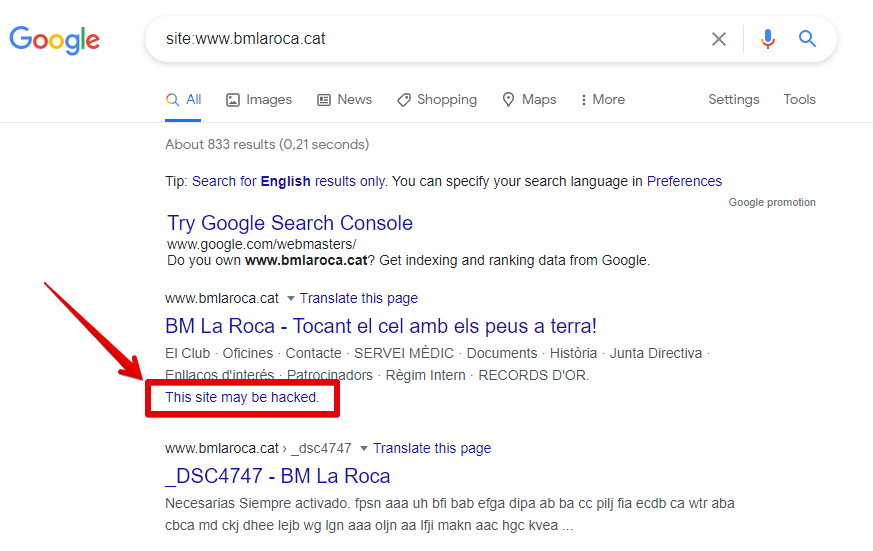
The Google Compromised scraper allows you to check for the presence of the This site may be hacked label in Google search results. Using the Google Compromised scraper, you can check your own domain databases for this label. You can learn more about this label in Google Search Help.
A-Parser functionality allows you to save scraping settings for future use (presets), set scraping schedules, and much more.
Results can be saved in any format and structure you need, thanks to the powerful built-in Template Toolkit which allows applying additional logic to results and outputting data in various formats, including JSON, SQL, and CSV.
Collected Data
- Checking for the presence of the This site may be hacked label in Google
Capabilities
- Supports all features of the
 SE::Google scraper.
Use Cases
- Checking a list of domains for the This site may be hacked label in Google
- Monitoring your own domains
Queries
You should specify the URL of the site you are looking for as queries, for example:
http://a-parser.com/
http://www.yandex.ru/
http://google.com/
http://russbehnke.com/
http://www.bmlaroca.cat/
http://vk.com/
http://facebook.com/
http://youtube.com/
Query Substitutions
You can use built-in macros for automatic substitution of subqueries from files; for example, if we want to check sites/a site against a keyword database, we specify several main queries:
ria.ru
lenta.ru
rbc.ru
yandex.ru
In the query format, we specify a substitution macro for additional words from the file Keywords.txt; this method allows checking a database of sites against a database of keys and getting positions as a result:
$query {subs:Keywords}
This macro will create as many additional queries as there are in the file for each original search query, which will result in [number of original queries (domains)] x [number of queries in the Keywords file] = [total number of queries] as a result of the macro's operation.
You can also specify a protocol in the query format so that only domains can be used as queries:
http://$query
This format will prepend http:// to each query.
Output Results Examples
A-Parser supports flexible result formatting thanks to the built-in Template Toolkit, which allows it to output results in any form, as well as structured formats like CSV or JSON.
Exporting the Label Check List
Result format:
$query: $compromised\n
Example result showing the URL and the presence of the This site may be hacked label in Google:
http://a-parser.com/: 0
http://www.bmlaroca.cat/: 1
http://russbehnke.com/: 0
http://www.yandex.ru/: 0
http://google.com/: 0
Links + Anchors + Snippets with Position Output
Outputting Links, Anchors, and Snippets to a CSV Table
Saving Related Keywords
Keyword Competition
Checking Link Indexing
Saving in SQL Format
Dumping Results to JSON
Results Processing
A-Parser allows processing results directly during scraping; in this section, we have listed the most popular cases for the SE::Google::Compromised scraper.
Saving Domains with Validation Value "1"
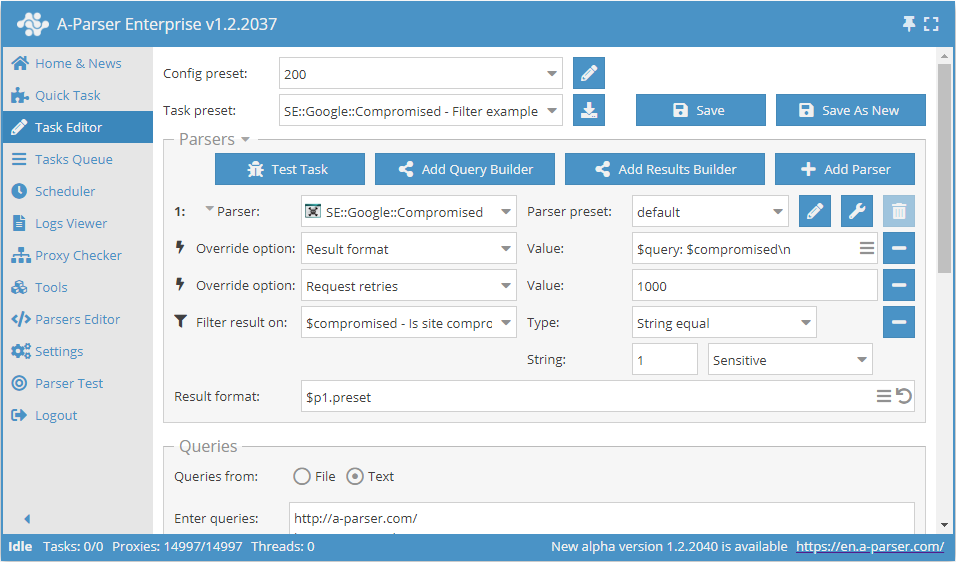
Add a filter and select the check value variable $compromised - Is site compromised from the dropdown list. Select type: String equal. Next, in String, enter the value we need: 1. With this filter, you can remove all results with an unwanted value.
Download example
How to import an example into A-Parser
eJx1VE1z2jAQ/SseTQ7tDDFw6MU3woROOzSkITkBB2GtiYosCUnmYzz8965kYxta
btZ+vH37dtclcdRu7asBC86SZFESHb5JQubPSfJdqY2AJBmrXBuVcwsseowmXDgw
ERxprgWQHtHUWDA+f3EvDaMYZLQQjvRK4k4asITagzGceQjO8J0pk1OHBEIY2VNR
+LCHXQHmlEQPaYu3XEpyvo+EYceTAWc42A7ScDAYdNOy0AkG1DUTkl5RrvzvVTDs
Ciq6YPittONK4sOCtOS8Wl2g7CT04tnrYVyL2jjndA/vqiIArRmFhReah54ZdeC9
cSXKl6+xO3oEyhj3NamoKnjV26ofku8COakw1uuGAkywITQ5CABBzAu7RS0uQYgi
5P6uckiSUWGhRyxSnVAkwm49HKWhTplZ0ADtJVFyJMQU9iDasID/VHDBcEVGGSb9
qBP/HzL7B+PctNcthRM/GOTQoITX0+xXm8XUVG2wc7bGvgXPucO3HatC+sEM0LgF
0I1mL16zXBloytTIdXU8Ew3Sr1c7spFuTVdtXI3l2pgqmfHNrF7ZS2Qh3/EWZ9If
jQDflyyEwLFYeGvXY2TrMfhHS/A2eRxK+NYvR0ecUsL+nFdUteG4ft88wRyV7Fat
IVMqxMfbtOsh7Urh49M5nfT79LG6/hgvpx9FS1nbD4dDfKKSwTE2RdexCT+H23BT
WLuGT7mtPFcw61xQo1Iap9T1iafmYKNwaVG486r5/TR/sfLuTygpz7gWf+xrleE1
9PFow2HYcMnD81/p/MfQ
See also: Results Filters
Link Deduplication
Link Deduplication by Domain
Extracting Domains
Removing Tags from Anchors and Snippets
Filtering Links by Inclusion
Possible Settings
Supports all settings of the SE::Google scraper, as well as additionally:
| Parameter Name | Default Value | Description |
|---|---|---|
| Pages count | 1 | Number of search result pages to scrape (from 1 to 10) |