 SE::Yandex::Register - Allows registering accounts on Yandex
Scraper Overview
Automatic Yandex mail registrar. Mass registers accounts using  Util::SMS for automatic SMS confirmation.
A-Parser functionality allows you to save SE::Yandex::Register scraping settings for future use (presets), set scraping schedules, and much more.
To receive a phone number and confirmation code, you must use a Util::SMS scraper preset (Util::SMS preset option).
Scraper Use Cases
🔗 Wordstat scraping automation
Used to store up-to-date information in the database, and generates a csv with fresh data upon each run.
🔗 Retrieving Yandex regions list
Account registration and region data collection via ID brute-forcing.
Basic Setup
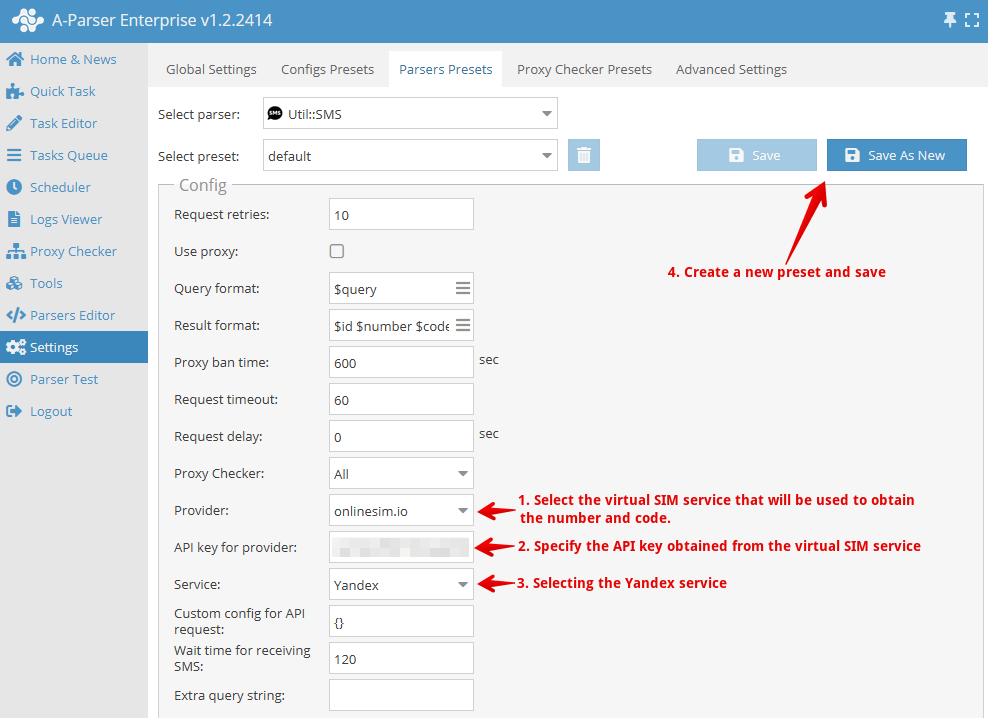
Since obtaining a virtual phone number and confirmation code is the main factor for registration, let's look at configuring the Util::SMS preset for this.
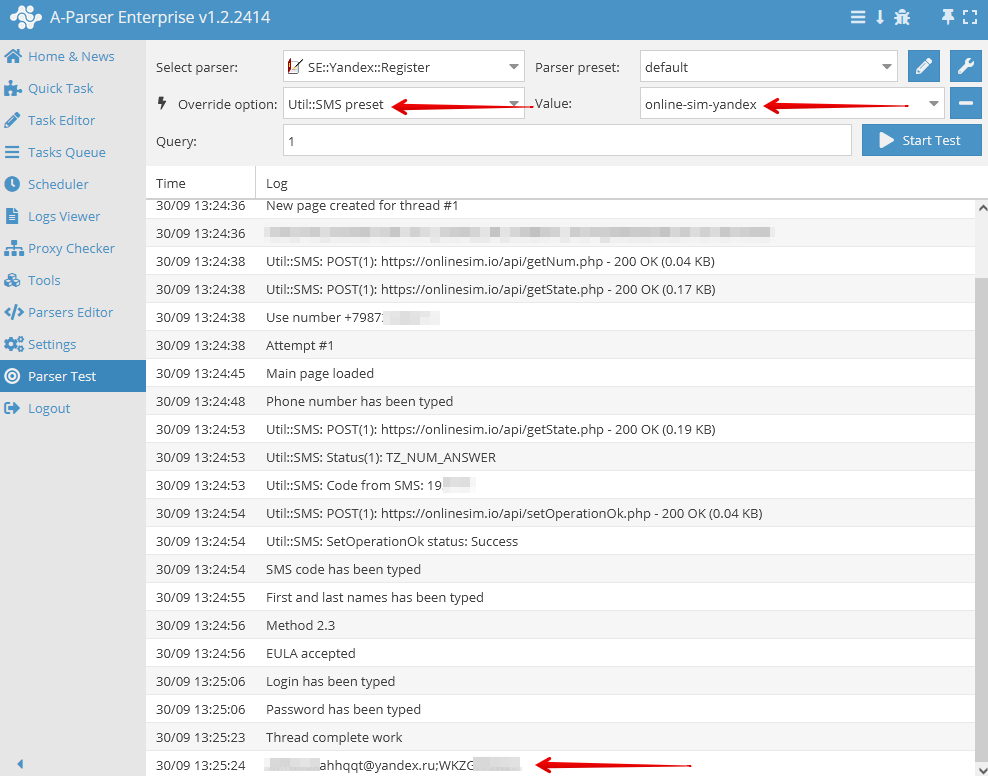
After creating a preset for the Util::SMS scraper, select it in the task for  SE::Yandex::Register
Collected Data
- Automatically registers accounts based on the number of queries using Util::SMS
Features
- Automatic Yandex account registration
- Obtaining the answer to the security question (variable
$answer); additionally, the question and answer themselves are identical - Registering multiple accounts per phone number
- Adding your own accounts to the file
files/SE-Yandex/accounts.txt
Account Format
Two account formats are supported:
[email protected];password- simple (old) format[email protected];password;info- extended (new) format, whereinfois JSON with additional data
Example of accounts in extended format:
[email protected];j85qWzWCez;{"answer":"lhutmofwlp","proxy":"http://88.198.56.226:23663"}
[email protected];jqrZ80kNbG;{"answer":"mzpcdxklbw"}
[email protected];wPXAEGoKPf;{"proxy":"http://88.198.56.226:23663"}
[email protected];pJ4563aOSl;{"answer":"qoysggfmya","proxy":"socks5://fsghfdgf:[email protected]:36532"}
The SE::Yandex::Register scraper by default saves the answer to the secret question and the proxy used during registration in info. Saving the used proxy is controlled by the Write with used proxy option and can be disabled, for example, in cases where the exit IP changes with each proxy connection.
Use Cases
- Creating accounts for use in
 SE::Yandex::WordStat and similar scrapers
Queries
You must specify the required number of queries. They can be set using a macro in the "Enter queries" field, for example:
{num:1:20}
In this example, the scraper will register 20 accounts.
The built-in macro {num:START:END} is used here for automatic substitution.
Results Output Examples
A-Parser supports flexible result formatting thanks to the built-in Template Toolkit, which allows it to output results in any form, as well as in structured formats like CSV or JSON.
Exporting Registered Accounts
Result format:
$login;$password\n
Example result:
[email protected];xobgbygi
[email protected];cropssyo
[email protected];foqxvpjy
[email protected];zsiofjew
[email protected];adppfssz
...
Outputting Account Number, Login, and Password
Result format:
$query;$login;$password\n
Example result:
1;[email protected];papkrbsp
2;[email protected];voadzgna
...
Output to CSV Table
The built-in utility $tools.CSVLine allows creating correct tabular documents ready for import into Excel or Google Sheets.
Result format:
[% tools.CSVline(login, password) %]
File name:
$datefile.format().csv
Initial text:
Login,Password
To make the "Prepend text" option available in the Task Editor, you need to activate "More options". In "Prepend text", write the column names separated by commas and make the second line empty.
Saving in SQL Format
Result format:
[% "INSERT INTO serp VALUES('" _ login _ "', '" _ password _ "')\n"; %]
Example result:
INSERT INTO serp VALUES('[email protected]', 'zobafsdu')
INSERT INTO serp VALUES('[email protected]', 'zsiofjew')
INSERT INTO serp VALUES('[email protected]', 'adppfssz')
...
Dumping Results to JSON
Common result format:
[% IF notFirst;
  ",\n";
ELSE;
  notFirst = 1;
END;

obj = {};
obj.login = p1.login;
obj.password = p1.password;

obj.json %]
Initial text:
[
Final text:
]
Example result:
[{"password":"bsjgfhsm","login":"[email protected]"},{"password":"adppfssz","login":"[email protected]"}]
To make the "Prepend text" and "Append text" options available in the Task Editor, you need to activate "More options".
Possible Settings
| Parameter name | Default value | Description |
|---|---|---|
| Util::SMS preset | default | Preset for the Util::SMS scraper. You must first configure the Util::SMS scraper - specify your access key and other parameters, then select the created preset here |
| Wait time for receiving SMS | 120 | SMS waiting time |
| Click "Resend sms" when it possible | ☑ | The scraper automatically clicks the SMS resend button on the registration page as soon as it becomes available. This helps in cases where the SMS did not arrive the first time. Disabling is recommended only if problems occur. |
| Chrome headless | ☑ | If the option is enabled, the browser will not be displayed |
| Write registered account to "SE-Yandex/accounts.txt" | ☑ | Whether to record accounts in files/SE-Yandex/accounts.txt. Necessary for their subsequent use in A-Parser |
| Write with used proxy | ☑ | Recording the proxy used during registration along with the account in files/SE-Yandex/accounts.txt |