 Shop::Yandex::Market - Yandex Market product scraper
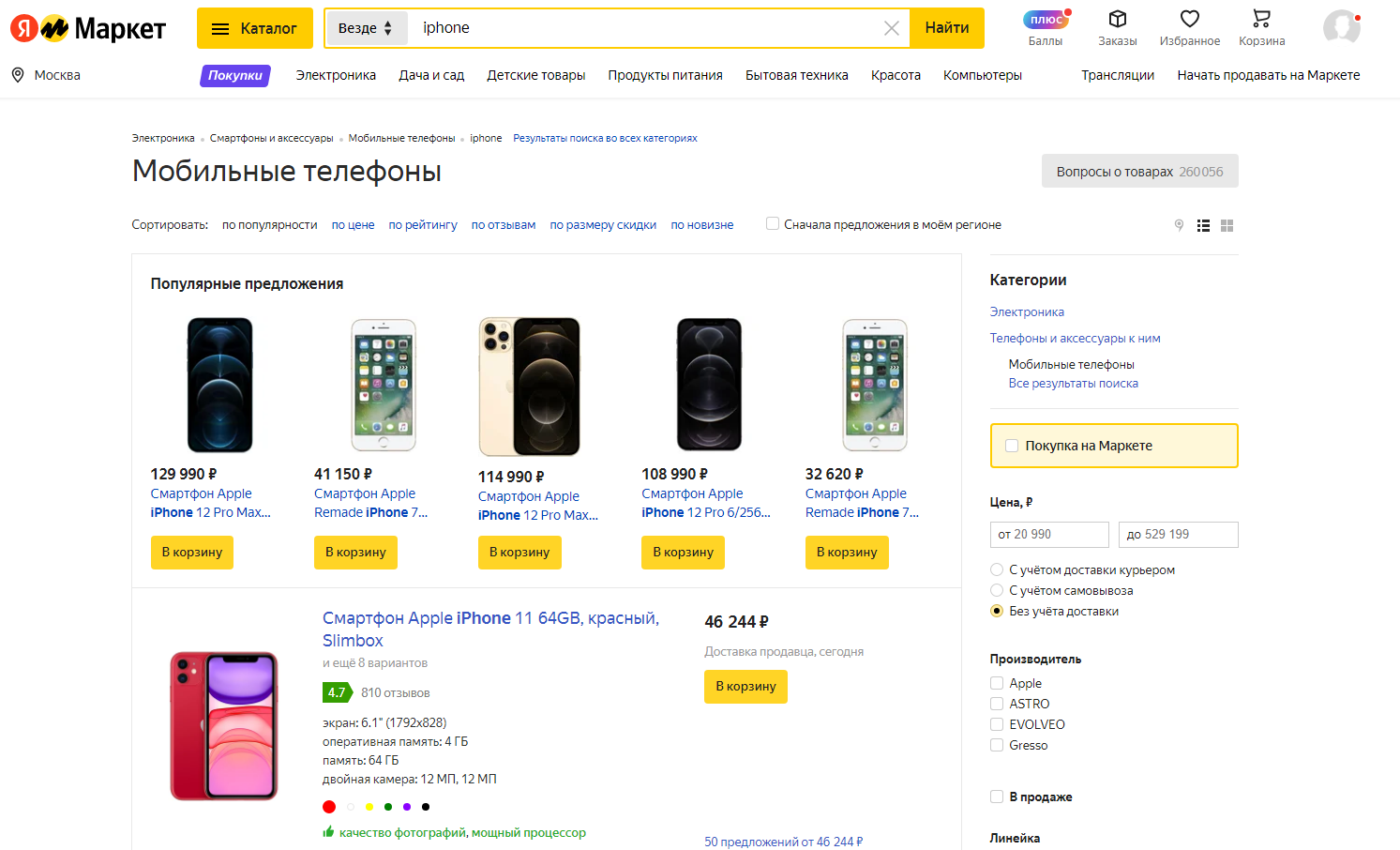
Scraper overview
Using the Yandex Market product scraper, you can retrieve data from product cards, collect a database of product links, track price dynamics, monitor changes in the number of sellers, collect ratings and the number of reviews, and scrape product images.
A-Parser functionality allows you to save scraping settings for future use (presets), set scraping schedules, and much more. You can use automatic query multiplication, substitution of subqueries from files, and iteration of alphanumeric combinations and lists to obtain the maximum possible number of results.
Collected data
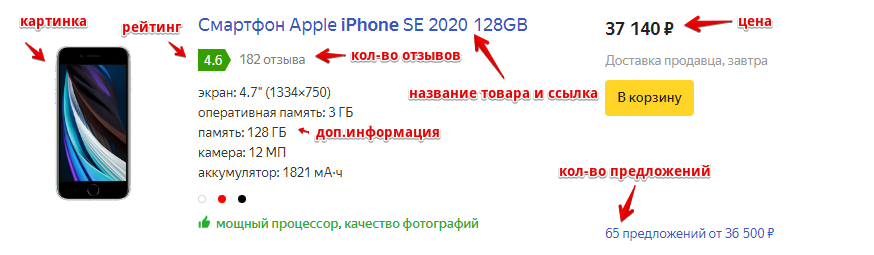
- Product name
- Product link
- Product image
- Price and old price
- Currency
- Rating and number of comments
- Number of sellers
- Additional information
- Number of purchases and product views
Use cases
- Collecting product links
- Assessing product popularity
- Tracking price dynamics and product popularity
Queries
You should specify keywords or a link to a category as queries, for example:
xiaomi redmi note
https://market.yandex.ru/catalog/54726/list?local-offers-first=0&deliveryincluded=0&onstock=1
Output results examples
A-Parser supports flexible result formatting thanks to the built-in Template Toolkit, which allows it to output results in any form, as well as in structured formats like CSV or JSON.
Outputting product name, minimum price, and rating
Result format:
$products.format('Name: $title, Minimum price: $amountfrom, Rating: $rating\n')
Result example:
Name: Smartphone Apple iPhone 11 64GB, Minimum price: 46 244,  Rating: 4.7
Name: Smartphone Apple iPhone Xr 64GB, Minimum price: 36 990,  Rating: 4.7
Name: Smartphone Apple iPhone 12 64GB, Minimum price: 60 840,  Rating: 4.7
Name: Smartphone Apple iPhone SE 2020 64GB, Minimum price: 33 490,  Rating: 4.5
Name: Smartphone Apple iPhone Xr 128GB, Minimum price: 43 450,  Rating: 4.7
Output to CSV table
Result format:
[% FOREACH item IN products;
    tools.CSVline(item.cardlink, item.title, item.amountfrom, item.rating, item.commentscount);
END %]
Result example:
https://market.yandex.ru/product--smartfon-apple-iphone-11-64gb/558171067?nid=54726&show-uid=16206538929466307988916001&context=search&text=iphone&sku=101106266737,"Smartphone Apple iPhone 11 64GB","46 244",4.7,810
https://market.yandex.ru/product--smartfon-apple-iphone-xr-64gb/175941311?nid=54726&show-uid=16206538929466307988916002&context=search&text=iphone&sku=101103379766,"Smartphone Apple iPhone Xr 64GB","36 990",4.7,624
https://market.yandex.ru/product--smartfon-apple-iphone-12-64gb/722976004?nid=54726&show-uid=16206538929466307988916003&context=search&text=iphone&sku=101077347750,"Smartphone Apple iPhone 12 64GB","60 840",4.7,103
https://market.yandex.ru/product--smartfon-apple-iphone-se-2020-64gb/661221015?nid=54726&show-uid=16206538929466307988916004&context=search&text=iphone&sku=101099789863,"Smartphone Apple iPhone SE 2020 64GB","33 490",4.5,358
Initial text:
Product link, Product name, Minimum price, Rating, Number of comments
In the Result format, the Template Toolkit is used to output the $products array in a FOREACH loop.
To make the "Prepend text" option available in the Task Editor, you need to activate "More options". In "Prepend text", write the column names separated by commas and make the second line empty.
Saving in SQL format
Result format:
[% FOREACH item IN products;
    "INSERT INTO products VALUES('" _ item.title _ "', '"; item.cardlink _ "', '"; item.amountfrom _ "', '"; item.rating _ "')\n";
END %]
Result example:
INSERT INTO products VALUES('Smartphone Apple iPhone 11 64GB', 'https://market.yandex.ru/product--smartfon-apple-iphone-11-64gb/558171067?nid=54726&show-uid=16206542754162480526716001&context=search&text=iphone&sku=101106266737', '46 244', '4.7')
INSERT INTO products VALUES('Smartphone Apple iPhone Xr 64GB', 'https://market.yandex.ru/product--smartfon-apple-iphone-xr-64gb/175941311?nid=54726&show-uid=16206542754162480526716002&context=search&text=iphone&sku=101103379766', '36 990', '4.7')
INSERT INTO products VALUES('Smartphone Apple iPhone 12 64GB', 'https://market.yandex.ru/product--smartfon-apple-iphone-12-64gb/722976004?nid=54726&show-uid=16206542754162480526716003&context=search&text=iphone&sku=101077347750', '60 840', '4.7')
INSERT INTO products VALUES('Smartphone Apple iPhone SE 2020 64GB', 'https://market.yandex.ru/product--smartfon-apple-iphone-se-2020-64gb/661221015?nid=54726&show-uid=16206542754162480526716004&context=search&text=iphone&sku=101099789863', '33 490', '4.5')
Dump results to JSON
Common result format:
[% IF notFirst;
  ",\n";
ELSE;
  notFirst = 1;
END;

obj = {};
obj.query = query;
obj.items = [];

FOREACH item IN p1.products;
    obj.items.push({
        link = item.cardlink
        name = item.title
        amountfrom = item.amountfrom
    });
END;

obj.json %]
Initial text:
[
Final text:
]
Result example:
[
    {
        "query": "https://market.yandex.ru/catalog--mobilnye-telefony/54726/list?text=iphone&hid=91491&was_redir=1&rt=10&cpa=0&onstock=0&local-offers-first=0",
        "items": [
            {
                "link": "https://market.yandex.ru/product--smartfon-apple-iphone-11-64gb/558171067?nid=54726&show-uid=16206548825917275667016001&context=search&text=iphone&sku=101106266737",
                "amountfrom": "46 244",
                "name": "Smartphone Apple iPhone 11 64GB"
            },
            {
                "link": "https://market.yandex.ru/product--smartfon-apple-iphone-xr-64gb/175941311?nid=54726&show-uid=16206548825917275667016002&context=search&text=iphone&sku=101103379766",
                "amountfrom": "36 990",
                "name": "Smartphone Apple iPhone Xr 64GB"
            },
            {
                "link": "https://market.yandex.ru/product--smartfon-apple-iphone-12-64gb/722976004?nid=54726&show-uid=16206548825917275667016003&context=search&text=iphone&sku=101077347750",
                "amountfrom": "60 840",
                "name": "Smartphone Apple iPhone 12 64GB"
            },
            {
                "link": "https://market.yandex.ru/product--smartfon-apple-iphone-se-2020-64gb/661221015?nid=54726&show-uid=16206548825917275667016004&context=search&text=iphone&sku=101099789863",
                "amountfrom": "33 490",
                "name": "Smartphone Apple iPhone SE 2020 64GB"
            }
        ]
    }
]
To make the "Prepend text" and "Append text" options available in the Task Editor, you need to activate "More options".
Possible settings
| Parameter | Default value | Description |
|---|---|---|
| AntiGate preset | default | Preset selection  Util::AntiGate, more details on the setting here Util::AntiGate, more details on the setting here |
| AntiGate preset for old captcha | default | Similar to AntiGate preset, but used only for regular (old, single image) captchas. If no preset is selected here, the preset selected in AntiGate preset will be used for such captchas. |
| Auto-Solve ClickCaptcha | ☐ | Automatic click captcha solving (without using services) |
| Experimental img captcha max count | 1 | Maximum number of repeated captcha images per attempt |
| Pages count | 5 | Number of pages to scrape |
| Search region ID | Not set | Region for scraping |