 Telegram::GroupScraper - Scraper for public Telegram channels and groups
Scraper Overview
The scraper collects all posts and messages from public Telegram channels and groups.
The operation logic differs from other scrapers: it automatically iterates through messages in a channel or group. Because of this, it cannot be used together with other scrapers in a single task.
The order of lines in the result is not guaranteed by post number (depends on threads). Chat/channel metadata is loaded once per channel and duplicated in each post line.
Saving results is possible in any format and structure you need, thanks to the powerful built-in Template Toolkit which allows applying additional logic to results and outputting data in various formats, including JSON, SQL, and CSV.
Scraper Use Cases
🔗 User Scraping
Scraping users from public Telegram groups
🔗 Scraping all messages
Scraping all messages from public Telegram groups
Collected Data
Works with public channels and groups.
Message
- Post link (
url) - Post ID (
post_id) - Channel/group username without
@(channel) - Post text with HTML (
message_text) - Same text without HTML (
message_text_plain) — for filters, search, and output - Date in ISO (
message_date) - Views (
views) — as in Telegram:15.5K,1.2M, etc.; only for channels, empty for groups - Video notice (
message_video_notice) — if the post contains a video but themessage_videosarray has no URL, and this field is filled: the video can only be viewed in Telegram under your account (authorization required), there is no direct file link. This is not a scraping error — Telegram does not provide such videos without logging into an account
Post author
- Profile link (
user_link) - Name (
user_name) - Avatar URL (
user_avatar)
Forward
- Forwarded from (
forward_from) - Source link (
forward_from_url) — original URL, if available - Explanation for missing link (
forward_from_notice) — filled ifforward_from_urlis empty (e.g., "Source link not available in embed"): no direct link, the original might have been deleted, hidden, or unavailable for another reason. Not a scraper error
Reply
- URL of the message being replied to (
reply_to_url) - Post ID from URL (
reply_to_post_id) - Author of the original message (
reply_to_author) - Text of the original message, plain (
reply_to_text)
Reactions
- Total sum of all reactions (
reactions_total) — number as a string;K/M/Bare recalculated
Chat/channel metadata
Loaded once per channel, duplicated in every row of the post.
- Title (
chat_title) - Number of subscribers/members (
chat_members) - Online (
chat_online) — only for groups; number of users online at the start of scraping the channel, not updated during scraping. Empty for channels - Description, plain text (
chat_description) - Media and link counters (
chat_photos,chat_videos,chat_files,chat_links) — only for channels
Arrays
reactions — fields emoji, count (as in Telegram: 16, 1.2K). Who reacted is not collected: only the emoji type and total count are available
message_photos — field url; album — multiple rows.
message_videos — field url. If there is no URL but the post has a video — see message_video_notice (viewing only after logging into Telegram)
links — field url; external links from the post text. Links like t.me/username without a path do not go here (these are mentions).
mentions — field username (@username); from t.me/username links and @username text in <a>.
Capabilities
- Flexible query normalization (see Queries)
- Filters by date (
dateFrom,dateTo) and forwarded messages (skipForwards) - Photo and video albums — multiple URLs in one post
Use Cases
- Collecting content from channel or group posts
- Monitoring reactions, views, and forwards
Queries
Public channels and groups are supported. All formats are normalized to https://t.me/{username}:
| Query | Behavior |
|---|---|
@username | channel or group, starts from Start message number |
username | same |
https://t.me/username | same |
t.me/username | same |
https://t.me/s/username | same |
https://t.me/username/123 | channel or group, starts from post #123 (Start message number is ignored) |
Invalid query → Unknown query line in log, empty result.
Examples:
https://t.me/a_parser
@a_parser
https://t.me/a_parser/100
Output Results Examples
A-Parser supports flexible result formatting thanks to the built-in Template Toolkit, allowing it to output results in any form, as well as structured formats like CSV or JSON.
Default Output
Result format:
$channel/$post_id: $message_text_plain ($views views, $reactions_total reactions)
Result example:
a_parser/1234: these are filters) ( views, 0 reactions)
a_parser/85962: Google rolled out something new for protection) ( views, 2 reactions)
Output to CSV Table
Result format:
[% tools.CSVline(channel, post_id, message_text_plain, views, reactions_total) %]
Result example:
a_parser,1234,"these are filters)",,0
a_parser,85962,"Google rolled out something new for protection)",,2
Filtering and skip posts
A row does not enter the result if:
- Date is outside the Date from / Date to range
- Skip forwards is enabled and the post is forwarded
When filtering by date or forward, the post is considered found, and the channel traversal continues.
Channel traversal stops when:
- after the last found post, Max empty posts IDs have been checked consecutively without new finds;
- or a series of empty posts from the beginning (if no posts have been found yet).
Results Processing
A-Parser allows processing results directly during scraping; in this section, we have listed the most popular cases for the Telegram scraper.
Filtering Results by Word Occurrence in Message
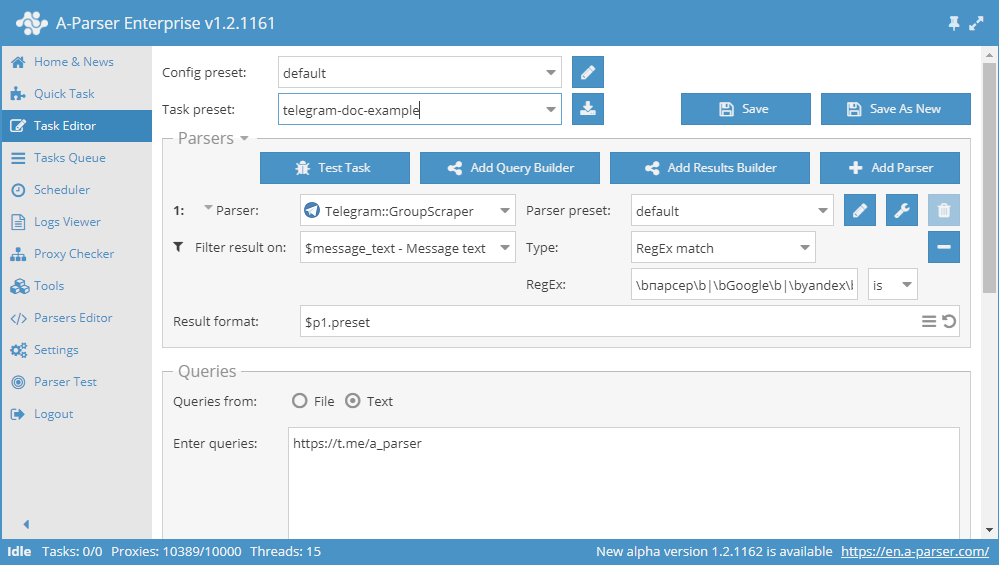
You need to add a filter and select $message_text - Message text from the dropdown list. Select type RegEx match.
In the regex field, enter the regex with the required words:
\bscraper\b|\bGoogle\b|\byandex\b|\bscraper\b|\bProxy\b|\bDorks\b
\b - word boundary
| - OR
is - regex flag
Download example
How to import an example into A-Parser
eJyVVN1v2jAQ/18sHjaJ8qFSacobRaLaxEpX6BOg6oovqVfH9myHgTL+952dkMC6
PewhVu53v/v2uWQe3Jt7sOjQO5asSmbiP0uYR4mZhfyK6+0V7iE3ElmXGbAObeCu
2LKmJMmd1YVZbC0YtETimEIhPeuWzB8MkrdUSB9V5D5oEpajc5Dhs8c9EWvCsmJb
zMFvXwnegSwCsl6/rIvB6DqN5yCco+ocRuSmRtYvv+i70zqTWAsHUBz3tfAfToIw
TFvSNcYTzgw+nVNHLak2gIZElWjjhVZUinDsuNmcOuGm2lKxhHfMsFd3v1EuYIdL
XfUPW3hK0j3koTEdDh6DtpdGRx8+9nxsKHAuQkSQVYQwsjbqkxI/YmOVJi79WoFu
anUeJx8dBPBwym7FOlFm5KKItt8qG5akIB12maNUp0CJ8D81ggYLXtt57ADhJdNq
LOUMdyhbWvR/WwjJ6X6NUzL6XBv+nTJ/5+PYlHceaof2p6UcGi9Rup1/ba24numM
KudhUFLkwpPsJrpQYTADAt8QTdOz+9CzXFtswnhbYBOc1smg4kRsJzY2LXRRxcVU
LsGtVqnI5pS/FRxPzEItaWfnaqLDRoayVCElTcXhY3s7xq6eQhCayt8ZT2KIUPlp
Y5nXWroviypVYwXdvpuQYE6NPI9au9yClE+Ps3MNa28UCa/eG5f0+76XYx+eq/eD
BUOPmaYbRWUdN83D0rxF5b+el6Q80si+u4fKIBQY6IRRp1zcseHxN9yRrow=
Possible Settings
| Parameter | Default value | Description |
|---|---|---|
| Max empty posts | 1000 | How many empty IDs in a row to try after the last found post before stopping the channel crawl. This is not a limit for saved posts |
| Start message number | 1 | The post number to start the crawl from (if the query does not contain /123) |
| Skip forwards | ☐ | Do not save forwarded messages |
| Date from | Date from, inclusive. Format YYYY-MM-DD | |
| Date to | Date to, not inclusive. Format YYYY-MM-DD |