 Rank::MajesticSEO - Scraper for backlink counts from majesticseo.com
Majestic Scraper Overview
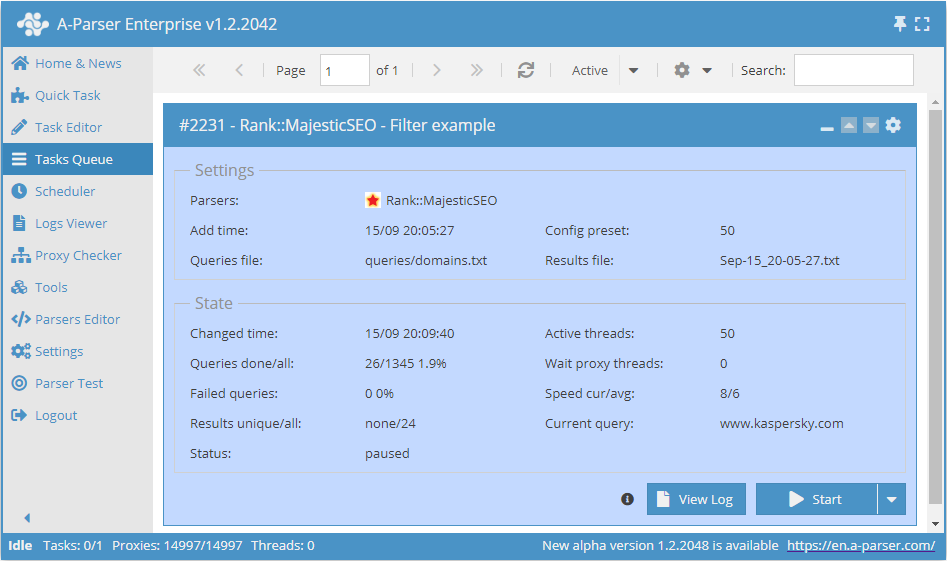
The Majestic scraper is one of the most popular scrapers for SEO specialists as it allows obtaining such important metrics as Trust Flow and Citation Flow. With the automated multithreaded Majestic scraper, you can scrape the following data: number of referring domains, backlinks, and indexed pages.
A-Parser functionality allows you to save scraping settings for future use (presets), set scraping schedules, and much more.
Thanks to A-Parser multithreading, the request processing speed can reach 100 requests per minute using only 50 threads.
Saving results is possible in any form and structure you need, thanks to the built-in powerful Template Toolkit which allows applying additional logic to results and outputting data in various formats, including JSON, SQL, and CSV.
Collected data
Data is collected from the service www.majesticseo.com
- Number of referring domains
- Number of backlinks
- Number of indexed pages
- Trust Flow and Citation Flow metrics
Use Cases
- Obtaining summary information about a domain
- Estimating the number of backlinks
- Estimating traffic on a domain
Queries
You should specify a list of domains as queries, for example:
a-parser.com
yandex.ru
google.com
vk.com
facebook.com
youtube.com
Output results examples
A-Parser supports flexible result formatting thanks to the built-in Template Toolkit, which allows it to output results in any form, as well as in structured formats like CSV or JSON
Exporting a list of results
Result format:
$query - domains: $domains, backlinks: $backlinks, trust: $trustflow, citation: $citationflow, indexed: $indexed\n
The result displays the domain, number of backlinks, number of referring IP addresses, trust, citation, and indexed pages.
Result example:
facebook.com - domains: 28384898, backlinks: 83357892873, trust: 99, citation: 99, indexed: 6743835203
a-parser.com - domains: 380, backlinks: 90219, trust: 12, citation: 38, indexed: 16121
yandex.ru - domains: 592182, backlinks: 1751277762, trust: 88, citation: 82, indexed: 92468056
google.com - domains: 21134537, backlinks: 32206959211, trust: 100, citation: 100, indexed: 3278520318
vk.com - domains: 1145676, backlinks: 3235015237, trust: 90, citation: 85, indexed: 372205938
...
Output to a CSV table
The built-in utility $tools.CSVLine allows you to create correct tabular documents ready for import into Excel or Google Sheets.
Result format:
[% tools.CSVline(query.orig,domains,trustflow,citationflow,indexed) %]
File name:
$datefile.format().csv
Head text:
Domain,Referring domains,Trust,Citation,Indexing
Result example:
Domain,Referring domains,Trust,Citation,Indexing
a-parser.com,380,12,38,16121
yandex.ru,592182,88,82,92468056
vk.com,1145676,90,85,372205938
facebook.com,28384898,99,99,6743835203
google.com,21134537,100,100,3278520318
The Template Toolkit is used in the Result Format to output results.
In the result file name, simply change the file extension to csv.
To make the "Prepend text" option available in the Task Editor, you need to activate "More options". In "Prepend text", write the column names separated by commas and make the second line empty.
Saving in SQL format
Result format:
INSERT INTO serp VALUES('$query.orig', '$domains', '$backlinks', '$trustflow', '$citationflow', '$indexed')\n
Result example:
INSERT INTO serp VALUES('google.com', '21134537', '32206959211', '100', '100', '3278520318')
INSERT INTO serp VALUES('vk.com', '1145676', '3235015237', '90', '85', '372205938')
INSERT INTO serp VALUES('yandex.ru', '592182', '1751277762', '88', '82', '92468056')
INSERT INTO serp VALUES('a-parser.com', '380', '90219', '12', '38', '16121')
INSERT INTO serp VALUES('facebook.com', '28384898', '83357892873', '99', '99', '6743835203')
Dumping results to JSON
Common result format:
[% IF notFirst;
  ",\n";
ELSE;
  notFirst = 1;
END;

obj = {};
obj.query = p1.query.orig;
obj.indexed = p1.indexed;
obj.domains = p1.domains;
obj.citationflow = p1.citationflow;
obj.trustflow = p1.trustflow;
obj.backlinks = p1.backlinks;

obj.json %]
Initial text:
[
Final text:
]
Result example:
[
    {"indexed":"372205938","domains":"1145676","citationflow":"85","query":"vk.com","trustflow":"90","backlinks":"3235015237"},
    {"indexed":"92468056","domains":"592182","citationflow":"82","query":"yandex.ru","trustflow":"88","backlinks":"1751277762"},
    {"indexed":"6743835203","domains":"28384898","citationflow":"99","query":"facebook.com","trustflow":"99","backlinks":"83357892873"},
    {"indexed":"3278520318","domains":"21134537","citationflow":"100","query":"google.com","trustflow":"100","backlinks":"32206959211"},
    {"indexed":"16121","domains":"380","citationflow":"38","query":"a-parser.com","trustflow":"12","backlinks":"90219"}
]
To make the "Prepend text" and "Append text" options available in the Task Editor, you need to activate "More options".
Results processing
A-Parser allows you to process results directly during scraping; in this section, we have listed the most popular cases for the Rank::MajesticSEO scraper
Saving domains with the required trust
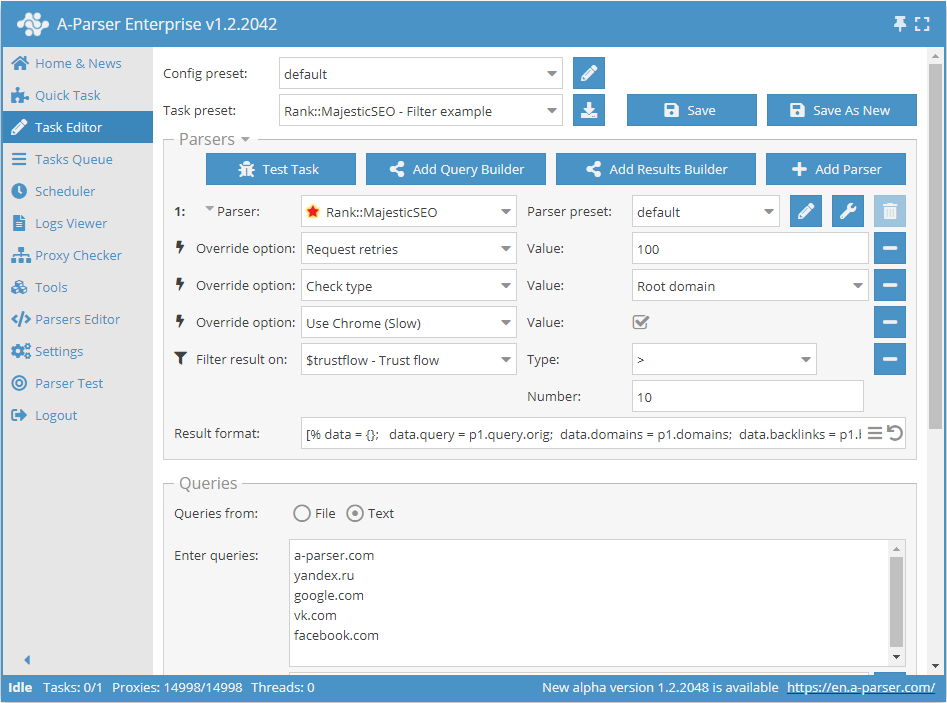
Add a filter and select the check value variable $trustflow - Trust flow from the drop-down list. Select the type, for example: >. Next, in Number, enter the value you need, e.g., 10. With such a filter, you can remove all results with a Trust flow value less than 10.
Download example
How to import an example into A-Parser
eJx9VFFP20AM/ivRCaRNggoe9lK0SQWt0iagDMpT24cjcbqjl3O4u5RWUf479iW9
tMD21Nr+7LM/f3EtvHQrd2fBgXdiOKtFGf6LobiXZjUc3shncF6lDz8nyWkyVtqD
TWAji1KDOBGltA4sZ84+JlA8g1xW2ouTWvhtCVQW12CtyjhZZWSXFjdbC94qcORb
S10x7PzsTDT/zgruHm0R/f/g6V+LxV6CtxXswfMwFoVpdu6W6tvK+VzjKznb6LSF
/jjokQwsvUJDlgPjRLNY7Kq4MdpCcrHZcZJJL5PvSd1cJMncsDV4qcBuyVeet38H
aNXyYhfNsJDKuDbeGTH4JNOVVmbVhaMZAbH9FhDNCEiVl9x3j9n3RJgyGWwgaxGd
wcHjxVGIPzs087mJzLkHuYYptpRC7ybdwK0smDROBI4O8sDPl68DvyGBCJllihuQ
uiWORdWT+WjUSyDdIGGZMNLLmLbKy4JQILC4I30mjoItqEQVcv+0OWKYS+3gRDhq
dSypkex9RNG6pUc7Caslfy3QjLS+hjXoHhbqX1ZKZ/QFjHJK+tUlfg6ZfKjRxPH2
nyLtvlrqIVYJ1uXkps/K8BqXNHn2RHNrVShPtrvCyrDeWJYrgDJydsucFWghPtNV
7l6n778Ewx9Kv7JR2bsOxjhYy6EzJfmo5aT7+HbIykzpyEzMFfLR4LlMpTWtxcF9
L4+R69bARt/g++Sr8ASPvrsswiNq9/uhbbW0iuT3jRssiMn9V7uSqdT68f56PyJ6
SZEhT9urNkixmJutZNkPbDU3S8Ql6Ta416v2N5cpPCF2luDyHpZIwqPhm0W8kPHE
1p/cyWHd0FKf3V2LZQYYST6i0oXzct68AXxQ/Fc=
See also: Results filters
Possible settings
| Parameter name | Default value | Description |
|---|---|---|
| Check type | Root domain | Allows choosing the check type: Root Domain / Subdomain / URL |
| Use Chrome (Slow) | ☐ | Specifies to use the Chrome browser for all requests |
| Use Headless mode for Chrome | ☑ | Use Headless mode for requests via browser |
| Use Stealth mode for Chrome | ☐ | Mask browser usage when making requests via browser |
| Use HTTP2 for requests without Chrome | ☐ | Use HTTP/2 for requests without a browser |
| Emulate browser headers for requests without Chrome | ☐ | Emulate browser headers for requests without a browser |
| User-agent for requests without Chrome | [% tools.ua.random() %] | Override User-Agent for requests without a browser |
| Additional headers for requests without Chrome | Accept, Accept-Encoding, Accept-Language | Allows setting headers for requests without a browser. Works similarly to Additional headers in  Net::HTTP. Net::HTTP. |