 Net::Whois - Scraper checks domain data via RDAP and WHOIS
Scraper Overview
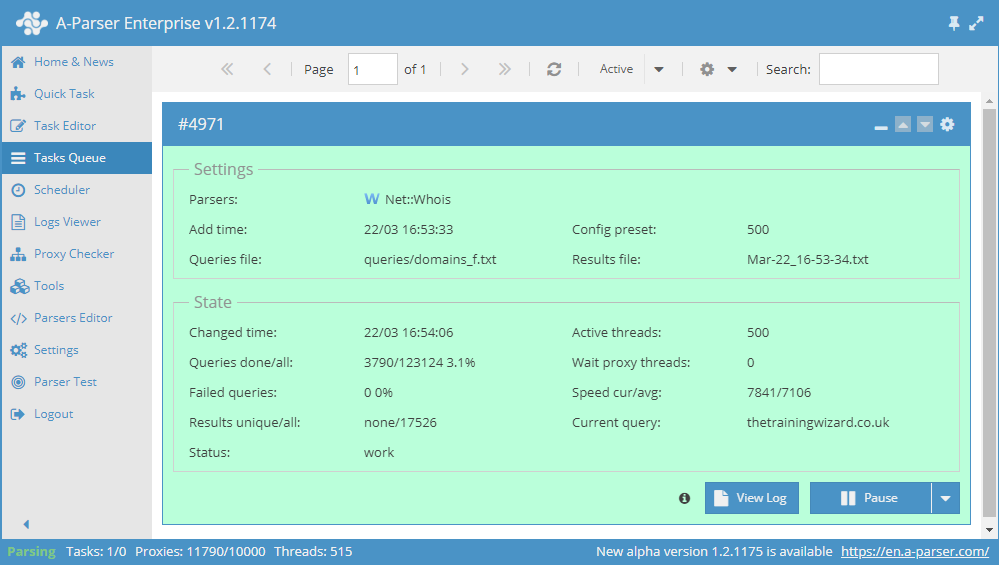
Domain data is collected via RDAP (HTTP, JSON), WHOIS (port 43), or the operator's web page — depending on the domain zone. For each TLD, RDAP and WHOIS servers are predefined in the scraper; if RDAP is available for a zone, the request is performed through it first, falling back to WHOIS on error, and if neither is available, via the web when a page exists.
The set of check methods depends on the operator, not just the TLD. Some zones lack WHOIS or RDAP, or they do not function — as decided by the operator. A web page for checking is also not available for everyone: its presence is also determined by the operator. If a page exists, the scraper requests data through it.
There are zones where the operator owns only the TLD, and sites are registered on SLDs (second level, for example co.uk, org.uk). An SLD may have one or several owners — but they are not the TLD operator. The set of check methods is then defined by the SLD owner: WHOIS, RDAP, web page, a combination thereof — or none of the above.
The composition of fields in WHOIS and RDAP may also differ — due to legislation, operator policy, and restrictions on personal data. However, the set is generally predictable: registration, dates, NS, registrar, status.
When collecting via the web, there is no standardization. It is always checked whether the domain is registered or not. The rest depends on what the operator has displayed on the page: it could be an almost complete set, or it could be just the fact of registration.
A-Parser functionality allows you to save scraping settings for future use (presets), set scraping schedules, and much more. You can use automatic query multiplication, subquery substitution from files, brute-forcing of alphanumeric combinations, and lists to obtain the maximum possible number of results.
Saving results is possible in the form and structure you need, thanks to the built-in powerful Template Toolkit engine, which allows you to apply additional logic to results and output data in various formats, including JSON, SQL, and CSV.
Scraper use cases
🔗 Selecting arbitrary data
Net::Whois selecting arbitrary data
🔗 Domain parameters
Getting parameters by domains
🔗 Domain expiration notification
Getting notifications in Telegram about domain registration expiration
🔗 Collecting e-mail address database
The preset allows collecting domain e-mail addresses via the Whois service.
Collected data
The list below is a typical set for WHOIS/RDAP; specific fields depend on the server response and laws. When collecting via web, only the registration status is guaranteed to be filled; other fields are filled only if the operator publishes them.
$registered— whether the domain is registered or not$expire_date— domain registration expiration date$creation_date— when the domain was registered$free_date— domain deletion/release date$whoisserver— the WHOIS server used (for WHOIS requests; often empty for RDAP)$rdapserver— RDAP server URL (upon successful RDAP request)$registrar— domain registrar$updated_date— date of the last record update$data— raw response: WHOIS text or RDAP JSON- Array
$ns(Name servers):$ns.$i.server— NS server name
- Array
$statuses(Statuses list):$statuses.$i.status— domain status
Capabilities
- Automatic selection of RDAP or WHOIS by domain zone (RDAP priority)
- If a zone has no working WHOIS/RDAP but has an operator web page, the check is performed through it
- The set of WHOIS/RDAP fields depends on the server response and legislation
- When collecting via web, domain existence is always checked; other fields are included only if the operator provides them
- Some zones (TLD and SLD) have neither WHOIS/RDAP nor a web page — WHOIS data is unavailable, but domain existence is checked via
 Net::DNS
 - Support for internationalized domains (IDN, e.g., яндекс.рф)
Use cases
- Collecting available domains or those that will soon expire
- Collecting a list of NS servers
- Obtaining domain statuses
Queries
As queries, you must specify the domain of the target site, for example:
a-parser.com
yandex.ru
google.com
vk.com
facebook.com
Result output options
A-Parser supports flexible result formatting thanks to the built-in Template Toolkit engine, which allows it to output results in arbitrary forms, as well as structured ones, such as CSV or JSON
Default output
Result format:
$query - registered: $registered, expire: $expire_date, creation: $creation_date
The result displays the domain, whether it is registered, the expiration date, and the domain registration date:
facebook.com - registered: 1, expire: 30.03.2028, creation: 29.03.1997
a-parser.com - registered: 1, expire: 25.02.2022, creation: 25.02.2012
vk.com - registered: 1, expire: 23.06.2021, creation: 24.06.1997
yandex.ru - registered: 1, expire: 01.10.2021, creation: 23.09.1997
google.com - registered: 1, expire: 14.09.2028, creation: 15.09.1997
NS list output
Result format:
$ns.format('$server\n')
Result example:
demi.ns.cloudflare.com
vern.ns.cloudflare.com
Outputting domain expiration data to CSV
Result format:
[% tools.CSVline(query, registered, expire_date, creation_date, updated_date, free_date, whoisserver, rdapserver, registrar) %]
Example result (domain .com, RDAP response — whoisserver is empty, rdapserver is filled):
a-parser.com,1,25.02.2027,25.02.2012,10.02.2026,none,,https://rdap.verisign.com/com/v1/domain/a-parser.com,"Squarespace Domains II LLC"
Outputting NS list to a CSV table
Result format:
[% FOREACH ns;
  tools.CSVline(query, server);
END %]
Result example:
a-parser.com,demi.ns.cloudflare.com
a-parser.com,vern.ns.cloudflare.com
Dumping results to JSON
Common result format:
[% IF notFirst;
  ",\n";
ELSE;
  notFirst = 1;
END;

obj = {};
obj.query = query;
obj.registered = p1.registered;
obj.expire_date = p1.expire_date;
obj.creation_date = p1.creation_date;
obj.updated_date = p1.updated_date;
obj.free_date = p1.free_date;
obj.whoisserver = p1.whoisserver;
obj.rdapserver = p1.rdapserver;
obj.registrar = p1.registrar;
obj.domains = [];

FOREACH item IN p1.ns;
    obj.domains.push({
        server = item.server
    });
END;

obj.json %]
Initial text:
[
Final text:
]
Result example (RDAP):
[{
    "registered": 1,
    "rdapserver":"https://rdap.verisign.com/com/v1/domain/a-parser.com",
    "query":"a-parser.com",
    "free_date":"none",
    "domains":[
      {
        "server":"demi.ns.cloudflare.com"
      },
      {
        "server":"vern.ns.cloudflare.com"
      }
    ],
    "registrar":"Squarespace Domains II LLC",
    "expire_date":"25.02.2027",
    "creation_date":"25.02.2012",
    "whoisserver":"",
    "updated_date":"10.02.2026"
}]
To make the "Prepend text" and "Append text" options available in the Task Editor, you need to activate "More options".
Results processing
A-Parser allows processing results directly during scraping; in this section, we have provided the most popular cases for the Net::Whois scraper
Getting the domain registrar
When responding via WHOIS, the $p1.data field contains text; with RDAP, it contains JSON. To get the registrar in both cases, add two Results Builders.
Add a Result Builders and in the dropdown list choose the source: $p1.data. Select the type: RegEx Match. In the Regular expression field enter: Registrar:\s*(.+) and save to variable registrarwhois.
Add again a Result Builders and in the dropdown list choose the source: $p1.data. Select the type: RegEx Match. In the Regular expression field enter: "entities"[\s\S]+?"vcardArray"[\s\S]+?"fn"[\s\S]+?"text"[\s\S]+?"([^"]+?)" and save to variable registrarrdap.
Add to Result format: [% IF registrarrdap == 'none' %]$query - $registrarwhois[% ELSE %]$query - $registrarrdap[% END %] — if RDAP didn't find the name (registrarrdap equals none), the value from WHOIS is displayed; otherwise, from RDAP.
Download example
How to import an example into A-Parser
eJyVVNtO20AQ/RVrFEQoJioPfbGEqkATiSpNKAH1wU6lVTxJt6x3ze46EEX5987Y
jh1TpKpP9lzPmdvuYIPWSaMhugzBC/fk7iw69A6ieAd5+Q8RWFxL562wEEIurKMg
cohhij6Kfvwy0pEhxZUolIdwB36bI4UZym5limSUKckrYzPhKWnpBhuhCnaLT4Lb
cdBg2FTkwdVVcKqNxtPgZNF7LtBug4ug1/i8MCbFjSbz0fsenIUdpl/InmjYLxYh
VNBuXPIg5F5+OaiLbIxzscEHw2ylwlY9JmkqMubbS4VHtg6qgvpnA//KGUSaSk/d
FKpC4Ca1qI9aPnO9K6EchsCUJbqxNRnl9FhmKOs40IuhqgsoR1EGf69imhyOuI4F
MUnfWqRHK7yxs5wJkX4HRg+VmuAGleuQ2F4XUqU00uGKgm7rwPddZn/l2Df1HUPR
4F8scWiylNL17FsblZqJWTd2JTPpSeFuTKGp9o8hPCHmh57B1FB3MmOxQakDa3Ba
2xw1L1k7smHeqjpVdMZypNyBM4VdEl5M+DRlwa2vl5k2C1/L5PyN4P6waVGSuA/9
wfnZwfhQBZDoDU+xu7Ww2If/BZQAak97hS6BmLCSZL44/5zAZilsOrRWbLv6le7K
vFpdTT/+mQD9nSXwT858R0SZ6C2NXsn1rL7pQxML/UDPxkzfmCxXyBPXhVK0sA7v
28sZunpBWWhn9zb4poQgHs1bQnSMcl/nFbfcSmL3iTlntGPHqHXKpVDq8X5ybOFA
500+0yNr3yx2eTIgLqpHbbCkW2wvs6TKRS7p3teGDpEk7kT9BDZP5Y7W+be7q7Qc
Vur2fwBx19yZ
Possible settings
| Parameter | Default value | Description |
|---|---|---|
| Recursive query | ☐ | Allows obtaining an extended version of WHOIS |
| WHOIS server | Allows specifying a custom WHOIS server | |
| RDAP server | Allows specifying a custom RDAP server | |
| Checking by DNS | ☑ | Allows checking if a domain is registered based on the existence of an IP for the domain |
| Checking domains by DNS record | ☑ | IP check: if status ALLOCATED is found, the domain is determined as registered; if the option is disabled, IP check does not occur at all |
| Force DNS check for not found domains | ☑ | Forced check if the domain was determined as not registered |