 Rank::Bukvarix::Domain - Collecting keywords by domain from Bukvarix
Scraper Overview
A scraper for keywords by domain from Bukvarix. Thanks to the Rank::Bukvarix::Domain scraper, you can automatically collect keyword databases from bukvarix.com on request. Using the Rank::Bukvarix::Domain scraper, you can easily and quickly scrape Bukvarix keywords by domain based on the selected region.
Bukvarix word selection solves one of the main SEO tasks, namely the fast automated acquisition of an expanded semantic core. Obtaining keywords, the number of results in Yandex, frequency, positions, and in combination with the Bukvarix keyword scraper -  Rank::Bukvarix::Keyword you will get the most complete semantics, which will help attract more organic traffic.
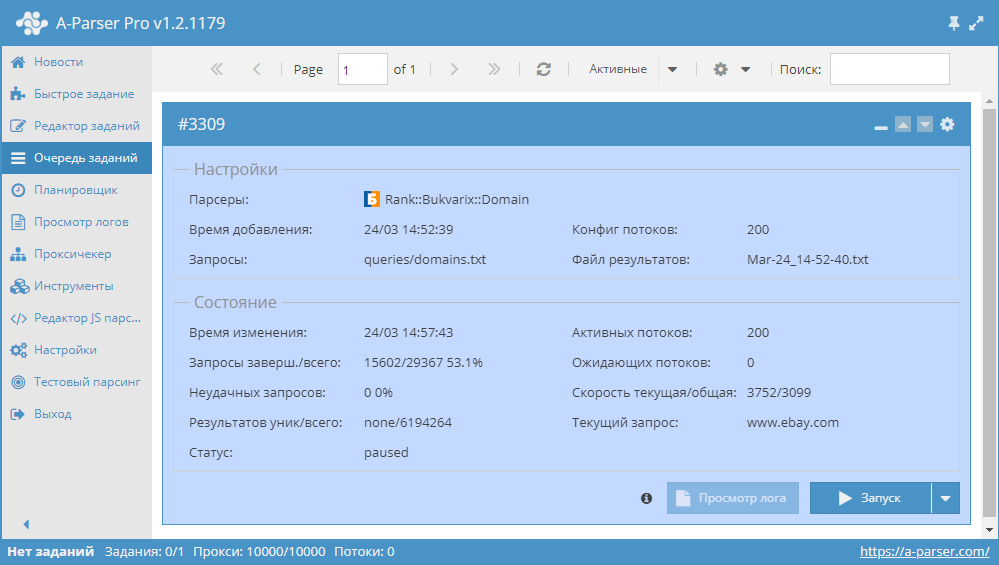
Thanks to A-Parser multithreaded operation, the request processing speed can reach 3,700 requests per minute, which on average allows obtaining up to 1,238,000 non-unique results per minute.
You can use results filtering to clean up the result by removing all unnecessary clutter (using negative keywords).
A-Parser functionality allows you to save Rank::Bukvarix::Domain scraper settings for future use (presets), set scraping schedules, and much more.
Saving results is possible in the form and structure you need, thanks to the built-in powerful Template Toolkit which allows applying additional logic to results and outputting data in various formats, including JSON, SQL, and CSV.
Collected Data
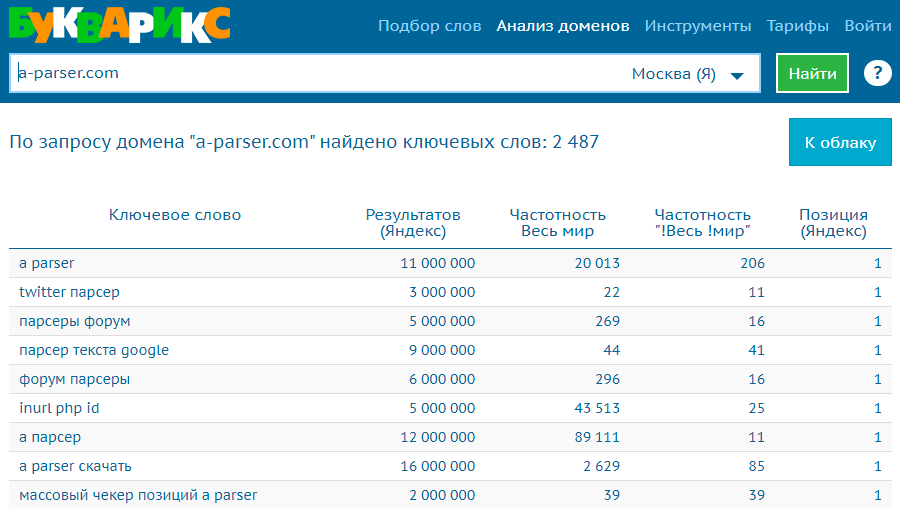
Data is collected from the service bukvarix.com
- Keywords
- Number of results in Yandex
- Frequency (Worldwide)
- Frequency ("!Worldwide")
- Position (Yandex)
- Number of results in Bukvarix
Features
- Region selection (region option)
- Ability to scrape up to 1000 results per query or more with a paid API key
- Ability to use a paid API key
Use Cases
- Collecting keywords by domain
- Determining the keyword with the highest frequency for a domain
API Key
Free API Key
A-Parser uses a free API key in its default settings.
Paid API Key
Possible API key limitations reported by Bukvarix support when issuing a key:
- number of requests per day
- number of rows in the report for each request
It is essential to take these limitations into account in A-Parser when using a paid API key.
Additionally, the following rules/limitations exist when using the API (they apply to all keys):
- Sequential (single-threaded) execution of requests.
- Do not use proxies.
The API key is purchased separately from the Bukvarix subscription.
To use a paid key in A-Parser, you need to use the API-key and Max rows count options described below in Settings.
Queries
As queries, you need to specify a list of domains for evaluation, for example:
a-parser.com
yandex.ru
google.com
vk.com
facebook.com
youtube.com
Output Results Examples
A-Parser supports flexible result formatting thanks to the built-in Template Toolkit, which allows it to output results in any form, as well as structured ones like CSV or JSON
Exporting a List of Keywords
Result format:
$keywords.format('$key\n')
Example result:
a parser
twitter scraper
scrapers forum
google text scraper
forum scrapers
inurl php id
a scraper
a parser download
bulk position checker a parser
a parser api
...
Outputting Keyword, Frequency, and Position
Result format:
$keywords.format('$key, $frequency, $position\n')
Example result:
a parser, 20013, 1
twitter scraper, 22, 1
scrapers forum, 269, 1
google text scraper, 44, 1
forum scrapers, 296, 1
inurl php id, 43513, 1
a scraper, 89111, 1
a parser download, 2629, 1
bulk position checker a parser, 39, 1
a parser api, 83, 1
...
Outputting Keyword, Frequency, and Position to a CSV Table
The built-in utility $tools.CSVLine allows creating correct table documents ready for import into Excel or Google Sheets.
Result format:
[% FOREACH i IN keywords;
    tools.CSVline(i.key,i.frequency,i.position);
END %]
File name:
$datefile.format().csv
Initial text:
Keyword,Frequency,Position
In the Result Format, the Template Toolkit is used to output elements of the $keywords array in a FOREACH loop.
In the result file name, you just need to change the file extension to csv.
To make the "Prepend text" option available in the Task Editor, you need to activate "More options". In "Prepend text", write the column names separated by commas and make the second line empty.
Saving in SQL Format
Result format:
[% FOREACH results;
    "INSERT INTO serp VALUES('" _ query _ "', '" _ frequency _ "', '" _ position _ "')\n";
END %]
Example result:
INSERT INTO serp VALUES('a parser', '20013', '1')
INSERT INTO serp VALUES('twitter scraper', '22', '1')
INSERT INTO serp VALUES('scrapers forum', '269', '1')
INSERT INTO serp VALUES('google text scraper', '44', '1')
INSERT INTO serp VALUES('forum scrapers', '296', '1')
INSERT INTO serp VALUES('inurl php id', '43513', '1')
INSERT INTO serp VALUES('a parser', '89111', '1')
INSERT INTO serp VALUES('a parser download', '2629', '1')
INSERT INTO serp VALUES('bulk position checker a parser', '39', '1')
INSERT INTO serp VALUES('a parser api', '83', '1')
...
Dumping Results to JSON
Common result format:
[% IF notFirst;
  ",\n";
ELSE;
  notFirst = 1;
END;

obj = {};
obj.keywords = [];

FOREACH item IN p1.keywords;
    obj.keywords.push(item.key);
END;

obj.json %]
Initial text:
[
Final text:
]
Example result:
[{"keywords":["a parser","twitter scraper","scrapers forum","google text scraper","forum scrapers","inurl php id","a scraper","a parser download","bulk position checker a parser","a parser api","a parser nulled","download a parser","a parser","proxy server collector","a parser com","a scraper","twitter scraper","twitter scraping","member area what is it","a scraper download","google account buy scraping forum","a parser download torrent","google scraping","a parser torrent","google yahoo yandex scraper","forum scraper"]}]
To make the "Prepend text" and "Append text" options available in the Task Editor, you need to activate "More options".
Results Processing
A-Parser allows processing results directly during scraping; in this section, we have listed the most popular cases for the Rank::Bukvarix::Domain scraper
Results Deduplication
Example of results deduplication using the Unique string option.
Download example
How to import an example into A-Parser
eJx1VMFu2zAM/ZVAKNAVSIP1sItvSYYAG7K6S9tTmoMW0YZmWdIk2U1g+N9Hyo6d
dMvNJN8j+UTSDQvcF/7JgYfgWbJtmI3fLGEbroskWVRFzZ08JMlXU3KpJ/eTVy3/
VDBBXKWCn8CBl1YBmzLLnQdHabZX2AgSkHHksWnDwtECFjI1OCcFZZACbQe5NASt
uaoIUPqCtdfxmXElD107Z6ybAo7vxgk/6wCfbsnz9qZv71i7201ZL2AVo0SwD7Ne
/RB85jW8GCoio8QTB61HXsYyggeg6KnM3SwcKAMXQgYUwlVXgd5lrNo9IvJ9cFLn
iEfTSfArZ0p0B4hJyHk8dbhlN9FmmKaK/J8dhyUZVx6mzGO7K47NiI8RGcDxYFxq
qSf0N8zouVJrqEGNsJh/UUklcJDzDEnfeuL/Iek/OdpB4nkpHNm7wx6GLNFapD9G
ljBrk6Ny8Qt1K1nKgLZfmkrTcD6jswCww7s9GvSUxsFQps/cV8edtqBpP8axze3o
upBxMZpL597oTOZpv3MnZKVf8HBSvTS0+6RLV0rhWDxsxhWZ+34MZIwNfiQvYwmS
froNFoxR/vtz16p1ElfwCzVY4kueV+1T7rlSr5v1eYSNK4UGv++Oc7bH7SJ8gNzg
JqGadjdc7vAfaK7db9K0OKrf/qkjkC6Cow8fyNPZJg/tXzQJhx0=
See also: Results deduplication
Results Filtering (Using Negative Keywords)
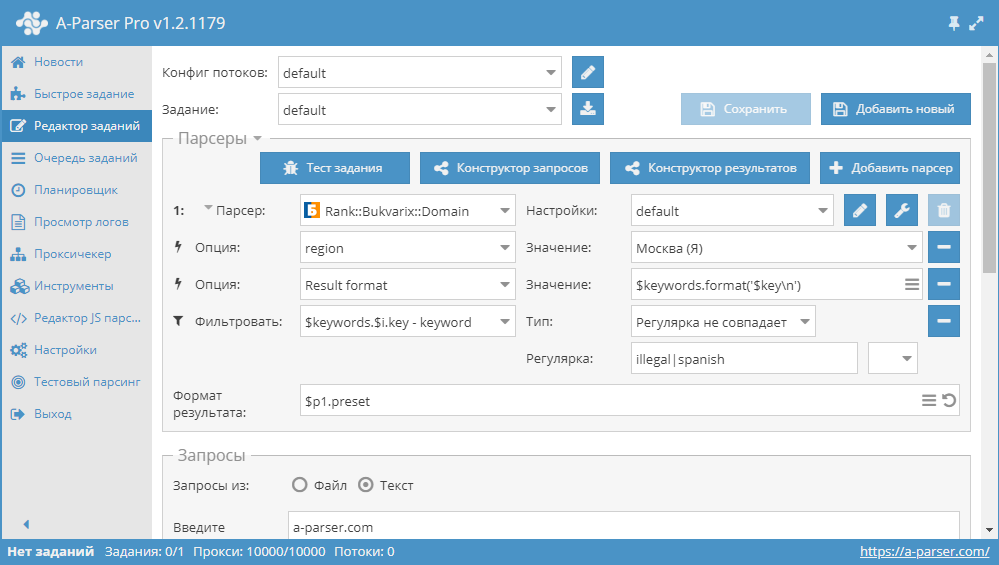
By using negative keywords, you can immediately remove results you don't need. Similarly, using a filter, you can keep only those results that contain the required words.
Download example
How to import an example into A-Parser
eJx1VE1vGjEQ/SvIipRGIqg59LI3oEJqRUNKyIlwcPHs1sVru7aXgLb73zvj/SQt
N8943pt5M2OXLHB/8E8OPATPkm3JbDyzhK25PiTJrDgcuZOnJPlsci716H60kCqA
G8GJ51YBGzPLnQdH8O0VFAYJSHmhAhuXLJwtYAJzBOekIAYp0HaQSUOhR64KCsj9
gVXX41Pjch6w3EjboW4OcH4zTvhJHfDhljyvr/r2bsiWRhWIawiSLWuB6MQj242b
oE2NcKBNQML9z0E2qRRkXP3xlmvp6cbYQDISxqrdrqX3i1gLlWcfJk2Pu8tnfoSN
qYuC3o2NhkeeR1GCB6DbVtTdJJyIgQshKR9XdQaaQp/1RcvfsUwfnNQZxqPpJPiF
Mzm6A0QScp7bCrfsJtqkv4j47zWGJSlXHsbMY7kLjsWI9zcSu8WDcavYA/SXzOip
Uks4gurDIv+skErg2kxTBH1pgP8PWf3DUXUSh6lwQd4c1tCxRGu2+tajhFmaDJWL
H6hbyVwGtP3cFJqG8zGOHmzXt0eDntw46NI0zE12fDkWNG1jP7ap7V0XMi5Gc+nc
G53KbNVseBtZ6A0+z5WeG3pppEsXSuFYPKz7FZn6Zgxk9AW+B89jCpLevkQWjFH+
63NdqnUSV/ATFZhjJ4dZG8o9V+plvRzesH6l0OD39Vcw2eN2UXyAzOAmoZpq1/0T
3W9TXvstkrLCUf3yTzWAdFE4+rBBPr6uh+ov5gmppw==
See also: Results filters
Settings
| Parameter name | Default value | Description |
|---|---|---|
| region | Moscow (Y) | Region selection: Moscow (Y) / Moscow (G) / SPb (Y) / Russia / Kyiv (G) / Minsk (G) |
| API-key | free | Input of the API key used |
| Max rows count | 1000 | Number of rows in the result for each query |