 SE::Yandex::WordStat - WordStat Scraper. Collecting keywords and impression statistics
Scraper overview
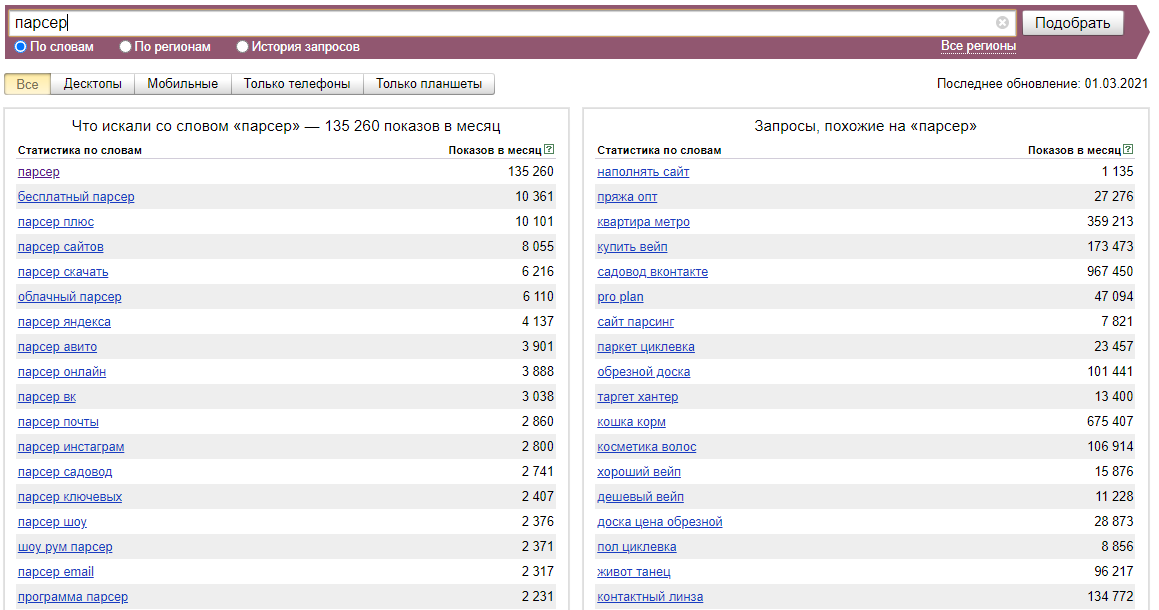
Wordstat is a Yandex service designed to estimate user interest in various topics and select keywords for SEO optimization and contextual advertising. In addition, with Wordstat Yandex, you can estimate the seasonality and geographic dependence of search queries.
The Yandex WordStat keyword scraper supports automatic query multiplication, so you can be sure that you will get the maximum number of results from the output. Also, A-Parser can automatically follow related queries to a specified depth.
A-Parser functionality allows you to save scraping settings for future use (presets), set a scraping schedule, and much more. You can use automatic query multiplication, substitution of subqueries from files, iteration of alphanumeric combinations and lists to get the maximum possible number of results when scraping Yandex Wordstat.
Saving results is possible in the form and structure you need, thanks to the built-in powerful Template Toolkit templating engine, which allows you to apply additional logic to the results and output data in various formats, including JSON, SQL, and CSV.
Scraper use cases
🔗 Deep Wordstat Scraping
Using the Yandex WordStat scraper for deep scraping.
🔗 WordStat Search Volume Estimation
WordStat search volume estimation
Accounts
To use the  SE::Yandex::WordStat scraper, Yandex accounts are required. Accounts can be registered using the
  SE::Yandex::Register scraper or simply by adding existing accounts to the
 files/SE-Yandex/accounts.txt file in the supported format.
Alternatively, you can enable "on-the-fly" account registration.
To work using session authorization, it is necessary that the data string be in this format:
[email protected];MAQT78Z31Rinx4H;{"answer":"qmfhsxdcrk","proxy":"185.104.120.45:3128","session_id":"3:1748440908.5.0.1748440867459:ZXBxpg:47e4.1.2:1|2191075974.41.2.2:41.3:1748440908|3:10308131.797655.5pfkoRZWgLJGntKTlcUhYdysNfk"}
Collected data
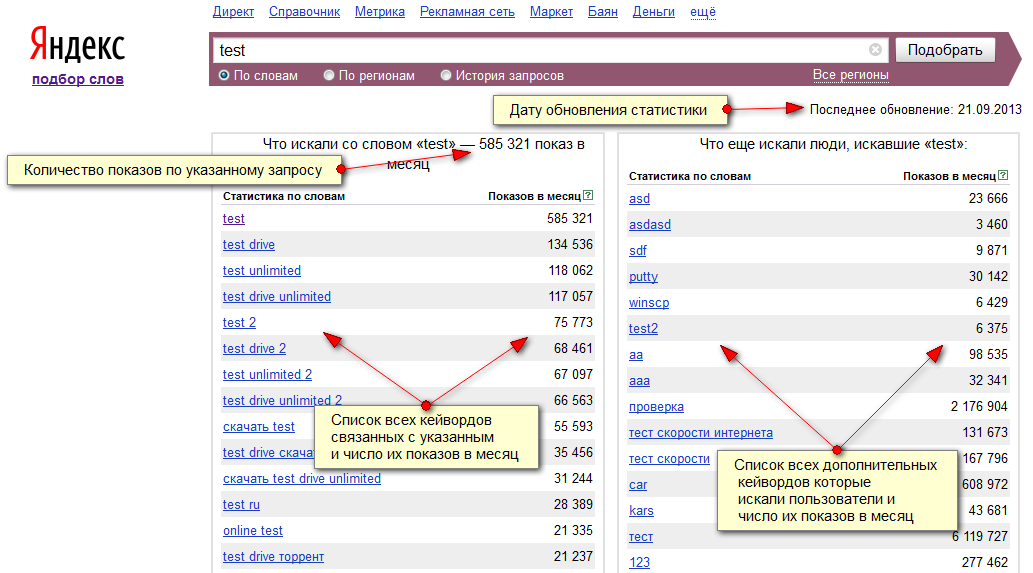
- Number of impressions for the specified query
- Statistics update date
- List of all keywords related to the specified one and their number of impressions per month
- List of all additional keywords that users searched for and their number of impressions per month
Capabilities
- Scrapes the maximum number of results provided by Wordstat - 40 pages of 50 output elements
- Supports search region selection (with subgroups)
- Can automatically substitute found keywords back into queries (option Parse to level)
- Ability to select several regions for evaluation at once
- Support for automatic Smart captcha bypass and the ability to bypass graphic captcha using the AntiCaptcha service or any other supporting their API
- Device type selection
- Ability to choose the authorization method
- Ability to register accounts "on the fly"
- Supports working with extended account format and can answer the secret question (if the answer is in
info). It also uses a saved proxy for authorization (if it is ininfo).
Usage options
- Estimating the amount of traffic by keyword (frequency)
- Searching for new keywords of similar topics
- Collecting large databases of keywords of different topics
- Any other options involving Yandex.WordStat scraping in one form or another
Queries
Keywords should be specified as queries, just as if they were entered directly into the Wordstat search form, for example:
windows moscow
"windows moscow"
!windows !moscow
Result output options
A-Parser supports flexible result formatting thanks to the built-in templating engine Template Toolkit, which allows it to output results in any form, as well as in structured form, such as CSV or JSON
Default output
Result format:
$query - $totalcount, updated: $updatedate\nkeywords:\n$keys.format('$key: $count\n')\nadditional keywords:\n$search.format('$key: $count\n')
The result displays the original query, the number of its impressions, the statistics update date, a list of related keywords and their monthly impressions, a list of additional keywords and their monthly impressions:
!windows !moscow - 10368, updated: 16/05/2013
keywords:
windows moscow: 32367
plastic windows moscow: 8994
pvc windows moscow: 4813
buy windows moscow: 2561
windows prices moscow: 1706
moscow work windows: 1547
windows vacancies moscow: 1187
wooden windows moscow: 1087
one-stop service moscow: 1021
...
additional keywords:
pvc windows production: 8512
rehau windows: 15686
salamander windows: 1576
kbe windows: 3798
kbe windows: 6089
kbe windows: 3227
balcony glazing: 83216
gazebos: 471213
loggia glazing: 26366
office partitions: 18740
windows installation: 26223
Output in CSV table
Result format:
[% FOREACH i IN keys;
  tools.CSVline(query, i. key, i.count);
END %]
Result example:
website scraper,    website scraper, 8055
website scraper,    free website scraper,   1122
website scraper,    scraper official website,   666
website scraper,    cloud scraper websites, 507
website scraper,    email scraper +from website,    477
website scraper,    download website scraper,   434
website scraper,    website address scraper,    390
website scraper,    online website scraper, 366
website scraper,    turbo website scraper,  342
website scraper,    turbo scraper official website, 309
website scraper,    cloud scraper official website, 308
website scraper,    excel website scraper,  276
website scraper,    sliza scraper website,  259
Saving in SQL format
Result format:
[% FOREACH i IN keys;
  "INSERT INTO keys VALUES('" _ query _ "', '";     i.key _ "', '";     i.count _ "')\n";
END %]
Result example:
INSERT INTO serp VALUES('test', 'test', '10837937')
INSERT INTO serp VALUES('test', 'test drive', '1164338')
INSERT INTO serp VALUES('test', 'dough +for test', '879980')
INSERT INTO serp VALUES('test', 'online tests', '792560')
INSERT INTO serp VALUES('test', 'test drive video', '550164')
INSERT INTO serp VALUES('test', 'dough recipe', '484489')
INSERT INTO serp VALUES('test', 'tests +with answers', '449401')
INSERT INTO serp VALUES('test', 'test 2014', '427602')
INSERT INTO serp VALUES('test', 'free tests', '315144')
INSERT INTO serp VALUES('test', 'free tests', '315096')
INSERT INTO serp VALUES('test', 'tests +for girls', '309355')
INSERT INTO serp VALUES('test', 'tests +by topic', '293917')
INSERT INTO serp VALUES('test', 'test games', '288989')
Dump results to JSON
Common result format:
[% IF notFirst;
  ",\n";
ELSE;
  notFirst = 1;
END;

obj = {};
obj.updatedate = p1.updatedate;
obj.totalcount = p1.totalcount;
obj.keys = [];

FOREACH item IN p1.keys;
    obj.keys.push({
        key = item.key
        count = item.count
    });
END;

obj.json %]
Initial text:
[
Final text:
]
Result example:
[{
    "updatedate": "12.03.2014",
    "totalcount": "10837937",
    "keys": [
        {
            "count": "10837937",
            "key": "test"
        },
        {
            "count": "1164338",
            "key": "test drive"
        },
        {
            "count": "879980",
            "key": "dough +for test"
        },
        {
            "count": "792560",
            "key": "online tests"
        },
    ]
}]
See also: Results filters
Possible settings
| Parameter | Default value | Description |
|---|---|---|
| Pages count | 10 | Number of pages to scrape |
| Region | All | Search region |
| Remove + from keywords | ☐ | Remove the plus symbol (+) from found queries |
| AntiGate preset | default | It is necessary to pre-configure the  Util::AntiGate scraper - specify your access key and other parameters, then select the created preset here Util::AntiGate scraper - specify your access key and other parameters, then select the created preset here |
| AntiGate preset for Login | default | AntiGate preset for Login. It is necessary to pre-configure the Util::AntiGate scraper with parameters, then select the created preset here |
| Type | All | Device type selection |
| Accounts | Only from "accounts.txt" | Selection of account handling method: Always auto register - always automatically register accounts "on the fly", requires selecting a configured preset in the SE::Yandex::Register preset parameter. Auto register if no more in "accounts.txt" - existing accounts from accounts.txt are used first, and if they run out, automatic registration "on the fly" is used, for which you need to select a configured preset in the SE::Yandex::Register preset parameter. Only from "accounts.txt" - use only existing accounts from accounts.txt, and if they run out, wait for a specified time (Wait new accounts in "accounts.txt" parameter) for new ones to appear. Only by session_id from "accounts.txt" - authorization by cookies. |
| Wait new accounts in "accounts.txt" | 0 | Waiting time for new accounts to appear in accounts.txt |
| Remove bad accounts | Always, except wrong login/password | Automatic removal of "bad" accounts: Always - always remove. Always, except wrong login/password - always remove, except when Yandex reported an incorrect login/password. The fact is that Yandex can give such a message when an IP is banned for a perfectly working account, so optionally such accounts can be left for reuse. Never - never remove. Regardless of the selected option, accounts are not removed in case of proxy/browser errors |
| SE::Yandex::Register preset | default | Selection of settings preset for SE::Yandex::Register |
| Authorization method | HTTP | Authorization method: HTTP - fast, not resource-intensive. Chrome - slow, resource-intensive, theoretically can extend account life |
| Chrome headless | ☑ | If the option is enabled, the browser will not be displayed |
| Use sessions | ☑ | Use of sessions |
| Do not reset session if authorization passed | ☑ | Do not reset session on errors if the scraper is already authorized |
| Use Wordstat 2 | ☐ | Use Wordstat 2 |
| Wordstat 2 parse all table data | ☑ | Allows you to immediately download all 2000 results for a query without going through pagination |
