 Check::BackLink - checks for the presence of a link (links) in a link database
Scraper Overview
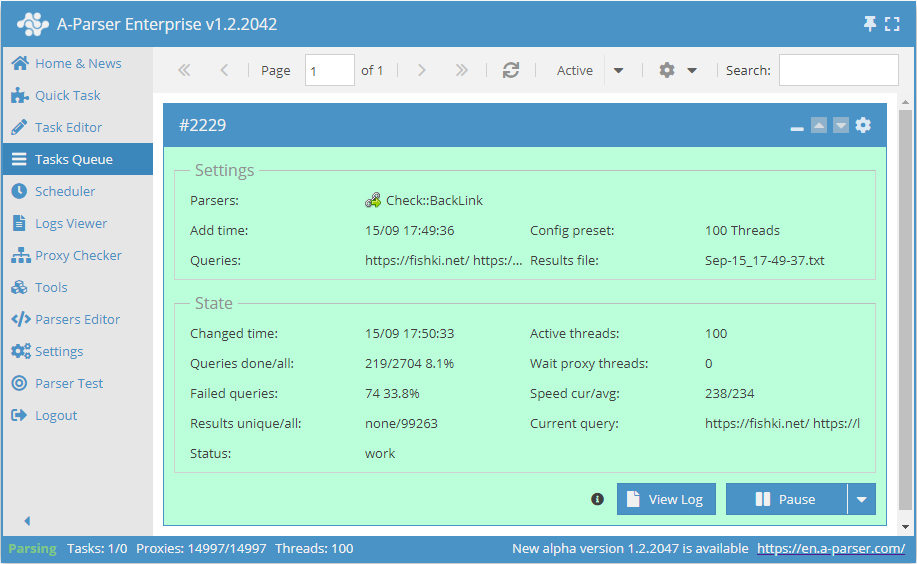
The scraper allows you to check backlinks, specifically links on website pages that point to your site.
A-Parser functionality allows you to save scraping settings for future use (presets), set scraping schedules, and much more.
Saving results is possible in the form and structure you need, thanks to the built-in powerful Template Toolkit templating engine, which allows applying additional logic to results and outputting data in various formats, including JSON, SQL, and CSV.
Scraper Use Cases
🔗 Backlink Monitoring
Periodic backlink checking with appending results to an SQLite database table
Collected Data
- Total count of external and internal links on the page
- Checks for the presence of a link on the specified page:
0and10- means there is no exact backlink match1- means there is an exact backlink match
- Blocking of the specified page from viewing via robots.txt -
0and1 - Blocking page indexing via the robots meta tag with the
noindexattribute, as well as blocking link following via thenofollowattribute - Blocking link following via the
rel=nofollowattribute
Additional data that can be obtained:
- Number of external and internal links on the page
- List of all external and internal links on the page
Features
- Checks for the presence of a link on the specified page, with the ability to search for a link without specifying a scheme by string occurrence
- Checks if the page is blocked from indexing via robots.txt
- Checks the robots meta tag for
noindexandnofollowattributes - Checks for the presence of
rel=nofollowon the found link - Link search by string occurrence
- Ability to specify a custom User-Agent header
Use Cases
- Verifying the placement of your links on specified pages
- Searching for links displayed only to a specific User-Agent (e.g., for Google bot)
Queries
As queries, you must specify the page where to search for the link and, separated by a space, specify the link being searched for:
https://fishki.net/ https://lenta.ru/news/2020/12/18/lavina/
https://en.wikipedia.org/wiki/Moscow https://lenta.ru/news/2005/12/23/city/
http://soccerjerseys.in.net/ https://lenta.ru/news/2012/03/12/homeless/
https://tjournal.ru/ https://lenta.ru/articles/2016/02/15/deathlab/
Query Substitutions
You can use built-in macros for automatic substitution of subqueries from files; for example, if we want to check sites/a site against a database of pages, we specify the list of pages where to search for links:
https://fishki.net/
https://en.wikipedia.org/wiki/Moscow
http://soccerjerseys.in.net/
https://tjournal.ru/
In the query format, we specify a substitution macro for additional queries from the file backlinks.txt; this method allows checking a database of sites for the presence of a list of links from a file:
$query {subs:backlinks}
This macro will create as many additional queries as there are in the file for each original search query, which in total will result in [number of original queries (page links)] x [number of queries in the backlinks file] = [total number of queries] as a result of the macro's operation.
You can also specify a protocol in the query format so that only domains can be used as queries:
http://$query
This format will prepend http:// to each query.
Results Output Examples
A-Parser supports flexible result formatting thanks to the built-in Template Toolkit templating engine, which allows it to output results in any form, as well as structured formats like CSV or JSON.
Default Output
Result format:
$backlink - $checklink: $exists, blocked by robots.txt: $robots\n
Example result showing the backlink, the link to the page where the backlink search occurs, the presence or absence of the backlink, and a check of the page for blocking in the robots.txt file:
http://soccerjerseys.in.net/ - https://lenta.ru/news/2012/03/12/homeless/: 1, blocked by robots.txt: 0
https://tjournal.ru/ - https://lenta.ru/articles/2016/02/15/deathlab/: 0, blocked by robots.txt: 0
https://en.wikipedia.org/wiki/Moscow - https://lenta.ru/news/2005/12/23/city/: 0, blocked by robots.txt: 0
https://fishki.net/ - https://lenta.ru/news/2020/12/18/lavina/: 0, blocked by robots.txt: 0
Outputting Backlink Presence and Additional Parameters for Backlink and Page Analysis to a CSV Table
The built-in utility $tools.CSVLine allows creating correct tabular documents ready for import into Excel or Google Sheets.
The result of the variable $actualchecklink exists only if a backlink is present on the page; if there is no backlink, the result of this variable will be none. $actualbacklink and $actualchecklink are the real links after redirection.
Result format:
[% tools.CSVline(backlink, checklink, anchor, nofollow, noindex, redirect, exists, robots, actualbacklink, actualchecklink, intcount, extcount) %]
File name:
$datefile.format().csv
Initial text:
Backlink,Checklink,Anchor,Nofollow,Noindex,Redirect,Exists,Robots,Actualbacklink,Actualchecklink,Intlinks count,Extlinks count
Example result:
https://tjournal.ru/,https://lenta.ru/articles/2016/02/15/deathlab/,none,0,0,0,0,0,https://tjournal.ru/,none,112,37
https://fishki.net/,https://lenta.ru/news/2020/12/18/lavina/,none,0,0,0,0,0,https://fishki.net/,none,966,31
http://soccerjerseys.in.net/,https://lenta.ru/news/2012/03/12/homeless/,"get more information",0,0,0,1,0,http://soccerjerseys.in.net/,https://lenta.ru/news/2012/03/12/homeless/,89,20
https://en.wikipedia.org/wiki/Moscow,https://lenta.ru/news/2005/12/23/city/,none,0,0,0,0,0,https://en.wikipedia.org/wiki/Moscow,none,2733,598
...
Download example
How to import an example into A-Parser
eJx9VE1v4jAQ/SuR1UqtRGOg6mqVG6AidUWhS9u9UA5uMgE3jp21HaBC/Pcd5xPK
7t484zdvxjNvvCeWmcQ8aTBgDQkWe5IVZxKQ+x1LMwFeuIYw8d5ZmAguE+OxKPIy
plkKFrQhHYKGcadgsSAjBw6CIaIniMbbCGKWC0uWyw5BajyasdIpcykWlzeeVUoY
f/T8C9nhKuv5daaOh0aRvLGYDNdKF0epYiWE2lYGlxHsirOGiGsIbWHAjhtrSr96
V9WRhTZn4iRP6TrNxqUNVS5rptK49m4ul6R5yjPbwIvCp8RcQOseozXFDuHFRcQs
uFs/Lp59de3bnUUo9pFbriQTZT9cA9sevUr+O3fxUiEWj5qDGWuVostCQeCcn3Uv
F+SisAlS5EXszzKGBDETBjrEYKljhoVEX284DpJZpWeZqwf9e6LkQIgJbEC0sIJ/
mHMR4bQHMQY9VIF/h8zOOA7N845TbUBvNdbQsBTWcPbYRkVqolZ1MwRPuUXbjNxA
0NtFZwKQNT2bOliqNDRprM6hSY5yz0BGCBzWGhg1kx+UGpvW+ppW2prXurovNTUv
9TQ41dLgi44epC23plTS/e7YfJOtYgZZVRL50sUTVZw6QyVjvpph/zSPoEbm8gV3
eiZHyq2va6vMhUBVGJi36hyYSgXOaDp/FjwqUmBZ9Rp3SLGwP57LUjPNUf13rsAU
B3mctaIMmRCv88nxDWkVjcba2swElMbcrBPuS7DUq30CpGW+zqmEraH9br9Le33a
+04F23DJ6JuskSD9LU94hlNivtIr6iz6qEyotv+k6945uv4tDbn9rMgQZlQYgv7A
PsOnwW/g/zUhQ/fW8axVCgKMOarKfqhc44Y7+DkB05aHGOFIvtEuPuyORsDsWrB3
SlzrLKwU7jQO9rBsPtrmt96ffbfB/oDb8mGeSqSbrcOhD0VicBVI0Dv8AQ3PGZI=
The Template Toolkit templating engine is used in the Result Format.
In the result file name, you simply need to change the file extension to csv.
To make the "Prepend text" option available in the Task Editor, you need to activate "More options". In "Prepend text", write the column names separated by commas and make the second line empty.
Dumping External Links from the Backlink Page to JSON
Result format:
[% data = {};
    data.query = query; data.links = [];
    FOREACH item IN extlinks;
        data.links.push(item.link);
    END;
    IF !firstString;
        ",\n";
    ELSE;
        firstString = 0;
    END;
data.json %]
Initial text:
[% firstString = 1 %][
Final text:
]
Example result:
[{"query":"https://tjournal.ru/ https://lenta.ru/articles/2016/02/15/deathlab/","links":["https://vc.ru/job","https://vc.ru/job/new","https://vc.ru/job","https://twitter.com/aktroitsky","https://twitter.com/aktroitsky/statuses/1382294384931188748","https://twitter.com/aktroitsky/statuses/1382294384931188748","https://t.co/fD4AiCpbrV","https://twitter.com/aktroitsky/statuses/1382294384931188748"]}]
Results Processing
A-Parser allows processing results directly during scraping; in this section, we have provided the most popular cases for the Check::BackLink scraper.
Saving Domains of External Links When Backlinks Are Present
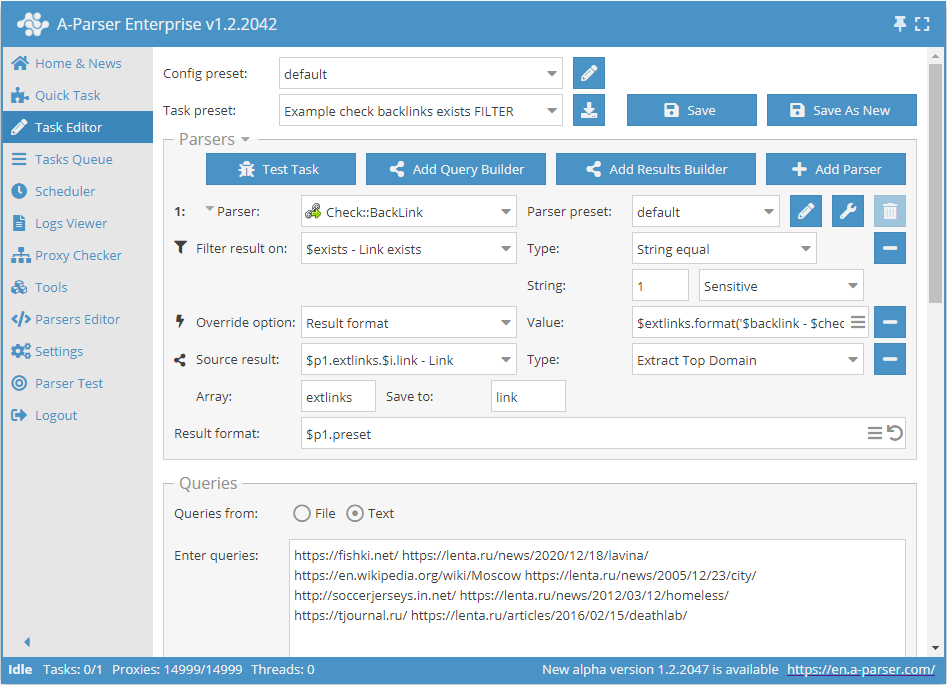
Add a filter and select the trust variable $exists - Link exists from the drop-down list. Select type: String equal. Next, in the String field, enter the value that equals the presence of a backlink: 1. With this filter, you can output all results where a backlink is present.
Add a Result Builders and select the source from the drop-down list: $p1.extlinks.$i.link - Link. Select type: Extract Top Domain. This way, we get domains from external links.
Download example
How to import an example into A-Parser
eJx9VNtuGjEQ/RVkIaWR6C4Qpar2jdAgpSIhJeSJ5MHZHcDBa29sLxch/r0z3hsp
bd88M2fO3H1gjtu1fTRgwVkWzQ8s828WsdsdTzMJrXgF8br1xuO1FGptW7AT1tnW
6G48u52yDsu4sWDIec6GhI2iGwSPEYzWBBY8l451DsztM0DehZAODJowEFkiVjCi
pjDNChx85FyicsNlTnIP3zpzQisULCjLjg2p3oAxIgHEiISCaJNyV0ZoONqwc76K
oAB8uWhXhbW+ttq+1Eoo68QXaV5e1MUlO76+VnnbkWcg0qwXlF2rjU98AzNdVAuN
eoTSA099Kgl3QNYqlcvA7YiBJ4mgKrksIlBnm6jPSnz4UpRGLD6NADsyOkWVA09A
yn2V3Zy1vcyQIve+vwofFi24tNBhFlMdcUwk+dMicBjcaTPxXUf9gWk1kHIMG5AN
zPPf5EImuAaDBTrdlY5/h0zOOI51eaehcKRbgznULF66mdw3Xoke62XVDClS4VC2
Q50rGkwXlWuArO7ZA8FSbaAO40wOdXA8gwwUrU8zsUHWqD5V8WkqJ8oDszo3MYab
dztzVi2czw8vghao3Fk0GR67mc5+6JQLRbM3hu8LU+XlaIu86xFdY60WYjkpt71K
IlczPOOJGmq6WOqYyqXEgVuYNos3sOWASaibeuY89CEwaH26mIOW9udT0YXMCEzp
mmpPcUanUUvKmEv5PB2fWlizrCisnMtsFIYLYVdrEShwYavSSVCOByYPFWxt2O/2
u2GvH/a+h5JvhOLhi6qQoIKtWIsMEsEDbZYhSeG9trHe/pOue010/aswFm5fkiHM
6jgG844jhL0NhPp/TsjQvSKelU5BgrUnWbl3HD8eL8HPCbhxIkYPIvkWdrGw6zAB
7laSv4WMWudgqfFccbA07/JzrT/ow9kXGx2OeAjv9rFA0mwJhzpcEut/y97xN4Qy
DUs=
Possible Settings
Supports all settings of the  HTML::LinkExtractor scraper, as well as additionally:
| Parameter Name | Default Value | Description |
|---|---|---|
| Check robots.txt | ☑ | Determines whether to check for page indexing prohibition via robots.txt |
| Match link by substring | ☐ | Determines whether to search for a link by string occurrence. You can check links without specifying a scheme, for example, by domain without specifying the http protocol |