 SE::Yandex::Position - Check website rankings by keywords in Yandex
Scraper overview
A scraper for checking website positions by keywords in Yandex. Thanks to the SE::Yandex::Position scraper, you can automatically check positions in Yandex search results using your own domain databases. Using the SE::Yandex::Position scraper, you can easily, accurately, and quickly determine a website's position in Yandex. Yandex position checking is performed in multithreading mode, with the ability to use captcha solving services (AntiCaptcha or any other supporting their API). The Yandex position scraper is always up to date, as it is regularly updated by our specialists.
A-Parser functionality allows you to save SE::Yandex::Position scraper settings for future use (presets), set scraping schedules, and much more. You can use automatic substitution of subqueries from files.
Saving results is possible in the form and structure you need, thanks to the built-in powerful Template Toolkit templating engine, which allows applying additional logic to results and outputting data in various formats, including JSON, SQL, and CSV.
Scraper use cases
🔗 Overview of display options
The article examines 4 different options for representing results: text, CSV, JSON, HTML
🔗 ⏩Positions for multiple regions
Obtaining website positions for multiple regions simultaneously
Collected data
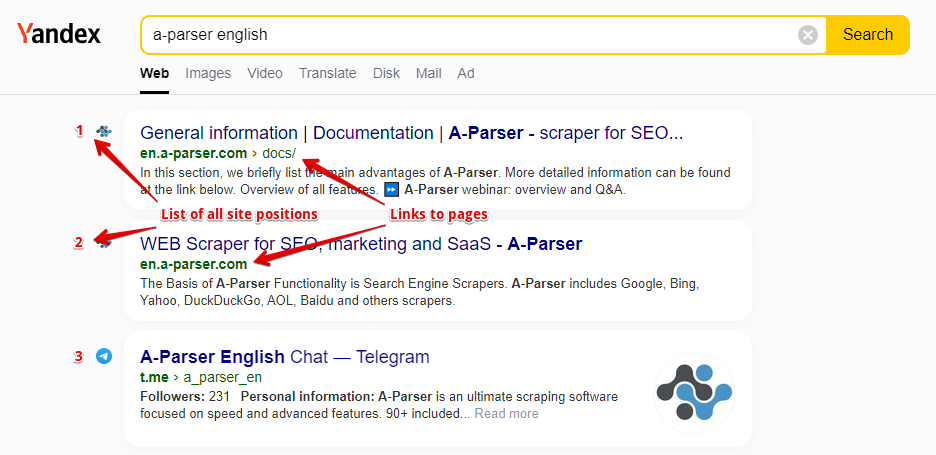
- Website position and the link to the website page
- List of all website positions and links to pages
Features
- All features of the
 SE::Yandex scraper
 - Automatically stops scraping when the website is found
- Supports subdomain search
- Ability to compare the searched position by domain, by main domain, and by full link
- Collecting positions for multiple domains at once
Use cases
- Checking positions of your own websites and competitors' websites
- Searching for high-traffic website pages
Queries
As queries, you must specify the domain of the searched website and the search query separated by a space, for example:
lenta.ru news
lenta.ru news online
If you need to check one website against a list of queries, you can specify the domain in the Query format:
lenta.ru $query
Or just use a list of keywords. To use multiple domains in a query at once, you need to specify a list of domains separated by commas and the keyword after a space, for example:
lenta.ru,ria.ru,notfound.com news feed
Results will be recorded in the $bulkcheck array.
The Stop when found option is also supported; scraping will end if positions are found for all domains.
Query substitutions
You can use built-in macros for automatic substitution of subqueries from files; for example, if we want to check websites/a website against a keyword database, specify several main queries:
ria.ru
lenta.ru
rbc.ru
yandex.ru
In the query format, specify the macro for substituting additional words from the Keywords.txt file; this method allows checking a database of websites against a database of keys and getting positions as a result:
$query {subs:Keywords}
This macro will create as many additional queries as there are in the file for each initial search query, which in total will give [number of initial queries (domains)] x [number of queries in the Keywords file] = [total number of queries] as a result of the macro's operation.
Output results examples
A-Parser supports flexible result formatting thanks to the built-in Template Toolkit templating engine, which allows it to output results in arbitrary form, as well as in structured formats like CSV or JSON
Exporting a list of positions
Getting the result in the form:
searched domain - key: position number in search results
Result format:
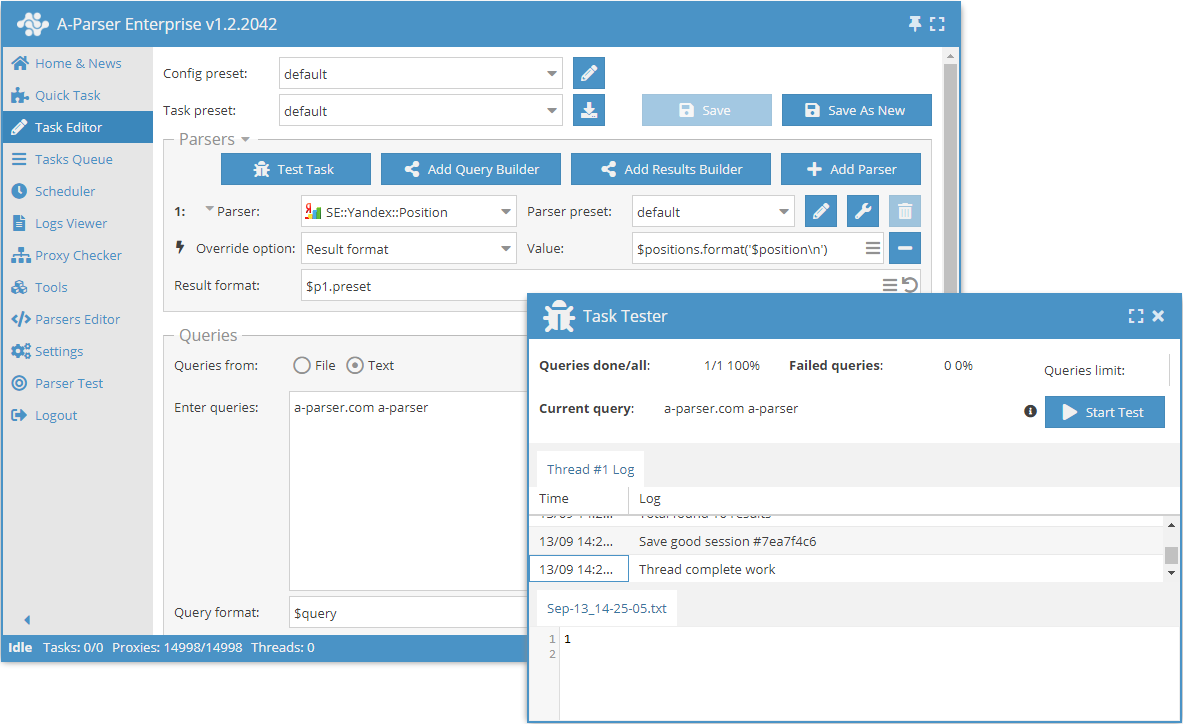
$domain - $key: $position\n
Example result:
lenta.ru - news: 3
lenta.ru - news online: 13
...
Simultaneous check of multiple domains (batch check)
Information for all domains during simultaneous checking of multiple domains is contained in the $bulkcheck array.
Result format:
$bulkcheck.format('$domain - $position\n')
Example query:
lenta.ru,ria.ru,notfound.com news feed
Example result:
lenta.ru - 1
ria.ru - 4
notfound.com - 0
Links + anchors + snippets with position output
Outputting links, anchors, and snippets to a CSV table
Saving related keywords
Keyword competition
Link indexing check
Saving in SQL format
Result dump to JSON
Results processing
A-Parser allows processing results directly during scraping; in this section, we have provided the most popular cases for the SE::Yandex::Position scraper
Saving domains without zero positions
The example of simultaneous checking of several domains (see above in output results variants) was taken as a basis and a filter was added.
Add a filter and select the position output variable in the dropdown list. Select type: >. Next, enter 0 in Number. With such a filter, you can remove all results with a zero position.
Download example
How to import an example into A-Parser
eJx1VE1v2zAM/SuGEKAr4AXJ1gKDDwPSYAE2dE3Xj8OQ5KBGdKtFFj1JTpsF/u+j
ZNlOuu4im9Qj+fhEac8ctxt7bcCCsyxb7FkZ/lnGbr9k2U+uBbxk2TVa6STq5H1y
y7eQCCy41DZ5lu4JK5fw5A8YTMoIYykrubFgfMrFm5kIIiDnlXIs3TO3K4FK4haM
kQJoUwqyczQFd0QowNiWq8rDBg+V2qyfYL0ZNoh3J4OGEfEbtCSWS31yyur/Z68s
lAZfdn3mnCsLBxG5VA4M7UcK2YJ1pX2PbS+rNELvmrjPB2RH9I9lgGXMgrasXq3a
jHYW+PueyvEwSt9teqnvsOEBvXtG1hUvghKCO/C7rRCnQ/fiM3AhAjWumgr+IPqq
91r+DuQ0EpZ+jQQ7M1iQy0FI4J27lt2CDYLtG61C7I8mJkqWMktUZ5yIiNc7kmTh
Ds08aED+PUM9UeoStqB6WMh/UUklaGomOQV9jYFvQ+b/5Ki79g5L0Zk/G+LQZQnW
xfx7HyXwEh+pc/FAfStZSEe2nWKlXTy/DUDZaXblNSvQQFcmZo7V6TKVoP2A9Uc2
KXvXURtHx3LsXKPO5eM8Dm2LrPQd3di5nmJRKvB96Uqp1A/zTT8eExuPwRs9wdfB
01DCt95eReYQlf1221AtjaTxO/cEC1LysGpMueZK3d9cHu6wfqTIUKAdH5oqNTJ8
NLqclBXDNRbJshqdfRRhhbB+6P/PxmFtPJ8a6ENYz/uwuD1a+vdkTXfhEWlKSal6
1T1B3eO2f/shyvY1DcEve93AvWIeTD6S3gbEuP4LmbnKEA==
See also: Result filters
Link deduplication
Link deduplication by domain
Extracting domains
Removing tags from anchors and snippets
Filtering links by inclusion
Possible settings
Supports all settings of the SE::Yandex scraper, as well as additionally:
| Parameter name | Default value | Description |
|---|---|---|
| Pages count | 1 | Number of search result pages to scrape (from 1 to 25) |
| Links per page | 20 | Number of links in search results per page (10 / 20 / 30 / 50) |
| Result format | $domain - $key: $position\n | Default result output format |
| Stop when found | ☑ | Stop scraping if the domain is found; will not proceed to subsequent pages |
| Match type | Exact domain | Ability to compare the searched position by domain, by main domain, and by full link (Exact domain / Top level domain / Exact url) |