 HTML::LinkExtractor - Scraper for external and internal links from a specified site
Scraper overview
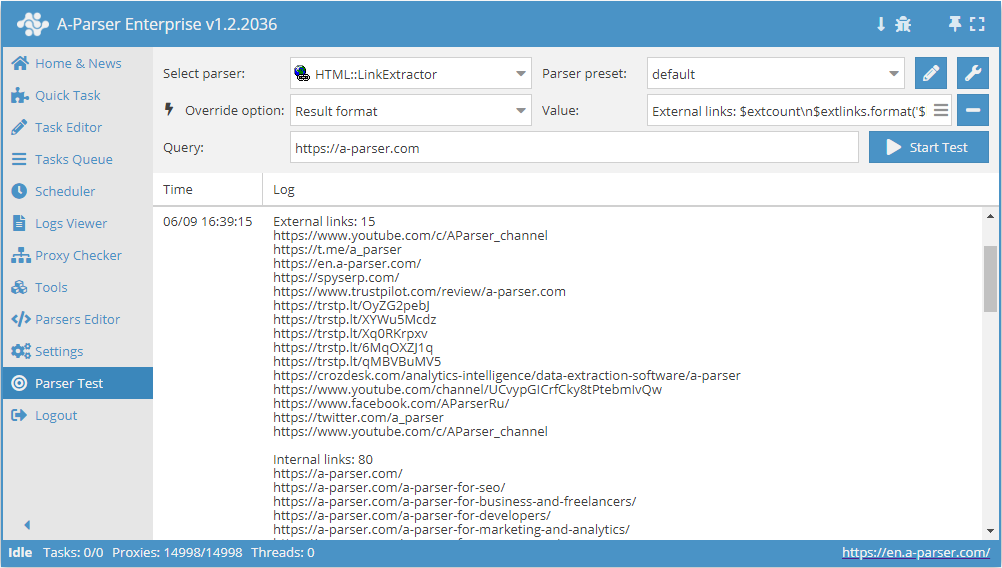
 HTML::LinkExtractor – external and internal link scraper from a specified site. Supports multi-page scraping and crawling internal site pages up to a specified depth, allowing you to traverse all site pages while collecting internal and external links. It has built-in protection bypass tools for CloudFlare and also the option to choose Chrome as the engine for scraping emails from pages where data is loaded by scripts. Capable of reaching speeds up to 2000 requests per minute – which is 120,000 links per hour.
Scraper use cases
Collecting all external links from a site
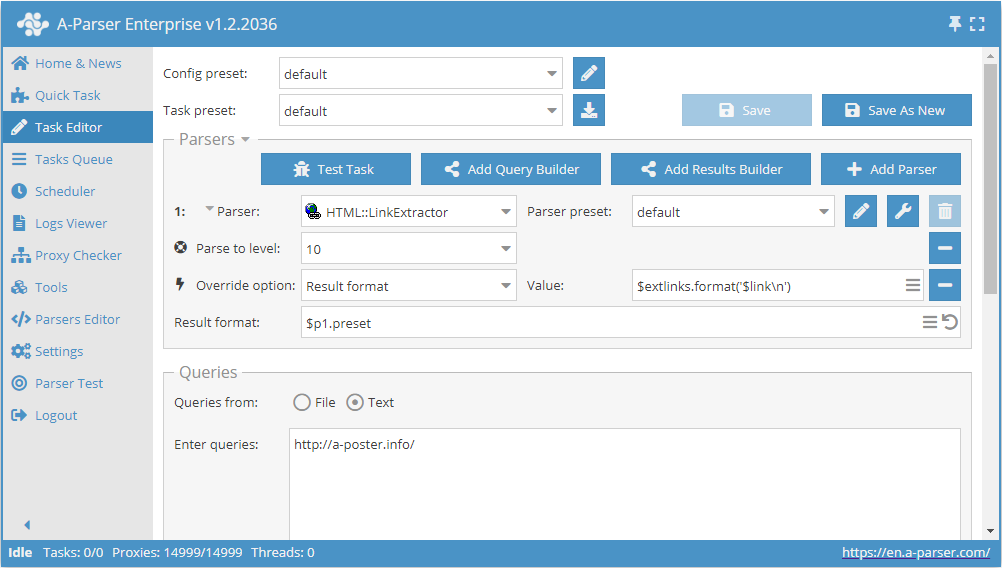
- Add the Parse to level option, select the value
10from the list (crawling adjacent pages up to the 10th level). - Add the Result format option, specify
$extlinks.format('$link\n')as the value (outputting external links). - In the Queries section, check the
Unique queriesoption. - In the Results section, check the
Unique stringoption. - Specify the link to the site from which you want to scrape external links as a query.
Download example
How to import an example into A-Parser
eJxtU01v2zAM/S9CgK5AlrSHXnxLgwZb4dZdm57SHISYztTIoirRWQrD/32U7NjJ
1ptIvsfHL9WCpN/5JwceyItkVQsb3yIRORSy0iTGwkrnwYXwSvxYPqRJkiqzuzuQ
kxtCx4geWwv6tMBstKTQeI6pnM2YIoU9aPbspa4Yc33VnOD34JzK4Ugo0JWSuJa2
hI4iRnAgzeJ+0gK+XYyC+fZmLi5Fs16PRUvxixgODHs96Xrqgy9yD0sMKkrD4F6w
9SjLqJNLghA96lxO6BAyyDxXoTOpW4UwlUH11aiPWKcnp8yW8Ww6BX7hsGQ3QUwS
nJ/HCldiFG3BaarI/9VyREKugrHwXO1Cci15Hyik9hxRBE7yBrJu2Ekt0My0joMe
YDH9baV0zlucFUz62RG/hmT/5Wj6Dk+leGV/HNfQZ4nWbfYwsHJMccuNG+S2tSoV
se3nWJmwmyt27gBsP7bHACvRQS/TZe7U+VAtmHAfw9ZmdnCdtXG2mXPnBk2htll3
c0dkZZb8GzIzx9JqCH2ZSmveiofn4UJmvltDMIYC/yXPo8TZPyJE7e9f2lKtU3yB
N6HAkid5qtql3EitX5/T04gYLoqN30Q2mU7ld4ueFzpRpsCpCESCLfJFcVvNuv+/
/S+vv/zFSd3wwt79U4sO3QUs+3hMnrfBP7b5C6wbebo=
Collecting all internal links from a site
Similar to the first case, but in step 2, you need to specify $intlinks.format('$link\n') as the value (outputting internal links).
Download example
How to import an example into A-Parser
eJxtU8tu2zAQ/BfCQBrAtZNDL7o5Roy2cOI0j5PjA2GtXNYUyZIrN4Ggf++QkiW7
zY27O7OzL9aCZdiHB0+BOIhsXQuX3iITORWy0izGwkkfyMfwWnx9vltm2VKZ/e0b
e7ll64HosbXgd0dgW8fKmoCYymGmFEs6kIbnIHUFzPVVc4I/kPcqpyOhsL6UjFra
EjqKGCnDGuJh0gI+XYyi+fpqLi5Fs9mMRUsJixSODHc96Xrqg0/yQM82qihNg3sB
616WSSeXTDF61Lmc8FvMIPNcxc6kbhXiVAbVF6N+pzoDe2V2wMP0isLC2xJuppQk
Ot+PFa7FKNkCaarE/9FyRMa+orEIqHYhUUveBwqpAyKKyUtsYNUNO6uFNTOt06AH
WEp/UymdY4uzAqRvHfFjyOq/HE3f4akUVvbHo4Y+S7JuVncDK7dLu0PjxqJtrUrF
sMPcVibu5grOPZHrx3YfYaX11Mt0mTt1HKojE+9j2NrMDa6zNs42c+7cWlOo3aq7
uSOyMs/4DSszt6XTFPsyldbYSqDH4UJmoVtDNIYC/yXPk8TZP2Jrdfj+1JbqvMIF
fokFlpjkqWqXciu1fnlcnkbEcFEwfjK7bDqVn50NWOhEmcJORSQy7SwuCm01m/7/
9r+8/vAXZ3WDhf0KDy06dhex8GFMAdvAj23+ApcrebQ=
Click only on links that do not contain the word "forum"
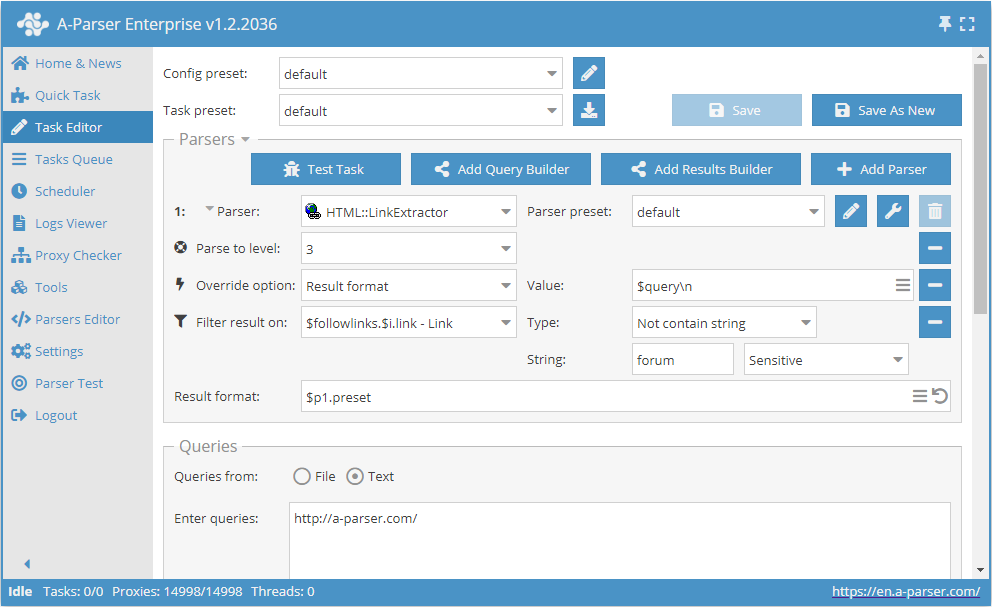
- Add the Parse to level option, select the value
3from the list (crawling adjacent pages up to the 3rd level). - Add the Result format option, specify
$queryas the value. - Add a filter. Filter by
$followlinks.$i.link - Link, select typeNot contain string, and specifyforumas the string itself. - In the Queries section, check the
Unique queriesoption. - In the Results section, check the
Unique stringoption. - Specify the link to the site from which you want to scrape links as a query.
Download example
How to import an example into A-Parser
eJxtVE1v2zAM/S/CDhuQJS2GXXxLgwbd4DZdm57SHISYzrTIkipRaQvD/33UR2xn
6ykh+R75+CG3DLk7uHsLDtCxYtMyE/+zglVQcy+RTZjh1oEN4Q27Wd+WRVEKdbh+
Q8t3qC0hemzL8N0AsbVBoZWjmKjIjClKOIIkz5FLT5hv3Qh+BGtFBSd8rW3DkaQk
BZnBPr14sO/Pz4qNuLWQCEFFhhcbokupXyWpDArCL9tOMnCdWErjTivkQo3yU1nf
kJ3Uk8MB9dBtt6fkbhmFBSnmcppn1Qcf+RHWOkmCwb0k6443sYGKI4ToNHX4+csU
30IGXlUi1OQyVQjTHqo+KfESBTq0Qu0JHwYhwC2tbsiNEJPE6ZwUbvK0Quc+8n8l
DivQepgwR2qXnLRUfaDm0lFE0Jg4bXaVl1i0TKu5lHGBAyymv/JCVnQd85pIPzLx
Y8jqvxxd3+G4FN3CqyUNfZZoXa1uB1alS72PW4z7bQSS7Rbaq7CbC3IeAEw/trsA
a7SFvkzOnKvTAzCgwuENW5ubwXXWxtlmzp10UbXYr/Ixn5BeremVrdRCN0ZC6Et5
KWkrDh6GC5m7vIZgDAL/JS9iibP3iVpL9/MxSTVW0AV+DwIbmuS4ak6541I+PZTj
CBsuiozfiKaYzfjX9PCnO93MWOAh7DUdFHXVbfvPQv/xaD/8OBRtR/v64+4TOjQX
sOSjKbn4yi67v8azl7c=
tip
Collected data
- Number of external links
- Number of internal links
- External links:
- the links themselves
- anchors
- anchors stripped of HTML tags
- nofollow parameter
- full
<a>tag
- Internal links:
- the links themselves
- anchors
- anchors stripped of HTML tags
- nofollow parameter
- full
<a>tag
- Array with all collected pages (used when the Use Pages option is active)
Features
- Multi-page scraping (crawling through pages)
- Crawling internal site pages up to a specified depth (Parse to level option) – allows traversing all site pages while collecting internal and external links
- Page crawl limit (Follow links limit option)
- Automatically strips HTML tags from anchors
- Nofollow detection for each link
- Ability to specify whether to treat subdomains as internal site pages
- Supports gzip/deflate/brotli compression
- Detection and conversion of site encodings to UTF-8
- CloudFlare protection bypass
- Engine selection (HTTP or Chrome)
Use cases
- Obtaining a full sitemap (saving all internal links)
- Obtaining all external links from a site
- Checking backlinks to your own site
Queries
Queries should be links to pages from which you need to collect links, or an entry point (e.g., the site's homepage) when using the Parse to level option:
https://lenta.ru/
https://a-parser.com/wiki/index/
Output results examples
A-Parser supports flexible result formatting thanks to the built-in Template Toolkit, allowing it to output results in any form, as well as structured formats like CSV or JSON
Outputting external and internal links with their count
Result format:
External links: $extcount\n$extlinks.format('$link\n')
Internal links: $intcount\n$intlinks.format('$link\n')
Result example:
External links: 12
https://www.youtube.com/c/AParser_channel
https://t.me/a_parser
https://en.a-parser.com/
https://spyserp.com/ru/
https://sitechecker.pro/
https://arsenkin.ru/tools/
https://spyserp.com/
http://www.promkaskad.ru/
https://www.youtube.com/channel/UCvypGICrfCky8tPtebmIvQw
https://www.facebook.com/AParserRu
https://twitter.com/a_parser
https://www.youtube.com/c/AParser_channel

Internal links: 129
https://a-parser.com/
https://a-parser.com/
https://a-parser.com/a-parser-for-seo/
https://a-parser.com/a-parser-for-business-and-freelancers/
https://a-parser.com/a-parser-for-developers/
https://a-parser.com/a-parser-for-marketing-and-analytics/
https://a-parser.com/a-parser-for-e-commerce/
https://a-parser.com/a-parser-for-cpa/
https://a-parser.com/wiki/features-and-benefits/
https://a-parser.com/wiki/parsers/
Possible settings
| Parameter name | Default value | Description |
|---|---|---|
| Good status | All | Selection of which server response will be considered successful. If there is a different response from the server during scraping, the request will be retried with a different proxy |
| Good code RegEx | Ability to specify a regular expression to check the response code | |
| Ban Proxy Code RegEx | Ability to ban a proxy for a period of time (Proxy ban time) based on the server response code | |
| Method | GET | Request method |
| POST body | Content to be sent to the server when using the POST method. Supports variables $query – request URL, $query.orig – original query, and $pagenum - page number when using the Use Pages option. | |
| Cookies | Ability to specify cookies for the request. | |
| User agent | _User-agent of the current Chrome version is automatically substituted_ | User-Agent header when requesting pages |
| Additional headers | Ability to specify arbitrary request headers with support for template engine features and using variables from the query builder | |
| Read only headers | ☐ | Read only headers. In some cases, this saves traffic if there is no need to process content |
| Detect charset on content | ☐ | Recognize encoding based on page content |
| Emulate browser headers | ☐ | Emulate browser headers |
| Max redirects count | 0 | Maximum number of redirects the scraper will follow |
| Follow common redirects | ☑ | Allows redirects http <-> https and www.domain <-> domain within the same domain, bypassing the Max redirects count limit |
| Max cookies count | 16 | Maximum number of cookies to save |
| Engine | HTTP (Fast, JavaScript Disabled) | Allows choosing the HTTP engine (faster, no JavaScript) or Chrome (slower, JavaScript enabled) |
| Chrome Headless | ☐ | If the option is enabled, the browser will not be displayed |
| Chrome DevTools | ☑ | Allows using Chromium debugging tools |
| Chrome Log Proxy connections | ☑ | If the option is enabled, information on chrome connections will be output to the log |
| Chrome Wait Until | networkidle2 | Determines when a page is considered loaded. More about values. |
| Use HTTP/2 transport | ☐ | Determines whether to use HTTP/2 instead of HTTP/1.1. For example, Google and Majestic ban immediately if HTTP/1.1 is used. |
| Don't verify TLS certs | ☐ | Disabling TLS certificate validation |
| Randomize TLS Fingerprint | ☐ | This option allows bypassing site bans based on TLS fingerprint |
| Bypass CloudFlare | ☑ | Automatic CloudFlare check bypass |
| Bypass CloudFlare with Chrome(Experimental) | ☐ | CF bypass via Chrome |
| Bypass CloudFlare with Chrome Max Pages | 20 | Max number of pages when bypassing CF via Chrome |
| Subdomains are internal | ☐ | Whether to count subdomains as internal links |
| Follow links | Internal only | Which links to follow |
| Follow links limit | 0 | Follow links limit, applied to each unique domain |
| Skip comment blocks | ☐ | Whether to skip comment blocks |