 SE::Google - Google Search Results Scraper
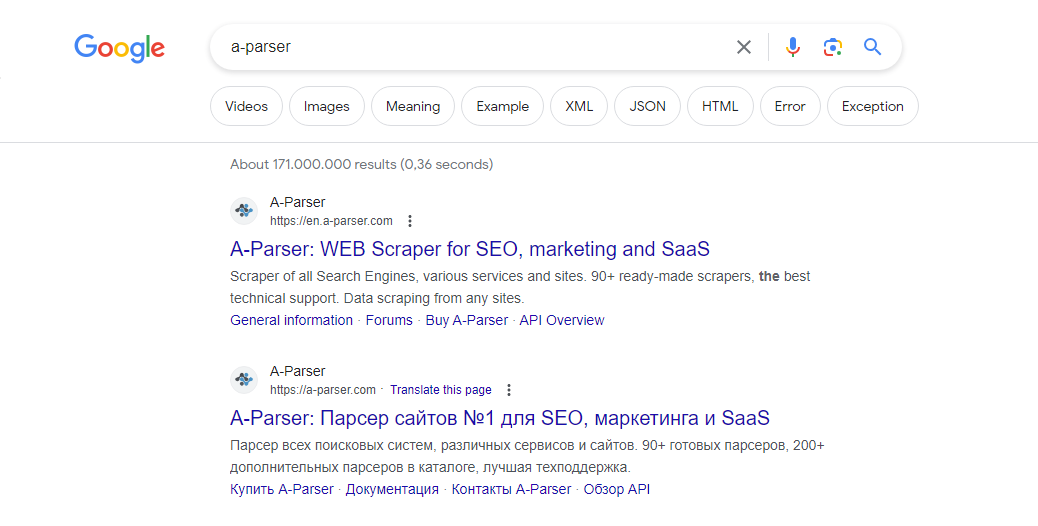
Scraper overview
The Google search results scraper is one of the most popular, allowing you to obtain huge databases of links ready for further use. You can use queries in the same format as you enter them in Google, including search operators (inurl, intitle, etc.).
The Google scraper supports automatic query multiplication, ensuring you get the maximum number of results from the search engine. A-Parser can also automatically follow related queries to a specified depth. Thanks to A-Parser multithreading, the processing speed can reach 3000-7000 queries per minute, which on average allows for up to 500,000 links per minute.
A-Parser functionality allows you to save scraping settings for future use (presets), set scraping schedules, and much more. You can use automatic query multiplication, substitution of subqueries from files, permutation of alphanumeric combinations, and lists to obtain the maximum possible number of results.
Saving results is possible in any format and structure you need, thanks to the built-in powerful Template Toolkit templating engine, which allows applying additional logic to results and outputting data in various formats, including JSON, SQL, and CSV.
Use cases for the scraper
🔗 Domain Scraping
Scraping thematic domains by keyword from Google and retrieving various domain parameters
🔗 Google News Scraping
This preset scrapes Google News by search query and collects the dates of these news items
🔗 Indexing Check
The preset checks the indexing of website pages in Google by going through a list of specified links
🔗 Competition Assessment
The preset determines competition in the Google search engine by keywords
🔗 Top 3 SERP Scraping
The preset saves the top three snippets from Google search results
🔗 Questions and Answers
A scraper that collects questions and answers from the People Also Ask section
Collected data
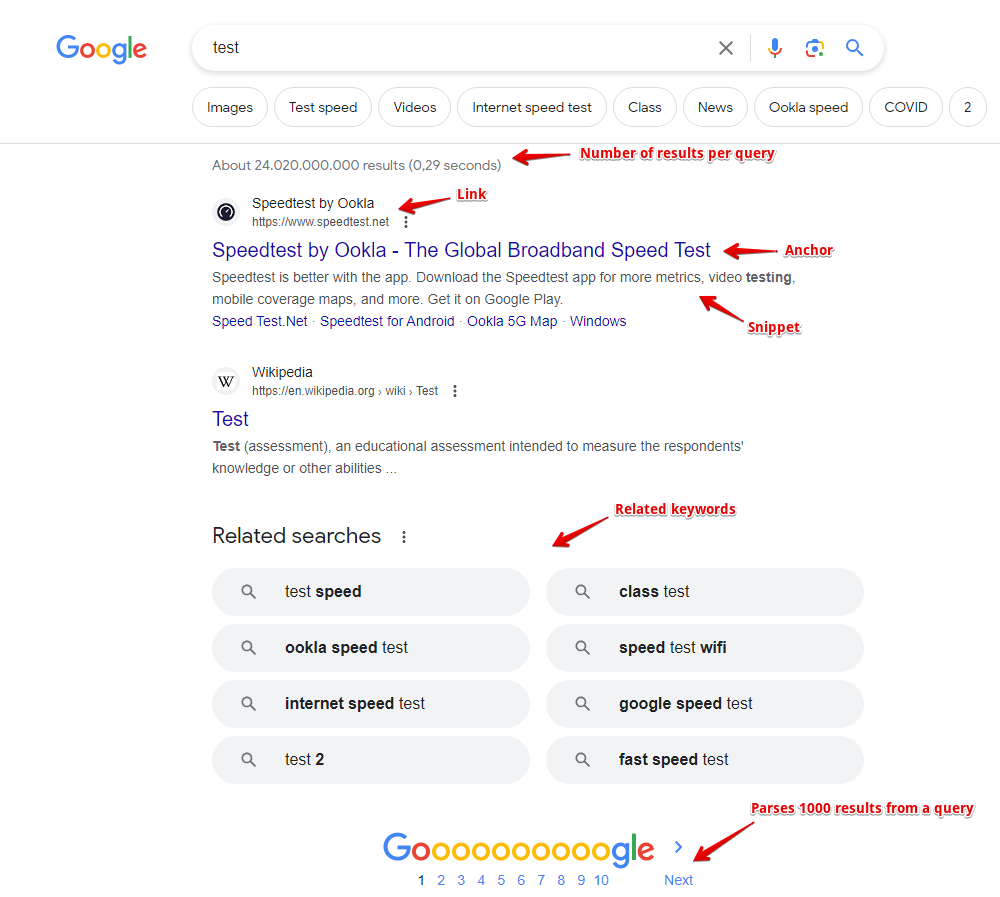
- Links, anchors, and snippets from search results, as well as the date from the snippet (if available)
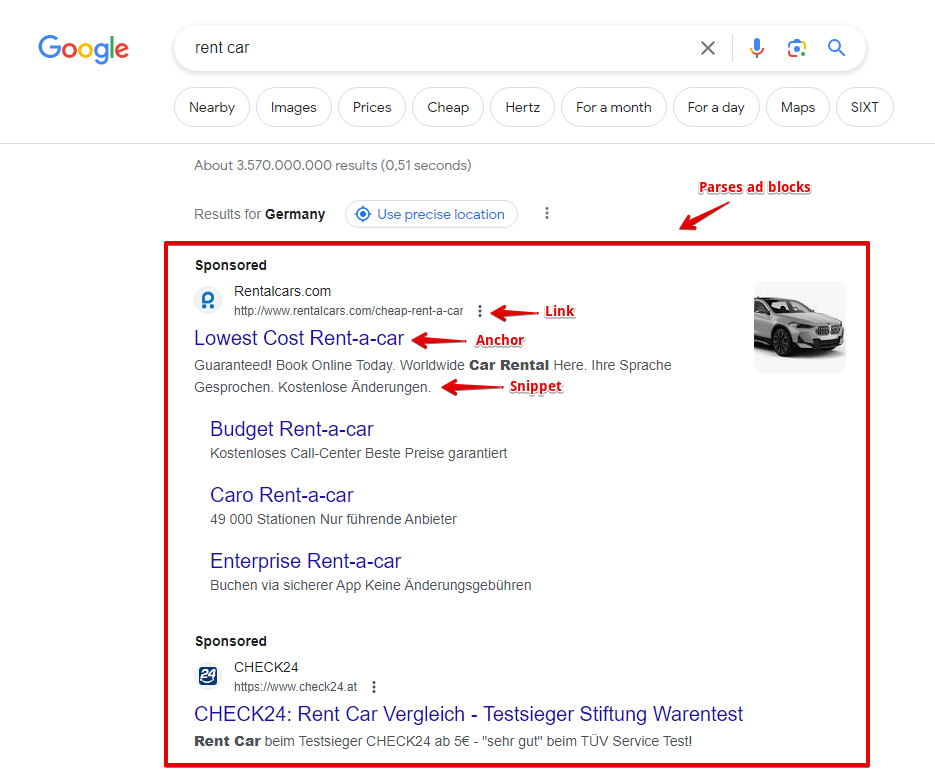
- Information about flags for each result is also collected; currently supported flags include: Date, AMP, Image Preview, Video, Rich snippet, Featured snippet
- Presence and content of ad blocks, as well as their position on the page
- Number of results for the query (competition)
- List of related keywords
- Presence of additional blocks on the page: product carousel, videos, etc.
- The scraper also collects the following additional data:
- Presence of a typo in the query and the corrected query
- Geo-location determined by Google
- Presence of AMP pages
- People also ask list: questions, answers, source links, their anchors, and media links (enabled by the separate Parse People also ask option)
- AI response (AI overview), its type, and list of sources
Capabilities
The Google search engine scraper has many features and settings:
- Support for all Google search operators (site:, inurl:, etc.)
- Specifying results size (10, 20, 30, 50, or 100 results) and number of pages (from 1 to 10); at maximum settings, Google provides from 300 to 500 results per query, and A-Parser easily bypasses this limit through query multiplication
- Ability to automatically follow related keywords
- Specifying results language and country, ability to choose a local Google domain, and the interface language of the results
- Ability to specify geo-location, allowing for precise local results for any place on the globe
- Choice between desktop or mobile view
- Ability to choose the type of results; besides the main organic results, the Google scraper can collect news, books, or video results
- If necessary, automatic ReCaptcha2 recognition can be connected via recognition services or through XEvil/CapMonster
- Supports specifying results time (all time or a specific interval from 24 hours to a year)
- Ability to disable the Google filter for hiding similar results (filter=)
- Ability to specify whether to scrape results if Google reports that nothing was found for the specified query and suggests results for a similar query
- Ability to set the number of People also ask items the scraper should collect by clicking deeper into each question
- Ability to collect tags
The following scrapers are based on the Google scraper:
 SE::Google::Position - determining the positions of any websites in search results for a list of queries
 SE::Google::Compromised - checks domains for cleanliness from Google's perspective, capable of identifying hacked and phishing sites
 SE::Google::TrustCheck - checks Google's Trust level for a website
Use cases
- Collecting link databases - for XRumer, AllSubmitter, GSA Ranker, etc.
- Full SERP dump, including links, anchors, snippets, ad blocks, and other information, allows for deep analysis for SEO specialists and marketers
- Keyword competition assessment
- Competition assessment in PPC (advertising) results
- Searching for backlinks and site mentions
- Checking site indexing
- Searching for vulnerable sites
- Any other cases involving obtaining search results for an unlimited number of queries
Queries
Search phrases should be specified as queries, exactly as if they were entered directly into the Google search form, for example:
car purchase
windows in moscow
site:https://lenta.ru
inurl:guestbook
Query substitutions
You can use built-in macros for query multiplication; for example, if we want to get a very large database of forums, we specify several main queries in different languages:
forum
forum
foro
论坛
In the query format, we specify a character permutation from a to zzzz; this method allows for maximum rotation of search results and obtaining many new unique results:
$query {az:a:zzzz}
This macro will create 475254 additional queries for each original search query, which in total will give 4 x 475254 = 1901016 search queries—an impressive figure, but not a problem for A-Parser. At a speed of 2000 queries per minute, such a task will be processed in just 16 hours.
Using operators
You can use search operators in the query format, so they will be automatically added to each query from your list:
inurl:$query
Output results examples
A-Parser supports flexible results formatting thanks to the built-in Template Toolkit templating engine, which allows it to output results in arbitrary forms, as well as structured ones like CSV or JSON.
Exporting a list of links
Result format:
$serp.format('$link\n')
Example result:
https://www.weforum.org/open-forum/
https://www.weforum.org/about/world-economic-forum/
https://www.merriam-webster.com/dictionary/forum
https://en.wikipedia.org/wiki/Forum
https://dictionary.cambridge.org/dictionary/english/forum
https://www.collinsdictionary.com/dictionary/english/forum
https://www.linkedin.com/company/world-economic-forum
https://docs.moodle.org/en/Forum_activity
https://wordpress.org/support/forums/
https://www.facebook.com/worldeconomicforum/
...
Links + anchors + snippets with position output
Result format:
[% FOREACH item IN serp; loop.count _ ' - ' _ item.link _ ' - ' _ item.anchor _ ' - ' _ item.snippet _ "\n"; END %]
Example result:
1 - https://ru.wikipedia.org/wiki/%D0%A4%D0%BE%D1%80%D1%83%D0%BC - Forum — Wikipedia - <em>Fórum</em> (lat. forum — arch. vestibule of a tomb; platform in a press for grapes to be processed; market square, city market; ...
2 - https://ru.wikipedia.org/wiki/%D0%A4%D0%BE%D1%80%D1%83%D0%BC_(%D0%BC%D0%B5%D1%80%D0%BE%D0%BF%D1%80%D0%B8%D1%8F%D1%82%D0%B8%D0%B5) - Forum (event) — Wikipedia - <em>Forum</em> — an event held to identify or solve some<wbr>sufficiently global problems. This concept is found in ...
3 - https://support.google.com/googleplay/community?hl=ru - Welcome to the community help forum ... - Welcome to the help <em>forum</em> of the Google Play community. Featured posts. View all interesting posts · Need help with a game?
4 - https://support.google.com/mail/community?hl=en - Gmail Community - Google Support - Welcome to the Gmail Help Community · Featured posts · Categories.
5 - https://www.weforum.org/ - The World Economic Forum - The World Economic Forum is an independent international organization committed to improving the state of the world by engaging business, political, academic ...
6 - https://www.kunena.org/ - Home - Kunena - To Speak! Next Generation Forum ... - Kunena! - To Speak! Next Generation Forum Component for Joomla.
7 - https://forum.adguard.com/index.php - AdGuard Forum - <em>Forum</em> for beta testers. Post bug reports for beta versions here. Threads: 355. Messages: 11.6K. Sub-forums: Comments on beta version releases ...
8 - https://www.sofiaforum.bg/ - Sofia Security Forum: Platform for discussion ... - Sofia <em>Forum</em> for Security / Sofia Security Forum.
9 - https://forum.keenetic.net/ - Forums - Keenetic Community - Keenetic fan club. A place to meet software developers, get the latest updates, and share experience.
10 - https://forum.euroaion.com/ - Perfect quality European private server of Aion - EuroAion.com - Perfect quality European private server of Aion!
...
Outputting links, anchors, and snippets to a CSV table
The built-in utility $tools.CSVLine allows creating correct tabular documents ready for import into Excel or Google Sheets.
General result format:
[% FOREACH i IN p1.serp; tools.CSVline(i.link, i.anchor, i.snippet); END %]
File name:
$datefile.format().csv
Initial text:
Link,Anchor,Snippet
Example result:
Link,Anchor,Snippet
https://ru.wikipedia.org/wiki/%D0%A4%D0%BE%D1%80%D1%83%D0%BC,"Forum — Wikipedia",
https://en.wikipedia.org/wiki/Forum,"Forum - Wikipedia","<em>Forum</em> (plural forums or fora) may refer to: Contents. 1 Common uses; 2 Places. 2.1 Natural features; 2.2 Populated places. 3 Arts and entertainment; 4 Media."
https://www.weforum.org/,"The World Economic Forum","The World Economic <em>Forum</em> is an independent international organization committed to improving the state of the world by engaging business, political, academic ..."
https://support.google.com/webmasters/community?hl=ru,"Welcome to the community help forum ...","Welcome to the help <em>forum</em> of the Google Search Central community. Featured posts. View all interesting posts · Answers to ..."
https://support.google.com/chrome/community?hl=ru,"Welcome to the community help forum ...","Welcome to the help <em>forum</em> of the Google Chrome community. Featured ..."
...
In the General result format, the Template Toolkit templating engine is used to output the $serp array in a FOREACH loop.
In the result file name, simply change the file extension to csv.
To make the "Prepend text" option available in the Task Editor, you need to activate "More options". In "Prepend text", write the column names separated by commas and make the second line empty.
Outputting ad blocks
Result format:
$ads.format('$link - $anchor - $snippet\n')
Example result:
https://www.rentalcars.com/ - Rent a Car Worldwide - Best Prices Online Guaranteed - Secure Your <em>Car Hire</em> Today. The Best Price Guaranteed. Book at Over 53,000 Locations. Search, Compare and Save Using the World's Biggest Online <em>Car Rental</em> Service.
https://www.kayak.com/United-States-Car-Rentals.253.crc.html - United States from $9/day - Search for Rental Cars on Kayak - Find and Compare Great <em>Car</em> Deals in USA. Book with Confidence on KAYAK®!
https://www.discovercars.com/ - -70% Worldwide Car Rental - Rent Your Car in 5 Minutes - <em>Car rental</em> prices are rising, but if you act fast, you can get a good deal. Don’t stress! We...
https://www.economybookings.com/ - Rent a Car for Summer Holidays - Car Rentals for the Best Price - Theft protection and Third Party liability part of a great deal. Free Mileage included.
...
Saving related keywords
Result format:
$related.format('$key\n')
Example result:
test <b>speed</b>
<b>net speed</b> test
<b>google speed</b> test
<b>fast speed</b> test
<b>ping</b> test
<b>xfinity speed</b> test
<b>speed</b> test <b>mobile</b>
test <b>my</b>
...
To automatically remove HTML tags in the result, you need to use the Results Builder, select the $related array, and apply Remove HTML tags.
Keyword competition
Result format:
$query - $totalcount\n
Example result:
speed test mobile - 1080000000
test score - 4020000000
net speed test - 1210000000
fast speed test - 2150000000
speed test - 2500000000
test match - 4160000000
ping test - 425000000
google speed test - 1870000000
Identifying misspelled keywords
Result format:
$query - $misspell\n
Example result:
spead test - 1
test match - 0
speed test - 0
temst match - 1
Checking link indexing
Query format:
site:$query
Result format:
$query.orig - $totalcount\n
Example result:
https://a-parser.com/pages/buy - 2
https://a-parser.com/wiki/parsers - 4
https://a-parser.com/resources - 883
https://trjkjfkdf.bg.ky - none
https://a-parser.com/forum - 371
To check link indexing, substitute the corresponding operator into the Query Format: site:.
The result format is output as "original url - number of pages in index".
As a result, we get the address of the pages and their count in the search engine index.
If the page is missing, the result will be: none.
Saving in SQL format
Result format:
[% FOREACH serp; "INSERT INTO serp VALUES('" _ query _ "', '"; link _ "', '"; anchor _ "')\n"; END %]
Example result:
INSERT INTO serp VALUES('test', 'https://www.speedtest.net/', 'Speedtest by Ookla - The Global Broadband Speed Test')
INSERT INTO serp VALUES('test', 'https://fast.com/', 'Fast.com: Internet Speed Test')
INSERT INTO serp VALUES('test', 'https://www.business-standard.com/article/sports/ind-vs-aus-live-score-4th-day-5-india-vs-australia-live-cricket-score-online-brisbane-weather-121011900103_1.html', 'IND vs AUS 4th Test highlights: India creates history, wins ...')
INSERT INTO serp VALUES('test', 'https://www.test.com/', 'Find online tests, practice test, and test creation software | Test ...')
INSERT INTO serp VALUES('test', 'https://www.espncricinfo.com/series/india-in-australia-2020-21-1223867/australia-vs-india-4th-test-1223872/match-report-4', 'Recent Match Report - Australia vs India 4th Test 2020 ...')
INSERT INTO serp VALUES('test', 'https://www.icc-cricket.com/world-test-championship/standings', 'World Test Championship (2019-2021) Points Table - Live ...')
INSERT INTO serp VALUES('test', 'https://www.icc-cricket.com/rankings/mens/team-rankings/test', 'ICC Test Match Team Rankings International Cricket Council')
INSERT INTO serp VALUES('test', 'https://projectstream.google.com/speedtest', 'Speedtest - Google')
INSERT INTO serp VALUES('test', 'https://www.google.com/search?hl=en&q=Software+Testing&stick=H4sIAAAAAAAAAONgecQ4g5Fb4OWPe8JSfYyT1py8xtjOyMUVnJFf7ppXkllSKaTCxQZlSXHxSHHo5-obmJul5GkwSHFxwXlKwUbuuy5NO8fmKMgABGJm_g5SmlpCXOyexT75yYk5ggpvuB68mfLeXkuYiyMksSI_Lz-3UtCBgcHhx__39kqcnEBND7aoddhrMTTtW3GIjYWDUYCBZxGrQHB-Wkl5YlGqQkhqcUlmXjoAS5B1P7EAAAA&sa=X&ved=2ahUKEwiW-rnmlajuAhWpAGMBHR-JAv4Q6RMwHXoECDQQBQ', '')
...
Dumping results to JSON
Common result format:
[% IF notFirst;
  ",\n";
ELSE;
  notFirst = 1;
END;

obj = {};
obj.totalcount = p1.totalcount;
obj.links = [];

FOREACH item IN p1.serp;
    obj.links.push(item.link);
END;

obj.json %]
Initial text:
[
Final text:
]
Example result:
[{"totalcount":"6450000000","links":["https://www.speedtest.net/","https://fast.com/","https://projectstream.google.com/speedtest","https://www.test.com/","https://www.speakeasy.net/speedtest/","https://www.att.com/support/speedtest/","https://speedtest.xfinity.com/","https://developers.google.com/speed/pagespeed/insights/","https://www.espncricinfo.com/series/india-in-australia-2020-21-1223867/australia-vs-india-4th-test-1223872/match-report-4","https://nasional.tempo.co/read/1424570/listyo-sigit-temui-ahy-menjelang-fit-and-profer-test-calon-kapolri","https://www.google.com/search?hl=en&q=Test+Assessment&stick=H4sIAAAAAAAAAONgecRYyC3w8sc9YamMSWtOXmNM4uIKzsgvd80rySypFNLiYoOyFLj4pbj10_UNjQyzKsvyzDQYpHi5kAWUNIxkdl2ado5NTJABCMTKAhyUODmBLIVA-wX2WgxN-1YcYmPhYBRg4FnEyh-SWlyi4FhcnFpcnJuaVwIAwEAP9ogAAAA&sa=X&ved=2ahUKEwj17MzXmajuAhW8CWMBHRlzBP4Q6RMwDHoECBEQBQ"]}]
To make the "Prepend text" and "Append text" options available in the Task Editor, you need to activate "More options".
Results processing
A-Parser allows processing results directly during scraping; in this section, we have provided the most popular use cases for the Google scraper.
Link deduplication
Add deduplication and select $serp.$i.link - Link from the dropdown list.
Download example
How to import an example into A-Parser
eJx9VE1v2zAM/SsFkcMGBEFy2MW3NFiKDVnTNekpyEGNaUOLLGmSnDUw/N9H+ktO
N/Rmko+PfCTlCoLwZ//k0GPwkBwqsM03JLD7miQPxuQK7zZSn/3di5a/S4QpWOE8
OoYfRigKpJiJUgWYVhCuFonEXNA5mXJQpmRbZ96uDoOT6Ml3Eapk2GI+n0P9QZrI
8WRKHWLO4gO44n4tOk4bZcxHKWUvhuRyy8kBSJMlByfDcdoh9i3cU8c6h977oMyr
UJAEV2J9PPYsfm1cIXh4E7uYdZMcgjtxwb2hYCZVrOzXZD2KgqtMUhGQo7OsIfr0
eRbemEGkqQzSaKHaCjz7WLVbTALaEJY+ebprZwpyBWwI2HntuzvApLGjyp9tDiSZ
UB6n4KnVtaBG0vcRGdCJYNzWcj/kr8DopVIbvKCKsIb/vpQqpUNZZpT0rUv8P2T7
D0c9yBuXokX/cdTDwNJY99sfMSs1G5OT8vS1WWYhA9l+1VxPAnNynhHtMLNHnllh
HA5lOuauOr0Ni5qvKq5saaPrRsbNWm6dJ6MzmW+7S+2Rpd7TA9zqlSmsQtalS6Vo
LR6f43ksfbcGNmKD75NXTQmW3r9DCMYo/33XtmqdpPP7wg0WNMlx1Y7yJJR6ed6M
IxBPqjknz7QnutPc0AWRivo4/BGG/0g1/i8kVU1r+eWfWhBrYAj5aBieZs6P+S/t
6pW4
See also: Results deduplication
Link deduplication by domain
Add deduplication and select $serp.$i.link - Link from the dropdown list. Select deduplication type: Domain.
Download example
How to import an example into A-Parser
eJx9VE2P2jAQ/SvI4tBKaAWHXnJj6bJqRZftwp4QB0MmyMXxuLZDF0X89844IQ7b
am+ZmffefDq1CNIf/bMDD8GLbFMLG79FJlYPWfaIeNAwWChz9INXo35XMNidB1+x
lMqIkbDSeXBM3PTwFMihkJUOYlSLcLZAcngC51TOQZWTbR2+nR0Ep8CT7yR1xbDJ
eDwWlw9o8gB7rExInMkHcM2VW3BM6zHGPUoV26IgNc4lZxtBPVlyMFlsRy1i3cDz
a++N91HjTmqRBVfBZbu9qvg5ulLyGId2ctfOtAuu5AnWSMFC6ZTZz8l6kiVnGeYy
AEfviij06fNdeGMFmecqKDRSNxl49ilrsyLiGyQsffJ05w5LcgWIAuw8X6vbiGG0
U5c/G47ICqk9jISnUueSCsnfR1QAJwO6peV6yF8LNFOtF3ACnWBR/75SOqdDmRZE
+tYS/w9Z/qNx6drrp6JF/3FUQ6cSrfvlj8TKcYEHXtkuLrNUgWw/i9eTiTE5jwC2
m9kTz6xEB12aVrnNTq/EguGrSiub2uS6aeNmLbfOPZpCHZbtpV6RlVnTU1yaGZZW
A/dlKq1pLR5e0nlMfbsGNlKB78mzmIJbv75DERC1/75qSrVO0fl94QJLmmQ/ayu5
l1q/viz6EZFOKp6TZ9k93ekB6YKoi8u2+yN0f5S6/1/I6gut5Zd/bkDcA0PIR8Pw
NHN+zH8BRVyZDA==
See also: Results deduplication
Extracting domains
Add Result Builders and select source: $p1.serp.$i.link - Link from the dropdown list. Select type: Extract Domain.
Download example
How to import an example into A-Parser
eJx9VE1v2zAM/SuFkMMGBIFz2MW3NGuGDVnTNe0p6EGzaUOLLGqSnCUw8t9HKort
dkNv5scj+cgndyJIv/cPDjwEL/JdJ2z8FrnY3uX5F8Raw83dMThZhJvP2EhlxFRY
6Tw4BuxGeRQooZKtDmLaiXCyQGXwAM6pkoOqJNs6PJ4cBKfAk+8gdctp8yzLxPkd
mKyhwNaEATN/J10rs/cWHMNGiOz88jIVxJBm9Ct0jWSmEzufJdp9cCsP8IQUrFQk
dsWQdS8bbjkpZQCOzqpY6MPHWThyBVmWKig0Ul868JqGrs9G/Y6MDVIuffIiVg4b
cgWIBdh5uk63E5NoCyrRRuyPC0bkldQepsLTqCtJg5RvIyqAkwHdxvI85O8EmoXW
aziAHtJi/dtW6ZJuuqgI9DUB/5+y+afGuac3bkU3+eNohr5KtG433wdUiWusiXn5
k3hr1ahAtl/GQ+ciI+cewPY7u+edNeigb5Mqp+4kZAuGBTCcbGEH1ysar84ycnbC
Y+sK6rfLpjtBQrdxOLMXrJ6kOLi8if5JSOfkifwpPWBSoTgTpkBTqXqTRHrt3Jon
en0bs8TGauA9mVZrOrOHx0FuC5/OysZA+C14GVvwKq9PkGZA7b9tL9StUzTSJybc
0GXGXVPJQmr9/LgeR8Qg0ShPz2UL0n2NpEhiweTSz6D/iXTjX0LenenMv/zDJYk5
cAr5aBmebsjv+C86oZM/
See also: Results Builder
Removing tags from anchors and snippets
Add Result Builders and select source: $p1.serp.$i.anchor - Anchor from the dropdown list. Select type: Remove HTML tags.
Add Result Builders again and select source: $p1.serp.$i.snippet - Snippet from the dropdown list. Select type: Remove HTML tags.
Download example
How to import an example into A-Parser
eJyVVD1v2zAQ/SsC4aEFBEMeumhzjLpp4cSp7UxGBlY6qawpkiUpN4bg/947mpaU
NAjQjby79+7rkR3z3B3cgwUH3rF83zETzixn2895/kXrWkKygUYfIbnd3a0Sz2uX
VFY3yVwVP7V1CVdlslXCGKJImeHWgSWy/YgDHSVUvJWepR3zJwOYAkmtFSU5RYl3
Y/XzyYK3AojpyGVLYbMsy9j5HRivodCt8gNm9k64FOrgDFiCjRDZ+ekpZdg91uiW
2jacpjAxs2kcSe/c8iPsNDorERq7YvB2zxtKOSm5B/JOq0D04ePUPxMDL0vhhVZc
XjLQmIasj0r8Dh0rjbF4pEEscdZo8hAIyHi6Vrdnk3BnSNEG7PcLhuUVlw5S5rDU
JcdCytce4cFyr+3aUD1o75hWcylXcAQ5hAX+m1bIEnc6rxD0NQLfDln/w3Hu2xun
wp38sVhDzxJuN+u7AVXqla6x8/IH9i1FIzze3SIsOmcZGg8App/ZPc2s0Rb6NJE5
ZkeRG1AkgGFlczOYXrTxYi0jY8ecbm2B+fZZumcodENbDS+BkX6i5mx4Mbe+keS2
lp/QGKM9SSdCSKZvMbrLe/ovyivmjJhCq0rU66j8azut2uFzX6uFbowEGr5qpUTt
ONgMGp67qBW6DFN8DV6EFLSf67vGMrR037aXeRorsKpPaSx8nDVSFlzKx81q7GGD
7oPmHdEW+JhqjTLHLqi5+MP0v1Y3/mfy7oza+eUeLkHUA4WgDYfhUBj0OfwFH/O5
UQ==
You can add the Results Builder as many times as you need.
See also: Results Builder
Filtering links by inclusion
Add a filter and select: $serp.$i.link - Link from the dropdown list. Select type: Contain string. Then in String, enter the filtering criteria.
Download example
How to import an example into A-Parser
eJx9VE1v2kAQ/StoxSGVEIJDL74RVKpWNKSBnBCHDR5bG9Y72901DbL83zuzNrZJ
qtw8H+/Nm491JYL0J//owEPwItlXwsZvkYjttyT5jphrGK2UDuCUyUcvl5EP8UuZ
kVbmJCbCSufBMXo/AFEghUyWOohJJcLFAnHiGZxTKQdVSrZ1+HZxQIzgyXeWuuS0
+Ww2E/UnMJnDEUsTesz8k3TW6S04hg0QswEkix1SkLpnycleUE+WHLHJw6TN2DXp
RzRBKjOQPD1iQSbaoNCQ7cF4UR8OV0a/QldInuvYzqftkLvgVp5hh40O6N00d3iQ
BfOPUxmAo9MsEt19mYY3ZpBpqrim1E0F3kNf9dmoP1GfQcqlT570ypHWRASIBOy8
XNXtxTja3HEZsb8bjEgyqT1MhCepK0lC0vcRRfORAd0mzoD8lUCz0HoNZ9B9WuS/
L5VO6WgWGYF+tMD/p2w+cNRde8NStPS/jjR0LNG63/zqUSmuMafO05e42EIFsv0y
XlIiZuQ8AdhuZg88swIddGVa5rY6PRsLhi+sX9nC9q6bNm7Wcuuka8pUvmmv9ppZ
mh29zY1ZYmE1cF+m1JrW4uGpP4+Fb9fARi/wPXgZS3Dr1zcpAqL2P7eNVOsUnd9X
FljQJIdVW8qj1Pr5aT2MiP6k4jl5pj3SneZIF0Rd1Ifu79D9YqrhPyKpalrLq39s
krgHTiEfDcPHlzSv/wHtZp3U
See also: Results filters
Possible settings
Regional settings
Google domain - the Google domain used, google.com by default
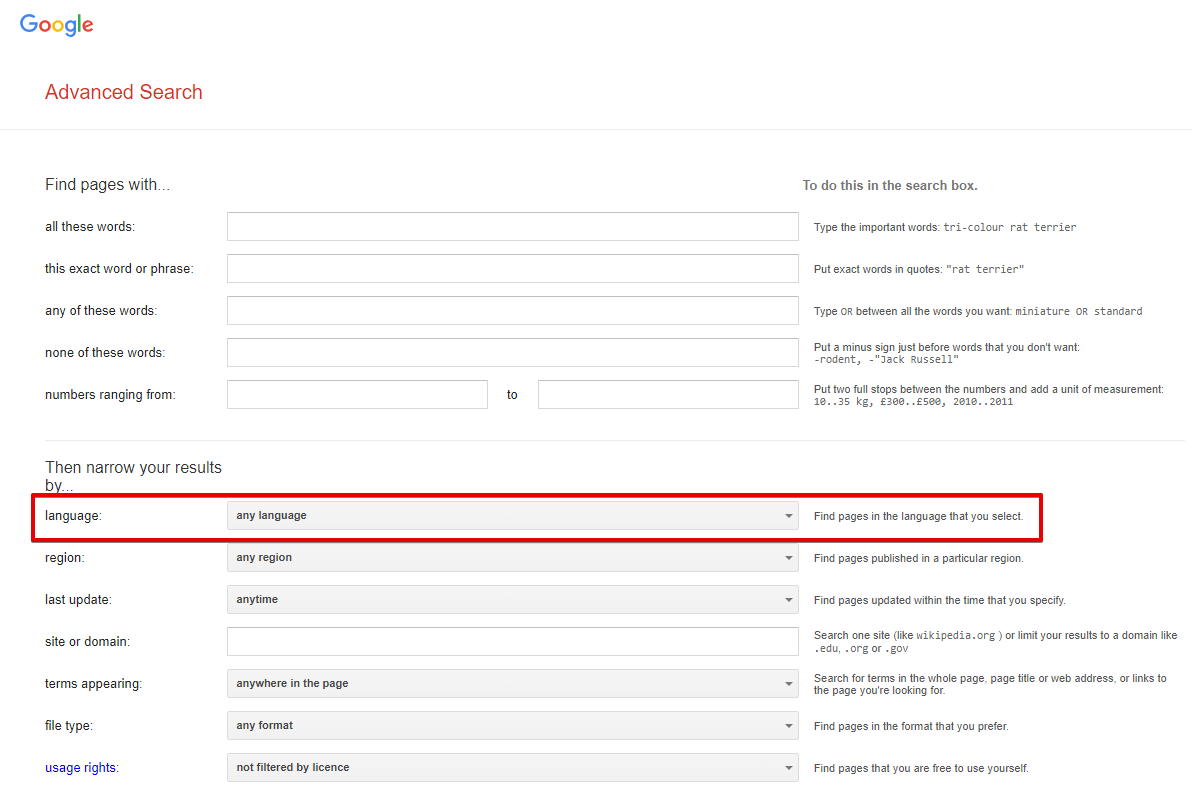
Results language - search for pages in the selected language; in the browser, this corresponds to Advanced Search -> Additional settings -> Search in (url parameter lr). Not set by default, which means automatic detection based on IP
Spoiler: Screenshot
Interface language - the language of Google products; in the browser, this is Languages -> Interface language (url parameter hl). English is selected by default
Spoiler: Screenshot
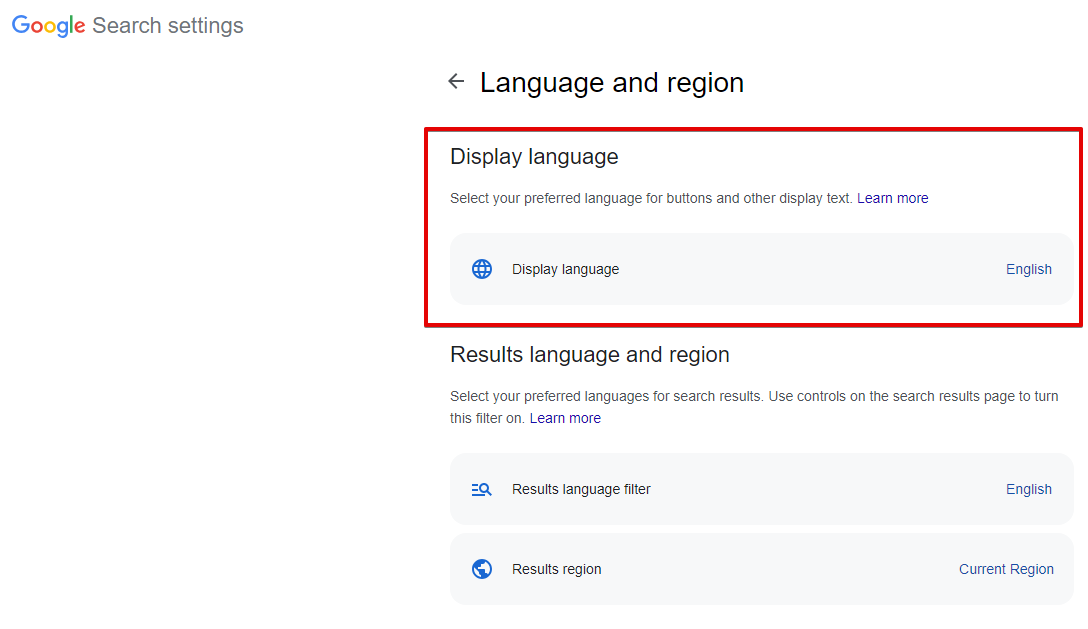
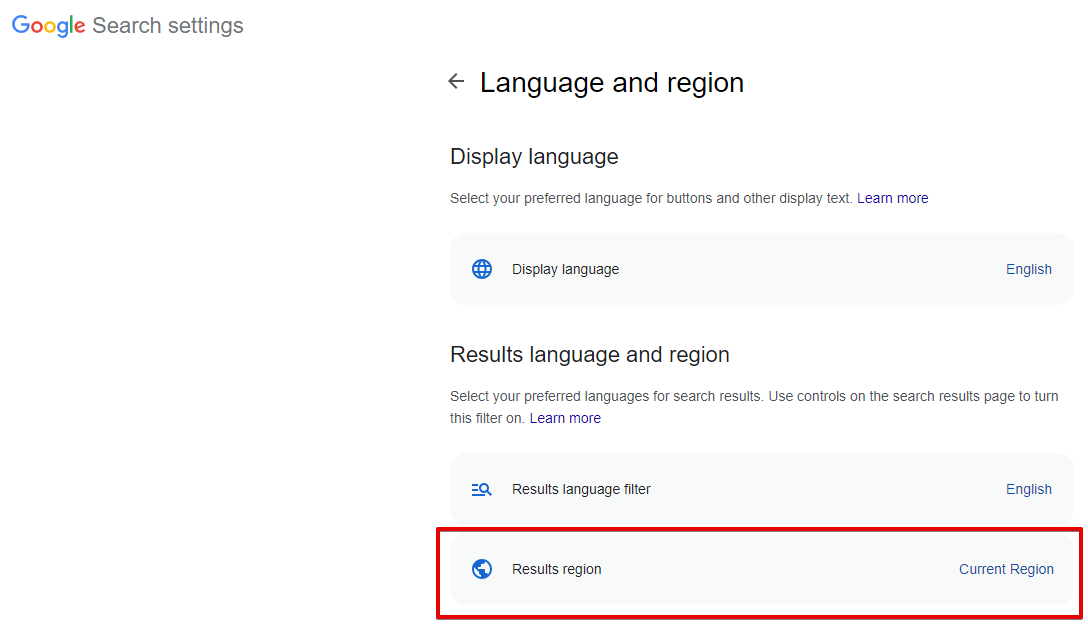
Search from country - choice of search region; in the browser, this is Languages -> Search region (url parameter gl). Not set by default, which means automatic detection based on IP
Spoiler: Screenshot
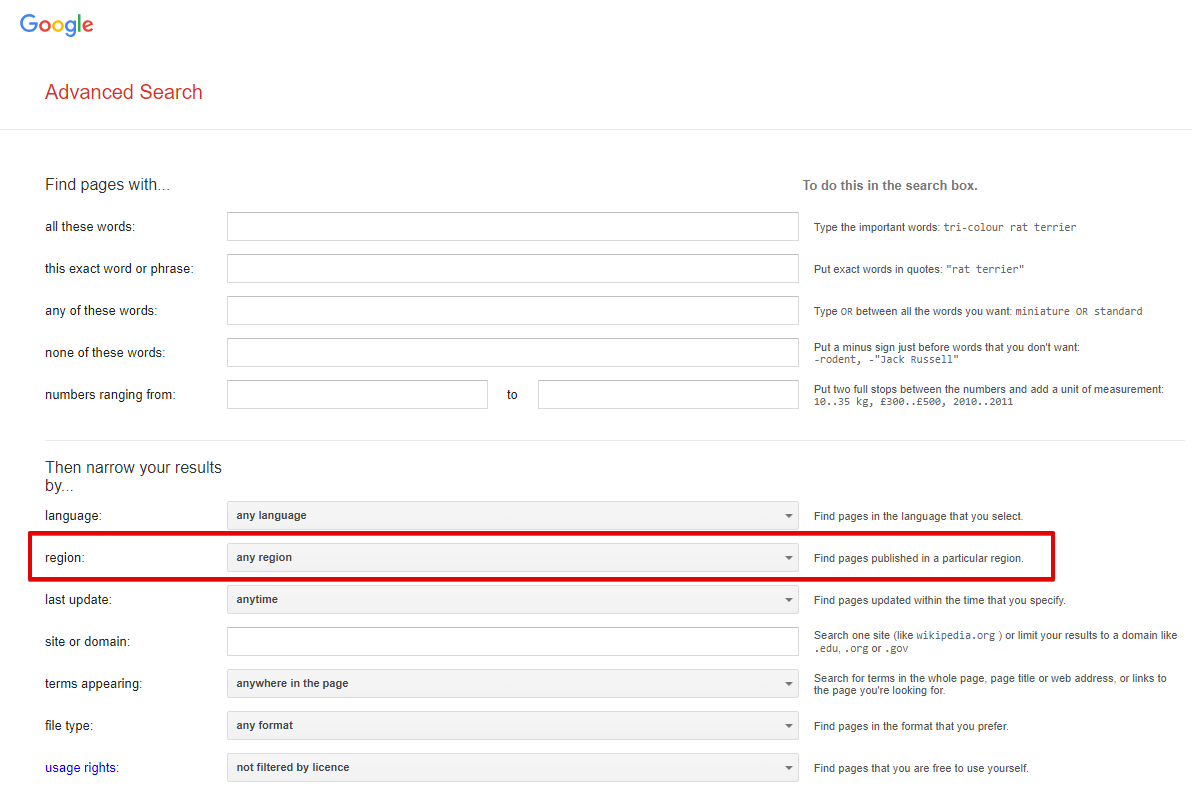
Narrow results by region - search for pages created in a specific country; in the browser, this is Advanced Search -> Additional settings -> Country (url parameter cr). Not set by default, which means this option is disabled
Spoiler: Screenshot
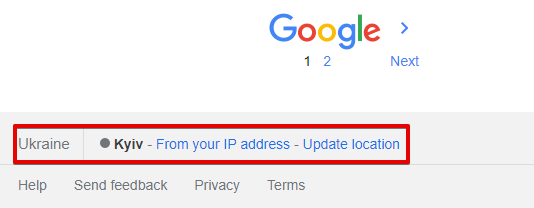
Location (city) - precise search location; in the browser, it is determined automatically based on the user's location. Not set by default, which means automatic detection based on the request IP
Spoiler: Screenshot
All regional parameters affect the search results to some extent.
| Parameter name | Default value | Description |
|---|---|---|
| Device | Desktop | Choice of desktop or mobile results: Desktop / Mobile |
| Pages count | 5 | Number of pages to scrape (from 1 to 100) |
| Parse pages links from first page | ☑ | Collects links to all available pagination pages from the first result page. Only considered when Device: Desktop; does not apply to mobile results |
| Serp type | Default (All) | Determines whether to scrape from the main page, news, or blogs (Books, News, Videos) |
| Hide omitted results | ☑ | Determines whether to hide omitted results (filter= parameter) |
| Serp time | Anytime | SERP time (time-dependent search, tbs= parameter, possible values: Past 1 hour, Past 24 hours, Past week, Past month, Past year) |
| Parse not found | ☑ | Determines whether to scrape results if Google reported that nothing was found for the specified query and suggested results for another query |
| Disable autocorrect | ☐ | Allows disabling Google's auto-correction and scraping results exactly for the specified query |
| Exact match | ☐ | Corresponds to the "Exact match" option in the search engine. Note, this option overwrites the Serp time parameter value (similar to how these options work in a browser). |
| Safe search | Blur | Ability to enable "Safe search" |
| Google domain | www.google.com | Google domain for scraping; all domains are supported (www.google.ac, www.google.com.af, www.google.co.ck, etc.) |
| Narrow results by region | Any region | Ability to narrow the search to a specific country |
| Results language | Auto (Based on IP) | Choice of results language (lr= parameter) |
| Search from country | Auto (Based on IP) | Choice of country from which the search is performed (geo-dependent search, gl= parameter) |
| Interface language | English | Ability to choose the Google interface language for maximum identity of results in the scraper and browser |
| Location (city) | Search by city, region. Cities can be specified as novosibirsk, russia; a full list of locations can be found in Geotargets (copy - use the value from the Canonical Name column). A correct Google domain must also be set | |
| Util::ReCaptcha2 preset | default | Determines whether to use  Util::ReCaptcha2 to bypass recaptchas Util::ReCaptcha2 to bypass recaptchas |
| Util::AntiGate preset | default | Determines whether to use  Util::AntiGate to bypass graphic captchas Util::AntiGate to bypass graphic captchas |
| ReCaptcha2 retries | 3 | Number of attempts to send a recaptcha response a specified number of times without changing the proxy |
| ReCaptcha2 pass proxy | ☐ | Allows passing proxies (used in the request to Google) and cookies (received in the response from Google) to the ReCaptcha recognition service |
| Use sessions | ☑ | Saves good sessions, allowing for even faster scraping with fewer errors. |
| Don't take session | ☐ | Ability to not use saved good sessions |
| Additional headers | Allows specifying any custom headers | |
| PAA questions count | 0 | Maximum number of questions-answers (People also ask) for each query that the scraper should collect |
| Empty totalcount is error | ☐ | When this parameter is enabled, the query will be considered failed if the $totalcount value is missing, and repeat attempts will be made accordingly |
| Count of retries when result is empty | 10 | Number of query retries if the results page is completely empty |
| Redirect browser max pages | 10 | Number of browser pages used to bypass protection in the form of a check for enabled JavaScript |
| Single redirect browser for task | ☑ | If multiple Google scrapers are specified in the task, use only one browser for all subtasks; the maximum number of pages and other settings are taken from the first Google scraper in the task |