 HTML::TextExtractor - Scraping content (text) from websites
Scraper overview
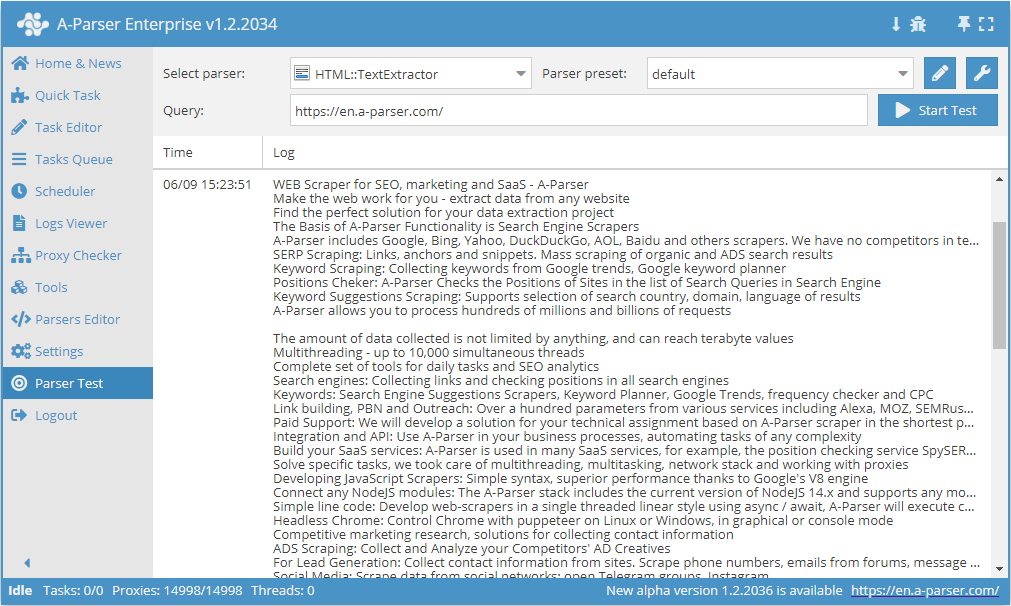
 HTML::TextExtractor scrapes text blocks from the specified page. This content scraper supports multi-page scraping (page navigation). It has built-in protection bypass tools for CloudFlare and also the ability to choose Chrome as an engine for scraping content from pages where data is loaded by scripts. Capable of reaching speeds up to 2000 requests per minute – which is 120 000 links per hour.
Scraper use cases
Text scraping via Chrome using lingualeo.com as an example
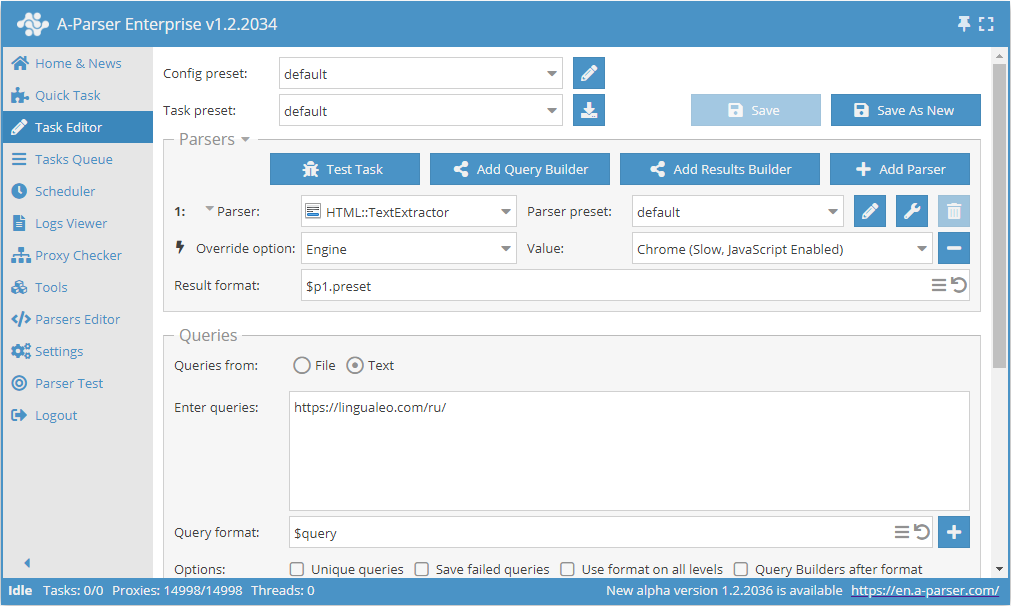
- Add the Engine option, and select the
Chrome (Slow, JavaScript Enabled)engine from the list. - Specify the link to the site from which you want to scrape text as the query.
This option can be useful in cases where the site loads the main text via scripts during page loading, and when using HTTP (Fast, JavaScript Disabled), the result is missing or incomplete.
Download example
How to import an example into A-Parser
eJxtU01v2zAM/S9EDhsQJO1hF9/SYME6pHXXpqcgB8GmXa2ypOkjS2Hkv+/Jce2k
680kHx8fxeeWgvCv/sGx5+Ap27Zku2/KqORKRBVoSlY4zy6Vt/Rjc7fOsg0fwvdD
cKIIxgExYFsKb5bRbfbsnCwZRVkiZl1LnaK9UDEBihdnGqbjbjcljES3XxnXiDR6
Yq9nvY6h+CT2vDEoVlLxmF4huhdNYpyUInCqzqqO6MvXWTgkBlGWMkijhTpNSJuM
U5+1/NMp8sFJXQOP0En2KwhEOnBHkpJv7wq3NOliAk3s+n+deigLLvKUPNSuBLSU
Q6ESyqMiAzuBV8ttkoR8S0YvlFrzntUI6+hvolQlXn5Roem2b/wckv/HcRw2PB+F
s/x10DCwdNFNfjd2lWZtaiyuDdZWspEBsV+aqNNtrpB8ZbbDs90nWGMcD2N65n46
zGVZJw+MV1vYMXWxxsVlLpOF0ZWs895X78ioN3BwrpemsYrTXjoqhat4fhwdsvD9
GVIwCvzYvOxGXHg/GKP8z6eTVOskHPgtCWzwkudTe8pCKPX8uD6v0OgoBC8hWJ/N
5wpWi0KxmRWmmbs4p9QcuDZwFVY77ob/bvg720//vqw94mi//cMJnTZMWOTwVB4X
oez6+A9VbWHX
Text scraping with page navigation using news as an example
Results are saved in the aparser/results/example/textextractor directory in a separate file for each query. The sequence number of the query is used as the name.
- Add the Check next page option, and specify
(forum\/news\/page-\d+)"[^>]+>Nextas the regex. - Add the Page as new query option.
- Change File name to
example/textextractor/${query.num}.txt. - Specify the link to the first page of A-Parser news as the query:
https://a-parser.com/forum/news/.
Download example
How to import an example into A-Parser
eJx1VN1v2jAQ/18sHjaVEtjoSx4qUVS0TRRoS58Ik6zkQj0c27UdPhTlf9/ZCQmw
7sXJne/jd7+7c0EsNVuz0GDAGhKuCqL8PwnJ44FmikMYLuFgHw9W09hKHYYzFBd0
A6RLFNUGtPNbkR/Lp+mVLVokkNKcW9ItiD0qwLBSWSaFwTuWoBi/Q7w9C7mjPHdm
X1Kp8yyKAgF7gx+F17dRlNx8jcjq9/365j7K+8PBN3d+T/15585h3513A68ZYkCa
JMxlpJyExWW6KcuYq7RPyvK/AF3ikZnB/jkHfWwRWp3DdfQtgPJmU9gBavpluV53
CTKKHJiJ1Bl1+Tpq0Ktpbi5f6Q6WEi9TxqFVT1Ca0czhgqofgUX0cKI46BQfLmFP
5FnZswd7UXGV0fWnRfEm2IdnWEi0dc4MzETLDFUubq08ntCuSMfLBEPk3ve58iFh
SrlBDgxCn1AEmlzfMAuaIsp5TSlSJMWIc09Pa+bjP+SMJzhMoxSdftaOn5vM/4lR
NuWdp9qB3mvE0ETx0sP8qfVK5FRuTmRwNw8om7HMRTUYXd/ThrOZM8ukhiZNHbnO
joukQLixaVs4Uq3qooyLtlwqYylStpljAZolcLLMxRK3dS7G0g2Cq0vknGNbDLy0
4zIydRuc0AK8dh77FAirWVFipeTm12sFVWmG43jnAGbI5HnWOmRMOX97mZ7fkHak
UHi3VpkwCOht9VD0YpkFfq/9VgfExbCwkThdWGG5bl6U5kEqPn1XwgIXlvwxi8ra
FepsUYeMGWwMCQflX6y1tO0=
Collected data
- Scrapes text blocks from the specified page
- Array with all collected pages (used when the Use Pages option is active)
Capabilities
- Multi-page text scraping (page navigation)
- Automatic cleaning of text from HTML tags
- Ability to set the minimum length of a text block
- Optional removal of link anchors from text
- Supports gzip/deflate/brotli compression
- Detection and conversion of website encodings to UTF-8
- CloudFlare protection bypass
- Engine selection (HTTP or Chrome)
Use cases
- Scraping text content from any websites
Queries
Links to the pages from which you need to scrape text blocks should be specified as queries, for example:
https://a-parser.com/
Output results examples
A-Parser supports flexible result formatting thanks to the built-in Template Toolkit, which allows it to output results in arbitrary form, as well as in structured formats such as CSV or JSON
Default output
Result format:
$texts.format('$text\n')
Result example:
Hello, Super Team of Highest Professionals of their Craft! Thank you for the opportunity to study Spanish, Turkish and Portuguese! I wish you further expansion of your Capabilities! Inspiration and Creativity! And please add the Opportunity to study German and French!”
I have been using Lingualeo for many years, I first started studying when there was no app at all, only the website) Thanks to the developers, keep it up, with creativity and great love for the craft)
Technical English for IT: dictionaries, textbooks, magazines
Learn languages online Learn English online Learn Vietnamese online Learn Greek online Learn Indonesian online Learn Spanish online Learn Italian online Learn Chinese online Learn Korean online Learn German online Learn Dutch online Learn Polish online Learn Portuguese online Learn Serbian online Learn Turkish online Learn Ukrainian online Learn French online Learn Hindi online Learn Czech online Learn Japanese online
Possible settings
| Parameter name | Default value | Description |
|---|---|---|
| Min block length | 50 | Minimum length of a text block in characters. |
| Skip anchor text | ☐ | Whether to skip anchors in the text. |
| Ignore tags list | Option to specify tags that should be ignored. Example: div,span,p | |
| Good status | All | Selection of which server response will be considered successful. If there is a different response from the server during scraping, the request will be repeated with another proxy. |
| Good code RegEx | Ability to specify a regular expression to check the response code. | |
| Method | GET | Request method. |
| POST body | Content to be sent to the server when using the POST method. Supports variables $query – request URL, $query.orig – original query, and $pagenum - page number when using the Use Pages option. | |
| Cookies | Ability to specify cookies for the request. | |
| User agent | `_Automatically substitutes the user-agent of the current Chrome version_ | User-Agent header when requesting pages. |
| Additional headers | Ability to specify arbitrary request headers with support for template engine capabilities and using variables from the query builder. | |
| Read only headers | ☐ | Read only headers. In some cases, this allows saving traffic if there is no need to process content. |
| Detect charset on content | ☐ | Detect encoding based on page content. |
| Emulate browser headers | ☐ | Emulate browser headers. |
| Max redirects count | 7 | Maximum number of redirects the scraper will follow. |
| Max cookies count | 16 | Maximum number of cookies to save. |
| Bypass CloudFlare | ☑ | Automatic CloudFlare check bypass. |
| Follow common redirects | ☑ | Allows making http <-> https and www.domain <-> domain redirects within one domain bypassing the Max redirects count limit. |
| Engine | HTTP (Fast, JavaScript Disabled) | Allows choosing the HTTP engine (faster, no JavaScript) or Chrome (slower, JavaScript enabled). |
| Chrome Headless | ☐ | If the option is enabled, the browser will not be displayed. |
| Chrome DevTools | ☑ | Allows using Chromium debugging tools. |
| Chrome Log Proxy connections | ☑ | If the option is enabled, chrome connection information will be output to the log. |
| Chrome Wait Until | networkidle2 | Determines when the page is considered loaded. More about values. |
| Use HTTP/2 transport | ☐ | Determines whether to use HTTP/2 instead of HTTP/1.1. For example, Google and Majestic ban immediately if HTTP/1.1 is used. |
| Bypass CloudFlare with Chrome(Experimental) | ☐ | CF bypass via Chrome. |
| Bypass CloudFlare with Chrome Max Pages | Max number of pages when bypassing CF via Chrome. |