Net::HTTP - Universal base scraper with multi-page scraping support and CloudFlare bypass
Scraper overview
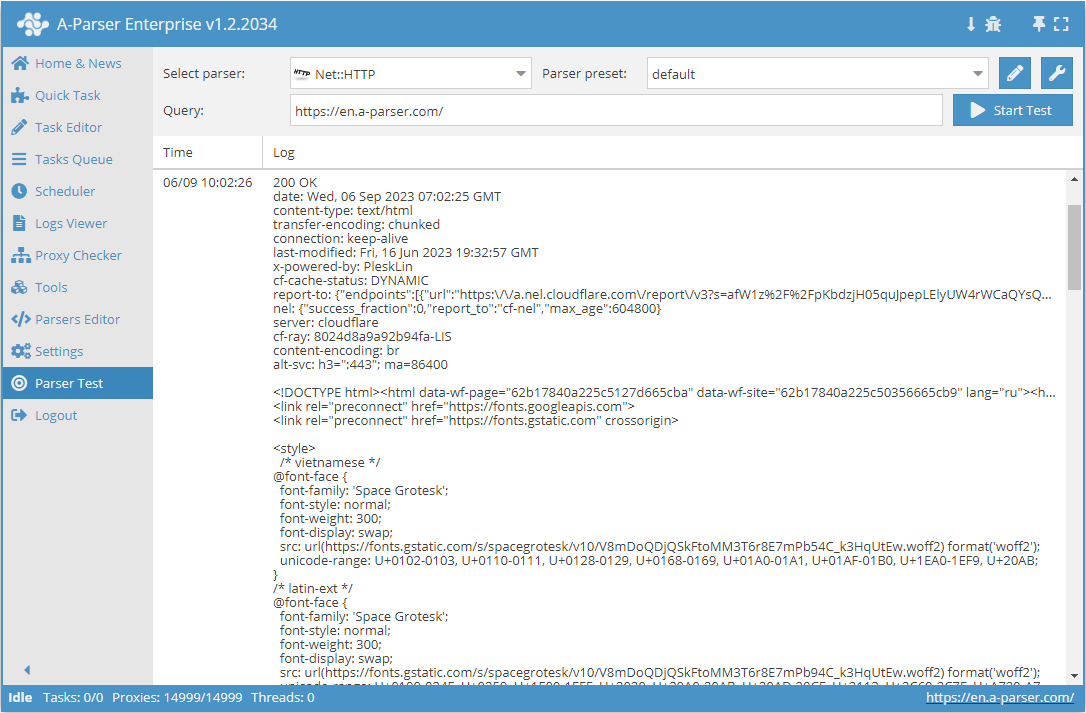
 Net::HTTP is a universal scraper that allows solving most non-standard tasks. It can be used as a basis for scraping arbitrary content from any websites. It allows downloading page code via a link, supports multi-page scraping (pagination), automatic proxy handling, and allows checking for a successful response by code or page content.
Scraper use cases
🔗 REG.RU Domain Auction
Scraping the auction of expiring domains with filtering options
🔗 SSL Certificate Data
Scraping domain SSL certificate data from leaderssl.ru
🔗 Booking.com Scraping
Retrieving apartment and hotel search results from the website
🔗 Collecting Product Specifications
Example of scraping an unknown number of product specifications
🔗 Scraping IMDB Movie Database
Retrieves data for each movie and records it in the result
🔗 Checking for HTTPS Presence
Preset checks for the presence of HTTPS on a website
Collected data
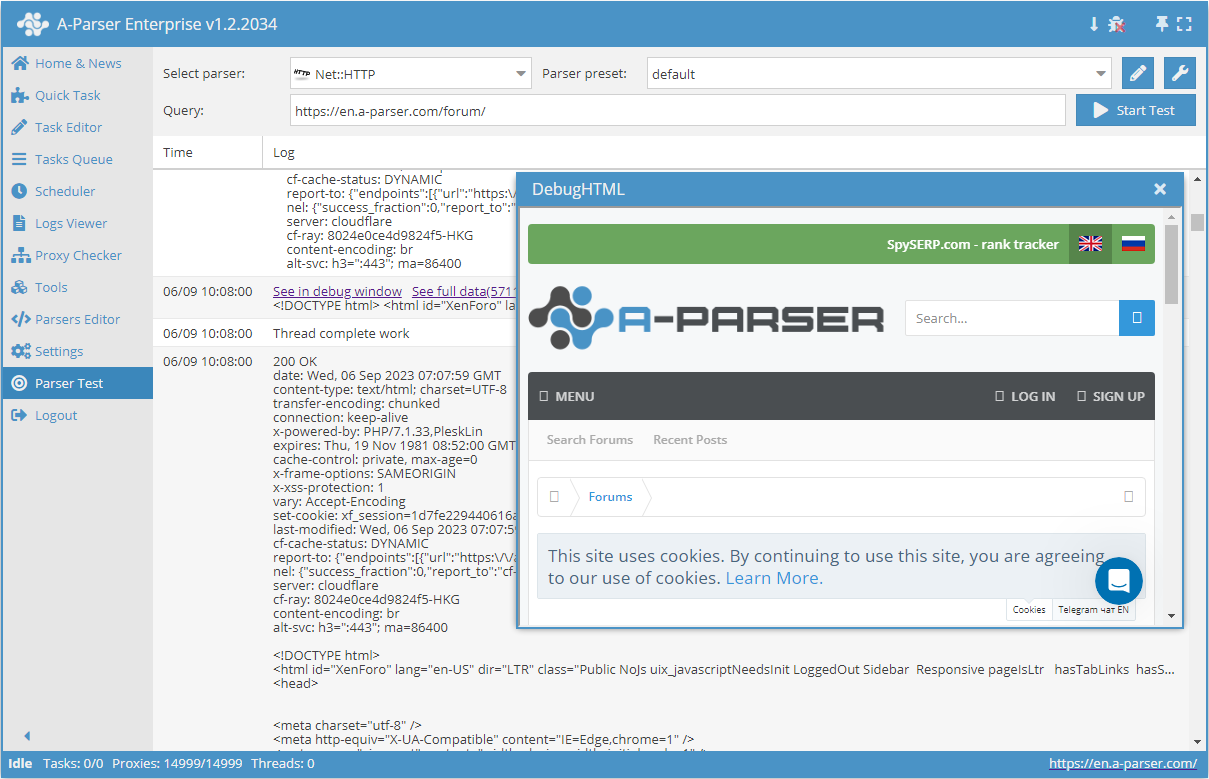
- Content
- Server response code
- Server response description
- Server response headers
- Proxies used during the request
- Array with all collected pages (used when the Use Pages option is active)
Features
- Multi-page scraping (pagination support)
- Automatic proxy management
- Success response verification by code or page content
- Supports gzip/deflate/brotli compression
- Detection and conversion of website encodings to UTF-8
- CloudFlare protection bypass
- Engine selection (HTTP or Chrome)
- Check content option – executes a specified regular expression on the received page. If the expression fails, the page will be reloaded using a different proxy.
- Use Pages option – allows iterating through a specified number of pages with a certain step. The
$pagenumvariable contains the current page number during iteration. - Check next page option – requires a regular expression that extracts the link to the next page (usually the "Next" button) if it exists. Navigation between pages is performed within the specified limit (0 for no limit).
- Page as new query option – navigation to the next page occurs as a new request. This allows removing the limit on the number of pages to navigate.
Use cases
- Downloading content
- Downloading images
- Checking server response codes
- Checking for HTTPS presence
- Checking for redirects
- Outputting a list of redirect URLs
- Getting page size
- Collecting meta tags
- Extracting data from page source code and/or headers
Queries
Specify page links as queries, for example:
http://lenta.ru/
http://a-parser.com/pages/reviews/
Output results examples
A-Parser supports flexible result formatting thanks to the built-in Template Toolkit engine, allowing it to output results in any format, including structured formats like CSV or JSON.
Content output
Result format:
$data
Example result:
<!DOCTYPE html><html id="XenForo" lang="ru-RU" dir="LTR" class="Public NoJs uix_javascriptNeedsInit LoggedOut Sidebar Responsive pageIsLtr hasTabLinks hasSearch is-sidebarOpen hasRightSidebar is-setWidth navStyle_0 pageStyle_0 hasFlexbox" xmlns:fb="http://www.facebook.com/2008/fbml">
<head>
<!-- Google Tag Manager -->
<!-- End Google Tag Manager -->
<meta charset="utf-8" />
<meta http-equiv="X-UA-Compatible" content="IE=Edge,chrome=1" />
<meta name="viewport" content="width=device-width, initial-scale=1" />
<base href="https://a-parser.com/" />
<title>A-Parser - scraper for SEO professionals</title>
<noscript><style>.JsOnly, .jsOnly { display: none !important; }</style></noscript>
<link rel="stylesheet" href="css.php?css=xenforo,form,public,parser_icons&style=9&dir=LTR&d=1612857138" />
<link rel="stylesheet" href="css.php?css=facebook,google,login_bar,moderator_bar,nat_public_css,node_category,node_forum,node_list,notices,panel_scroller,resource_list_mini,sidebar_share_page,thread_list_simple,twitter,uix_extendedFooter&style=9&dir=LTR&d=1612857138" />
<link rel="stylesheet" href="css.php?css=uix,uix_style&style=9&dir=LTR&d=1612857138" />
Server response code
Result format:
$code
Example result:
200
The result format [% response.Redirects.0.Status || code %] allows outputting the 301 status if redirects are present in the request.
Getting request data
The $response variable helps to get information about the request and server response.
Result format:
$response.json\n
Example result:
{
  "Time": 3.414,
  "connection": "keep-alive",
  "Decode": "Decode from utf-8(meta charset)",
  "cache-control": "max-age=3600,public",
  "last-modified": "Tue, 18 May 2021 12:42:56 GMT",
  "transfer-encoding": "chunked",
  "date": "Thu, 27 May 2021 14:18:42 GMT",
  "Status": 200,
  "content-encoding": "gzip",
  "Body-Length-Decoded": 1507378,
  "Reason": "OK",
  "Proxy": "http://51.255.55.144:25302",
  "content-type": "text/html",
  "Redirects": [],
  "server": "nginx",
  "Request-Raw": "GET / HTTP/1.1\r\nAccept: text/html,application/xhtml+xml,application/xml;q=0.9,image/webp,image/apng,*/*;q=0.8\r\nAccept-Encoding: gzip, deflate, br\r\nAccept-Language: en-US,en;q=0.9\r\nConnection: keep-alive\r\nHost: a-parser.com\r\nUpgrade-Insecure-Requests: 1\r\nUser-Agent: Mozilla/4.0 (compatible; MSIE 6.0; Windows NT 5.1; SV1)\r\n\r\n",
  "URI": "https://a-parser.com/",
  "HTTPVersion": "1.1",
  "Body-Length": 299312,
  "Decode-Mode": "auto-html",
  "etag": "W/\"60a3b650-170032\"",
  "Decode-Time": 0.003,
  "IP": "remote",
  "expires": "Thu, 27 May 2021 15:18:42 GMT"
}
Getting redirects
Query:
https://google.it
Result format:
$response.Redirects.0.URI -> $response.URI
Example result:
https://google.it/ -> https://www.google.it/
JSON with redirects
Result format:
$response.Redirects.json
Example result:
[{"x-powered-by":"PleskLin","connection":"keep-alive","URI":"http://a-parser.com/","location":"https://a-parser.com/","date":"Thu, 18 Feb 2021 09:16:36 GMT","HTTPVersion":"1.1","Status":301,"content-length":"162","Reason":"Moved Permanently","Proxy":"socks5://51.255.55.144:29683","content-type":"text/html","IP":"remote","server":"nginx","Request-Raw":"GET / HTTP/1.1\r\nAccept: text/html,application/xhtml+xml,application/xml;q=0.9,image/webp,image/apng,*/*;q=0.8\r\nAccept-Encoding: gzip, deflate, br\r\nAccept-Language: en-US,en;q=0.9\r\nConnection: keep-alive\r\nHost: a-parser.com\r\nUpgrade-Insecure-Requests: 1\r\nUser-Agent: Mozilla/4.0 (compatible; MSIE 6.0; Windows NT 5.1; SV1)\r\n\r\n"}]
Outputting server response status
Result format:
$reason
Example result:
OK
Server response time
Result format:
$response.Time
Example result:
1.457
Getting page size
As an example, the size is presented in three different variants.
Result format:
[% "data-length: " _ data.length _ "\n";
"Body-Length: " _ response.${'Body-Length'} _ "\n";
"Body-Length-Decoded: " _ response.${'Body-Length-Decoded'} _ "\n" %]
Example result:
data-length: 70257
Body-Length: 23167
Body-Length-Decoded: 75868
Results processing
A-Parser allows processing results directly during scraping; in this section, we have provided the most popular cases for the Net::HTTP scraper.
Outputting H1-H6 tags
Add a regular expression (option Parse custom results) <(h\d+)[^>]+>(.+?)<\/h\d+>, in the "Parse result" field select $pages.$i.data - Page content, in the field next to the regular expression select modifiers sg. The result type will be automatically set to an array. In the "Name" field specify headers, then in "$1 to" specify tag, click on

content. In the general result format, specify the output $p1.headers.format('$tag - $content\n').Download example
How to import an example into A-Parser
eJxtVNuO2jAQ/RVkIS2IW3loH6IVFYuK2ooSlmWfIJUsMgR3HTu1HboI8e+dcUIC
tE+Jj+ccn7nYJ+a4fbMLAxacZcH6xDL/zwI2BxcEX1erRWOrpYStEypp7Ie9/SfW
ZRk3Fgwx1nUg4jHseC4d656YO2aAMtvcOp0uwXqYmeInWKNEApYo3HEW0U4C70h4
bO03m7jTXv8cRZ1Rq9/53H7cbAYeHLEyblWI26SSLBFuDD8i6L9znhK2Bx6T2Uso
2cbEibvVyoFyLDpHUbU91SblVIJmNuyX5P7Og62HJhIbvUazZG426qFdK7/wA6w0
UndCQg1PcVWaaWK+QLsXxXbfvVNleBwLJ7TisjifXNaeXpX4nRNfaYzFXyPATo1O
EXLgBQg8XryvWdOvqbK55z4XHBbsuLTQZRatTjkaie93hAPDnTZhRn4QPzGtxlLO
4ACyDvP6T7mQVJ/xDknfSuL/Q8J/NM5VetdHHcD8MeihUvGrp/BHzYr1TCeXYkiR
CodrO9G5orZ9QPANIKtqNqewVBuojimVy9Nx/jNQMUbWLRtnNXSTxk1bbkGciZ1I
QkzAiBgukbla4SUL1USnmQTKS+VSYlssLOvxGNuyDbSoDd6TJ/4ItFXdNOa0lvb7
S2E1MwLH7yMZTLGS16eWklsu5etydr1DRLylWai+GHPXPj8YbO9cZoPBgPeKm9/f
6nRA9weHOdE4ZpjqOarehepBOV29DsHpjK37ZRdFDOVJEYhhwSz2hQXD81+VjpX2
Collecting meta tags
Add a regex (option Parse custom results) (<meta[^>]+>), in the "Parse result" field select $pages.$i.data - Page content, in the field opposite the regex select the g modifier. The result type will automatically be set to array. In the "Name" field specify meta, in "$1 to" specify item. In the Result Format use $p1.meta.format('$item\n').
Download example
How to import an example into A-Parser
eJxtVO9v2jAQ/V8spBatg/XDvkRTJYqEtokRRtNPNJMscsk8/Gu2Q0FR/vfeJSGB
bp/ie37v3Z3PTsUC93u/duAheBZtK2abNYtYBjkvZWB3zHLnwdH2lq0gRNHXJFkj
3jMqFk4WULMrfTBqA74VunYRbdGiAE8SHjhLaaeAIwpuvygIfPvrIf3wMGYdnrRm
Re/QAdw5fkKw+a64IozkPY9KZCKAYmmdpj26ME5xamlk7yckmOQNcnszIvLLi74Z
Dx5P/ACJQXYuJAzwAqMu5wi7ANo9+4wn4Uj98iwTQRjNZZuS6hnKeNbib0l6bZCL
SyfAL5xRCAVoDAg8ncvdslET03mVjfZnq2FRzqWHO+ax1AXHQrL3O9iX48G42FI9
iFfM6JmUSziAHGiN/2MpZIbzneUo+tYJ/0+J//Go+/YuUx3AvTqsoXdposf4x6DK
zNIU58OQQomAsZ+bUtOkPiG4B7D9ma2IpoyDPk3n3GXHK2xBZ8gcRjazA3TVxtVY
rsGd0bkoYmzAiQzOzFIn+E5iPTfKSqC+dCkljsXDZrgeM9+NgYKhwPfieZPi6oUF
Y6T//tSWap3A6/eZClR4kpdZO8sdl/J5s7zcYcOVwuB3CNZH0yn/2L7dyc6o6avY
i6nQGRynjDwCFAZvF3ZYp/0j738F1cVTj6oaJ/bHr1sOtUcMxPCcPI6DRff1GzD1
gDE=
Pagination traversal options
Using Use pages
Use pages. This function allows traversing pagination by specifying a known number of pages in advance.
For example, let's take a category on a product catalog website https://www.proball.ru/catalog/myachi/. We see pagination panels at the top and bottom. When clicking on page number icons, you can see in the browser address bar how the page number parameter is passed at the end of the request:
https://www.proball.ru/catalog/myachi/?PAGEN_1=1
Use pages is a kind of counter that actually substitutes sequential numbers into the $pagenum variable, increasing them by the value we specify.
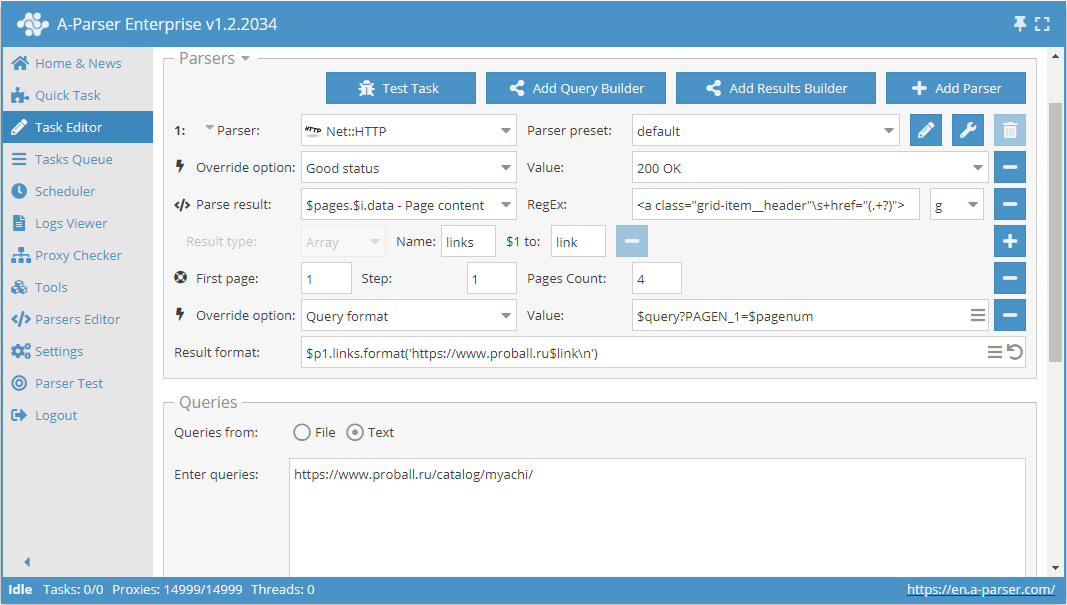
As seen in the screenshot, the $pagenum variable is used in the appropriate place in the scraper's query format.
The Use pages function will iterate through and substitute all values into the query; essentially, we will be getting links for the request:
https://www.proball.ru/catalog/myachi/?PAGEN_1=$pagenum
where the page number will be substituted instead of the $pagenum variable, starting from 1 up to 4 with a step of 1.
Thus, a traversal through the pages of the required range is achieved. This is the limitation of this method - you need to know the number of pages in the pagination in advance. Obviously, when scraping multiple categories simultaneously, the number of pages will be different everywhere, and as a workaround, we can simply specify a larger number of expected pages. But this is not entirely correct, so there is a more optimal solution, which will be discussed next.
Download example
eJx1VNtu2kAQ/ZVqhJSgUAhV+2I1jSgqvSgCmtAnjKKtPTZu1rubvXAR8r931jY2
pOmTvWfPXM7M7BzAMvNk5hoNWgPB8gCq/IcAnME5SxF6oJg2qP31EqZog+DbYjEn
PMaEOW6hdwC7V0g2coNaZ7E3ymI6p1LGY1meN4w7oizfXV+vitYicsbK/B5N6Qh0
9RMsKWiKxgdhlsHK36S4I4OP7E3EmTE3IaQU6m1mMX98XCOLUYcQhuZqrTGh28v+
1W03hE9Q2y6qgGkTpQaY1mxPYPmdstxjPBNPpiF65SUEp5lLZTMpzFFqXS7TSoWh
9xrHmecxDsGhEvVgUdW3/hxJJ3y930NR/L+Szw71PpE6Z/YkQqeEb+ejr1+mj8Ob
jvcnXA7FatUkP6mMiKyG/VJYv/JzebG2VplgMNhut32l5W/GeV+7jieFobjothV4
YBtcSHKSZBxbeEKnumQdahT626P3bj8ym7MKVJn4arbZ/RLZcylFSOJ6ORmaiZY5
QRZ3tgb3RxXLWrMfCVfa/qxsIEgYN9gDQ6lOGCUSv7yhUdHMSj2rO0cNkWLE+R1u
kLe00v9nl3GaKDNKyOh7bfg6ZfaPj6KRdxqKOrrVlENLiuWdTI/anxBVU42pR3Kp
sXFQR6790otVKPxgtM0YqRY6S/Cs4OdgJEWSpbN62I5MJxa0FmZiLHPF0WcsHOc9
P+P3beNHpi6wP7QJvjQelyEorWZdgJWSmx8PVapKZzRYH5rmE/r6XA4iWgVcpoN8
z6J1NiBbQjCVNA1+c5XjQi9Hl/J6gDvFRIxUEasdFqti1ayyZuEdThZacKAHCH/M
vOJ4VZ5BGJXHUBcgGBZ/AXULzRU=
Using Check next page
Check next page is another function that allows organizing pagination traversal. The peculiarity of its use is that to move to the next page, you need to use a regular expression that will return the link to the next page. This is a more convenient and most frequently used method. However, it cannot be applied to https://www.proball.ru/catalog/myachi/ because there are no links to next pages in the code. Links there are generated by a script. Therefore, let's take the site http://www.imdb.com/search/name?gender=female as an example. There is pagination both at the beginning and at the end of the list. After looking at and analyzing the source code, you can see the presence of a link that allows moving to the next page:

- in the Next page RegEx field, write the regular expression
- in the Limit field, specify the number of pages to traverse
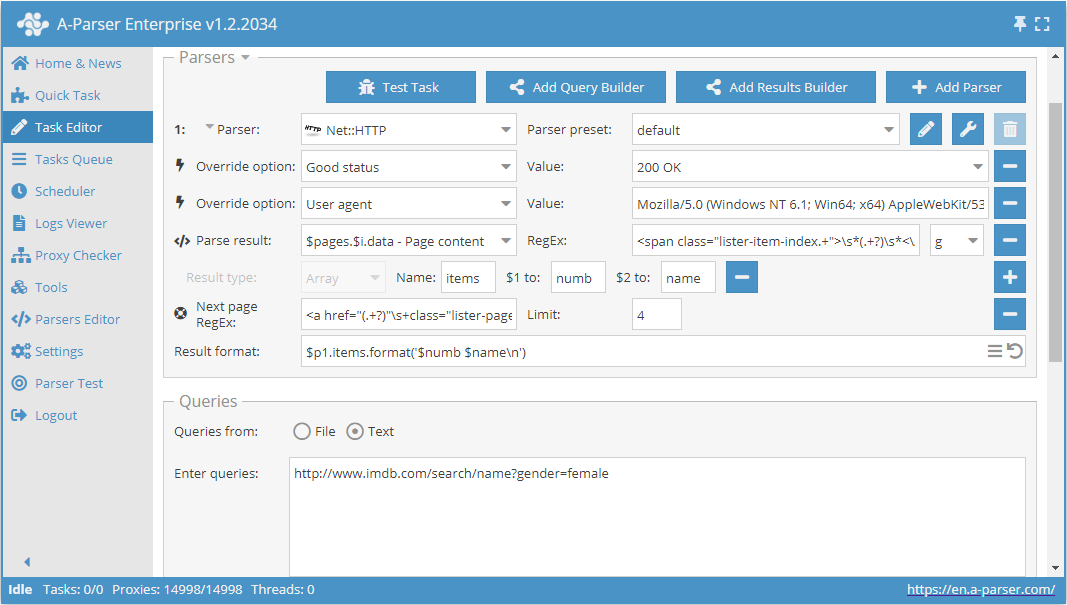
In the example, 4 is specified. By specifying a limit, we determine how many pages the scraper should traverse. In our case, 5 pages will be traversed, as the count starts from 0. If you specify a limit of 0, the scraper will work until it traverses all pages regardless of their number. This is very convenient to use when you need to scrape all results from all pages.
Download example
eJx1VGFT2kAQ/SuZG2aUggGq4DSijnXG2qpAlY4fCM6cZANXL7n07iJYhv/e3RAS
sO0XuH3ZvX1vd2+XzHLzYgYaDFjDvNGSJdmZeWwyg8lLDxZ2wKfA6izh2oAmpxHr
gfW86+FwgHgAIU+lZfUls28JYKR6Ba1FQEEiQHuqVHCpMvuVyxRdRh+bzfHq/xEp
ZjrAtLEtY9id+i2k5I2223T2H0UcqLlxekOn47ZOHLQ7RyfOonNUdS6SRMIjPN8I
22gfHruHHWf/5np4d1t3pHgB5wsKU1XncqZVBI32J7fpHjaPW26r1XYeeMi1yMPY
FsVJaqyK7sFkWpleH7wR1mUKhurALWdj+jKFBQZ0TcJjZyK5Mac+k8JY1CQsRAdI
HRZuzWdnvm8+7Lu18yodur7foBhCa10+ejob19Yeo6fueMuJn7E8zXDNbVoQygGu
NX9DMPvv8YgwSm0KR+oji9PoGZGYHHbakVihYrPpxvtJ2DSky52ZhhDVrTUwIv5O
MFXnIMZYh34y02fELAgEJeGSecvdDLciEjSAR2y1Go8LwldKR5zwStJyMzFumEH7
exUS4lRIh+/He9VS5QN/haHCoFBIKOErtPKyVLBvQF83t1Vdu7A7DNeZqWIlmx+x
+JUVIVboi0ctwFzhQCFkIbuAwLcN6xGrZDZNSJrFfl/HMC/k0kCdGaR6xZFI8P4L
itXcKt3P24IFU/GFlLfwCrJ0y+7/nAoZ4DO9CDHoax74b5f+X3esCnnbqfBtzjVy
KJ0CdaumG+0vAElRjR4hkdJQXJBnzu/FTZNATENVNgOfawHtENwp+C44UXEopv18
bWw803iI66wfX6oINwAxjlMp67RO7svGX5i8wGSUBN8HX2YpkFax4JhVSppvD2uq
iRY4WO2i+YjOrE28RmM+n7siCp7diYoaBriezBo0m+e40FDCaQgRz6ZxgqM3VTgU
tHizqaHhMZQKFrgJAsCyWJ3CarwaFxu42NbLrT3sLVfYmJ9msPYhaeSBGNbIYCuY
11r9ASIaBUM=
As mentioned above, it is possible to dynamically limit the number of pages in Use pages. To do this, you need to use Use pages and Check next page together. Let's supplement the example considered in the Use pages description and add the Check next page function to it:
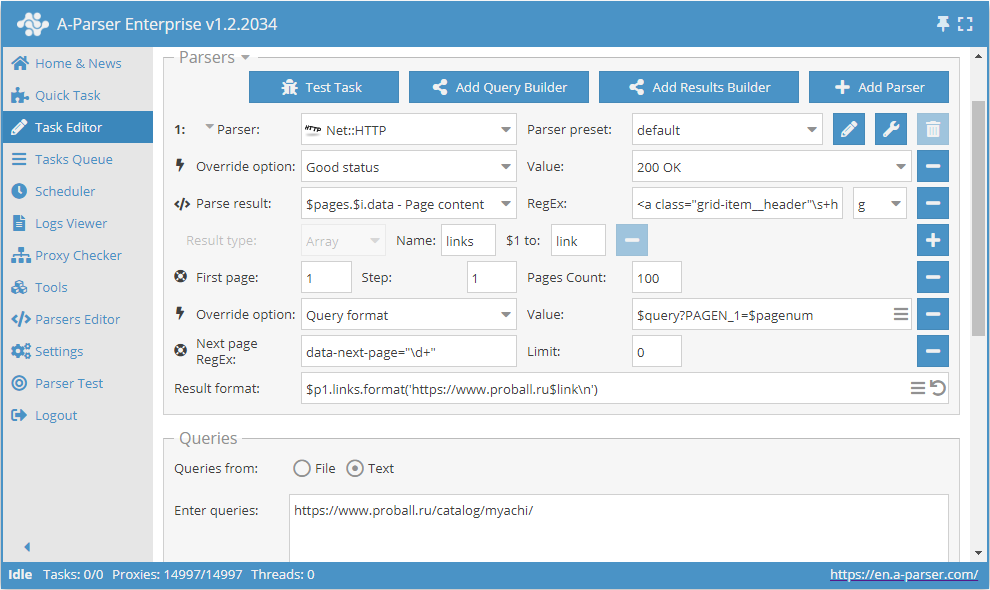
These two functions work together as follows: Use pages provides the page traversal, and Check next page verifies if the next one exists. As soon as Check next page does not find a next page, scraping of this category will be stopped without waiting to complete the full count specified in Use pages. By combining these functions, we add efficiency to the scraper's operation, saving time and resources.
Download example
eJx1VNtuGjEQ/ZXKQkqiEC6V+rJqGtGo9KIIaEKfWBS5u7OLi9d2bC8EIf69M3uF
XJ52fTyXM2fGs2eeu7WbWXDgHQsWe2aKfxaw3MGMp8C6zHDrwNL1gk3AB8GP+XyG
eAwJz6Vn3T3zOwPoozdgrYjJScR4TrWOb3Vx3nCZo8ni42CwPLQeUe68zu7BFYGY
LX+CBSZNwVES7jlb0k0Kz+jwmX+IJHfuOmQpproSHrLHxxXwGGzIwtBdriwkeHve
u7y5CNkXVvnOy4Rpk6UCuLV8h2DxnfCMMCnU2jWGVHkBsWPm2nihlatLreRybals
SFHjWJAdlyzYl0U9eDDVLZ0jnSvSezgYsMPhfS2fcrC7RNuM+6McnQK+mY2+f5s8
Dq87FFHlGXufaLSCaD2BZ191t45EQl8pxK8oxjVpGV+G7FUNJ/53IhNEnqgvl41g
45Im0jPDXiFmr2R+frby3rig399utz1j9V8uZc/mHTIKQ3V20ar+wDcw1xgkERJa
eIynqk0d5Ax0W0e/6EVuc8K4ZEIdbNn9UeKpKFlptCUBBbix1RlCHgurwF1dxaJS
mcYwL3x/lz4sSLh00GUOqY45Eolf3uB4Wu61nVZNQAG1Gkl5BxuQrVkR/2suJE6x
GyXo9LNyfNtk+irGoSnvOBXO0NYih9Yo1nc6rWtfA5hGjQkhmbbQBKgyV3FxSxhQ
NEJtM0amhU4Ingh+CkZaJSKdVuNdW+Zqjqtoqm51ZiQQY5VL2aV3dd82fuQqgenQ
EnzpfFukoKGuVxTzWkv366GkaqzAwfrUNB/Rt+eyH+GrkDrtZzserUQffRGBVOM0
0LYsxgWfmC3K6zJ4NlzFgIoMD8vDstmdzYbdH23QYI/vnf1zs9KGSiILxFAbhy2g
KP8Byg3yDQ==
Using substitution macros
Substitution macros allow implementing sequential substitution of values from a specified range.
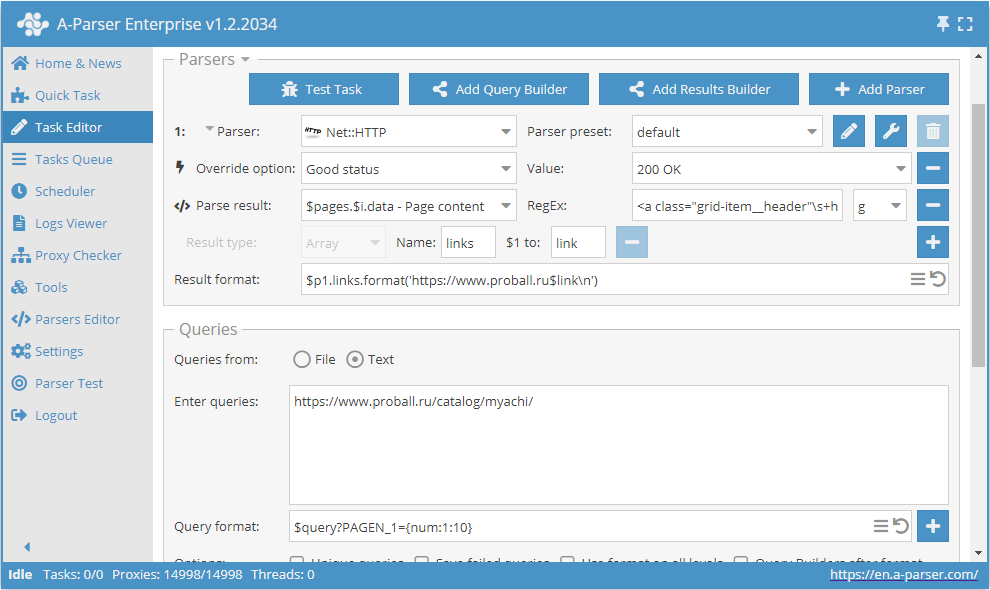
This preset will work as follows. By specifying a template in the query format:
$query?PAGEN_1={num:1:10}
we add substitution of values from 1 to 10 (any range can be specified) into the query itself. Thus, we get queries that provide traversal through the required number of pages, like:
https://www.proball.ru/catalog/myachi/?PAGEN_1=1
https://www.proball.ru/catalog/myachi/?PAGEN_1=2
...
https://www.proball.ru/catalog/myachi/?PAGEN_1=10
Using substitution macros for pagination traversal is similar to the Use pages function and has the same limitations, meaning you need to specify a specific range of values. The advantage of this method is that through substitution macros, you can substitute various values, both numeric and text, such as words or expressions. This allows us to more flexibly insert necessary parts into queries or form the queries themselves from parts that will be located in different files if the task requires it.
Download example
eJxtVFtP2zAU/iuTVQkQXUsn7SUaQx2iu4i1HXRPTYW85CT1cGzPx+lFUf47x26a
AOMp8Xcu3+dzccUcx0ecW0BwyKJlxUz4ZxH7yROr8WbH+sxwi2C9fcmm4KLo22Ix
JzyFjJfSsX7F3N4ABekNWCtSIKNI6ZxrnV7rcN5wWZLL8sPFxaruIpISnS7uAEMi
Zg8/0ZJIc0BPwh1nK2/JYUcBn/i7RHLEy5jlRPVeOCgeHtbAU7Axi2M8X1vIyHo6
OL86i9ln1sQuDoR5y9IA3Fq+JzB8p7zwmBTqEVtHf/MAsVW9WrXoRNuC+1L1zGgQ
IgZZgE5P1s4ZjIbD7XY7MFb/4VIObNnzTnGsTs661Pd8AwtNSTIhoYMndGq09KgC
4K3H7GeDBDdecJoKJ7Ti8qDEy+zU/Vbiny84U5p86dcKwInVBUEOdq4B98dbLFkv
nK/m468304fRZaXKIhpFo4val78M6X4d0rAo4xKhz5DUTzhpS19bqC2WO21nxksk
vGJajaW8hQ3Izi1QfimFpO7hOKOg703g2y6z/3LU7Y2fU9Ecbi1p6JxSfavzYzke
AUxboKlHCm2hTdAwN3lpPQwoP85df8amg14IfNGDl2CiVSbyWbMiR89SLWgHZ+pa
F0aCV6xKKangCHfdLIyxKbA/dAJfB18HCpLVriZzWkv8cX+QaqygWfvYzgOhb4/q
MKG1kzofFnuerMWQYgmBXNt9eCbCBPlBQs8BO8NVClQPZ0uoaUvaR6N9W6pnT0dU
1dSRvzg/+Pg7eQ/CqDhIPWDRqH4C36ybyg==
Using Page as query
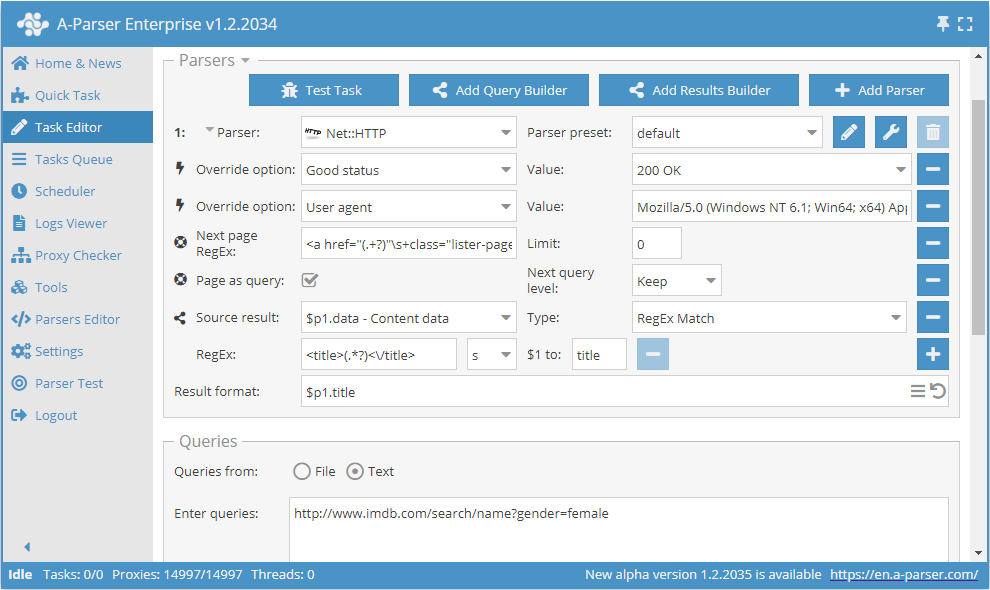
To reduce memory consumption, logic can be defined using the Page as query option. When activated, the Check next page and Use pages functions will substitute each subsequent page into queries as a separate independent query, thereby not accumulating their content in memory. Page as query also allows determining whether to increase the query level Increase (similar to the tools.query.add tool operation) or not Keep.
Download example
eJx1VNty2jAQ/RWPJg/QEts0gUydpBnCDE0bAiQhkwfgQbHXoCJbriQDKcO/dyXM
tc0LeFd7OXv2siSaqqnqSVCgFQkGS5LZbxKQHh1DQ3Vg/piDfCcVklGpQBqrAemA
DoK7fr+H+ghimnNNKkui3zNAVzEDKVkE+MgilMdCRE1h5RnlOZoMvvj+aPWxR46Z
ThFAqnc+5EH8YZxTr+b6TumVpZGYK6fTd+pu9dJBuX5+6Szq52WnkWUcXuHtnmmv
dnbhntWd0v1d/6FdcTibgvMdwqkoO82JFAl4ta+u7575F1W3Wq05zzSmkhVuZB9i
pplI1QZhOMEgHVhow9MeyCvqTCTE10NScj/flIdkOFSfQ06VQhVnSmNhGbqcpujr
mB8rDgnGoFHETBLKSbA8zNBmCTNd8cnqY0zZccsKUFrmcBx9CpBZszbMADX+ajUa
VQh2H3upWkIm1OQ7yaquZpqbEou3ZzqDvsC3mO2rWyh1aGJgnURUg3l1YxunVHb1
Qh8UuE5ghmmX9CVlvy2HqUBb/JQMVAt7hCoNNoBRvm/ADciJlQmGyK3v49qHBDHl
CktWCLVFEUh0/MKwD1QL2S0YREZE2uDcsrEzs/Fvc8YjnPxGjE4/Csf/m3T/ibHa
lrefCsd9LhHDNoqVbrsPO69ItMUYK4/esG5u2o+yaoo8Xc9BxbZwy1nHcJYICds0
ReQiO+54BqmZkl3LcE+2qoMyDtqyp1wSJXIZmgX2ESHV1HBfDKOEMSxscPOPm2Dn
5lvJ/XRTvhoOvbW4MeivnczsamF6uZ6y0QoDhiKN2bhb3IQNmjzt47Hqpk2R4Hob
7tKc84q5FU+7EWyootVG2JFw7Ny0KQy9m+uFMARXP5/XdGSSIaqaAZtgt/azFiFD
yvnLU3v/hezGFoWJ1lngefP53GVJ9OaGIvEUUBlOvBT35AavG9J6HUNC7R6FuDRj
geOM5RoWinu7Pc7LvasbLPEMkF+qt7YxtRoL1CFpCvtPgurqL0u6AK8=
Possible settings
| Parameter name | Default value | Description |
|---|---|---|
| Good status | All | Selection of which server response will be considered successful. If a different response is received during scraping, the request will be repeated with a different proxy |
| Good code RegEx | Ability to specify a regular expression to check the response code | |
| Ban Proxy Code RegEx | Ability to ban proxies temporarily (Proxy ban time) based on the server response code | |
| Method | GET | Request method |
| POST body | Content to be sent to the server when using the POST method. Supports variables $query – request URL, $query.orig – original query, and $pagenum - page number when using the Use Pages option. | |
| Cookies | Ability to specify cookies for the request. | |
| User agent | _Automatically substitutes user-agent of the current Chrome version_ | User-Agent header when requesting pages |
| Additional headers | Ability to specify custom request headers with template engine support and using variables from the query builder | |
| Read only headers | ☐ | Read headers only. In some cases, this saves traffic if there is no need to process content |
| Detect charset on content | ☐ | Detect encoding based on page content |
| Emulate browser headers | ☑ | Emulate browser headers |
| Max redirects count | 7 | Maximum number of redirects the scraper will follow |
| Follow common redirects | ☑ | Allows performing redirects http <-> https and www.domain <-> domain within one domain bypassing the Max redirects count limit |
| Max cookies count | 16 | Maximum number of cookies to save |
| Engine | HTTP (Fast, JavaScript Disabled) | Allows choosing the HTTP engine (faster, no JavaScript) or Chrome (slower, JavaScript enabled) |
| Chrome Headless | ☐ | If the option is enabled, the browser will not be displayed |
| Chrome DevTools | ☐ | Allows using Chromium debugging tools |
| Chrome Log Proxy connections | ☐ | If the option is enabled, information on chrome connections will be output to the log |
| Chrome Wait Until | networkidle2 | Determines when the page is considered loaded. More about values. |
| Use HTTP/2 transport | ☐ | Determines whether to use HTTP/2 instead of HTTP/1.1. Some sites ban immediately if HTTP/1.1 is used, while others do not work via HTTP/2. |
| Try use HTTP/1.1 for Protocol error | ☑ | Tells the scraper to retry the request with HTTP/1.1 if HTTP/2 was enabled and a protocol error occurred (i.e., if the site does not work via HTTP/2) |
| Don't verify TLS certs | ☐ | Disable TLS certificate validation |
| Randomize TLS Fingerprint | ☐ | This option allows bypassing site bans based on TLS fingerprint |
| Bypass CloudFlare with Chrome | ☐ | Automatic CloudFlare check bypass |
| Bypass CloudFlare with Chrome Max Pages | 20 | Max number of pages when bypassing CF via Chrome |
| Bypass CloudFlare with Chrome Headless | ☑ | If the option is enabled, the browser will not be displayed during CF bypass via Chrome |